
Stop letting your rosbag data rot. Pandas-like analysis for robotics bag files with health checks, sync, ML export, semantic search, and WebSocket bridge.
RosBag Resurrector
Stop letting your rosbag data rot. Analyze it.
A pandas-like data analysis tool for ROS 2 (MCAP) bag files — with automatic quality validation, multi-stream synchronization, ML-ready export, CLIP-powered semantic search, and a PlotJuggler-compatible WebSocket bridge.
No ROS installation required. Works on Linux, macOS, and Windows with just pip install.
"We have terabytes of rosbag data and no good way to work with it after recording. Every time someone wants to analyze something, they write throwaway scripts to convert to CSV. Most bags never get analyzed at all.">
— The Rosbag Graveyard, a shared frustration across the robotics community
Install
Python (recommended — works on Linux, macOS, Windows)
python -m venv .venv
source .venv/bin/activate          # Windows: .venv\Scripts\activate
pip install rosbag-resurrector
Requires Python 3.10+. No ROS required.
This pulls in the mcap and mcap-ros2-support Python libraries automatically — they're hard dependencies and required for native MCAP read/write. You don't need to install them separately, but if you ever want to upgrade them on their own (or pin a specific version), they're plain PyPI packages:
pip install mcap mcap-ros2-supportNote on legacy ROS 1.bagfiles: converting.bag→.mcaprequires the separatemcapGo CLI (brew install mcap,apt install mcap-cli, or download from mcap.dev/guides/cli). It's not bundled because pip can't ship a Go binary.resurrector doctorwarns if it's missing — and you only need it if you actually have.bagfiles. ROS 2.mcapfiles work out of the box with no external CLI.
The venv step matters on macOS (Sonoma+) and recent Ubuntu/Debian, where a bare pip install outside a virtualenv fails with error: externally-managed-environment (PEP 668). If you already manage Python environments with uv, pipx, poetry, or conda, install with whatever you normally use — pipx install rosbag-resurrector is a good one-liner if you only need the CLI.
Optional extras unlock specific features (vision/CLIP, live ROS 2 bridge, additional export formats) — see Optional Extras below.
Standalone binaries
Pre-built single-file binaries are attached to every GitHub release — useful if you want to install without setting up Python at all.
Ubuntu / Debian (.deb):
curl -LO https://github.com/vikramnagashoka/rosbag-resurrector/releases/latest/download/rosbag-resurrectoramd64latest.deb
sudo dpkg -i rosbag-resurrectoramd64latest.deb
sudo apt-get install -f   # resolve any missing system libraries
The latest filename always points to the newest release. For a specific version, browse the releases page and download the version-tagged rosbag-resurrectorX.Y.Zamd64.deb.
macOS (.dmg):
curl -LO https://github.com/vikramnagashoka/rosbag-resurrector/releases/latest/download/RosBag-Resurrector-macos-latest.dmg
open RosBag-Resurrector-macos-latest.dmg
Drag the app to Applications. Same _latest filename pattern — the version-tagged RosBag-Resurrector-vX.Y.Z-macos.dmg is also attached to each release if you need to pin to a specific version.
Note: the macOS binary isn't notarized yet, so on first launch you'll need to right-click → Open and confirm.
For repeated installs across many machines, pip install rosbag-resurrector is still the path of least resistance. The standalone binaries shine when you want a one-file deployable.
First 10 minutes
Don't have a bag handy yet? You can explore the entire pipeline using a synthetic sample bag. Pick a path based on how you like to work.
Step 1 — Verify your install (10 seconds)
resurrector doctorPrints a pass / warn / fail grid for Python version, the MCAP parser, the DuckDB index path, optional vision/bridge dependencies, and dashboard configuration. Tells you exactly which features are ready to use with your current install.
Step 2 — Generate a sample bag (5 seconds)
resurrector demo --fullCreates a 5-second synthetic MCAP at ~/.resurrector/demo_sample.mcap with realistic IMU, joint-state, camera, and lidar data, then walks through scan → health → export so you can see end-to-end what the tool does.
Now pick the surface you'd actually use day-to-day:
Path A — Web Dashboard (recommended for first-time)
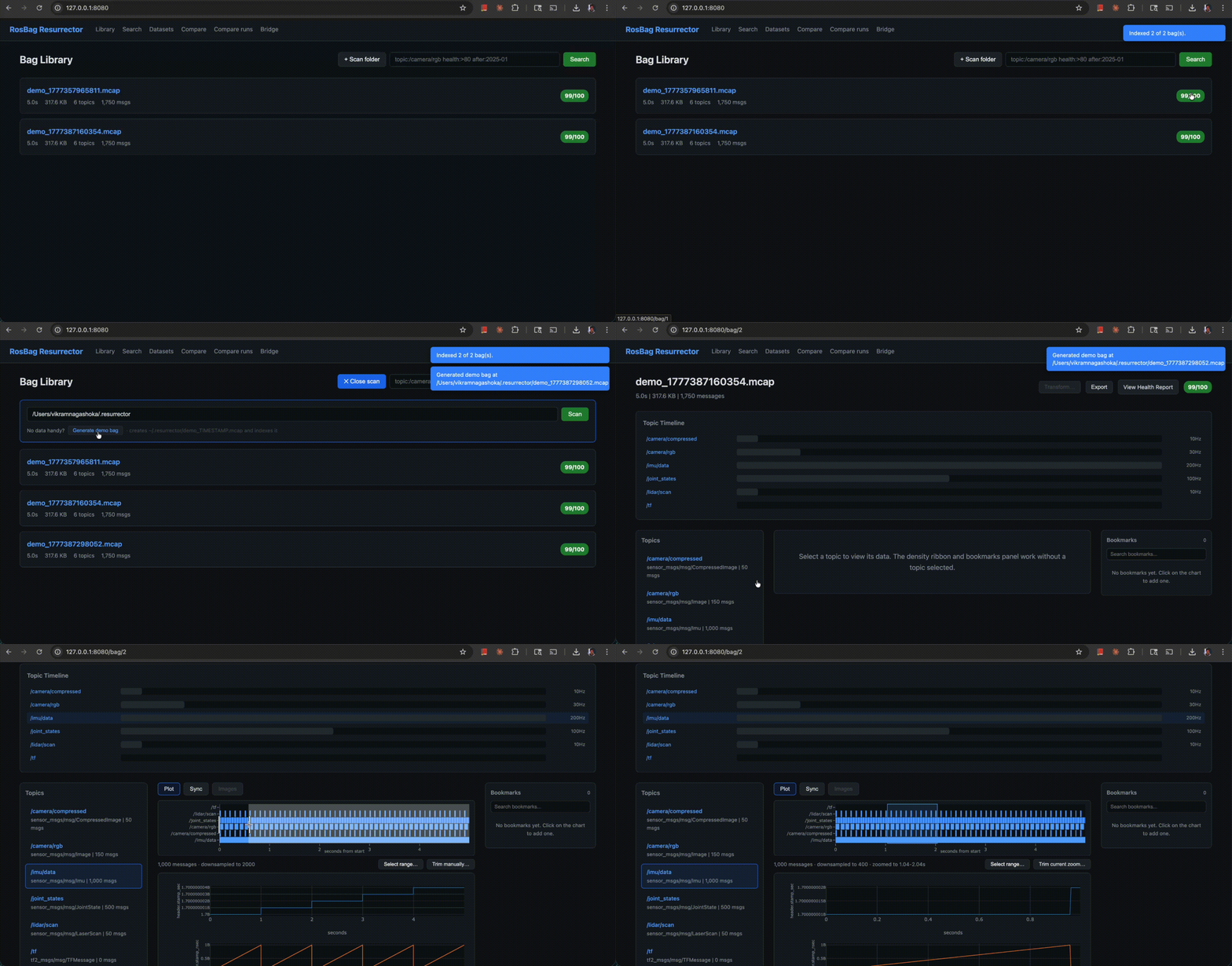
resurrector dashboardOpen http://localhost:8080 in your browser. You'll land on an empty Library page — paste the path from step 2 (~/.resurrector/) into the Scan folder input and click Scan folder. The demo bag appears with a health badge.
Click into the bag. From the Explorer page you can:
- Plot tab — pick a topic from the sidebar; the Plotly chart supports drag-to-zoom (server re-downsamples the narrower window) and click-to-annotate (notes persist across reloads)
- Sync tab — pick 2+ topics, choose a sync method, see them aligned in a table
- Images tab — automatically opens for image topics; scrub through frames with a slider
- Export button — opens the dialog for Parquet / HDF5 / CSV / NumPy / Zarr export
- Search — semantic frame search across all your indexed bags ("robot dropping object" → matching clips with thumbnails). Requires
pip install 'rosbag-resurrector[vision]'for the local CLIP backend, OR[vision-openai]for the OpenAI API backend - Datasets — create versioned dataset collections for ML training pipelines
- Bridge — start a PlotJuggler-compatible WebSocket bridge from any bag in one click
- Compare — side-by-side topic / health comparison between two bags
Path B — CLI
# scan a folder (also pre-builds video frame index for fast image access)
resurrector scan ~/.resurrector/
quick visual summary with sparklines and grouped topics
resurrector quicklook ~/.resurrector/demo_sample.mcap
detailed health report
resurrector health ~/.resurrector/demo_sample.mcap
semantic search (after you've indexed frames)
resurrector index-frames ~/.resurrector/
resurrector search-frames "robot arm reaching"
export to ML training format
resurrector export ~/.resurrector/demo_sample.mcap \
  --topics /imu/data /joint_states \
  --format parquet \
  --sync nearest \
  --output ./training_data/
Run resurrector --help for the full command list — see CLI Reference below for details on each.
Path C — Python / Jupyter
from resurrector import BagFrame
Load a bag (lazy — doesn't read all data into memory)
bf = BagFrame("~/.resurrector/demo_sample.mcap")
Quick overview
bf.info()
Get a topic as a Polars DataFrame
imudf = bf["/imu/data"].topolars()
Or as Pandas
imupd = bf["/imu/data"].topandas()
Stream large topics without OOM (chunked iterator)
for chunk in bf["/camera/rgb"].iterchunks(chunksize=10_000):
    process(chunk)
Lazy frame for filter/projection pushdown — lifecycle is explicit
(use as a context manager so the temp cache file is cleaned up).
with bf["/imu/data"].materializeipccache() as cache:
    filtered = (
        cache.scan()
        .filter(pl.col("linear_acceleration.x").abs() > 5.0)
        .collect()
    )
Health report
report = bf.health_report()
print(f"Score: {report.score}/100")
Synchronize multiple topics by timestamp
synced = bf.sync(["/imu/data", "/joint_states", "/camera/rgb"],
                 method="nearest", tolerance_ms=50)
Export to ML-ready formats
bf.export(topics=["/imu/data", "/joint_states"],
          format="parquet", output="training_data/", sync=True)
In Jupyter, just display the bf object — it renders a rich HTML table with health badges and topic groups.
Common gotchas
mcapmodule not found — runpip install -e ".[dev]"if you cloned from source, orpip install rosbag-resurrectorfrom PyPI- Dashboard scan returns 403 — by default,
RESURRECTORALLOWEDROOTSdefaults to your home directory. Set it (os.pathsep-separated) to broaden the scope - Semantic search returns nothing — frames are only indexed for bags you ran
resurrector index-frameson, OR if your bags were scanned with v0.2.2+ (which pre-builds the frame index duringscan) .bagor.db3raises NotImplementedError — make suremcap(for ROS 1) orros2(for ROS 2 SQLite) is on your PATH; we shell out to them for auto-conversion
Optional Extras
Install only what you need:
pip install 'rosbag-resurrector[vision]'        # local CLIP semantic search (~2GB model)
pip install 'rosbag-resurrector[vision-openai]' # OpenAI-backed semantic search (lighter)
pip install 'rosbag-resurrector[vision-lite]'   # image/video parsing, no ML
pip install 'rosbag-resurrector[bridge-live]'   # live ROS 2 topic bridge (requires rclpy)
pip install 'rosbag-resurrector[watch]'         # auto-index new bags as they appear
pip install 'rosbag-resurrector[all-exports]'   # Zarr, additional export formats
pip install 'rosbag-resurrector[ros1]'          # ROS 1 .bag support via rosbags
Run resurrector doctor any time to see which extras are active.
Try every feature in 30 seconds
The repo ships with 17 standalone exploration scripts under examples/ — one per major feature. They use a synthetic sample bag (auto-generated on first run) so you don't need your own data:
python examples/01bagframe_basics.py        # the pandas-like API
python examples/02healthchecks.py           # 0-100 quality score per bag
python examples/03multistream_sync.py       # align topics with mismatched rates
python examples/04imagevideo_export.py      # iterate frames, export MP4
python examples/05mlexport_formats.py       # Parquet/HDF5/NumPy/LeRobot/RLDS
python examples/06indexsearchquerydsl.py  # DuckDB index + query DSL
python examples/07semanticframe_search.py   # CLIP semantic search
python examples/08datasetsversioning.py     # versioned dataset collections
python examples/09plotjugglerbridge.py      # WebSocket bridge for live viz
Plus the v0.3.1 power features (11densityribbon.py through 18polarslazy_filter.py) — bookmarks, math/transform editor, brush-to-trim export, cross-bag overlay, "Open in Jupyter", lazy Polars filter pushdown.
Each script:
- Runs in under 10 seconds end-to-end
- Auto-generates the demo bag on first run
- Auto-skips with install instructions when an optional extra (CLIP, OpenCV, etc.) isn't installed
- Has a one-line "what this is and why" header so you can decide whether to keep reading
Features
Automatic Health Checks
Every bag gets a quality score (0-100) detecting real-world problems:
- Dropped messages — catches the classic rosbag buffer overflow
- Time gaps — detects sensor disconnects and recording interruptions
- Out-of-order timestamps — flags clock sync issues
- Partial topics — topics that don't span the full recording
- Message size anomalies — sudden changes indicating corruption or config changes
report = bf.health_report()
Health Score: 87/100
/lidar/points has 47 gaps > 200ms
Recommendation: increase buffer size or reduce recording frequency
Configurable thresholds — every robot is different. Tune thresholds for your platform:
from resurrector.ingest.health_check import HealthChecker, HealthConfig
config = HealthConfig(     ratedropthreshold=0.4,      # 40% drop before flagging (default: 25%)     gap_multiplier=3.0,           # 3x expected period for gap detection (default: 2x)     completeness_threshold=0.1,   # 10% start/end delay tolerance (default: 5%)     sizedeviationthreshold=0.8, # 80% size deviation tolerance (default: 50%) ) checker = HealthChecker(config)
Pandas-Like API
Work with robotics data the way you work with any tabular data:
# Select topics
imu = bf["/imu/data"]
joints = bf["/joint_states"]
Time slicing
segment = bf.time_slice("10s", "30s")
Get as DataFrame with flattened columns
df = imu.to_polars()
Columns: timestampns, linearacceleration.x, .y, .z,
          angular_velocity.x, .y, .z, orientation.x, .y, .z, .w
Jupyter Notebook Integration
BagFrame renders rich HTML tables in Jupyter with health badges, topic groups, and styled output:
# In a Jupyter notebook cell, just display the object:
bf = BagFrame("experiment.mcap")
bf  # Renders interactive HTML table with health badges and topic groups
Video & Image Support
Full support for both raw and compressed image topics:
# Iterate frames from any image topic
for timestampns, frame in bf["/camera/rgb"].iterimages():
    print(f"Frame at {timestamp_ns}: shape={frame.shape}")
Works with compressed images too (JPEG/PNG)
for ts, frame in bf["/camera/compressed"].iter_images():
    process(frame)
Export as frame sequence
bf["/camera/rgb"].isimagetopic  # True
Export frames or video:
# Export as numbered PNG files
resurrector export-frames experiment.mcap --topic /camera/rgb --output ./frames
Export as MP4 video
resurrector export-frames experiment.mcap --topic /camera/rgb --video --output video.mp4 --fps 30
Semantic Frame Search (CLIP-powered)
Search your bag collection by describing what's happening — no manual scrubbing:
# Index frames for semantic search
resurrector index-frames /path/to/bags/ --sample-hz 5
Search by natural language
resurrector search-frames "robot fails to catch ball"
resurrector search-frames "gripper collision with table" --clips --clip-duration 5
Save matching frames + metadata to disk
resurrector search-frames "robot arm reaching" --save ./results
Uses CLIP embeddings stored in DuckDB for fast cosine similarity search. Supports two backends:
# Option 1: Local CLIP (recommended, ~2GB model download)
pip install 'rosbag-resurrector[vision]'
Option 2: OpenAI API (lighter install, requires API key)
pip install 'rosbag-resurrector[vision-openai]'
Option 3: Just image parsing + video export, no ML
pip install 'rosbag-resurrector[vision-lite]'
Python API:
from resurrector.core.vision import FrameSearchEngine, CLIPEmbedder
from resurrector.ingest.indexer import BagIndex
index = BagIndex() engine = FrameSearchEngine(index)
Index a bag's image frames
engine.indexbag(bagid=1, bagpath="experiment.mcap", samplehz=5.0)
Search by text
results = engine.search("robot drops the object", top_k=10)
for r in results:
    print(f"{r.bagpath} @ {r.timestampsec:.1f}s — similarity: {r.similarity:.3f}")
Search for temporal clips
clips = engine.searchtemporal("grasping attempt", clipduration_sec=5.0)
for c in clips:
    print(f"{c.bagpath} [{c.startsec:.1f}s - {c.endsec:.1f}s] — {c.framecount} frames")
Resurrector Bridge (PlotJuggler-compatible WebSocket Streaming)
Stream bag data over WebSocket for real-time visualization — no DDS network config needed:
# Replay a bag at 2x speed — opens built-in web viewer automatically
resurrector bridge playback experiment.mcap --speed 2.0 --loop
Connect PlotJuggler → WebSocket Client → ws://localhost:9090/ws
Stream live ROS2 topics (requires rclpy)
resurrector bridge live --topic /imu/data --topic /joint_states
Two modes:
- Playback — replay recorded MCAP bags at configurable speed (0.1x–20x) with play/pause/seek
- Live — subscribe to real ROS2 topics via rclpy and relay over WebSocket
REST API for playback control:
POST /api/playback/play Start/resume POST /api/playback/pause Pause POST /api/playback/seek?t=5.0 Seek to timestamp POST /api/playback/speed?v=2.0 Set speed GET /api/topics Discover available topics GET /api/status Playback state + progress WS /ws Data stream (PlotJuggler format)Multi-Stream Synchronization
Topics publish at independent rates. Resurrector aligns them:
# Nearest-timestamp matching
synced = bf.sync(["/imu/data", "/jointstates"], method="nearest", tolerancems=50)
Linear interpolation for numeric streams
synced = bf.sync(["/imu/data", "/joint_states"], method="interpolate")
Sample-and-hold for slow topics
synced = bf.sync(["/imu/data", "/camera/rgb"], method="sampleandhold")
Reproducible Datasets
Create named, versioned dataset collections with full provenance tracking — the bridge between raw bags and ML training pipelines:
from resurrector import DatasetManager, BagRef, SyncConfig, DatasetMetadata
mgr = DatasetManager()
Create a dataset
mgr.create("pick-and-place-v1", description="Training data for manipulation")
Add a version with specific bags, topics, and sync config
mgr.create_version(
    dataset_name="pick-and-place-v1",
    version="1.0",
    bag_refs=[
        BagRef(path="session001.mcap", topics=["/imu/data", "/jointstates"]),
        BagRef(path="session002.mcap", starttime="10s", end_time="60s"),
    ],
    syncconfig=SyncConfig(method="nearest", tolerancems=25),
    export_format="parquet",
    downsample_hz=50,
    metadata=DatasetMetadata(
        description="6-DOF arm pick-and-place demonstrations",
        license="MIT",
        robot_type="UR5e",
        task="pickandplace",
        tags=["manipulation", "imitation-learning"],
    ),
)
Export — creates data files, manifest.json, dataset_config.json, and README.md
output = mgr.exportversion("pick-and-place-v1", "1.0", outputdir="./datasets")
Each exported dataset includes:
- manifest.json — SHA256 hashes of every file for reproducibility
- dataset_config.json — full configuration for re-creating the dataset
- README.md — auto-generated documentation with sources, config, and a Python code snippet to load the data
Smart Topic Grouping
Topics are automatically categorized into semantic groups for easier navigation:
from resurrector.core.topicgroups import classifytopics
groups = classifytopics(bf.topicnames) [TopicGroup(name='Perception', topics=['/camera/rgb', '/lidar/scan']),  TopicGroup(name='State', topics=['/imu/data', '/joint_states']),  TopicGroup(name='Transforms', topics=['/tf', '/tf_static'])]
Built-in groups: Perception, State, Navigation, Control, Transforms, Diagnostics. Override with custom patterns:
groups = classifytopics(bf.topicnames, custom_patterns={
    "MyRobot Sensors": ["/mysensor", "/customlidar"],
})
ML-Ready Export
Export directly to the formats your training pipeline expects:
bf.export(topics=["/imu/data", "/joint_states"],
          format="parquet",    # Also: hdf5, csv, numpy, zarr, lerobot, rlds
          sync=True,
          downsample_hz=10)
Memory bounds vary by format — see Performance contract for the precise rule. Parquet, HDF5, CSV, Zarr, and LeRobot are chunk-streamed (memory bounded by chunk_size, independent of topic size). NumPy .npz and RLDS accumulate per-topic and are bounded by total converted-array size; for very large topics, prefer Parquet.
| Format | Best For | Streaming | |--------|----------|-----------| | Parquet | Tabular sensor data, Spark/Polars pipelines | Chunk-streamed | | HDF5 | Mixed numeric/image data, MATLAB compatibility | Chunk-streamed | | CSV | Quick inspection, sharing with non-technical team members | Chunk-streamed | | Zarr | Cloud-native, chunked, very large datasets | Chunk-streamed | | LeRobot | Hugging Face LeRobot training (parquet + meta JSON) | Chunk-streamed | | NumPy (.npz) | Jupyter notebook workflows | Bounded by total topic size — hard-capped at 1 M rows | | RLDS | OpenX / RT-2 / robotic foundation models (TFRecord) | Chunk-streamed (v0.4.0+) |
LeRobot needs no extra deps. RLDS needs tensorflow: pip install 'rosbag-resurrector[all-exports]'.
Robotics Transforms
Common operations built in:
from resurrector.core.transforms import quaterniontoeuler, addeulercolumns
Add roll/pitch/yaw from quaternion columns
df = addeulercolumns(imu_df, prefix="orientation")
Laser scan to Cartesian coordinates
from resurrector.core.transforms import laserscanto_cartesian
points = laserscantocartesian(ranges, anglemin, angle_max)
Temporal downsampling
from resurrector.core.transforms import downsample_temporal
df10hz = downsampletemporal(df, target_hz=10)
Interactive Web Dashboard
resurrector dashboard --port 8080Pages:
- Library — Browse, search, and filter all indexed bags. Header has a one-click "+ Scan folder" button + "Generate demo bag" so you can index data without leaving the page.
- Explorer — Plotly-based topic plots with brush-to-zoom, linked cursors, click-to-annotate. Tabs for plotting / multi-stream sync / image-video scrubbing. Side rails: bookmarks panel (right), topic list with density ribbon above the chart.
- Search — Semantic frame search by natural language ("robot drops object"); thumbnails link back to the matched frame in Explorer.
- Datasets — Full CRUD on versioned dataset collections with one-click export.
- Compare — Side-by-side topic / health comparison between two bags.
- Compare runs (v0.3.1) — Cross-bag overlay: pick 2+ bags + a topic, see them aligned on one chart with per-bag offset sliders, optional diff trace (B − A), and per-bag summary stats.
- Bridge — Start a PlotJuggler-compatible WebSocket bridge from any bag in one click; live status polling.
- Health — Visual quality reports with recommendations and per-topic scores.
- Bookmarks panel — searchable annotations with click-to-jump, timeline-anchored, persists across sessions
- Density ribbon — heatmap above the chart showing per-topic message density across the full bag duration; click a column to jump there
- Transform editor — modal with a Common menu (derivative, integral, moving-average, low-pass, scale, abs, shift) plus a Polars expression escape hatch with sandboxed evaluation; preview live and "Add to plot" appends a new derived series
- Trim & export — three entry points (Select range button, current-zoom, manual sliders) → popover with format dropdown (MCAP / Parquet / CSV / HDF5 / NumPy / Zarr / MP4) and persistent output directory
- Open in Jupyter — exports the selected window as Parquet, copies a Polars
read_parquet(...)snippet to your clipboard, openslocalhost:8888if a Jupyter server is running
POST /api/scan?path=/data/bags&stream=trueReturns SSE events as bags are indexed, so the UI can show bags appearing in real-time.
Searchable Index
DuckDB-powered index for fast queries across your entire bag collection:
from resurrector import search
results = search("topic:/camera/rgb health:>80 after:2025-01")
Stale index detection — automatically detects when indexed bags have been moved or deleted:
from resurrector.ingest.indexer import BagIndex
index = BagIndex() stale = index.validate_paths()   # Find missing files removed = index.remove_stale()   # Clean up stale entries
CLI Reference
# Scan and index a directory
resurrector scan /path/to/bags/
resurrector scan /path/to/bags/ --verbose --log-file scan.log
Quick summary with sparklines and grouped topics
resurrector quicklook experiment.mcap
Show bag info
resurrector info experiment.mcap
Health check
resurrector health experiment.mcap
resurrector health /path/to/bags/ --format json --output report.json
List indexed bags with filtering
resurrector list --after 2025-01-01 --has-topic /camera/rgb --min-health 70
Export
resurrector export experiment.mcap \
  --topics /imu/data /joint_states \
  --format parquet \
  --sync nearest \
  --output ./training_data/
Compare two bags
resurrector diff bag1.mcap bag2.mcap
Tag bags for organization
resurrector tag experiment.mcap --add "task:pickandplace" "robot:digit"
Watch a directory for new bags (auto-index on arrival)
resurrector watch /path/to/recording/dir/ --interval 5
Dataset management
resurrector dataset create my-dataset --desc "Pick and place training"
resurrector dataset add-version my-dataset 1.0 \
  --bag session001.mcap --bag session002.mcap \
  --topic /imu/data --topic /joint_states \
  --format parquet
resurrector dataset export my-dataset 1.0 --output ./datasets
resurrector dataset list
Launch web dashboard
resurrector dashboard --port 8080
Bridge — stream bag data over WebSocket
resurrector bridge playback experiment.mcap --speed 2.0 --loop --port 9090
resurrector bridge live --topic /imu/data --port 9090
Where Resurrector fits
- Treat a bag like a Pandas DataFrame.
bf["/imu/data"].to_polars()and you're in your normal data-analysis flow. No protobuf, no ROS imports. - Health checks built in. Catch dropped messages, rate drops, and gaps without writing a custom validator. Configurable thresholds.
- Multi-stream sync.
bf.sync(["/imu", "/joint_states"], method="nearest")returns one aligned DataFrame. - ML-ready export. Parquet, HDF5, CSV, Zarr, NumPy, plus first-class LeRobot and RLDS writers for Hugging Face / OpenX-style training pipelines.
- Cross-bag overlay. Compare the same topic across multiple bags on one chart — the kind of "did the new firmware change the gait?" workflow nobody else handles cleanly.
- Memory bounds you can trust. See Performance contract.
- PlotJuggler-compatible WebSocket bridge. When the ad-hoc analysis is done, hand the data straight to PlotJuggler for live plotting.
A more honest comparison, narrowed to what Resurrector is built for:
| Capability | Resurrector | Foxglove | PlotJuggler | rosbags | |---|---|---|---|---| | DataFrame API on a bag (Polars/Pandas) | Yes | No | No | Partial | | Built-in health checks (dropped msgs, rate drops, gaps) | Yes | No | No | No | | Multi-stream timestamp sync | Yes (3 methods) | Visual only | Visual only | No | | ML-export to LeRobot / RLDS | Yes | No | No | No | | Cross-bag overlay (same topic, multiple bags) | Yes | No | No | No | | Semantic frame search (CLIP) | Yes | No | No | No | | Versioned dataset bundles | Yes | No | No | No | | Bounded-memory streaming (per the contract) | Yes | N/A | N/A | Partial |
Supported Formats
Built ROS 2 first. MCAP is the modern ROS 2 default format (recommended since ROS 2 Iron) and the format we optimize for — self-describing, cross-platform, and readable without a ROS installation.
| Format | Extension | Status | |--------|-----------|--------| | MCAP (ROS 2 default) | .mcap | Fully supported — primary format | | ROS 2 SQLite (single shard) | .db3 | Auto-converted via ros2 bag convert | | ROS 2 SQLite (directory bag) | dir with metadata.yaml | Recognized by scanner; auto-converted | | ROS 1 bag | .bag | Auto-converted via mcap convert |
Note on legacy formats: auto-conversion shells out to the official tools —mcap convert(Go binary, install via mcap.dev/guides/cli or Homebrew/apt) for.bagfiles, andros2 bag convert(ships with ROS 2) for.db3. Neither is bundled with the Python package because both are external binaries that pip can't ship.resurrector doctorwill warn if either is missing — you only need the converter for the legacy format(s) you actually use.
Architecture
resurrector/
  ingest/          # Scanner, parser, indexer, health checks
  core/            # BagFrame, sync, transforms, export, datasets, topic groups
  cli/             # Typer CLI with Rich formatting
  dashboard/       # FastAPI backend + React frontend
Design principles:
- Bounded memory — see Performance contract for the exact rule, enforced by tests
- Batteries included — health checks, sync, transforms, export with zero config
- Escape hatches —
.topolars()/.topandas()/.to_numpy()to drop into familiar tools - ROS-aware but not ROS-dependent — parses MCAP directly, no ROS installation needed
- Fast — Polars for processing, DuckDB for queries, lazy evaluation
- Reproducible — versioned datasets with manifests and auto-generated documentation
Performance contract
Memory is bounded by the configured chunk size, not by bag size, topic size, or export size.
That rule applies to: dashboard plotting, sync, health checks, density, cross-bag overlay, iterchunks(), materializeipc_cache(), and the chunk-streaming export formats (Parquet, HDF5, CSV, Zarr, LeRobot, RLDS).
Two formats are explicit exceptions: NumPy .npz is bounded by total converted-array size and hard-capped at 1 M rows (use Parquet for larger topics — clear LargeTopicError is raised). The eager bf["/topic"].to_polars() path materializes the full topic and refuses topics > 1 M messages unless the user passes force=True.
The contract is verified by tests/teststreaming_oom.py, which builds a 10 M-message synthetic bag and asserts peak RSS deltas across every workflow. Run it locally with pytest -m slow.
Tuning the bounds
Every knob below has a sensible default. Override per-call when you need to — there is no global config file or environment variable.
| Knob | Default | Where it applies | When to change it | |---|---|---|---| | chunksize= | 50000 | iterchunks(), materializeipccache(), streambucketed_minmax(), all chunk-streaming exporters | Lower for tighter RSS budgets on small machines; raise to reduce per-chunk overhead on fast NVMe | | maxbuffermessages= | 100_000 | bf.sync(engine="streaming") per-topic lookahead buffer | Raise if a genuine rate mismatch trips SyncBufferOverflowError; lower to fail faster on misconfigured topics | | maxlatenessms= | 0.0 | bf.sync(outoforder="reorder") watermark window | Set > 0 to admit late samples within the window when reordering. Ignored unless outoforder="reorder" | | tolerance_ms= | required arg | bf.sync() match window | Per-call — depends on your sensor rates | | engine= | "auto" | bf.sync() engine selector | "auto" picks eager when every topic is < 1 M messages, streaming otherwise. Force one explicitly to override | | force=True | False | topolars(), topandas(), to_numpy() on a topic > 1 M messages | Escape hatch to materialize a large topic eagerly — you accept the RSS cost |
Hard limits (not configurable)
These are constants the test suite verifies. There is no env var or config file to override them — by design, since they're the contract, not a tuning knob.
| Constant | Value | Behavior past the limit | |---|---|---| | LARGETOPICTHRESHOLD | 1,000,000 messages | topolars() / topandas() / to_numpy() raise LargeTopicError unless you pass force=True. Also the cutoff engine="auto" uses to pick streaming over eager in bf.sync() | | NUMPYHARDCAP | 1,000,000 rows | NumPy .npz export refuses entirely (no force= escape) and raises LargeTopicError pointing at Parquet |
If you want to raise these on a big-RAM machine, the only options today are forking or monkey-patching the constants. A user-facing override is on the v0.5 wishlist.
Development
git clone https://github.com/vikramnagashoka/rosbag-resurrector.git
cd rosbag-resurrector
pip install -e ".[dev]"
Generate test bags
python tests/fixtures/generatetestbags.py
Run tests (348 tests, ~30 seconds)
pytest tests/ -v
Build dashboard frontend
cd resurrector/dashboard/app
npm install && npm run build
Test Coverage
| Test Suite | Tests | Covers | |-----------|-------|--------| | test_integration | 5 | Full pipeline: scan → index → health → sync → export | | test_cli | 14 | All CLI commands including quicklook, watch, dataset | | test_api | 13 | FastAPI endpoints: CRUD, health, sync, search, export | | test_dataset | 14 | Dataset manager: create, version, export, manifest | | testbagframe | 13 | BagFrame API, time slicing, conversions | | test_ingest | 17 | Scanner, parser, indexer | | test_sync | 6 | All 3 sync methods | | test_health | 7 | Health checks, recommendations, caching | | testhealthconfig | 5 | Configurable thresholds, edge cases | | test_export | 8 | All export formats, downsampling | | testtopicgroups | 12 | Topic classification, custom patterns | | testcompressedimage | 7 | CompressedImage CDR parsing, decoding, iter_images | | testexportframes | 5 | PNG/JPEG sequences, MP4 video, subsampling | | test_vision | 8 | FrameSampler, CLIPEmbedder, FrameSearchEngine (auto-skip) | | testbridgeprotocol | 6 | PlotJuggler encoding, key format, list expansion | | testbridgebuffer | 7 | Ring buffer put/get, overflow, multi-consumer, threading | | testbridgeplayback | 6 | Playback engine: play, pause, resume, speed, topic filter | | testbridgeserver | 6 | REST API: topics, metadata, status, playback controls |
Contributing
Contributions welcome! Key extension points:
- New export formats: Add a method to
resurrector/core/export.py - New health checks: Add a method to
resurrector/ingest/health_check.py - New transforms: Add to
resurrector/core/transforms.py - New topic groups: Add patterns to
resurrector/core/topic_groups.py - ROS1 support: Implement a
ROS1Parserinresurrector/ingest/parser.py
License
MIT


