
✨ Innovative and open-source visualization application that transforms various data formats, such as JSON, YAML, XML and CSV into interactive graphs.
JSON Crack
The open-source JSON Editor.
Learn more »
ToDiagram · Discord · Website · Issues · VS Code · Chrome
About the Project
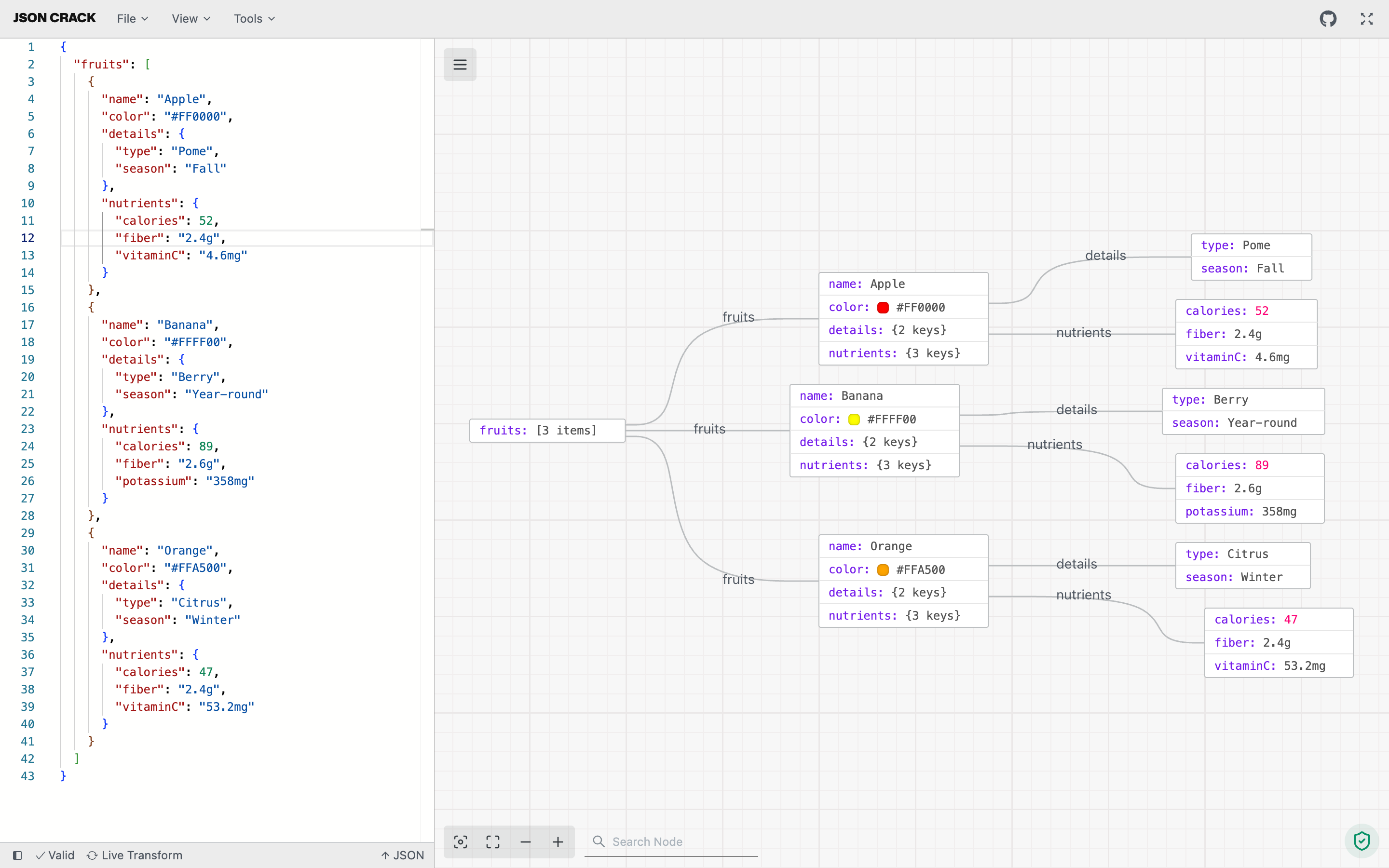
Visualize JSON into interactive graphs
JSON Crack is a tool for visualizing JSON data in a structured, interactive graphs, making it easier to explore, format, and validate JSON. It offers features like converting JSON to other formats (CSV, YAML), generating JSON Schema, executing queries, and exporting visualizations as images. Designed for both readability and usability.
- Visualizer: Instantly convert JSON, YAML, CSV, and XML into interactive graphs or trees in dark or light mode.
- Convert: Seamlessly transform data formats, like JSON to CSV or XML to JSON, for easy sharing.
- Format & Validate: Beautify and validate JSON, YAML, and CSV for clear and accurate data.
- Code Generation: Generate TypeScript interfaces, Golang structs, Kotlin data classes, Rust serde types, and JSON Schema.
- JSON Schema: Create and validate JSON Schema.
- Advanced Tools: Run jq and JSON path queries.
- Export Image: Download your visualization as PNG, JPEG, or SVG.
- Privacy: All data processing is local; nothing is stored on our servers.
Recognition

Integrations
Contributing
- Found a bug or missing feature? Open an issue on GitHub Issues.
- Want to contribute code or docs? Start with our contribution guide.
Sponsors & Support
If you find JSON Crack useful, you can support the project by using ToDiagram. For sponsorship inquiries, reach out at contact@todiagram.com.
Stay Up-to-Date
JSON Crack officially launched as v1.0 on the 17th of February 2022 and we've come a long way so far. Watch releases of this repository to be notified of future updates:

Getting Started
To get a local copy up and running, please follow these simple steps.
Prerequisites
Here is what you need to be able to run JSON Crack.
- Node.js (Version: >=24.x)
- pnpm (Version: >=10)
Development
Setup
- Clone the repo into a public GitHub repository (or fork https://github.com/AykutSarac/jsoncrack.com/fork). If you plan to distribute the code, read the
LICENSEfor additional details.
git clone https://github.com/AykutSarac/jsoncrack.com.git- Go to the project folder
cd jsoncrack.com- Install packages
pnpm install- Run the web app
pnpm dev:www
# Running on http://localhost:3000/
Useful Commands
From repository root:
# Web app
pnpm dev:www
pnpm build:www
VS Code extension
pnpm dev:vscode
pnpm build:vscode
pnpm lint:vscode
pnpm lint:fix:vscode
Chrome extension
pnpm dev:chrome
pnpm build:chrome
pnpm lint:chrome
All workspaces
pnpm dev
pnpm build
pnpm lint
Debug VS Code Extension
- Open repository root in VS Code.
- Press
F5. - Select
Run VSCode Extension (apps/vscode)when prompted. - In the Extension Development Host window, open a
.jsonfile and run:
JSON Crack: Enable JSON Crack visualization.
Docker
🐳 Docker assets are in apps/www. If you want to run JSON Crack locally:
cd apps/www
Build a Docker image with:
docker compose build
Run locally with docker compose
docker compose up
Go to http://localhost:8888
Configuration
The supported node limit can be changed by editing NEXTPUBLICNODE_LIMIT in apps/www/.env.
License
See LICENSE for more information.


