
Visualize hnsw, faiss and other anns index
Feder
What is feder
Feder is a JavaScript tool designed to aid in the comprehension of embedding vectors. It visualizes index files from Faiss, HNSWlib, and other ANN libraries to provide insight into how these libraries function and the concept of high-dimensional vector embeddings. Currently, Feder is primarily focused on the IVF_FLAT index file type from Faiss and the HNSW index file type from HNSWlib, though additional index types will be added in the future.
Feder is written in javascript, and we also provide a python library federpy, which is based on federjs.
NOTE:
- In IPython environment, it supports users to generate the corresponding visualization directly.
- In other environments, it supports outputting visualizations as html files, which can be opened by the user through the browser with web service enabled.
Online demos
- Understanding vector embeddings with Feder by a reverse image search example
- Javascript example (Observable)
- Jupternotebook example (Colab)
How feder works
Wiki
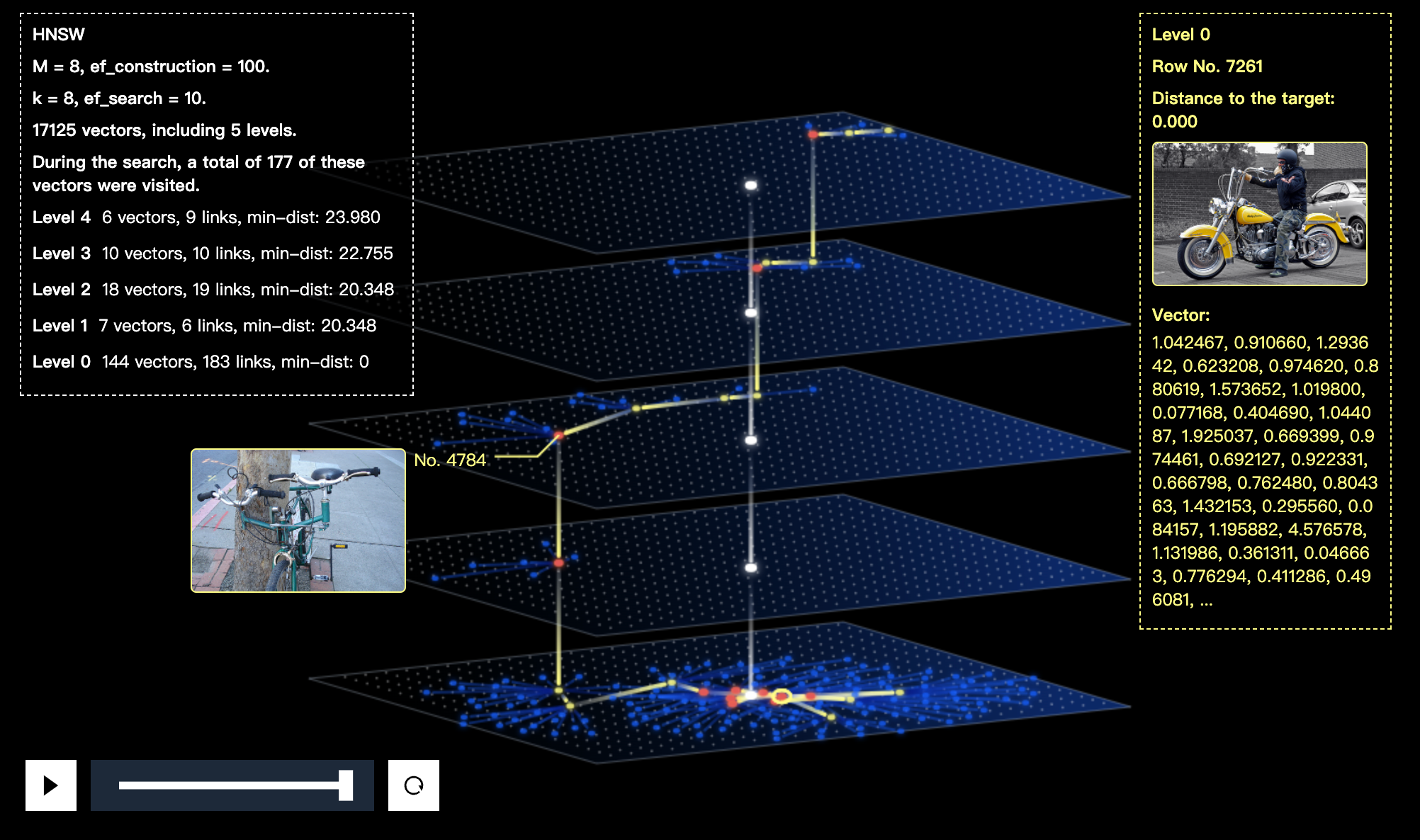
HNSW visualization screenshots
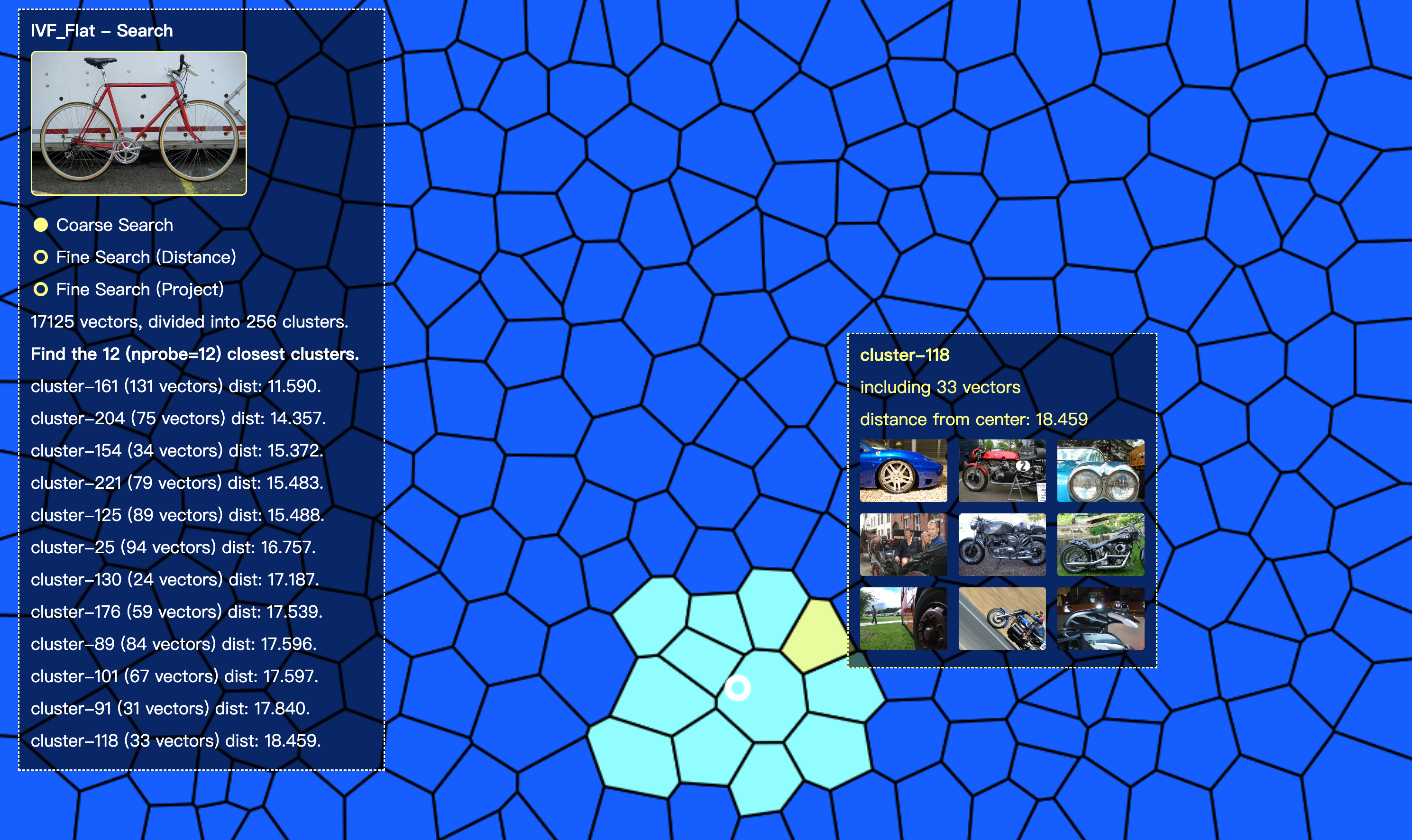
IVF_Flat visualization screenshots


Quick Start
Installation
Use npm or yarn.
yarn install @zilliz/federMaterial Preparation
Make sure that you have built an index and dumped the index file by Faiss or HNSWlib.
Init Feder
Specifying the dom container that you want to show the visualizations.
import { Feder } from '@zilliz/feder';
const feder = new Feder({   filePath: 'faiss_file', // file path   source: 'faiss', // faiss | hnswlib   domSelector: '#container', // attach dom to render   viewParams: {}, // optional });
Visualize the index structure.
- HNSW - Feder will show the top-3 levels of the hnsw-tree.
- IVF_Flat - Feder will show all the clusters.
feder.overview();Explore the search process.
Set search parameters (optional) and Specify the query vector.
feder
  .setSearchParams({
    k: 8, // hnsw, ivf_flat
    ef: 100, // hnsw (ef_search)
    nprobe: 8, // ivf_flat
  })
  .search(target_vector);
Examples
We prepare a simple case, which is the visualizations of the hnsw and ivfflat with 17,000+ vectors that embedded from VOC 2012).
git clone git@github.com:zilliztech/feder.git
cd feder
yarn install
yarn dev
Then open http://localhost:12355/
It will show 4 visualizations:
hnswoverviewhnswsearch viewivf_flatoverviewivf_flatsearch view
Feder for Large Index
Feder consists of three components:
FederIndex- parse the index file. It requires a lot of memory.FederLayout- layout calculations. It consumes a lot of computational resources.FederView- render and interaction.
- oneServer
FederIndex and FederLayout). - twoServer
FederIndex) - layoutServer (with FederLayout)
Referring to case/oneServer and case/twoServer.
Example with One Server
- launch the server
yarn testoneserver_backend- launch the front web service
yarn testoneserver_front- open http://localhost:8000
Example with Two Servers
- launch the FederIndex server
yarn testtwoserverfederindex- launch the FederLayout server
yarn testtwoserverfederlayout- launch the front web service
yarn testtwoserver_front- open http://localhost:8000
Pipeline - explore a new dataset with feder
Step 1. Dataset preparation
Put all images to test/data/images/. (example dataset VOC 2012)
You can also generate random vectors without embedding for index building and skip to step 3.
Step 2. Generate embedding vectors
Recommend to use towhee, one line of code to generating embedding vectors!
We have the encoded vectors ready for you.
Step 3. Build an index and dump it.
You can use faiss or hnswlib to build the index.
(\*Detailed procedures please refer to their tutorials.)
Referring to test/data/genhnswlibindex\.py or test/data/genfaissindex\.py
Or we have the index file ready for you.
Step 4. Init Feder.
import { Feder } from '@zilliz/feder';
import * as d3 from 'd3';
const domSelector = '#container'; const filePath = [indexfilepath]; const source = "hnswlib"; // "hnswlib" or "faiss"
const mediaCallback = (rowId) => mediaUrl;
const feder = new Feder({   filePath,   source,   domSelector,   viewParams: {     mediaType: 'img',     mediaCallback,   }, });
If use the random_data, no need to specify the mediaType.
import { Feder } from '@zilliz/feder';
import * as d3 from 'd3';
const domSelector = '#container'; const filePath = [indexfilepath];
const feder = new Feder({   filePath,   source: 'hnswlib',   domSelector, });
Step 5. Explore the index!
Visualize the overview
feder.overview();or visualize the search process.
feder.search(target_vector[, targetMediaUrl]);or randomly select an vector as the target to visualize the search process.
feder.searchRandTestVec();More cases refer to the test/test.js
Blogs
- Visualize Your Approximate Nearest Neighbor Search with Feder
- Visualize Reverse Image Search with Feder
Roadmap
We're still in the early stages, we will support more types of anns index, and more unstructured data viewer, stay tuned.


