
✨ Awesome expandable, collapsible tableview cell for iOS written in Swift 5
ExpandableCell





Intoduction
Fully refactored YNExapnadableCell with more concise, bug free. Easiest usage of expandable & collapsible cell for iOS, written in Swift 6. You can customize expandableUITableViewCell whatever you like. ExpandableCell is made because insertRows and deleteRows is hard to use. Just inheirt ExpandableDelegate
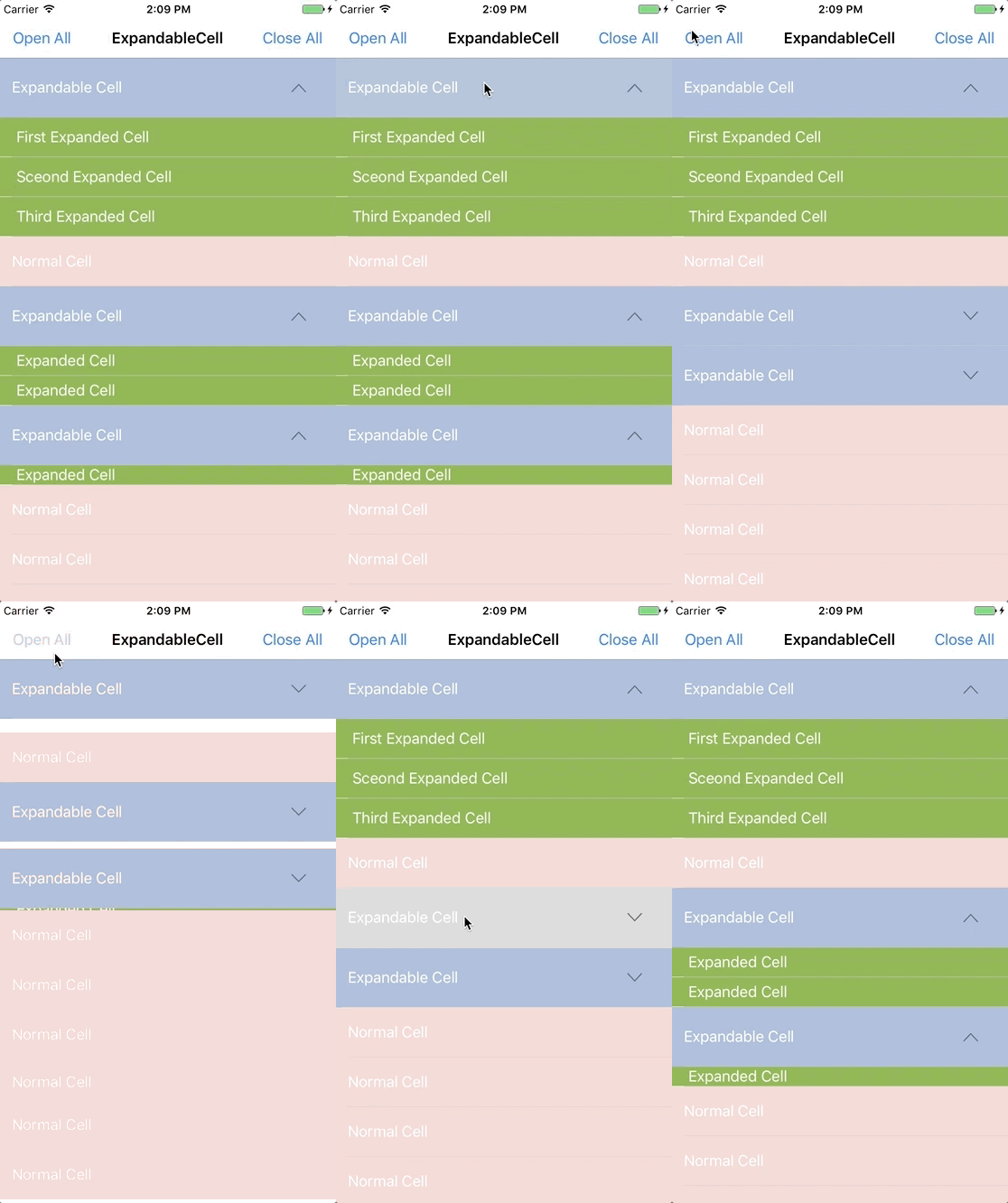
Usage
Basic
import ExpandableCellMake ExpandableTableView in Storyboard or in code
@IBOutlet var tableView: ExpandableTableView!Inherit ExpandableDelegate
class ViewController: UIViewController, ExpandableDelegateSet delegate
tableView.expandableDelegate = selfSet required ExpandableDelegate method.
Key two methods
| Required ExpandableDelegate | Explanation | | --------------------------- | ----------- | |func expandableTableView(_ expandableTableView: ExpandableTableView, expandedCellsForRowAt indexPath: IndexPath) -> [UITableViewCell]? | Key method to get expandable cells | | func expandableTableView(_ expandableTableView: ExpandableTableView, heightsForExpandedRowAt indexPath: IndexPath) -> [CGFloat]? | Key method to get expandable cells's height |
| Required UITableViewDelegate, UITableViewDataSource | Explanation | | --------------------------------------------------- | ----------- | | func expandableTableView(_ expandableTableView: ExpandableTableView, cellForRowAt indexPath: IndexPath) -> UITableViewCell | - | | func expandableTableView(_ expandableTableView: ExpandableTableView, numberOfRowsInSection section: Int) -> Int | - | | func expandableTableView(_ expandableTableView: ExpandableTableView, heightForRowAt indexPath: IndexPath) -> CGFloat | - |
Advanced
ExpandableTableView property
| Property | Type | Explanation | | -------- | ---- | ----------- | |animation | UITableViewRowAnimation | Animation when open and close |
| expansionStyle | ExpandableTableView.ExpansionStyle | Select expansion type:single - one row at a time;
singlePerSection - one row at a time, per section;
multi - any number of rows at a time| |
autoRemoveSelection | Bool | autoRemoveSelection true means the cell will flicker selected, and autoRemoveSelection false means the default selection behaviour of the tableview will apply (single or multi selection) |
ExpandableTableView methods
| Method | Explanation | | ------ | ----------- | |openAll | Open all that you set in func expandableTableView(_ expandableTableView: ExpandableTableView, expandedCellsForRowAt indexPath: IndexPath) -> [UITableViewCell]? |
| closeAll | Close all that you set in func expandableTableView(_ expandableTableView: ExpandableTableView, expandedCellsForRowAt indexPath: IndexPath) -> [UITableViewCell]? |
| reloadData | TableView reload data. Expanded cells will be work also |
| open(at indexPath: IndexPath) | Open specific indexPath |
Optional delegates
| Optional ExpandableDelegate | Explanation | | --------------------------- | ----------- | |func expandableTableView(_ expandableTableView: ExpandableTableView, didSelectExpandedRowAt indexPath: IndexPath) | Get indexpath in expanded row |
| func expandableTableView(_ expandableTableView: ExpandableTableView, expandedCell: UITableViewCell, didSelectExpandedRowAt indexPath: IndexPath) | Get expandedCell and indexPath |
| Optional UITableViewDelegate, UITableViewDataSource | Explanation | | --------------------------------------------------- | ----------- | | func expandableTableView(_ expandableTableView: ExpandableTableView, didSelectRowAt indexPath: IndexPath) | - | | func expandableTableView(_ expandableTableView: ExpandableTableView, titleForHeaderInSection section: Int) -> String? | - | | func expandableTableView(_ expandableTableView: ExpandableTableView, heightForHeaderInSection section: Int) -> CGFloat | - | | func expandableTableView(_ expandableTableView: ExpandableTableView, viewForHeaderInSection section: Int) -> UIView? | - | | func numberOfSections(in expandableTableView: ExpandableTableView) -> Int | - | | func expandableTableView(_ expandableTableView: ExpandableTableView, willDisplay cell: UITableViewCell, forRowAt indexPath: IndexPath) | - | | func expandableTableView(_ expandableTableView: ExpandableTableView, willDisplayHeaderView view: UIView, forSection section: Int) | - | | func expandableTableView(_ expandableTableView: ExpandableTableView, willDisplayFooterView view: UIView, forSection section: Int) | - |
For arrow effect
InheritExpandableCell when you need arrow effect or change arrow image
open class ExpandableCell: UITableViewCell {
    open var arrowImageView: UIImageView!
}
For highlight animation
InheritExpandableCell when you need disable or enable highlight animation
open class ExpandableCell: UITableViewCell {
    open var highlightAnimation = HighlightAnimation.animated
}
Adding right margin to arrow icon
InheritExpandableCell when you need right margin ( Default margin is 16 )
open class ExpandableCell: UITableViewCell {
    open var rightMargin: CGFloat = 16
}
Set tableview insert animation
tableView.animation = .automaticMake protocols in ExpandableDelegate if you need or make pull request to me :)
ExpandableCell methods
| ExpandableCell methods | Explanation | | --------------------------- | ----------- | | isExpanded() | Check if cell is expanded or not | | isInitiallyExpanded() | Make cell be open when the tableView content first appears in the view | | isSelectable() | Make cell be selectable or not, regardless of tableView selectionStyle |
Requirements
ExpandableCell written in Swift 6.0. Compatible with iOS 13.0+. Supports Swift Package Manager, CocoaPods, and Carthage.
Installation
Swift Package Manager
In Xcode, choose File ▸ Add Package Dependencies… and enter the repository URL:
https://github.com/younatics/ExpandableCell.gitOr add it to your Package.swift:
dependencies: [
    .package(url: "https://github.com/younatics/ExpandableCell.git", from: "2.0.0")
]
Cocoapods
ExpandableCell is available through CocoaPods. To install it, simply add the following line to your Podfile:
pod 'ExpandableCell'Carthage
github "younatics/ExpandableCell"References
Please tell me or make pull request if you use this library in your application :)
Author
younatics


