
Display and control your Android device
**This GitHub repo (scrcpy.**
scrcpy (v4.0)

pronounced "screen copy"
This application mirrors Android devices (video and audio) connected via USB or TCP/IP and allows control using the computer's keyboard and mouse. It does not require root access or an app installed on the device. It works on Linux, Windows, and macOS.



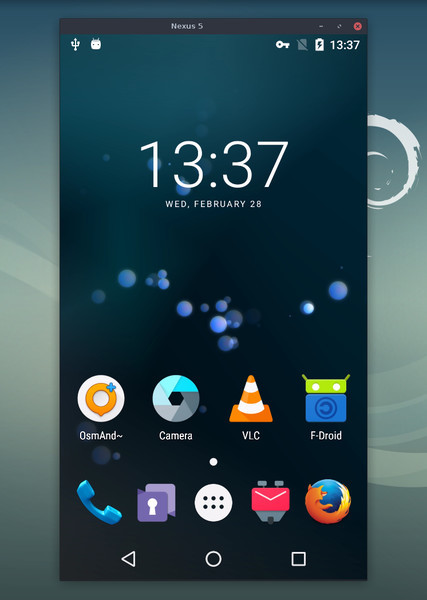
It focuses on:
- lightness: native, displays only the device screen - performance: 30~120fps, depending on the device - quality: 1920×1080 or above - low latency: [35~70ms][lowlatency] - low startup time: ~1 second to display the first image - non-intrusiveness: nothing is left installed on the Android device - user benefits: no account, no ads, no internet required - freedom: free and open source software
[lowlatency]: https://github.com/Genymobile/scrcpy/pull/646
Its features include: - audio forwarding (Android 11+) - recording - virtual display - mirroring with Android device screen off - copy-paste in both directions - configurable quality - camera mirroring (Android 12+) - mirroring as a webcam (V4L2) (Linux-only) - physical [keyboard][hid-keyboard] and [mouse][hid-mouse] simulation (HID) - gamepad support - OTG mode - and more…
[hid-keyboard]: doc/keyboard.md#physical-keyboard-simulation [hid-mouse]: doc/mouse.md#physical-mouse-simulation
Prerequisites
The Android device requires at least API 21 (Android 5.0).
Audio forwarding is supported for API >= 30 (Android 11+).
Make sure you [enabled USB debugging][enable-adb] on your device(s).
[enable-adb]: https://developer.android.com/studio/debug/dev-options#enable
On some devices (especially Xiaomi), you might get the following error:
Injecting input events requires the caller (or the source of the instrumentation, if any) to have the INJECT_EVENTS permission.In that case, you need to enable [an additional option][control] USB debugging (Security Settings) (this is an item different from USB debugging) to control it using a keyboard and mouse. Rebooting the device is necessary once this option is set.
[control]: https://github.com/Genymobile/scrcpy/issues/70#issuecomment-373286323
Note that USB debugging is not required to run scrcpy in OTG mode.
Get the app
- Linux - Windows (read how to run) - macOS
Must-know tips
- Reducing resolution may greatly improve performance (scrcpy -m1024) - Right-click_ triggers BACK - Middle-click_ triggers HOME - Alt+f toggles fullscreen - There are many other shortcuts
Usage examples
There are a lot of options, documented in separate pages. Here are just some common examples.
- Capture the screen in H.265 (better quality), limit the size to 1920, limit the frame rate to 60fps, disable audio, and control the device by simulating a physical keyboard:
scrcpy --video-codec=h265 --max-size=1920 --max-fps=60 --no-audio --keyboard=uhid
    scrcpy --video-codec=h265 -m1920 --max-fps=60 --no-audio -K  # short version
- Start VLC in a new virtual display (separate from the device display):
scrcpy --new-display=1920x1080 --start-app=org.videolan.vlc- Start VLC in a new flex display using H.265 with a bitrate of 16 Mbps, while keeping the display active so it does not turn off:
scrcpy --new-display -x --keep-active --start-app=org.videolan.vlc --video-codec=h265 -b16M- Record the device camera in H.265 at 1920x1080 (and microphone) to an MP4 file:
scrcpy --video-source=camera --video-codec=h265 --camera-size=1920x1080 --record=file.mp4- Capture the device front camera and expose it as a webcam on the computer (on Linux):
scrcpy --video-source=camera --camera-size=1920x1080 --camera-facing=front --v4l2-sink=/dev/video2 --no-playback- Control the device without mirroring by simulating a physical keyboard and mouse (USB debugging not required):
scrcpy --otg- Control the device using gamepads plugged into the computer:
scrcpy --gamepad=uhid
    scrcpy -G  # short version
User documentation
The application provides a lot of features and configuration options. They are documented in the following pages:
- Connection - Video - Audio - Control - Keyboard - Mouse - Gamepad - Device - Window - Recording - Virtual display - Tunnels - OTG - Camera - Video4Linux - Shortcuts
Resources
- FAQ - [Translations][wiki] (not necessarily up to date) - Build instructions - Developers - Verify release signatures
[wiki]: https://github.com/Genymobile/scrcpy/wiki
Articles
- [Introducing scrcpy][article-intro]
- [Scrcpy now works wirelessly][article-tcpip]
- [Scrcpy 2.0, with audio][article-scrcpy2]
Contact
You can open an [issue] for bug reports, feature requests or general questions.
For bug reports, please read the FAQ first, you might find a solution to your problem immediately.
[issue]: https://github.com/Genymobile/scrcpy/issues
You can also use:
- Reddit: r/scrcpy - BlueSky: @scrcpy.bsky.social - Twitter: @scrcpy_app
Donate
I'm @rom1v, the author and maintainer of scrcpy_.
If you appreciate this application, you can [support my open source work][donate]: - GitHub Sponsors - Liberapay - PayPal
[donate]: https://blog.rom1v.com/about/#support-my-open-source-work
License
Copyright (C) 2018 Genymobile Copyright (C) 2018-2026 Romain Vimont
Licensed under the Apache License, Version 2.0 (the "License"); you may not use this file except in compliance with the License. You may obtain a copy of the License at
http://www.apache.org/licenses/LICENSE-2.0
Unless required by applicable law or agreed to in writing, software distributed under the License is distributed on an "AS IS" BASIS, WITHOUT WARRANTIES OR CONDITIONS OF ANY KIND, either express or implied. See the License for the specific language governing permissions and limitations under the License.


