
android video record editor muxer sdk
Last updated May 31, 2026
911
Stars
278
Forks
69
Issues
0
Stars/day
Attention Score
62
Topics
Language breakdown
No language data available.
▸ Files
click to expand
README
trinity
If the trinity project is helpful to you, you can use paypal to support the author
https://www.paypal.me/wlanjie




trinity is an open source shooting and short video processing tool, written in kotlin and c++, which implements most of the popular features of short video editing software.
Apk download
- Please check actions options ci build result
QQ exchange group
125218305Contact me
- email: wlanjie888@gmail.com
git commit specification
- Follow git cz
Code Specification
- Kotlin indent using 2 spaces indent
- C++ code follows google c++ style guide
System version
Support Android 4.3 And above
Development environment
- Android Studio 3.5
- NDK r20
- kotlin 1.3.41
Open source library used
- fdk-aac
- ffmpeg 3.4
- libx264
- xlogger
- mnnkit
Features
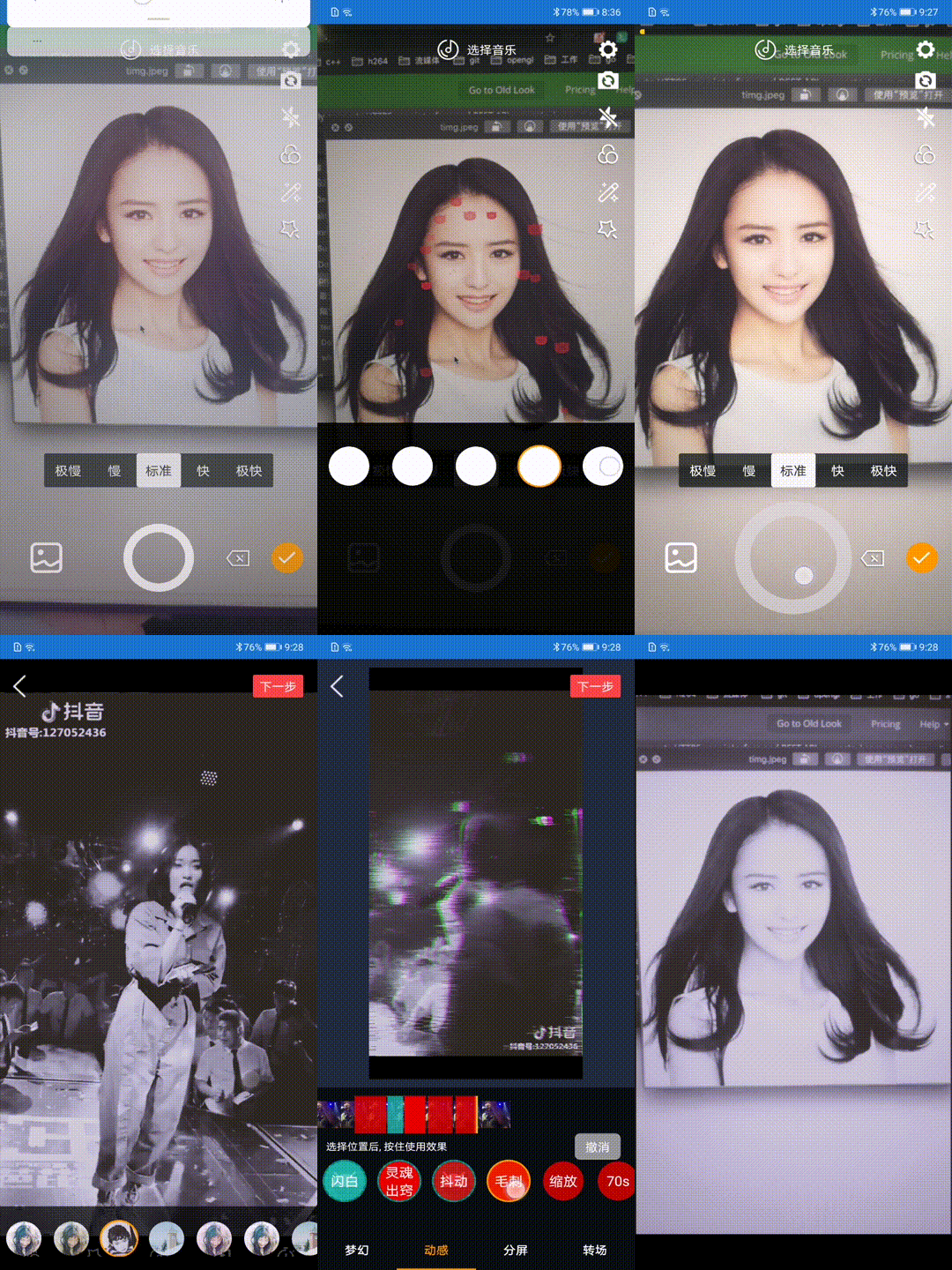
| Video shooting | |
| Function Description | Whether to support |
| Multi-session recording | √ |
| Custom duration | √ |
| Custom camera configuration | √ |
| Camera switch | √ |
| flash | √ |
| Focus adjustment | √ |
| Manual focus | √ |
| Mute | √ |
| Beauty | x |
| Microdermabrasion | √ |
| Custom resolution and bit rate | √ |
| Record background sound | √ |
| Recording speed | √ |
| Hard and soft coding | √ |
| Video editing | |
| Multi-segment editing | √ |
| Replace fragment | √ |
| Set clip time | √ |
| Background music | √ |
| Hard decode | √ |
| Special effects | |
| Filter | √ |
| Flash white | √ |
| Two split screen | √ |
| Three-point screen | √ |
| Quarter screen | √ |
| Six split screen | √ |
| Nine points screen | √ |
| Blur split screen | √ |
| Gaussian blur | √ |
| Soul out | √ |
| shake | √ |
| glitch | √ |
| 70s | √ |
| Face recognition | |
| Rose eye markup | √ |
| Princess | √ |
| Sticker makeup | √ |
| Falling pig | √ |
| Cat head | √ |
Face effect
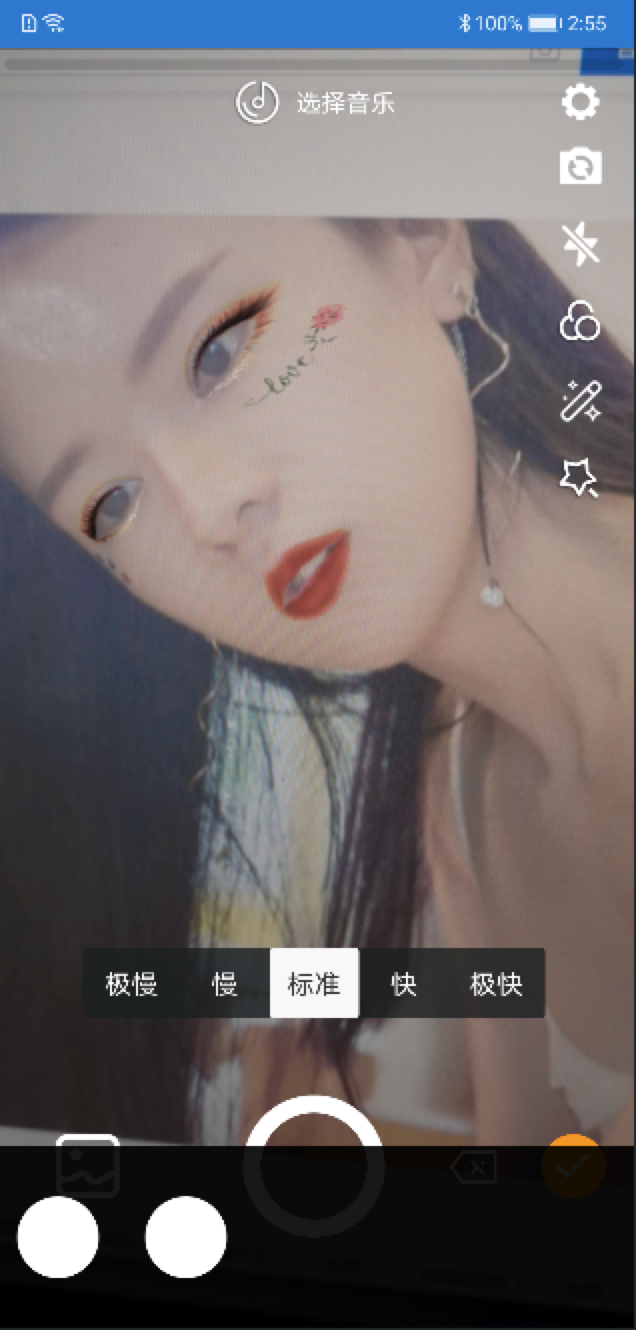
Special effects debugging
Use xcode to debug special effects in the project, you need to install glfw before usebrew install glfw/src/main/cpp/opengl.xcodeprojimage_process.OnAction("param/blurScreen", 0);Automated test
- Use uiautomator2 for automatic testing
python
cd trinity
python trinity.pyadb devicesPerformance
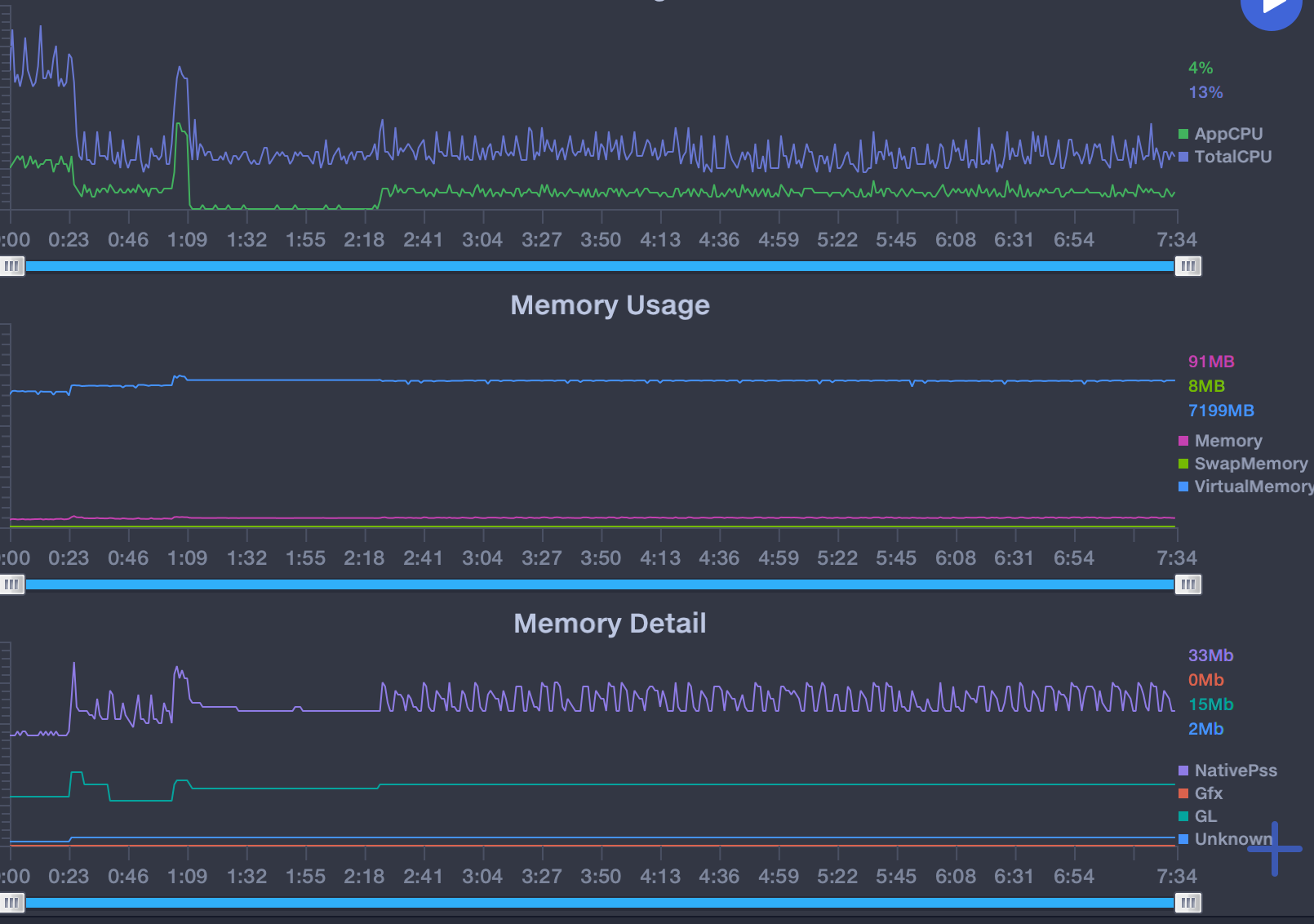
Use
Note: The permission judgment is not made in the SDK. The caller needs to apply for permission when using it. The time involved in the SDK is milliseconds.
Add jcenter dependency
gradle
dependencies {
    implementation 'com.github.wlanjie:trinity:0.2.9.1'
}
Load Libraries in Application class
companion object {
    init {
      System.loadLibrary("trinity")
      System.loadLibrary("c++_shared")
      System.loadLibrary("marsxlog")
    }
  }
Permission requirements
xml
<uses-permission android:name="android.permission.CAMERA" />
<uses-permission android:name="android.permission.RECORD_AUDIO" />
<uses-permission android:name="android.permission.WRITEEXTERNALSTORAGE" />
<uses-permission android:name="android.permission.READEXTERNALSTORAGE" />
Recording
Configuration parameter
- Create a recording preview view
kotlin
val preview = findViewById<TrinityPreviewView>(R.id.preview)- Create a recording interface instance
kotlin
mRecord = TrinityRecord(preview)- Destroy the recording interface instance
kotlin
mRecord.release()
Callback settings
- Set video rendering callback
kotlin
mRecord.setOnRenderListener(this)- Set recording progress callback
kotlin
mRecord.setOnRecordingListener(this)- Set camera callback
kotlin
mRecord.setCameraCallback(this)
Open preview
- Start preview
kotlin
mRecord.startPreview()- End preview
kotlin
mRecord.stopPreview()- Set preview type
kotlin
// Set the display type
// Include crop display, the original proportion is displayed in black
mRecord.setFrame(mFrame)
Recording control / management
- Switch camera
kotlin
mRecord.switchCamera()- Get the current camera
kotlin
// return the current camera id
val facing = mRecord.getCameraFacing()- Switch flash
kotlin
mRecord.flash(mFlash)- Setting up zoom
kotlin
// Set the focal length zoom, 0-100 100 is the maximum zoom
mRecord.setZoom(0)- Set exposure
kotlin
// Set the camera exposure, 100 is the maximum exposure
mRecord.setExposureCompensation(0)- Manual focus
kotlin
// Set manual focus, parameters are x and y
mRecord.focus(mPointF)- Set the angle of the recorded video
kotlin
/**
 * @param rotation Rotation angle includes 0 90 180 270
 */
mRecord.setRecordRotation(0)- Set up silent recording
kotlin
mRecord.setMute(false)- Double speed recording
kotlin
/**
 * @param speed contains 0.25 0.5 1.0 2.0 4.0 times the speed
 */
mRecord.setSpeed(mSpeed)
Start recording
- Start recording a video
kotlin
/**
 * Start recording a video
 * @param path Recorded video save address
 * @param width The width of the recorded video. The SDK will do a 16-times integer operation. The width of the final output video may be inconsistent with the setting.
 * @param height The height of the recorded video. The SDK will do a 16-times integer operation. The width of the final output video may be inconsistent with the setting.
 * @param videoBitRate The bit rate of the video output. If it is set to 2000, it is 2M. The final output and the set may be different.
 * @param frameRate frame rate of video output
 * @param useHardWareEncode whether to use hard coding, if set to true, and hard coding is not supported, it will automatically switch to soft coding
 * @param audioSampleRate audio sample rate
 * @param audioChannel number of audio channels
 * @param audioBitRate audio bit rate
 * @param duration
 * @return Int ErrorCode.SUCCESS is success, others are failures
 * @throws InitRecorderFailException
 */
mRecord.startRecording("/sdcard/a.mp4",
                      720,
                      1280,
                      2000, // 2M bit rate
                      30,
                      false,
                      44100,
                      1, // Mono
                      128, // 128K Rate
Int.MAX_VALUE)- End recording
kotlin
mRecord.stopRecording()
Video editing
Initialization
- Create editor instance
kotlin
mVideoEditor = TrinityCore.createEditor(this)- Set preview screen
kotlin
val surfaceView = findViewById<SurfaceView>(R.id.surface_view)
mVideoEditor.setSurfaceView(surfaceView)
Import video
- Add a snippet
kotlin
val clip = MediaClip(file.absolutePath)
mVideoEditor.insertClip(clip)- Add fragments based on subscripts
kotlin
val clip = MediaClip(file.absolutePath)
mVideoEditor.insertClip(0, clip)- Delete a clip
kotlin
/**
 * Delete a segment in accordance with the subscript
 */
mVideoEditor.removeClip(index)- Get the number of fragments
kotlin
val count = mVideoEditor.getClipsCount()- Get a clip based on the subscript
kotlin
 /**
  * If the fragment does not exist, returns a null
  */
val clip = mVideoEditor.getClip(index)- Replace a snippet based on a subscript
kotlin
mVideoEditor.replaceClip(index, clip)- Get all clips
kotlin
 /**
  * Returns a collection of all clips
  */
val clips = mVideoEditor.getVideoClips()- Total time to get all clips
kotlin
val duration = mVideoEditor.getVideoDuration()- Get the progress of the currently playing clip
kotlin
val current = mVideoEditor.getCurrentPosition()- Get start and end time of specified clip
kotlin
val timeRange = mVideoEditor.getClipTimeRange(index)- Find subscripts of clips based on time
kotlin
val index = mVideoEditor.getClipIndex(time)
Background music
- Add background music
kotlin
 /**
  * @param config background music json content
  * The specific json content is as follows:
  * {
  *   "path": "/sdcard/trinity.mp3",
  *   "startTime": 0,
  *   "endTime": 2000
  * }
  * json parameter explanation:
  * path: the local address of the music
  * startTime: the start time of this music
  * endTime: the end time of this music 2000 means this music only plays for 2 seconds
  */
val actionId = mVideoEditor.addMusic(config)- Updated background music
kotlin
 /**
  * @param config background music json content
  * The specific json content is as follows:
  * {
  *   "path": "/sdcard/trinity.mp3",
  *   "startTime": 2000,
  *   "endTime": 4000
  *}
  * json parameter explanation:
  * path: the local address of the music
  * startTime: the start time of this music
  * endTime: the end time of this music 4000 means this music is played for 2 seconds from the start time to the end time
  */
val actionId = mVideoEditor.addMusic(config)- Remove background music
kotlin
 /**
  * Remove background music
  * @param actionId must be the actionId returned when adding background music
  */
mVideoEditor.deleteMusic(actionId)
Add special effects
- Add ordinary filters
kotlin
/**
 * Add filters
 * For example: the absolute path of content.json is /sdcard/Android/com.trinity.sample/cache/filters/config.json
 * The path only needs /sdcard/Android/com.trinity.sample/cache/filters
 * If the current path does not contain config.json, the addition fails
 * The specific json content is as follows:
 * {
 *   "type": 0,
 *   "intensity": 1.0,
 *   "lut": "lut124 / lut124.png"
 * }
 *
 * json parameter explanation:
 * type: reserved field, currently has no effect
 * intensity: filter transparency, no difference between 0.0 and camera acquisition
 * lut: the address of the filter color table, must be a local address, and it is a relative path
 * Path splicing will be performed inside sdk
 * @param configPath filter parent directory of config.json
 * @return returns the unique id of the current filter
*/
val actionId = mVideoEditor.addFilter(config)- Update filters
kotlin
/**
 * Update filters
 * @param configPath config.json path, currently addFilter description
 * @param startTime filter start time
 * @param endTime filter end time
 * @param actionId Which filter needs to be updated, must be the actionId returned by addFilter
 */
mVideoEditor.updateFilter(config, 0, 2000, actionId)- Delete filter
kotlin
  /**
   * Delete filter
   * @param actionId Which filter needs to be deleted, it must be the actionId returned when addFilter
   */
mVideoEditor.deleteFilter (actionId)- Add vibrato effect
kotlin
/**
 * Add special effects
 * For example: the absolute path of content.json is /sdcard/Android/com.trinity.sample/cache/effects/config.json
 * The path only needs /sdcard/Android/com.trinity.sample/cache/effects
 * If the current path does not contain config.json, the addition fails
 * @param configPath filter parent directory of config.json
 * @return returns the unique id of the current effect
 */
val actionId = mVideoEditor.addAction(configPath)- Updated vibrato effect
kotlin
/**
 * Update specific effects
 * @param startTime The start time of the effect
 * @param endTime End time of the effect
 * @param actionId Which effect needs to be updated, must be the actionId returned by addAction
 */
mVideoEditor.updateAction(0, 2000, actionId)- Remove vibrato effect
kotlin
/**
 * Delete a special effect
 * @param actionId Which effect needs to be deleted, must be the actionId returned by addAction
 */
mVideoEditor.deleteAction(actionId)
Start preview
- Prepare
kotlin
mVideoEditor.prepare()- Play
kotlin
/**
 * @param repeat whether to repeat playback
 */
mVideoEditor.play(repeat)- time out
kotlin
mVideoEditor.pause()- Resume playback
kotlin
mVideoEditor.resume()- Stop play
kotlin
mVideoEditor.stop()
Release resources
kotlin
mVideoEditor.destroy()
Export video
- Create export instance
kotlin
val export = TrinityCore.createExport(this)- Start export
kotlin
/**
  * Start export
  * @param info export object
  * @param l export callback, success failed and progress
  * @return Int ErrorCode.SUCCESS is sucess, other failed
  */
// Create export object, must be insert video out path
val exportVideoInfo = VideoExportInfo("/sdcard/export.mp4")
// use hardware decode
exportVideoInfo.mediaCodecDecode = true
// use hardware encode
exportVideoInfo.mediaCodecEncode = true
// video width
exportVideoInfo.width = 544
// video height
exportVideoInfo.height = 960
// frame rate
exportVideoInfo.frameRate = 25
// video bitrate 2M
exportVideoInfo.videoBitRate = 2000
// sample rate
exportVideoInfo.sampleRate = 44100
// channel
exportVideoInfo.channelCount = 1
// audio bitrate 128K
exportVideoInfo.audioBitRate = 128
export.export(exportVideoInfo, this)- Cancel
kotlin
export.cancel()- Freed
kotlin
export.release()
Copyright 2019 Trinity, Inc.
Licensed under the Apache License, Version 2.0 (the "License");
you may not use this file except in compliance with the License.
You may obtain a copy of the License at
http://www.apache.org/licenses/LICENSE-2.0
Unless required by applicable law or agreed to in writing, software
distributed under the License is distributed on an "AS IS" BASIS,
WITHOUT WARRANTIES OR CONDITIONS OF ANY KIND, either express or implied.
See the License for the specific language governing permissions and
limitations under the License.


