
A simple customizable NumberPicker plugin for Android
NumberPicker ============



A simple customizable NumberPicker for Android.
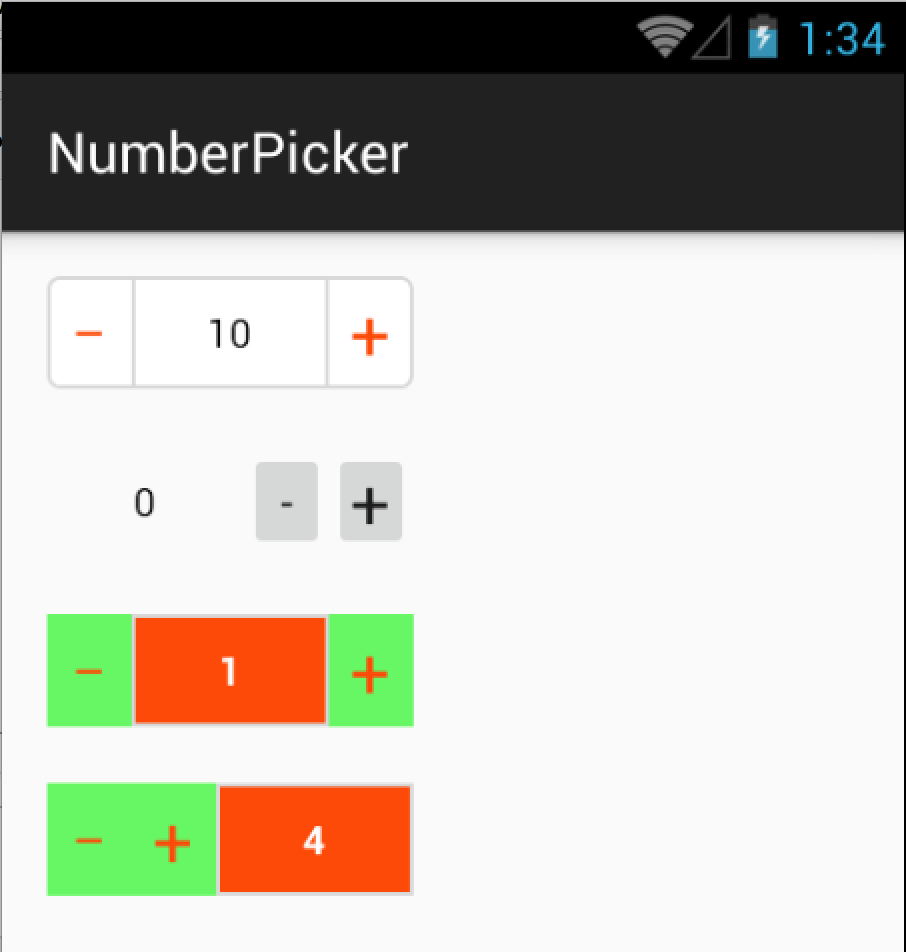
Installation
via Gradle:
compile 'com.github.travijuu:numberpicker:1.0.7'<dependency> <groupId>com.github.travijuu</groupId> <artifactId>numberpicker</artifactId> <version>1.0.7</version> <type>aar</type> </dependency>Usage
Add NumberPicker component in your XML layout
activity_main.xml
<LinearLayout xmlns:android="http://schemas.android.com/apk/res/android"
    xmlns:tools="http://schemas.android.com/tools"
    android:layoutwidth="matchparent"
    android:layoutheight="matchparent"
    android:orientation="vertical"
    xmlns:numberpicker="http://schemas.android.com/apk/res-auto"
    tools:c>
<com.travijuu.numberpicker.library.NumberPicker         android:id="@+id/number_picker"         android:layout_width="130dp"         android:layout_height="40dp"         numberpicker:min="0"         numberpicker:max="10"         numberpicker:value="-5"         numberpicker:unit="1"         numberpicker:focusable="false"         numberpicker:customlayout="@layout/numberpickercustomlayout" />
</LinearLayout>
MainActivity.java
import com.travijuu.numberpicker.library.NumberPicker;
public class MainActivity extends AppCompatActivity {
@Override     protected void onCreate(Bundle savedInstanceState) {         super.onCreate(savedInstanceState);         setContentView(R.layout.activity_main);
NumberPicker numberPicker = (NumberPicker) findViewById(R.id.number_picker);         numberPicker.setMax(15);         numberPicker.setMin(5);         numberPicker.setUnit(2);         numberPicker.setValue(10);     } }
XML Attributes
| Name | Type | Default | |---------------|---------|---------| | min | int | 0 | | max | int | 999999 | | value | int | 1 | | unit | int | 1 | | focusable | boolean | false | | customlayout | layout | @layout/numberpicker_layout |
Layout Customization
if you want to customize your NumberPicker layout you can create your own.
IMPORTANT! This layout should contains at least 3 items with given Ids:
- Button (@+id/increment)
- Button (@+id/decrement)
- TextView (@+id/display)
Example XML layout:
<LinearLayout
    xmlns:android="http://schemas.android.com/apk/res/android"
    android:layout_width="130dp"
    android:layout_height="40dp"
    android:orientation="horizontal"
    android:background="@android:color/white">
<Button         android:layout_width="30dp"         android:layoutheight="matchparent"         android:padding="0dp"         android:textColor="@android:color/black"         android:background="@null"         android:id="@+id/decrement"         android:textStyle="bold"         android:text="—"/>
<TextView         android:layout_width="70dp"         android:background="@android:color/white"         android:layoutheight="matchparent"         android:text="1"         android:textColor="@android:color/black"         android:inputType="number"         android:id="@+id/display"         android:gravity="center"         />     <Button         android:layout_width="30dp"         android:layoutheight="matchparent"         android:padding="0dp"         android:textSize="25sp"         android:textColor="@android:color/black"         android:background="@null"         android:id="@+id/increment"         android:text="+"/> </LinearLayout>
Methods
Here is the list of methods with definitions.
setMin(int value)
Sets minimum value allowedgetMin()
Gets minimum valuesetMax(int value)
Sets maximum value allowedgetMax()
Gets maximum value allowedsetUnit(int value)
Sets unit value for increment/decrement operationgetUnit()
Gets unit valuesetValue(int value)
Sets NumberPicker current valuegetValue()
Gets NumberPicker current valuesetActionEnabled(ActionEnum action, boolean enabled)
Enables or disables Increment/Decrement buttonssetDisplayFocusable(boolean focusable)
Enables or disables NumberPicker editable via keyboardincrement()
NumberPicker will be incremented bydefined unit value
increment(int unit)
NumberPicker will be incremented bygiven unit value
decrement()
NumberPicker will be decremented bydefined unit vale
decrement(int unit)
NumberPicker will be decremented bygiven unit value
refresh()
NumberPicker will be refreshed with already defined valueclearFocus()
NumberPicker will lose the focusvalueIsAllowed(int value)
Checks whether given value is acceptable or notsetLimitExceededListener(LimitExceededListener limitExceededListener)
setValueChangedListener(ValueChangedListener valueChangedListener)
setOnEditorActionListener(OnEditorActionListener onEditorActionListener)
setOnFocusChangeListener(OnFocusChangeListener onFocusChangeListener)
Listeners
LimitExceededListener
This is triggered when you try to set lower or higher than the given min/max limits
public class DefaultLimitExceededListener implements LimitExceededListener {
public void limitExceeded(int limit, int exceededValue) {
String message = String.format("NumberPicker cannot set to %d because the limit is %d.", exceededValue, limit);         Log.v(this.getClass().getSimpleName(), message);     } }
ValueChangedListener
This is triggered when the NumberPicker is incremented or decremented.
Note: setValue method will not trigger this listener.
public class DefaultValueChangedListener implements ValueChangedListener {
public void valueChanged(int value, ActionEnum action) {
String actionText = action == ActionEnum.MANUAL ? "manually set" : (action == ActionEnum.INCREMENT ? "incremented" : "decremented");         String message = String.format("NumberPicker is %s to %d", actionText, value);         Log.v(this.getClass().getSimpleName(), message);     } }
OnEditorActionListener
This is triggered when you click "done" button on keyboard after you edit current value.
Note: "done" button can be changed on xml so this listener should be overrided according to new IME option.
OnFocusChangeListener
This is triggered whenclearFocus() is called which helps to set new value when the focus lost


