
Your Data, Your AI — Privacy-First.
Last updated Jul 7, 2026
1.1k
Stars
195
Forks
12
Issues
+1.1k
Stars/day
Attention Score
90
Language breakdown
C++ 59.9%
JavaScript 15.6%
Kotlin 11.6%
Swift 7.0%
QML 1.9%
CMake 1.1%
▸ Files
click to expand
README
Mirobody v2
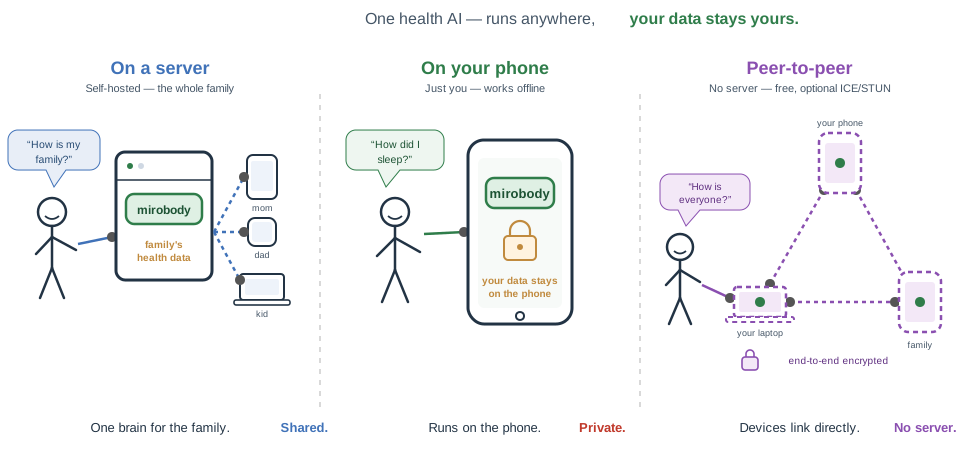
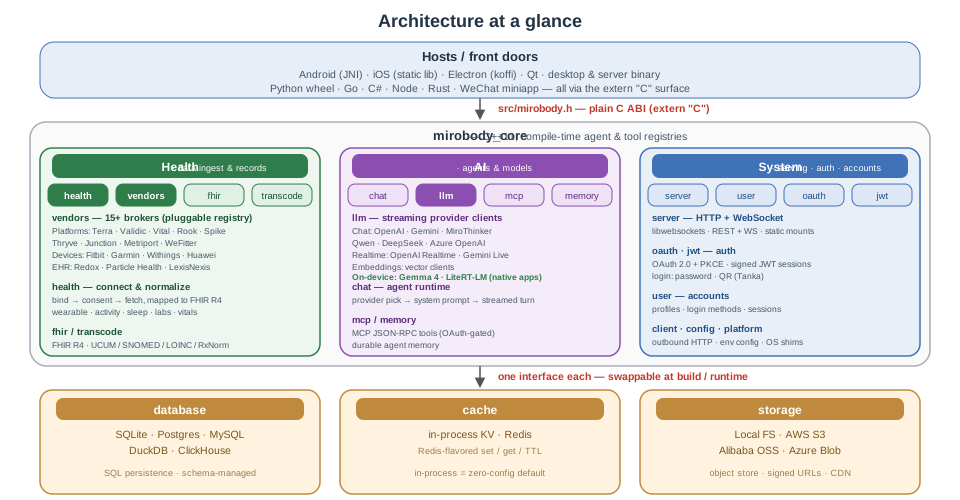
The C++ port of the Python mirobody server, built to run inside the
Android and iOS host app as well as standalone on desktop or a server.
Because the core runs on-device, all data can stay on the phone - it
never has to leave the device unless you choose to sync it.Live demo: test.mirobody.ai
- LLM clients (src/llm/) - one streaming
llm::Client per provider (OpenAI, Google Gemini, and
MiroThinker today), with new providers slotting in behind the same contract.
The native apps (Android · iOS · Qt · Electron) additionally offer a fully
on-device option — Gemma 4 via LiteRT-LM (llama.cpp on Electron) — so chat
can run with no server and no network at all.
- MCP tools (src/mcp/ + res/mcptools/) -
- Agents (src/chat/ + res/agents/) - pick a
- Health platforms (src/health/vendor/) - one
vendor::Vendor per source, brokering wearable,
lab, and clinical-EHR data behind a common authorize / fetch / webhook contract,
resolved by id through the registry. Each
implements transport against the platform's public API (fetch everywhere, plus
consent/webhook where documented; undocumented operations stay explicit stubs).
Clients sort into three buckets:
- platform/ - 15 B2B aggregators (Terra, Validic, Human API, …)
- phone/ - smartphone-vendor stores with a cloud API (Huawei)
- device/ - consumer device brands (Fitbit, Withings, Garmin)
- ehr/ - direct EHR systems via SMART on FHIR — one generic client for every
ONC-certified EHR (Epic, Oracle Health/Cerner, athenahealth, …), with a
directory loader that discovers each tenant's FHIR base URL from public
Service Base URL lists (ONC Lantern, vendor bundles)
- on-device-only stores (Apple Health, Samsung Health, Google Health Connect,
Xiaomi) have no server API and so no client — the host apps read them on-device
(Health Connect / HMS Health Kit on Android, HealthKit on iOS) and POST FHIR
Observations instead
See src/health/vendor/README.md for the platform comparison
the metadata is drawn from, plus the per-vendor implementation-status table.
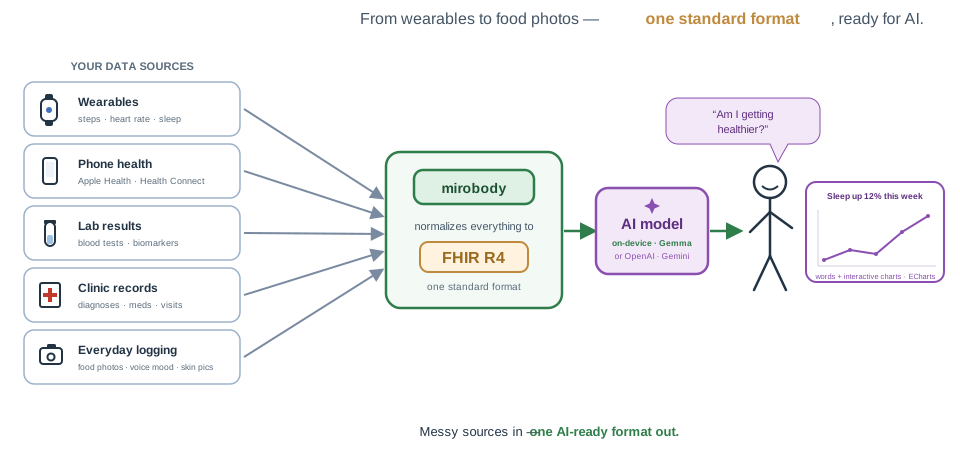
- FHIR R4 (src/fhir/) - an embedded RESTful FHIR R4 endpoint plus
Observations
- the results are served as FHIR resources
See src/fhir/README.md.
Agents and tools both self-register at compile time: drop a .cpp in the
matching res/ directory and rebuild.
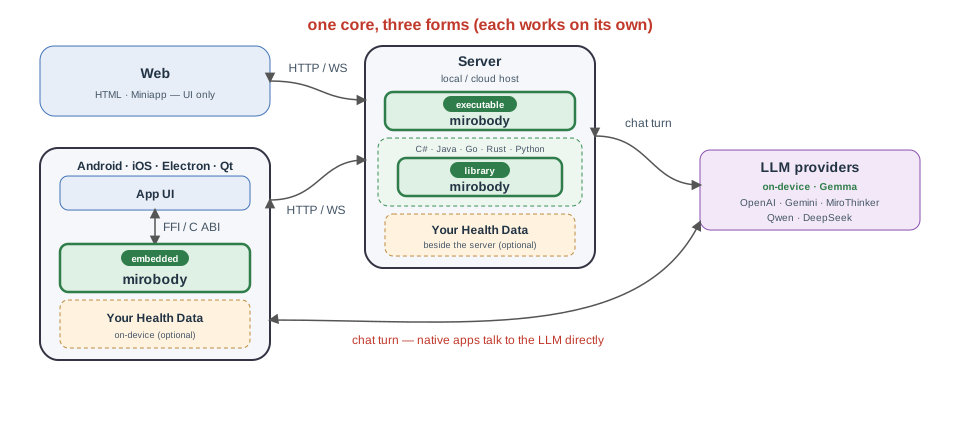 On desktop/embedded it runs as a standalone binary serving HTTP + WebSocket over
the network. On Android and iOS the same core ships inside the host app - as a
shared library loaded over JNI on Android, and as a static library linked
through the C API in src/mirobody.h on iOS.
That C API is a plain
On desktop/embedded it runs as a standalone binary serving HTTP + WebSocket over
the network. On Android and iOS the same core ships inside the host app - as a
shared library loaded over JNI on Android, and as a static library linked
through the C API in src/mirobody.h on iOS.
That C API is a plain extern "C" surface, so any language with a C FFI can
embed the core without going through the HTTP/WebSocket front door - Java
(JNI/JNA/Panama), Go (cgo), C# (P/Invoke), Rust (extern "C"), Swift,
Python (ctypes/cffi), and so on.
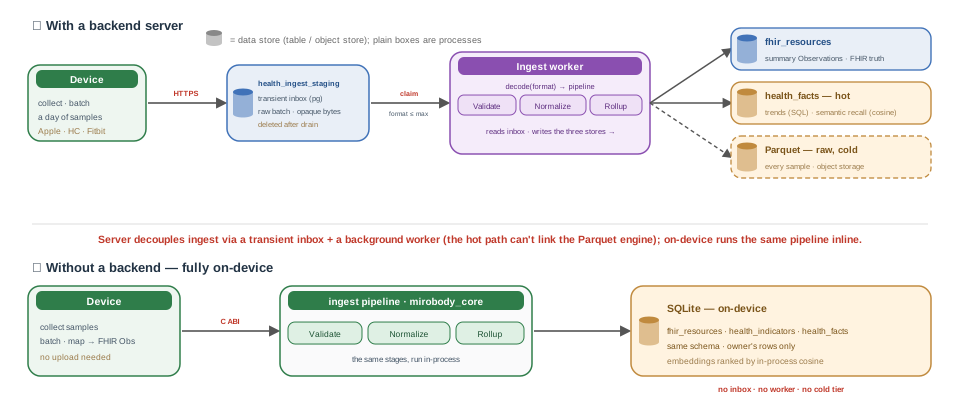
 Health data flows the same way with or without a backend. With a server, device
uploads land in a transient
Health data flows the same way with or without a backend. With a server, device
uploads land in a transient healthingeststaging inbox that a background worker
drains into Postgres (hot: healthindicators + healthfacts) and Parquet (cold,
raw), while fhir_resources keeps the FHIR-truth summary Observations. Fully
on-device, the same mirobody_core pipeline runs inline into a local SQLite file
with the identical schema — no inbox, worker, or cold tier.
Why open device access
If a wearable's moat were purely its algorithms, opening the raw Bluetooth (BLE GATT) layer wouldn't threaten it — yet most consumer vendors keep it closed. The commonly cited reasons are market dynamics, not any one company's practice:- The moat is usually broader than the algorithm — a historical-data flywheel plus
- Little upside for incumbents — at scale a developer ecosystem barely moves hardware
- Path dependency — products designed closed years ago are expensive to reopen (pairing,
Quick start
The default desktop database backend isPOSTGRESQL, so these install
the Postgres client (libpq) alongside the core deps. For other backends,
Fedora/RHEL packages, and full options, see Building - desktop.
Signing in — demo login is off by default. A fresh checkout configures no
email delivery or social provider, so to sign in without setting one up first,
enable the built-in demo accounts: uncomment the EMAILPREDEFINECODES block
inconfig.example.yml(it mapsdemo1@mirobody.ai→
777777, and so on). It ships commented out on purpose — while active,anyone who can reach the server could sign in with those well-known
credentials, so keep it disabled on any reachable deployment and rely on real
email-code or social sign-in there. Every mention of demo credentials below
assumes you have enabled this block.
Linux
# Debian / Ubuntu / WSL
sudo apt install build-essential cmake ninja-build pkg-config \
                 libwebsockets-dev libcurl4-openssl-dev libssl-dev \
                 rapidjson-dev libyaml-cpp-dev libhiredis-dev libpq-dev \
                 libjpeg-dev libpng-dev libtiff-dev libwebp-dev
./build.sh          # -> build/mirobody
./mirobody          # reads ./config.yml
macOS
brew install cmake ninja pkg-config libwebsockets curl openssl@3 \
             rapidjson yaml-cpp hiredis libpq \
             jpeg-turbo libpng libtiff webp
./build.sh          # -> build/mirobody
./mirobody          # reads ./config.yml
Note — response compression. The distro/Homebrew libwebsockets packages
are built with LWSWITHHTTPSTREAMCOMPRESSION off, so a server linked
against them serves every response uncompressed (e.g. assets/index.js at
~520 KB). That's fine for local development. The production
Docker image instead builds libwebsockets from source with
-DLWSWITHHTTPSTREAMCOMPRESSION=ON -DLWSWITHZLIB=ON so it gzip/deflatesresponses — do the same for any bandwidth-sensitive deployment.
Windows
Install Visual Studio with the Desktop development with C++ workload and the C++ CMake tools component (provides Ninja and a bundled vcpkg). vcpkg pulls the native deps fromvcpkg.json automatically - no manual installs.
build.cmd           :: configure + build -> build\mirobody.exe
build\mirobody.exe  :: reads .\config.yml
Webpage
The web client is a static single-page app inhtdoc/, served by the
standalone desktop/server binary (the mobile builds have no static surface).
Build it into res/htdoc, where HTTP_ROOT points by default; mirobody then
serves it at http://localhost:8080:
cd htdoc
npm install
npm run build # -> res/htdoc, served by mirobody at :8080mirobody backend on :8080:
npm startnode dependency: the server self-heals Tanka's request-signer by running
res/tanka/discover.cjs at boot and weekly, falling back to a pinned build when
node or Tanka is unavailable. See src/user/README.md for
the flow and the TANKA* keys in config.example.yml.
Android
Native deps come from prebuilt sysroots underandroid/prebuilt/<ABI>/
(arm64-v8a only today). Then build the host app, which bundles
libmirobody.so:
cd android
./gradlew assembleReleaseiOS
Native deps come from prebuilt sysroots underios/prebuilt/<sdk>-<arch>/.
Build the arm64 device slice and link it into the SwiftUI host via the C API:
cmake -S . -B build-ios-arm64 -G Xcode \
    -DCMAKETOOLCHAINFILE=path/to/ios.toolchain.cmake \
    -DPLATFORM=OS64 -DDEPLOYMENT_TARGET=15.0 \
    -DCMAKEPREFIXPATH="$(pwd)/ios/prebuilt/iphoneos-arm64"
cmake --build build-ios-arm64 --config ReleaseDesktop (Electron)
electron/ wraps the server in an Electron desktop app: the main
process embeds libmirobody in-process via koffi FFI (the same C API as the
other FFI hosts) and a BrowserWindow loads the htdoc web client from the
embedded server's loopback port - no separate process, and no electron-rebuild
across Electron's Node versions. Build the shared library and the web client
first, then run from the repo root:
./build-shared.sh                 # -> build-shared/libmirobody.* (build-shared.cmd on Windows)
( cd htdoc && npm run build )     # -> res/htdoc (already built in a fresh checkout)
( cd electron && npm install && npm start )EMAILPREDEFINECODES — see the note under
Quick start), sign in with demo1@mirobody.ai / 777777, and add
an LLM key to enable chat. npm run dist packages it with
electron-builder.
See electron/README.md for the extraResources packaging
layout, the writable-vs-read-only path handling, and the fixed-port note.
Desktop (Qt)
qt/ is a native Qt Quick (QML) desktop client - the C++ counterpart
of the web client in htdoc/. Unlike Electron, it does not embed
libmirobody; it is a pure HTTP/SSE API client built on Qt's networking stack,
so it talks to any running mirobody backend over the network. It mirrors the
web client's main flow (email-code login, streamed agent/proxy chat, provider
picker, history, settings, ten languages). It is off by default and needs
Qt 6.5+:
cmake -B build-qt -S . -DMIROBODYBUILDQT=ON \
      -DCMAKEPREFIXPATH=/path/to/Qt/6.x/<compiler>
cmake --build build-qt --target mirobody_qthttp://127.0.0.1:8080), and sign in with a demo code once demo login is enabled
on that backend (uncomment EMAILPREDEFINECODES; e.g. demo1@mirobody.ai /
777777). Because the target pulls in no mirobody_core deps, it can also be
built on its own.
See qt/README.md for the architecture, the API mapping, and the
two intentional omissions (social sign-in, KaTeX math).
Wechat Miniapp
A native WeChat Mini Program client lives inminiapp/ (WXML/WXSS/JS,
no build step). It mirrors the web client: the same {code, msg, data} envelope,
bearer-JWT auth, and streamed /api/chat agent protocol. Open the folder in
WeChat DevTools as a Mini Program project - it runs directly,
no npm install:
miniapp/
  project.config.json   # set your Mini Program AppID here
  config.js             # backend baseUrl (dev: http://localhost:8080) + language
  pages/login/          # wx.login() -> POST /wechat/verify -> token
pages/chat/ # provider picker + streamed agent chatPOST /wechat/verify: the page hands the wx.login()
code to the server, which exchanges it via WeChat's jscode2session
(WECHATAPPID / WECHATSECRET in config.yml) for the user's
openid and mints the same tokens as /email/verify.
See miniapp/README.md for the full setup, the backend
contract, and the streaming-over-wx.request details.
Feature parity
Where each client stands today. ✅ done · 🚧 partial · — not yet. Electron embeds thehtdoc web UI, so it inherits every web feature and adds an
on-device LLM.
| Feature | Web | Android | iOS | Electron | Qt | Miniapp |
|---|:--:|:--:|:--:|:--:|:--:|:--:|
| Chat & content | | | | | | |
| Streaming replies | ✅ | ✅ | ✅ | ✅ | ✅ | ✅ |
| Thinking / reasoning trace | ✅ | ✅ | ✅ | ✅ | ✅ | ✅ |
| Tool-call cards (MCP) | ✅ | ✅ | ✅ | ✅ | — | — |
| Markdown | ✅ | ✅ | ✅ | ✅ | ✅ | — |
| Math (LaTeX / KaTeX) | ✅ | ✅ | ✅ | ✅ | — | — |
| Charts (ECharts) | ✅ | ✅ | ✅ | ✅ | — | — |
| Inline images | ✅ | ✅ | ✅ | ✅ | — | — |
| Attachment upload | ✅ | ✅ | ✅ | ✅ | — | ✅ |
| Model | | | | | | |
| Provider / model picker | ✅ | ✅ | ✅ | ✅ | ✅ | ✅ |
| On-device LLM | — | ✅ | ✅ | ✅ | ✅ | — |
| Accounts & privacy | | | | | | |
| Sign in | ✅ | ✅ | ✅ | ✅ | ✅ | ✅ |
| Multi-account switch | ✅ | ✅ | ✅ | ✅ | ✅ | ✅ |
| Account avatar + nav drawer | ✅ | ✅ | ✅ | ✅ | ✅ | ✅ |
| Incognito mode | ✅ | ✅ | ✅ | ✅ | ✅ | ✅ |
| Chat history + resume | ✅ | ✅ | ✅ | ✅ | ✅ | ✅ |
| Health & sharing | | | | | | |
| Phone health read | — | ✅ | ✅ | — | — | 🚧 |
| EHR (SMART on FHIR) | ✅ | ✅ | ✅ | ✅ | ✅ | — |
| Device / vendor connect | 🚧 | ✅ | ✅ | 🚧 | ✅ | — |
| Care circles / sharing | ✅ | ✅ | 🚧 | ✅ | 🚧 | ✅ |
| Settings | | | | | | |
| Language switch (i18n) | ✅ | ✅ | ✅ | ✅ | ✅ | 🚧 |
| Font size | ✅ | ✅ | ✅ | ✅ | ✅ | ✅ |
| Backend URL | ✅ | ✅ | ✅ | ✅ | ✅ | ✅ |
| Dark theme | — | ✅ | ✅ | — | — | — |
Notes
- On-device LLM — LiteRT-LM (Gemma 4) on Android / iOS / Qt, llama.cpp (Gemma
- Phone health read — Health Connect + HMS Health Kit (Android), HealthKit
- Device / vendor connect — connect / list / disconnect for cloud vendors
- Care circles / sharing — create / manage circles and share threads on
- Miniapp language — the picker sets the model's reply language; the UI copy
- Dark theme — Android and iOS follow the system light / dark scheme; the other
- iOS math — MarkdownUI has no KaTeX equivalent, so math-bearing replies render
MathMarkdownText); plain replies stay on native
MarkdownUI. Math resolves when the turn settles — mid-stream it shows as source.
Database
mirobody_core keeps its in-process SQL persistence behind a single Database
class, linking exactly one concrete backend at build time:
- Backends —
SQLITE/DUCKDB/POSTGRESQL/POSTGRESQLLEGACY/MYSQL/CLICKHOUSE, selected via theMIROBODYDATABASE_BACKENDCMake option.
- Defaults —
SQLITEon mobile,POSTGRESQLon desktop / server.
- One per build — the backend is chosen at compile time, so call sites stay backend-agnostic.
Cache
mirobody::cache::Cache is a Redis-flavored key/value store behind one type,
with a pluggable backend:
- API —
set/get/incr/decr/exists/del/expiretime/prune/flushdb/dbsize.
- Backends — in-process
MemoryKv(zero-config default) or a hiredis-backed Redis connection.
- Uniform — both expose the same
Cache open() constshape, so call sites read the same regardless of backend.
MemoryKv direct-access notes.
Storage
mirobody::storage::Storage is an object-store interface with runtime-selected
backends:
- API —
putobject/getobject/deleteobject/presignedurl/public_url.
- Backends — AWS S3 / S3-compatible, Alibaba Cloud OSS, Azure Blob, and local filesystem. Unlike the SQL
Database(one backend linked per build), all compile into every build and the caller picks one at runtime from config.
- User uploads —
putuserobjectstores bytes under a per-user, content-addressed key (HMAC-hashed user segment and digest, content-type-derived suffix) with a<key>.metametadata sidecar;listuserobjectsscans a user's prefix back.
configured() / open() usage example, the user-object key scheme,
LocalStorage setup, the named-OSS getter, and where request signing lives and
is tested.
Memory
mirobody::memory::Memory is a long-term memory interface — remember /
recall / forget — that stores durable facts about a user and recalls the
most relevant ones for a turn, surfaced to agents as the remember /
recall_memory MCP tools. Every backend compiles in; the caller picks one at
runtime via MEMORY_PROVIDER:
local(default) — facts plus 1024-dim embeddings in the appDatabase, ranked by in-process cosine over the caller's own rows; no extra services, works on every SQL backend.
everos— an EverOS-compatible remote memory service.
mem0— Mem0.
zep— Zep.
make_memory() usage example, the local cosine / pgvector-upgrade notes, the
remote-adapter caveats (opaque ids, server-side extraction), the config keys,
and how to add a backend.
Vendor
mirobody::vendor::Vendor is a health-data source interface — authorize_url /
listproviders / fetch / handlewebhook / revoke — over brokers of
wearable, lab-diagnostic, and clinical-EHR data. Every vendor compiles in; the
caller picks one at runtime by id via open_vendor(). The clients live under
src/health/vendor/ in three buckets:
platform/— 15 B2B aggregators (Terra, Validic, Human API, Junction, Metriport, …).
phone/— smartphone-vendor stores with a cloud API (Huawei).
device/— consumer device brands (Fitbit, Withings, Garmin).
- on-device-only stores (Apple, Samsung, Google Health Connect, Xiaomi) have no client and feed the FHIR endpoint instead.
VendorInfo metadata, each vendor implements transport
against the platform's public API: fetch everywhere (the vendor's native JSON or
FHIR, per platform), plus consent and webhook operations where the contract is
documented. Per-deployment hosts (self-hosted or contract-gated) require an
explicit base_url rather than a guessed one, and operations with no public
contract stay VendorError stubs — never fabricated.
See src/health/vendor/README.md for the competitive matrix the
metadata is drawn from - positioning, data-source coverage, compliance posture,
and integration style across all 15 platforms - and the implementation-status
table tracking which operations are live per vendor.
Config
Config is resolved from layered sources, merged per key with higher layers overriding lower:- Precedence (high → low) — environment variables →
config.yml→ remote config → committedconfig.example.ymltemplate.
- Local — copy
config.example.ymltoconfig.yml(git-ignored) and edit that.
- Remote — pulled only when
CONFIGSERVER/CONFIGTOKEN/ENVare all set (ENVselects which remote environment to fetch; it doesn't affect local files).
- Encrypted values — values beginning with
gAAAAare Fernet-decrypted on load whenCONFIGENCRYPTIONKEYis set, one key shared across every source.
- Sub-path mounting —
HTTPURIPREFIXcan mount the whole app under a sub-path.
config.yml, the URI-prefix (sub-path mounting) details, remote-
config pull, and the encrypted-values derivation.
Building
The native dependency list (with licenses), toolchain minimums, and full build instructions for every target — desktop (Windows MSVC + vcpkg, and Linux / WSL / macOS), Android, iOS, the Python wheel, and the C-ABI shared library for embedding from Java / Go / C# / Node / Rust — live in docs/BUILDING.md. The Quick start above has the condensed one-liner for the common platforms; reach for the full guide when you need the dependency/toolchain reference, cross-compilation, a non-default database backend, prebuilt-sysroot setup, or the embedding bindings.HTTP API
| Method | Path | Purpose | | ------ | ------------- | ---------------------------------------------------- | | GET |/api/health | Liveness probe - returns ok. |
| POST | /api/chat | Streams a chat response over SSE - runs the named agent, or (with no agent field) proxies the body to OpenAI /v1/chat/completions. Rate-limited per user (CHATRATEMAX / CHATRATEWINDOW_SEC; the shipped config.example.yml caps it at 5 turns / 60s, 0 disables). |
Paths are shown at the root; when HTTPURI_PREFIX
is set they are served under it (e.g. /mirobody/api/health).
Errors come back as JSON:
{ "code": -1, "msg": "..." }WebSocket routes
| Method | Path | Purpose | | ------ | ------------ | ---------------------------------------------------------------------- | | GET |/api/chat | Live realtime bridge. JWT-guarded upgrade (bearer header or ?token=); each inbound JSON frame ({provider, system?, messages[]\|question}) runs the matching realtime client (OpenAI Realtime / Gemini Live) and streams its events back as JSON frames, ending with {"type":"end"}. Shares the path with the POST /api/chat SSE route above. |
As with the HTTP routes, this is served under
HTTPURI_PREFIX when it is set.
MCP
A Model Context Protocol JSON-RPC 2.0 endpoint lets MCP clients discover and invoke server-side tools. The service (src/mcp/service.hpp) owns the route and dispatches the standard methods (initialize, tools/list, tools/call, ping) to a
compile-time tool registry.
| Method | Path | Purpose |
| ------ | ---------------- | ------------------------------------------------------------ |
| POST | /mcp | JSON-RPC endpoint; authenticate with a bearer JWT. |
| POST | /mcp/{secret} | Same endpoint, authenticated by a personal-MCP secret in the URL - for clients that can't send a bearer token. |
| POST | /personal/mcp | Mint (or reuse) the caller's personal-MCP secret URL. |
Discovery (initialize / tools/list) is unauthenticated; tools flagged
auth resolve the caller's identity from the bearer JWT or the personal-MCP
secret before running. An auth-flagged call with no valid token returns
401 with a WWW-Authenticate: Bearer resource_metadata="…" header, which
points the client at the OAuth 2.0 authorization server below so it can obtain a
token. As with the other routes, paths are served under
HTTPURI_PREFIX when set.
Adding a tool. Discovery is compile-time, not runtime: every file under
res/mcp_tools/ is globbed into the build and self-registers
via a MIROBODYREGISTERTOOL(...) line. A tool declares its parameters in a
small table (C++11 has no signature reflection); the registry expands that into
the MCP inputSchema and the OpenAI / Gemini function-descriptor variants. Drop
a new .cpp in that directory, rebuild, and the tool is live - see
res/mcp_tools/echo.cpp for the smallest example and
src/mcp/tool.hpp for the registry API.
OAuth 2.0
An embedded OAuth 2.0 authorization server lets MCP clients (and any standard OAuth client) obtain access tokens through the browser **authorization-code + PKCE** flow, rather than a human pasting a bearer token. It issues the samemb_oauth JWTs the MCP endpoint already verifies; end-user login and consent
reuse the existing web client.
| Method | Path | Purpose |
| ------ | ------------------------------------------- | ----------------------------------------- |
| GET | /.well-known/oauth-protected-resource | RFC 9728 resource metadata (root). |
| GET | /.well-known/oauth-authorization-server | RFC 8414 server metadata (root). |
| GET | /.well-known/openid-configuration | OIDC-discovery compatibility alias (same 8414 body). |
| GET | /.well-known/jwks.json | Public JWKS for third-party token validators (RS256 only). |
| POST | /oauth/register | RFC 7591 dynamic client registration. |
| GET | /oauth/authorize | Authorization endpoint → web consent. |
| POST | /oauth/token | authorizationcode + refreshtoken. |
| POST | /oauth/revoke | RFC 7009 revocation (best-effort). |
The discovery documents are served at the host root (unaffected by
HTTPURIPREFIX); the endpoints they advertise carry the prefix. State
(registered clients, single-use codes) lives in the cache; refresh tokens are
stateless JWTs. Tokens are signed HS256 by default (JWT_KEY); set
JWTPRIVATEKEY to sign RS256 and publish a JWKS so third-party resource
servers can verify them without the secret. All keys are optional with working
defaults — see the OAUTH / JWT keys in config.yml and
src/oauth/README.md for the flow, security model, and
configuration.
FHIR
An embedded RESTful FHIR R4 endpoint (src/fhir/rest.hpp) serves health records as generic, validated FHIR JSON. The wider goal: an uploaded document (lab report, discharge summary, …) is parsed into indicators and values, the units are normalized to canonical UCUM, the indicators are mapped to SNOMED CT / LOINC / RxNorm codes, and the results are materialized as FHIR resources here. It is the C++ port of the runtime half of the Pythonmirobody.indicator package (the offline artifact builders stay in
Python; the core only consumes their output).
| Method | Path | Purpose |
| ------ | --------------------- | -------------------------------------------------------- |
| GET | /fhir/metadata | CapabilityStatement (public discovery). |
| POST | /fhir | batch / transaction Bundle. |
| GET | /fhir/{type} | search → searchset Bundle (id / count / _offset). |
| POST | /fhir/{type} | create (server-assigned id) → 201. |
| GET | /fhir/{type}/{id} | read → 200 / 404 / 410 (deleted). |
| PUT | /fhir/{type}/{id} | update or create-with-id → 200 / 201. |
| DELETE | /fhir/{type}/{id} | delete (idempotent) → 204. |
Bodies are application/fhir+json; errors come back as an OperationOutcome.
Resource routes require a bearer JWT and are scoped to the authenticated user;
GET /fhir/metadata is public. Resources are persisted as generic JSON in a
fhir_resources table via database::Database, with the server injecting id
and meta (versionId / lastUpdated). As with the other routes, paths are
served under HTTPURI_PREFIX
when set.
Status. Unit normalization and the REST server are built; the terminology
resolver (indicator → code) and the document → FHIR pipeline are the next
milestones. See src/fhir/README.md for the phase table,
the generic-resource model, validation rules, and current limitations.
Reads and writes may target another user's records via ?subject=<member> —
an opaque care-circle member handle, never a raw user id — when a
care circle authorizes it; without it they stay scoped to the
authenticated user.
Care circles
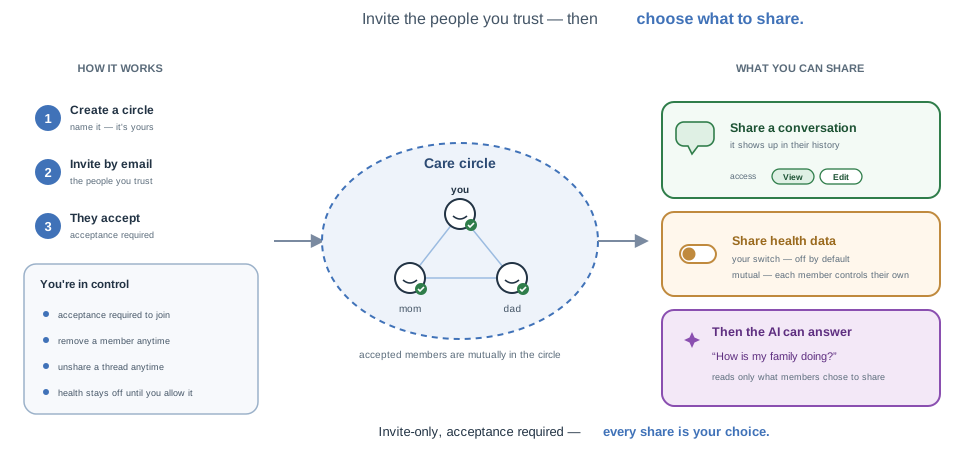
A care circle layers opt-in sharing on top of the otherwise single-user core — it's whoever you trust with your health (family, a partner, a caregiver). Two things can be shared, each checked at the read/write path so no other table is rescoped:- Conversations — grant a fellow member view/edit access to one chat thread; it then appears in their history.
- Health data — a per-member, per-circle switch (off / view / edit) that lets accepted members read — or read+write — your FHIR records, so the AI can answer "how is my family doing?".
Privacy — what the assistant can and can't reach
The view/edit switch governs two separate planes, and they are deliberately asymmetric:- FHIR REST (
?subject=<member>) honors the full switch:viewreads,
edit reads and writes the sharer's records. This is the programmatic
data plane (apps, integrations).
- The AI assistant is read-only, always. When you pick a member in the chat
family_health — reads their data, and only with view-or-higher
access. Even if they granted you edit, the assistant never writes to
their records, memory, files, or chat history. edit matters only on the FHIR
REST plane above.
Every other tool stays scoped to you, the signed-in caller, and never reads
or writes the subject's data:
| Tool | Acts on the "currently for" subject? |
| ---- | ------------------------------------ |
| family_health | Yes — read-only, gated by view+ health access |
| whoami | No — only flags that a subject is in focus (no id/data) |
| listfiles, readfile | No — your uploads only |
| recall_memory, remember | No — your long-term memory only |
| summarize_conversation | No — your own current conversation only |
| render_chart, echo | No — touch no user data |
In other words, asking the assistant about a family member can only ever read
their health observations, and nothing the assistant does on their behalf can
modify their data or expose their files, memories, or conversations to you. See
src/chat/README.md for the threading details
(UserInfo::subjectuserid).
A circle is a group: any two accepted members are mutually in it. Roles are
Member / Maintainer / Owner (maintainers and owners are admins who invite &
remove; owners also rename, delete, and change roles). Invites go out by email
and require acceptance.
| Method | Path | Purpose |
| ------ | ---- | ------- |
| POST | /api/circle/create \| /rename \| /delete | manage circles you own |
| POST | /api/circle/invite \| /accept \| /decline \| /remove | membership (invite by email, acceptance required) |
| GET\|POST | /api/circle/members | every circle you belong to, with your role + health level |
| POST | /api/circle/role \| /nickname \| /health-sharing | per-member role, label, and your own sharing level |
| POST | /api/conversation/share \| /unshare; GET /api/conversation/shares | share a conversation with co-members |
Cross-user references never expose the internal users primary key: members are
addressed by an opaque member handle (a carecirclemembers row id) that the
server resolves back to a user with an access check, and the caller's own id only
ever comes from the JWT. Growth is bounded by configurable caps — the shipped
config.example.yml allows 5 circles per user (CIRCLEMAXPER_USER) and
5 members per circle (CIRCLEMAXMEMBERS), with 0 disabling either.
Modern backends only — the schema lives under res/sql/{pg,mysql,sqlite} and the
legacy backend has no care-circle feature. See
src/circle/README.md for the group model, the
role/permission matrix, the opaque-handle scheme, the limits, the health-access
seam (?subject= cross-user FHIR read/write via circle::resolvehealthsubject),
and the full route list.
Debug tools
The desktop build produces a small family of standalone CLIs undercli/ that
bypass the embedded HTTP/WS server - the LLM debuggers (mirothinker,
openaichat, openairesponses, gemini) each wrap one client in
src/llm/, awss3 / aliyun_oss drive the storage backends, and
image / document exercise the src/transcode/ transcoders
(image-for-vision compliance, and PDF/Excel/CSV → Markdown + image parts), and
fhir runs unit normalization (fhir normalize "<5.6 mg/dL") and mints a
bearer JWT for the FHIR routes (fhir token <user_id> --config <yaml>), and
jwt_keygen generates an RSA keypair for RS256 JWT signing / JWKS publishing
(jwt_keygen >> config.local.yaml). Handy for poking at request parameters,
wire-format quirks, or bucket connectivity without rebuilding the server. Toggle
with -DMIROBODYBUILDTOOLS=OFF.
See cli/README.md for the shared CLI UX, the per-binary
endpoint/credential table, YAML config keys, Gemini-path notes, and the storage
CLI command set.
For the web client (htdoc/), which has no devtools on a phone, open the app
with ?debug (or ?vconsole) to load an on-device console - a floating
log / network / element inspector - and ?debug=0 to turn it off. The choice is
remembered across reloads, and the console is code-split into its own chunk, so it
adds nothing to the normal bundle when off.
Compliance — HIPAA & GDPR
Mirobody is built privacy-first: because the core runs on-device or self-hosted, personal health data never has to leave your device or your infrastructure. That architecture is the foundation for deploying in a HIPAA- or GDPR-compatible way — the software gives you the controls, while the deployer remains the covered entity / data controller responsible for the final compliance posture.- Keep PHI in-house. On the phone (SQLite, offline) or self-hosted
- HIPAA — keep the LLM on-device, or choose a BAA-covered one. The one place
GOOGLEGENAIUSE_VERTEXAI=1 with
GCPPROJECT / VERTEXLOCATION and an OAuth access token; calls go to
Google Cloud (covered by Google's BAA) instead of AI Studio.
- OpenAI GPT via Azure OpenAI — set AZUREOPENAIENDPOINT (the client
auto-flips into Azure mode) with the deployment and key; calls run inside
your own Azure resource (covered by Microsoft's BAA).
See the VERTEX and AZUREOPENAI_ keys in
config.example.yml.
- GDPR — data residency & sovereign clouds. Self-host in your region and pin
VERTEXLOCATION / VERTEXBASE_URL for the
Gemini region, the Azure resource region for GPT, the object-storage region per
backend (see Storage), and AZUREBLOBENDPOINT_SUFFIX for
sovereign clouds. The single-user core keeps records scoped per user, so
subject data stays locatable for access and erasure requests.
Layout
src/                    # C++ core
  mirobody.h            # public C ABI (extern "C") — the embedding surface
  main.cpp              # standalone server entry point
  server/               # HTTP + WebSocket routing on libwebsockets
  chat/                 # agents: provider selection, system prompt, streamed turns
  llm/                  # streaming LLM clients (OpenAI, Gemini, MiroThinker; chat / realtime / embeddings)
  mcp/                  # MCP JSON-RPC endpoint + compile-time tool registry
  memory/               # memory::Memory: long-term facts (local embeddings or Mem0 / Zep / EverOS)
  fhir/                 # RESTful FHIR R4 endpoint + unit normalization + terminology
  indicator/            # lexical terminology resolver: free-text medical terms → LOINC / SNOMED / RxNorm
  health/               # health-data layer: account linking, EHR connect, vendor service
    vendor/             # vendor::Vendor — one client per platform (platform/ phone/ device/ ehr/)
  database/             # database::Database: SQL backends (Postgres / SQLite / DuckDB / MySQL / ClickHouse)
  cache/                # cache::Cache facade (in-process KV or Redis)
  storage/              # storage::Storage: S3 / OSS / Azure Blob / local-filesystem backends
  user/                 # user domain: email + social sign-in (incl. Tanka QR), token issuance
  circle/               # care circles: social graph + conversation / health-data sharing
  jwt/                  # JWT issue/verify (HS256 / RS256) + Google / Apple / Firebase ID-token validators
  oauth/                # OAuth 2.0 authorization server (authorization-code + PKCE)
  config/               # Config schema + loader (YAML + Fernet, env fallback)
  transcode/            # upload transcoders: image (vision compliance) + document (PDF/Excel/CSV)
  client/               # libcurl / libwebsockets client wrappers
  compat/               # post-C++11 polyfills (optional)
  platform/             # logging + JNI / C-ABI / pybind11 entry points
cli/                    # standalone per-subsystem debug binaries
res/                    # bundled resources: agents, MCP tools, SQL migrations
tests/                  # C++ unit tests (build/tests/mirobody_tests)
android/                # Gradle project that builds the Android host app
ios/                    # SwiftUI host app (embeds mirobody.xcframework)
electron/               # Electron desktop app (embeds libmirobody via koffi FFI)
qt/                     # Qt Quick (QML) desktop client (pure HTTP/SSE API client)
miniapp/                # native WeChat Mini Program client
htdoc/                  # web client source (webpack -> res/htdoc)
python/                 # Python package wrapper + wheel README
bindings/               # Java / Go / C# / Node / Rust FFI bindings + examples
docs/                   # diagrams (images/) + the full build guide (BUILDING.md)


