
Android touch and sensors controlled mouse cursor(Accelerometer and light intensity)
Last updated May 9, 2026
76
Stars
24
Forks
1
Issues
0
Stars/day
Attention Score
7
Topics
Language breakdown
Python 100.0%
▸ Files
click to expand
README
Android-Controlled-Cursor
Android sensors controlled mouse cursor(Accelerometer and light intensity).MODE 1: FOR Airmouse_touch.py
Description: swipe on canvas for mouse movement and for clicks, buttons are there.1.Download Apk provided in repository.
2.Change IP in both apk(in settings screen) as well as script.


3.left top of screen = left top of your PC and similarly other coordinates.
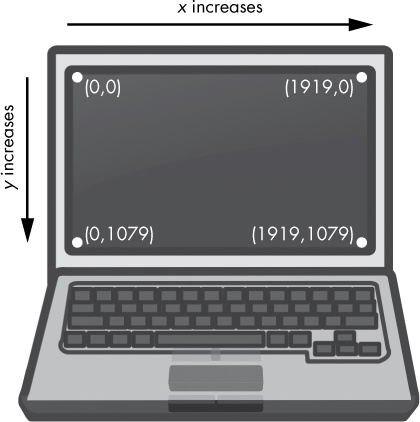 .
.
MODE 2: FOR Air_Mouse.py
Description: Android sensors controlled mouse cursor(Accelerometer and light intensity)FREE Sensor Node Apk:
https://play.google.com/store/apps/details?id=com.mscino.sensornode&hl=en. 
- Select Stream.
- Check Accelerometer and Light Intensity.
- Run the program.
- For moving mouse tilt mobile left,right,up and down.
- For left click cover the light sensor (@top front near speaker/front camera).
- For right click Push you're device downwards(Make sure it's register it's has been down) and then go upwards with you're device.
- In case of not responding or stuck, press ctrl+Alt+Del.
Demonstration : https://youtu.be/DK0oLFoKDV8


