
A Jupyter kernel for nim
 Jupyter Nim ====
This is a beta jupyter kernel for nim written in nim. Works with notebook, lab, nteract, should even work in vscode-python. If you use nteract or vscode-python, there are still some problems, please report them. For jupyter lab, you can also install the companion extension by jupyter labextension install jupyternim-labextension that provides syntax highlighting. Look at example-notebook for some examples, and at example-display for examples of displaying latex, md, etc.
NOTE: running a notebook with this creates a directory ~/.jupyternim in which it stores blocks of code, pngs, compiled outputs, etc. Compilation output should be automatically cleaned up starting from version 0.6.0.
NOTE2: nteract support is very wip, also nteract doesn't add a cellId to notebook cells so changing types is buggy, I'll work on it and maybe also provide a patch for nteract, but it's low priority, help appreciated.
Installation
TL,DR:
nimble install jupyternim -yjupyternim -v has some details about how it was compiled.
Prereqs
- a working
niminstallation ( download ) - a
zeromqinstallation. Currently tested only with ZeroMQ 4.2. It must be in PATH or the kernel won't run.
jupyternim to see if you need to install it yourself
- some kind of jupyter environment, some examples:
jupyter ( I recomend miniconda3 and adding jupyter with conda install jupyter )
- nteract (get it here)
- vscode+vscode-python extension ( poor naming, but vscode-python also provides jupyter support )
Long version:
The kernel should be automatically compiled and registered by doing nimble install jupyternim ( or nimble install https://github.com/stisa/jupyternim if it's not in nimble yet).
Alternatively, try the following:
- clone this repo:
git clone https://github.com/stisa/jupyternim - then go into the cloned dir
cd jupyternim - register to nimble with
nimble install - compile with
nimble dev, this will give you a debug version - run
jupyternimto register the kernel - run
jupyter notebook
HotCodeReloading
To enable the very experimental hotcodereloading support, you'll need to recompilejupyternim with -d:useHcr and then overwrite the one in ~/.nimble/pkgs/jupyternim-<version> with it.
The hotcodereloading mostly works, but there are various bugs that prevent its use. For examples, printing a float crashes it.
Editing
TAB : completion request, for example p<TAB -> a pop up with possible completions 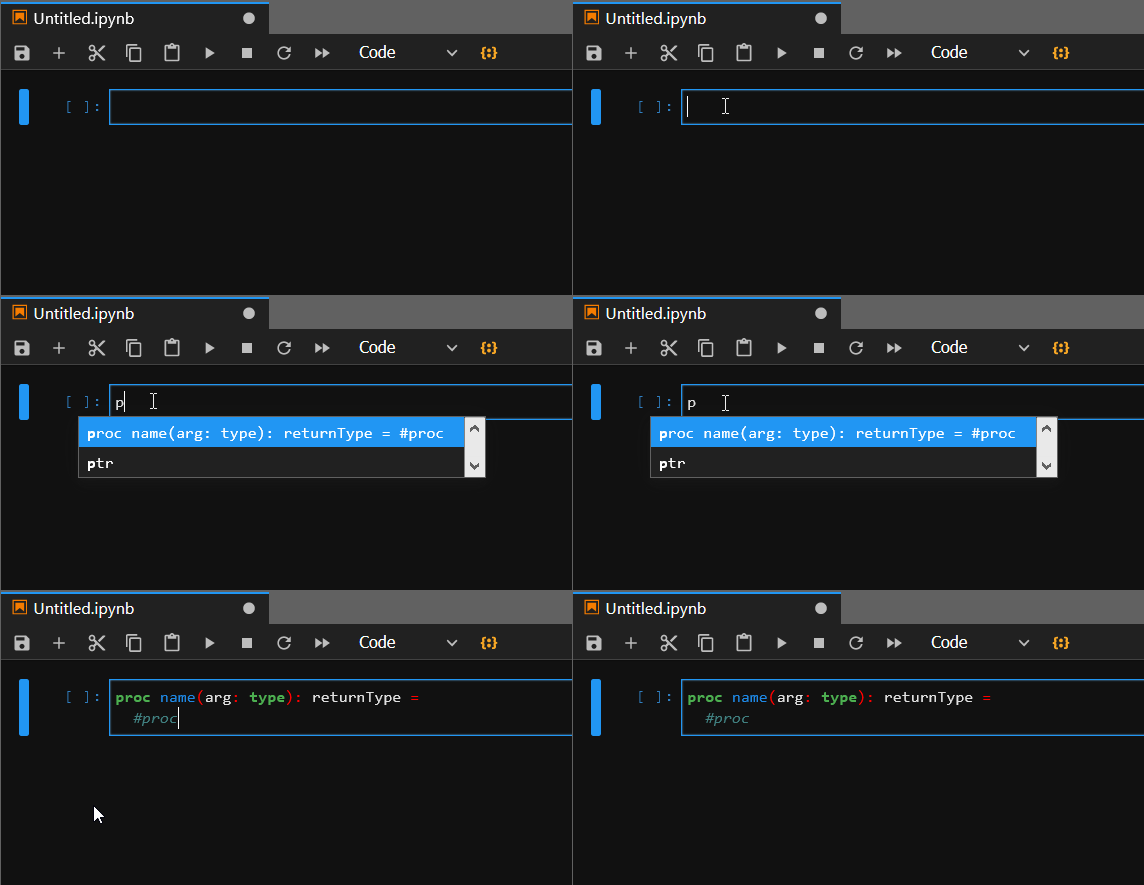
TODO:
- [ ]
shift+TAB: inspection request, for exampleecho<shift+TAB>-> a pop with a description of echo - [ ] support the debugger protocol, support variable value inspection
passing flags
#>flags < --some > < --d:flag > Pass flags to nim compiler, default is --verbosity:0 -d:release. Passing new flags overwrites all other previous flags, even default ones. Example:
#>flags -d:test
echo "hi" when defined test:   echo "test defined" else:   echo "test not defined"
hi test definedDelete old temp files
#>clear all
Displaying data
To send back data to display, you can use the module jupyternimpkg/display, example:import nimPNG, jupyternimpkg/display
let file = r"..\\src\\jupyternimspec\\logo-64x64.png" show dkPngFile, [64, 64]: # [width, height] file
If your file type is not supported by the display module yet, you need to implement the proc yourself. Just write to stdout a string containing a json object defined as
{ //<data> is base64 encoded for binary formats, eg png "data": {"<mimetype>": <data>}, "metadata": {"<mimetype>": {<mimespecific>}}, "transient": {} }#<jndd># and #<outjndd># markers. For example, to display a PNG image, simply: import json, base64 var img = readFile(path).encode # encode the png file with base64 w = 320 # displayed width h = 240 # displayed height var content: JsonNode = %*{ "data": {"image/png": img }, "metadata": %*{"image/png": {"width": w, "height":h}}, "transient": %*{} }
echo "#<jndd>#" & $content $ "#<outjndd>#"
TODO
- [ ] Finish implementing messaging ( completion, introspection, history, updatedisplaydata... )
- [ ] Connect to nimsuggest via socket, parse its output for introspection requests
- [ ] Documentation lookup magic?
#>doc sequtils opens a browser to the correct .html page ( possibly local ) - [ ] improve hotcodereloading (probably needs work on the compiler side)
- [ ] convince jupyter notebook maintainers to provide cellId, so I can stop patching the javascript
- [ ] find a better way to fake a repl than re running prior code and discarding output (we have HCR! Buggy though)
- [ ] use
JNsessionas name for temp files (allows multiple open kernels) - [ ] a better way to handle
display_datathan string delimiters
jupyternim
Handles init, start, stop of the various loops, as well as initial installation of the kernelspec.jupyternimpkg/messages
Handles message specifications exposing low level procs to decode, encode messagesjupyternimpkg/sockets
Defines sockets types, how they are created, how their loops work, how they send and receive messagesjupyternimpkg/display
Handle preparing and sending back data to displayjupyternimspec
Logos for jupyter, akernel.js file to load syntax highlight and patch jupyter notebook to send
a cellId.
Internal Notes
Messages must be multipart signature-must-be-lowercase
http://nim-lang.org/docs/tinyc.html
Jupyter Kernel Docs IHaskell Messaging Docs Async logger in nim


