
SirixDB is an an embeddable, bitemporal, append-only database system and event store, storing immutable lightweight snapshots. It keeps the full history of each resource. Every commit stores a space-efficient snapshot through structural sharing. It is log-structured and never overwrites data. SirixDB uses a novel page-level versioning approach.
SirixDB - The Bitemporal Database System
Query any revision as fast as the latest




🟢 Live Demo · Why SirixDB · Docs · Website · Discord · Forum · Web UI
Status: 1.0.0-beta — usable today and actively developed. The on-disk format and public APIs are stabilizing toward a 1.0 release; feedback from real use is exactly what we're looking for.
The Problem
You update a row in your database. The old value is gone.
To get history, you bolt on audit tables, change-data-capture, or event sourcing. Now you have two systems: one for current state, one for history. Querying the past means replaying events or scanning logs. Your "simple" audit requirement just became an infrastructure project.
Git solves this for files—but you can't query a Git repository. Event sourcing preserves history—but reconstructing past state means replaying from the beginning.
The Solution
SirixDB is a database where every revision is a first-class citizen. Not an afterthought. Not a log you replay.
// Query revision 1 - instant, not reconstructed
session.beginNodeReadOnlyTrx(1)
// Query by timestamp - which revision was current at 3am last Tuesday? session.beginNodeReadOnlyTrx(Instant.parse("2024-01-15T03:00:00Z"))
// Both return the same thing: a readable snapshot, as fast as querying "now"
This works because SirixDB uses structural sharing with sub-page versioning. Unchanged pages are shared between revisions via copy-on-write — and versioning continues below the page: a commit writes page fragments containing only the changed records, and the sliding-snapshot algorithm guarantees any page is reconstructible from at most N fragments. Block-level COW (ZFS-style) copies a whole page when one byte in it changes; delta-based systems make reads replay ever-growing diff chains. SirixDB pays neither cost. Revision 1000 doesn't store 1000 copies—it stores the current state plus pointers to shared history.
The result:
- Storage: O(changed records per revision), not O(total size × revisions) — and not O(changed pages) either
- Read any page from any revision: O(N) page fragment reads, where N is the configurable snapshot window (default 3)
- No event replay, no log scanning—direct page access
Bitemporal: Two Kinds of Time
Most databases (if they version at all) track one timeline: when data was written. SirixDB tracks two:
- Transaction time: When was this committed? (system-managed)
- Valid time: When was this true in the real world? (user-managed)
January 15: You record "Price = $100, valid from January 1"
January 20: You discover the price was actually $95 on January 1
After correction, you can ask:   "What did we THINK the price was on Jan 16?"  →  $100 (transaction time)   "What WAS the price on Jan 1?"                →  $95  (valid time)
Both questions have correct, different answers. Without bitemporal support, the correction destroys the audit trail.
Core Properties
- Append-only storage: Data is never overwritten. New revisions write to new locations.
- Structural sharing: Unchanged pages and nodes are referenced between revisions via copy-on-write.
- Snapshot isolation: Readers see a consistent view; one writer per resource.
- Embeddable: a single self-contained JAR (third-party dependencies shaded in) — embed it in-process, or run it as a REST server.
Performance
History is not a tax. Reading an old revision is a direct page lookup, not a replay — any revision reads as fast as the latest, and session-open cost is flat regardless of how much history exists (0.18 ms at 10,000 revisions).
A few measured receipts (we benchmark against ourselves and publish the losses, methodology in WHY-SIRIX.md and the linked comparison docs):
- Concurrent reads under a committing writer — on a 12,800-revision database, 16 reader threads + 1 writer over REST went from 361 to 11,198 reads/s with reader p99 334 ms → 4.8 ms and zero errors, after fixing a page-lifecycle bug and an O(history) open cost (
BENCHMARKS.md). The aged database now outruns the pre-fix fresh one. - Semantic diffs — node-level insert/update/delete between two revisions (with stable keys) in ~0.3 ms, not a text diff.
- Analytics — a vectorized, fail-closed execution path runs the group-by/aggregate suite head-to-head with DuckDB 1.5.2 at 100M records: ahead on three of nine query shapes, within 1.1–2.5× on all others except count-distinct (~4.2×) (sum 16 ms, two-key group-by 240 ms), and the GraalVM native binary runs 7–17× faster than the JVM on warm analytical queries (
COMPARISONDUCKDB.md,NATIVEIMAGE.md). The standalone query engine, brackit, runs analytical JSON queries several times faster thanjqin its own benchmark suite — see the per-query benchmark results andjq-equivalent workloads, reproducible viaexamples/benchmark.sh. - Honest loss vs PostgreSQL (
COMPARISON_POSTGRES.md) — PG 17 with a history table wins raw small-document ingest (4,015 vs ~430 commits/s) and total storage. SirixDB wins per-statement embedded reads, 0.3 ms semantic diffs, and sub-document time travel — things PG doesn't have. Durability settings were verified equivalent before measuring.
How Versioning Works
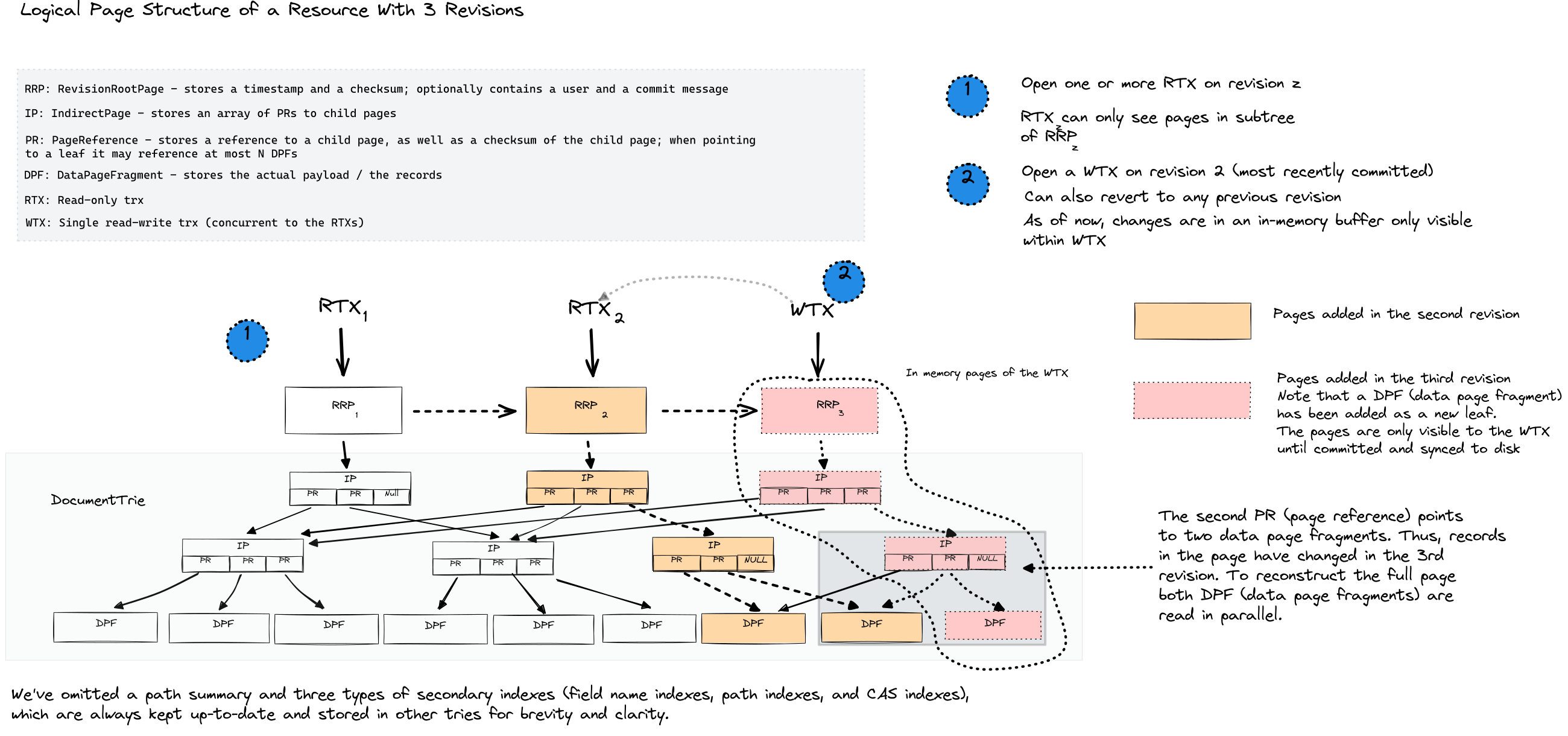
Logical page structure of a resource with 3 revisions — read-only transactions (RTX) can open any revision, while a single write transaction (WTX) appends to the latest.
SirixDB stores data in a persistent tree structure where revisions share unchanged pages and nodes. Traditional databases overwrite data in place and use write-ahead logs for recovery. SirixDB takes a different approach:
Physical Storage: Append-Only Log
All data is written sequentially to an append-only log. Nothing is ever overwritten.
Physical Log (append-only, sequential writes)
┌────────────────────────────────────────────────────────────────────────┐
│ [R1:Root] [R1:P1] [R1:P2] [R2:Root] [R2:P1'] [R3:Root] [R3:P2'] ...    │
└────────────────────────────────────────────────────────────────────────┘
     t=0      t=1     t=2      t=3      t=4       t=5       t=6    → time
Logical Structure: Persistent Trie
Each revision has a root node in a trie. Unchanged pages are shared via references.
Revision Roots                    Page Trie (persistent, copy-on-write)
      │
      ▼
   [Rev 3] ─────────────────┬─────────────────┐
      │                     │                 │
   [Rev 2] ────────┬────────┤                 │
      │            │        │                 │
   [Rev 1] ───┐    │        │                 │
              │    │        │                 │
              ▼    ▼        ▼                 ▼
           [Root₁][Root₂][Root₃]          [Pages...]
              │      │      │
              ▼      ▼      ▼
            ┌───────────────────────────────────────┐
            │           Shared Page Pool            │
            │  ┌─────┐ ┌─────┐ ┌─────┐ ┌─────┐      │
            │  │ P1  │ │ P1' │ │ P2  │ │ P2' │ ...  │
            │  └──▲──┘ └──▲──┘ └──▲──┘ └──▲──┘      │
            │     │      │       │       │          │
            │   R1,R2    R3    R1,R3    R2          │
            │  (shared)       (shared)              │
            └───────────────────────────────────────┘
Page Versioning Strategies
SirixDB supports multiple strategies for storing page versions, configurable per resource:
┌──────────────────────────────────────────────────────────────────────────────┐
│ FULL: Each page stores complete data                                         │
│                                                                              │
│   Rev1: [████████]  Rev2: [████████]  Rev3: [████████]                       │
│         (full)            (full)            (full)                           │
│                                                                              │
│   + Fast reads (no reconstruction)                                           │
│   - High storage cost                                                        │
├──────────────────────────────────────────────────────────────────────────────┤
│ INCREMENTAL: Diffs from previous revision + periodic full snapshots          │
│                                                                              │
│   Rev1: [████████]  Rev2: [Δ←1]  Rev3: [Δ←2]  Rev4: [████████]               │
│         (full)       (diff)       (diff)       (full snapshot)               │
│                                                                              │
│   Rev5: [Δ←4]  Rev6: [Δ←5]  Rev7: [████████]  ...                            │
│         (diff)       (diff)       (full snapshot)                            │
│                                                                              │
│   Full snapshot written every N revisions (N = configurable window)          │
│   + Bounded read cost (max N-1 diffs between full snapshots)                 │
│   + Compact diffs (each diff is against previous revision only)              │
│   - Read cost grows linearly within each window                              │
├──────────────────────────────────────────────────────────────────────────────┤
│ DIFFERENTIAL: Diffs from reference snapshot + periodic full snapshots        │
│                                                                              │
│   Rev1: [████████]  Rev2: [Δ←1]  Rev3: [████████]  Rev4: [Δ←3]               │
│         (full)       (diff)       (full snapshot)    (diff)                  │
│                                                                              │
│   Rev5: [Δ←3]  Rev6: [████████]  Rev7: [Δ←6]  ...                            │
│         (diff)       (full snapshot)    (diff)                               │
│                                                                              │
│   Full snapshot every N revisions; diffs reference the last snapshot         │
│   + Bounded read cost (max 1 diff to apply)                                  │
│   - Diffs grow larger as they diverge from last snapshot                     │
├──────────────────────────────────────────────────────────────────────────────┤
│ SLIDING SNAPSHOT: Incremental diffs within a sliding window of size N        │
│                                                                              │
│   Rev1: [████████]  Rev2: [Δ←1]  Rev3: [Δ←2]  Rev4: [Δ←3 + R1 copy]          │
│         (full)       (diff)       (diff)       (diff + out-of-window         │
│                                                 records from Rev1)           │
│         ◄──────── window N=3 ──────────►                                     │
│                      ◄──────── window N=3 ──────────►                        │
│                                                                              │
│   As the window slides forward, records from pages that fall out of          │
│   the window are copied into the newest diff page, ensuring any              │
│   revision can be reconstructed from at most N page fragments.               │
│                                                                              │
│   + Bounded read cost (max N page fragments to combine)                      │
│   + No unbounded diff growth (out-of-window data is always rescued)          │
│   = Best balance of storage vs read performance                              │
└──────────────────────────────────────────────────────────────────────────────┘
When you modify data:
- Only the affected pages are copied and modified (copy-on-write)
- Unchanged pages are referenced from the new revision
- The old revision remains intact and queryable
Read performance: Opening a revision is O(1) by revision number or O(log R) by timestamp (binary search over R revisions). Each page read requires combining at most N page fragments, where N is the snapshot window size (configurable, default 3). Tree traversal to locate a node is O(log nodes), same as querying the latest revision.
Quick Start
Platform support: Linux is the fully supported, CI-tested platform (native JVM,
native binaries, Docker). On macOS and Windows the supported path is Docker
(via Docker Desktop) — the REST server, CLI images, and the demo stack all work there.
Running the JVM natively on macOS or Windows is experimental: the off-heap
allocator carries per-OS mmap flags (macOS) and a dedicated Windows implementation,
and advisory CI lanes now run the core, query, and Kotlin test suites on
macos-latestandwindows-latest. The experimental label drops once those lanes
are consistently green — reports from real hardware welcome.
Using the CLI (Native Binaries)
SirixDB provides two CLI tools, both available as instant-startup native binaries:
| Binary | Module | Description | |--------|--------|-------------| | sirix-cli | sirix-kotlin-cli | Full-featured CLI for database operations | | sirix-shell | sirix-query | Interactive JSONiq/XQuery shell |
Build native binaries with GraalVM:
# Build both CLIs as native binaries (requires GraalVM with native-image)
./gradlew :sirix-kotlin-cli:nativeCompile  # produces: sirix-cli
./gradlew :sirix-query:nativeCompile       # produces: sirix-shell
Or run via JAR
./gradlew :sirix-kotlin-cli:run --args="-l /tmp/mydb create"
sirix-cli: Database Operations
The -l option specifies the database path. Each database can contain multiple resources.
Create a database and store JSON:
sirix-cli -l /tmp/mydb create json -r myresource -d '{"name": "Alice", "role": "admin"}'Query your data:
sirix-cli -l /tmp/mydb query -r myresourceRun a JSONiq query:
# $$ is bound to the document root, so access fields directly sirix-cli -l /tmp/mydb query -r myresource '$$.name'Update and create a new revision:
sirix-cli -l /tmp/mydb update -r myresource '{"team": "engineering"}' -im as-first-childQuery a previous revision:
sirix-cli -l /tmp/mydb query -r myresource -rev 1View revision history:
sirix-cli -l /tmp/mydb resource-history myresourcesirix-shell: Interactive Query Shell
The interactive shell provides a REPL for JSONiq/XQuery queries. A query can span multiple lines — an empty line executes it; exit with Control-D:
$ sirix-shell
Enter query string (terminate with Control-D):
sirix > 1 + 1
Query result 2 Enter query string (terminate with Control-D): sirix > jn:store('mydb','resource','{"key": "value"}')
Query result
Enter query string (terminate with Control-D): sirix > jn:doc('mydb','resource').key
Query result "value"
Using the REST API
Start SirixDB and its bundled OAuth2 provider (Keycloak) with Docker:
git clone https://github.com/sirixdb/sirix.git
cd sirix
docker compose up
This starts two services: the SirixDB REST server on http://localhost:9443 (plain HTTP in the default local configuration — terminate TLS in a proxy for anything public) and a Keycloak instance that is auto-seeded with two demo users — admin/admin (full access) and viewer/viewer (read-only).
Check the server is up (this endpoint needs no auth):
curl http://localhost:9443/health # -> {"status":"UP"}All endpoints are OAuth2-protected. Obtain a bearer token from the server's /token endpoint, then use it on subsequent requests:
# 1. Get an access token (the server proxies to Keycloak)
TOKEN=$(curl -s -X POST http://localhost:9443/token \
  -H "Content-Type: application/json" \
  -d '{"username":"admin","password":"admin","granttype":"password"}' | jq -r .accesstoken)
2. Store a JSON resource
curl -X PUT http://localhost:9443/mydb/myresource \
  -H "Authorization: Bearer $TOKEN" \
  -H "Content-Type: application/json" \
  -d '{"name":"Alice","role":"admin"}'
3. Read it back
curl http://localhost:9443/mydb/myresource \
  -H "Authorization: Bearer $TOKEN" \
  -H "Accept: application/json"
For local development you can skip Keycloak entirely: start the server with auth.mode=none (or docker run -e SIRIXAUTHMODE=none ...) and every request runs as an all-permissions admin user — the server logs a loud warning. Container memory is tunable via SIRIXXMS/SIRIXXMX/SIRIXMAXDIRECT/SIRIXJAVAOPTS env vars (defaults fit a laptop).
→ docs/QUICKSTART.md walks through the whole loop — create, query, commit, time-travel read, diff — with verified, copy-pasteable commands. See the REST API documentation for the full endpoint reference.
Security note: The bundled Keycloak realm, demo users, client secret, and the self-signed
TLS certificate under bundles/sirix-rest-api/src/main/resources/ are for **local development
only**. Before any public deployment, generate your own certificate, rotate the client secret,
and create real users with strong passwords. See docs/operations.md.
Using the MCP Server (for AI Agents)
SirixDB ships a native Model Context Protocol server, so AI agents (Claude, Cursor, Windsurf, or any MCP client) can talk to it directly. Because every revision is copy-on-write, agents get O(1) disposable snapshots, time-travel reads, and structural diffs for free — branch, experiment, then discard or promote, with a human-reviewable diff. It is read-only by default and includes access control, output sanitization, and an audit log.
# Build a self-contained launcher (creates build/install/sirix-mcp/bin/sirix-mcp)
./gradlew :sirix-mcp:installDist
Register it with your MCP client (e.g. Claude Desktop / Cursor mcp_servers.json):
{
  "mcpServers": {
    "sirixdb": {
      "command": "/path/to/sirix/bundles/sirix-mcp/build/install/sirix-mcp/bin/sirix-mcp",
      "args": ["--database-path", "/path/to/data"]
    }
  }
}
Add --read-write to the args to allow mutations (read-only is the default). See docs/MCPSERVER_DESIGN.md for the full tool reference.
As an Embedded Library
<dependency>
  <groupId>io.sirix</groupId>
  <artifactId>sirix-core</artifactId>
  <version>1.0.0-beta4</version>
</dependency>
// Gradle (Kotlin DSL)
implementation("io.sirix:sirix-core:1.0.0-beta4")var dbPath = Path.of("/tmp/mydb");
// Create database and resource Databases.createJsonDatabase(new DatabaseConfiguration(dbPath)); try (var database = Databases.openJsonDatabase(dbPath)) { database.createResource(ResourceConfiguration.newBuilder("myresource").build());
// Insert JSON data (creates revision 1) try (var session = database.beginResourceSession("myresource"); var wtx = session.beginNodeTrx()) { wtx.insertSubtreeAsFirstChild(JsonShredder.createStringReader("{\"key\": \"value\"}")); wtx.commit(); }
// Update creates revision 2 (revision 1 remains unchanged) try (var session = database.beginResourceSession("myresource"); var wtx = session.beginNodeTrx()) { wtx.moveTo(2); // Move to the "key" node wtx.setStringValue("updated value"); wtx.commit(); }
// Read from revision 1 - still accessible try (var session = database.beginResourceSession("myresource"); var rtx = session.beginNodeReadOnlyTrx(1)) { rtx.moveTo(2); System.out.println(rtx.getValue()); // Prints: value } }
Time-Travel Queries
SirixDB extends JSONiq/XQuery (via Brackit) with temporal axis and functions.
Access by Revision Number or Timestamp
(: Open specific revision :)
jn:doc('mydb','myresource', 5)
(: Open by timestamp - returns revision valid at that instant :) jn:open('mydb','myresource', xs:dateTime('2024-01-15T10:30:00Z'))
Temporal Axis Functions
Navigate a node's history across revisions:
(: Single-step navigation :)
jn:previous($node)       (: same node in the previous revision :)
jn:next($node)           (: same node in the next revision :)
(: Boundary access :) jn:first($node)          (: node in the first revision :) jn:last($node)           (: node in the most recent revision :) jn:first-existing($node) (: revision where this node first appeared :) jn:last-existing($node)  (: revision where this node last existed :)
(: Range navigation - returns sequences :) jn:past($node)           (: node in all past revisions :) jn:future($node)         (: node in all future revisions :) jn:all-times($node)      (: node across all revisions :)
(: With includeSelf parameter :) jn:past($node, true())   (: include current revision :) jn:future($node, true()) (: include current revision :)
Example: iterate through all versions of a node:
for $version in jn:all-times(jn:doc('mydb','myresource').users[0]) return {"rev": sdb:revision($version), "data": $version}Diff Between Revisions
(: Structured diff between any two revisions :)
jn:diff('mydb','myresource', 1, 5)
(: Diff with optional parameters: startNodeKey, maxLevel :) jn:diff('mydb','myresource', 1, 5, $nodeKey, 3)
For adjacent revisions, jn:diff reads directly from stored change tracking files. For non-adjacent revisions it computes the diff.
If hashes are enabled, you can also detect changes via hash comparison:
(: Find which revisions changed a specific node - requires hashes enabled :) let $node := jn:doc('mydb','myresource').config for $v in jn:all-times($node) let $prev := jn:previous($v) where empty($prev) or sdb:hash($v) ne sdb:hash($prev) return sdb:revision($v)Bitemporal Queries
Query both time dimensions (see Bitemporal: Two Kinds of Time above for why this matters).
Configuring Valid Time Support
Configure a resource with valid time paths to enable automatic indexing and dedicated query functions:
// Configure resource with valid time paths
var resourceConfig = ResourceConfiguration.newBuilder("employees")
    .validTimePaths("validFrom", "validTo")  // specify your JSON field names
    .buildPathSummary(true)
    .build();
database.createResource(resourceConfig);
// Or use conventional field names (validFrom, validTo) var resourceConfig = ResourceConfiguration.newBuilder("employees")     .useConventionalValidTimePaths()     .build();
Via REST API, use query parameters when creating a resource:
# Custom valid time field names
curl -X PUT "http://localhost:9443/database/resource?validFromPath=validFrom&validToPath=validTo" \
  -H "Authorization: Bearer $TOKEN" \
  -H "Content-Type: application/json" \
  -d '[{"name": "Alice", "validFrom": "2024-01-01T00:00:00Z", "validTo": "2024-12-31T23:59:59Z"}]'
Use conventional validFrom/validTo fields
curl -X PUT "http://localhost:9443/database/resource?useConventionalValidTime=true" \
  -H "Authorization: Bearer $TOKEN" \
  -H "Content-Type: application/json" \
  -d '[{"name": "Bob", "validFrom": "2024-01-01T00:00:00Z", "validTo": "2024-12-31T23:59:59Z"}]'
When valid time paths are configured, SirixDB automatically creates CAS indexes on the valid time fields for optimal query performance.
Valid Time Query Functions
(: Get records valid at a specific point in time :)
jn:valid-at('mydb','myresource', xs:dateTime('2024-07-15T12:00:00Z'))
(: True bitemporal query: combine transaction time and valid time :) (: "What records were known on Jan 20 and valid on July 15?" :) jn:open-bitemporal('mydb','myresource',     xs:dateTime('2024-01-20T10:00:00Z'),   (: transaction time - opens revision :)     xs:dateTime('2024-07-15T12:00:00Z'))   (: valid time - filters via index :)
(: Extract valid time bounds from a node :) let $record := jn:doc('mydb','myresource')[0] return {   "validFrom": sdb:valid-from($record),   "validTo": sdb:valid-to($record) }
Transaction Time Functions
(: Transaction time: what did the database look like at a point in time? :)
jn:open('mydb','myresource', xs:dateTime('2024-01-15T10:30:00Z'))
(: Get the commit timestamp of current revision :) sdb:timestamp(jn:doc('mydb','myresource'))
(: Open all revisions within a transaction time range :) jn:open-revisions('mydb','myresource',         xs:dateTime('2024-01-01T00:00:00Z'),         xs:dateTime('2024-06-01T00:00:00Z'))
Revision Metadata Functions
(: Get revision number and timestamp :)
sdb:revision($node)              (: revision number of this node :)
sdb:timestamp($node)             (: commit timestamp as xs:dateTime :)
sdb:most-recent-revision($node)  (: latest revision number in resource :)
(: Get history of changes to a specific node :) sdb:item-history($node)          (: all revisions where this node changed :) sdb:is-deleted($node)            (: true if node was deleted in a later revision :)
(: Author tracking (if set during commit) :) sdb:author-name($node) sdb:author-id($node)
(: Commit with metadata :) sdb:commit($doc) sdb:commit($doc, "commit message") sdb:commit($doc, "commit message", xs:dateTime('2024-01-15T10:30:00Z'))
Merkle Hash Verification (Optional)
When enabled in resource configuration, SirixDB stores a hash for each node computed from its content and descendants. Use this for:
- Tamper detection
- Efficient change detection (compare subtree hashes instead of traversing)
- Data integrity verification
sdb:hash(jn:doc('mydb','myresource')) (: root hash :) sdb:hash(jn:doc('mydb','myresource').users[0]) (: subtree hash :)See Query documentation for the full API.
Web Interface
The SirixDB Web GUI provides visualization of revision history and diffs:
git clone https://github.com/sirixdb/sirixdb-web-gui.git
cd sirixdb-web-gui
docker compose -f docker-compose.demo.yml up
Open http://localhost:3000 (login: admin/admin)
Architecture
JSON Tree Encoding
SirixDB shreds JSON into a typed node tree where each node has a stable key across revisions:
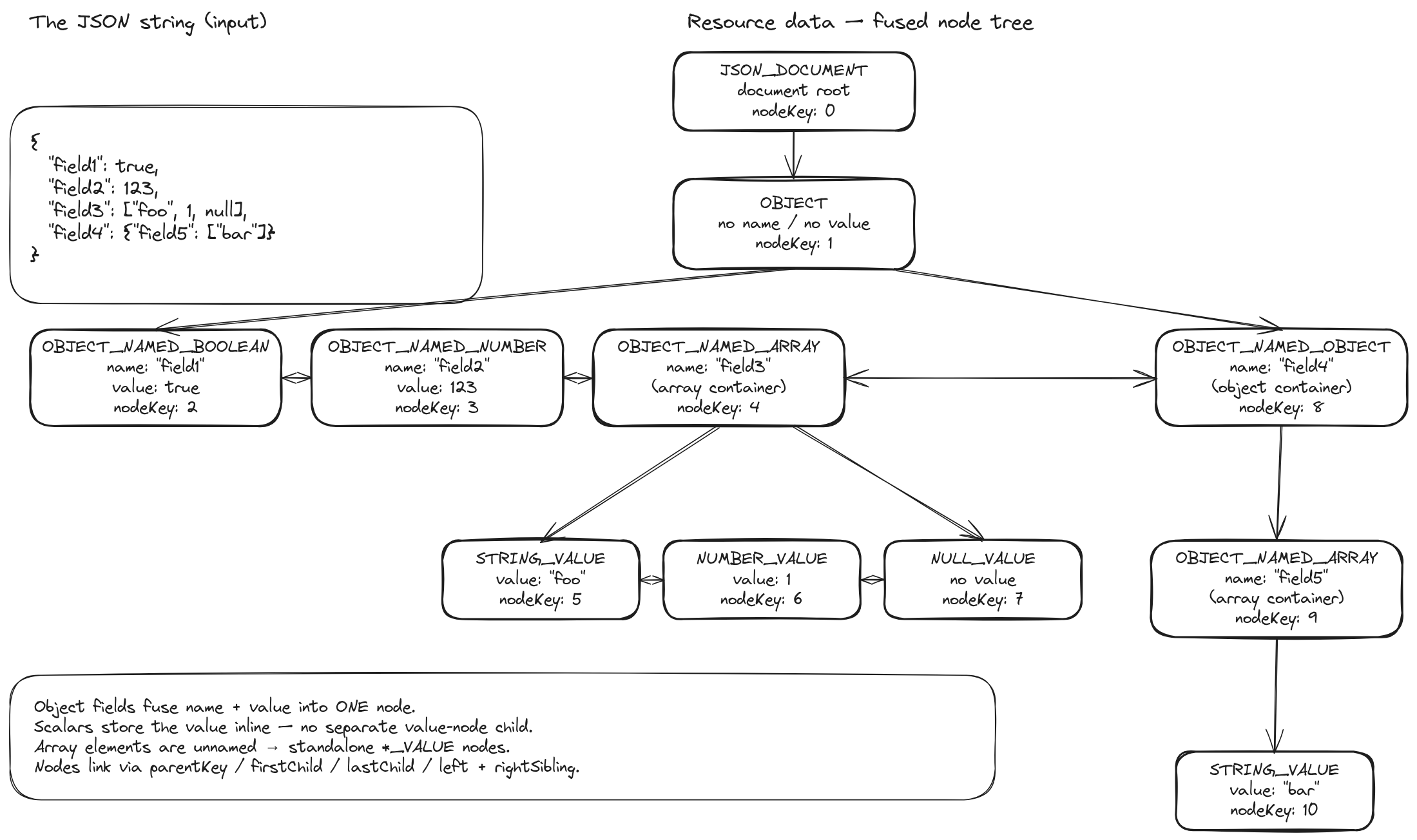
A JSON document and its internal tree representation — each node carries a stable key (nodeKey) for identity tracking across revisions.
Document Storage and Path Summary
When JSON is stored, SirixDB also builds a path summary — a compact trie capturing all unique paths in the document. This powers the path and CAS indexes:
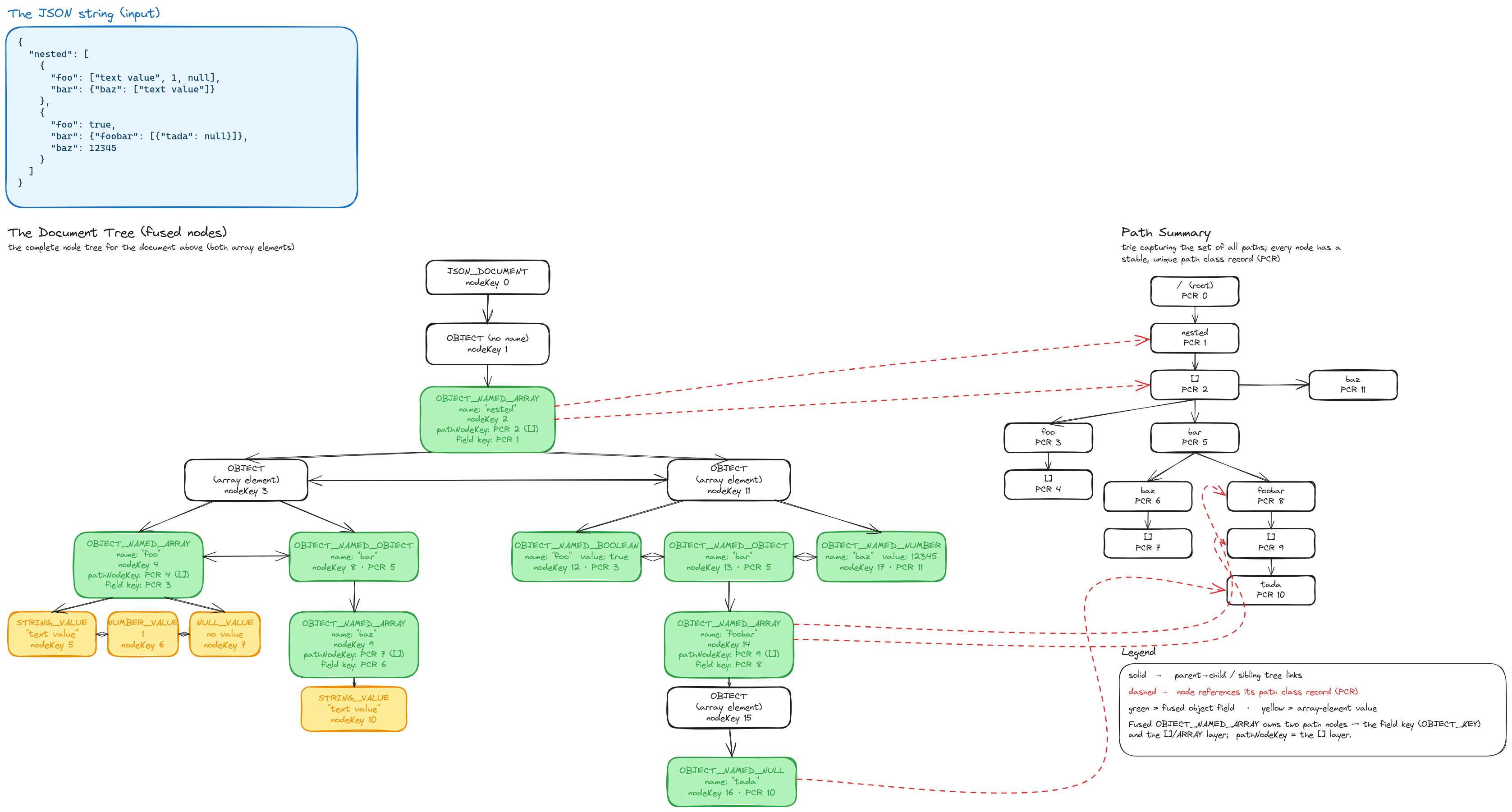
Left: the document tree. Right: the path summary trie with stable path class records (PCR) used for indexing.
On-Device Layout
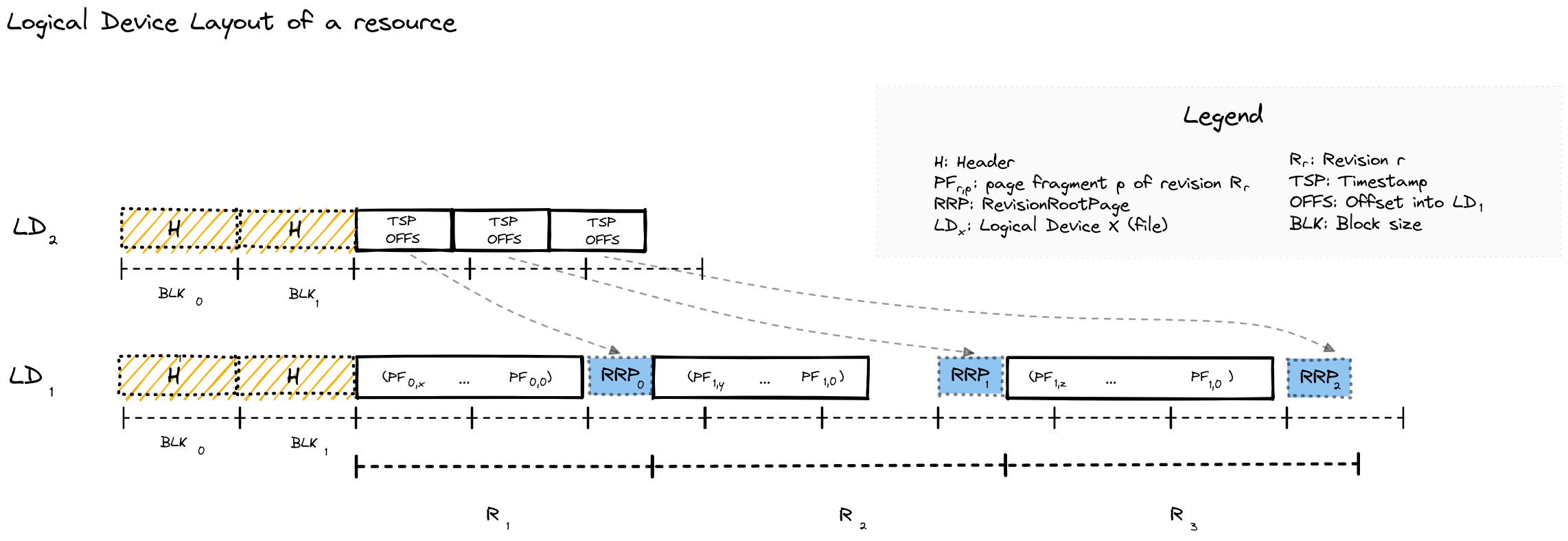
Physical layout on disk — data is split across two logical devices (LD₀ for metadata offsets, LD₁ for page data), written sequentially per revision.
Storage Model
Database (directory)
└── Resource (single JSON or XML document with revision history)
    └── Revisions (numbered 1, 2, 3, ...)
└── Pages (variable-size blocks containing node data)- Database: Directory containing multiple resources
- Resource: One logical document with its complete revision history
- Page: Unit of I/O and versioning. Variable-size, immutable once written.
Key Design Decisions
| Aspect | Design | Trade-off | |--------|--------|-----------| | Write pattern | Append-only | No in-place updates; simpler recovery; larger storage footprint | | Consistency | Single writer per resource | No write conflicts; readers never blocked | | Index updates | Synchronous | Queries always see current indexes | | Node IDs | Stable across revisions | Enables tracking node identity through time |
Indexes
Three secondary index types, all updated synchronously inside the writing transaction — queries never see a stale index:
- Path index — index specific JSON paths for faster navigation.
- CAS index (Content-And-Structure) — index values with type awareness; supports equality and range predicates, optionally
uniquefor constraint enforcement. - Name index — index object-key / element names.
ResourceConfiguration (useHOTIndexes() / useRBTreeIndexes()):
| Backend | Structure | Notes | |---------|-----------|-------| | HOT (default) | Height-Optimized Trie over off-heap leaf pages | cache-friendly, SIMD partial-key search, fewer levels | | RBTree | red-black-tree records in the standard page trie | traditional, stable |
Like the rest of the engine, indexes are fully versioned: opening an index at revision N returns the index state as of N — never a later commit's. RBTree indexes inherit this from the standard page-versioning trie (the same copy-on-write pages as the document tree); for the HOT backend it is verified directly across point and range reads, session close/reopen, and a concurrent pinned-reader-vs-writer (see HOTMultiVersionInvariantsTest).
Correctness & Formal Verification
A versioned storage engine is only useful if old revisions are exactly what was written. We take correctness seriously and treat it as a first-class, reviewable artifact:
- An invariant catalog —
docs/formal-verification.mdstates the
- Executable verification tests that fail CI if an invariant breaks — e.g.
DeweyIDEncodingVerificationTest,
ChecksumVerificationTest, FragmentCacheVerificationTest, and the HOTFormalModelTest /
HOTFormalVerificationTest model-based suite (a formal model checked against the implementation).
- Property-based & fuzz testing — a SQLite-
fuzzcheck-style random JSON round-trip property test,
The aim isn't Coq-grade proof; it's that every behavioral claim about the storage engine is stated precisely and guarded by a test.
Comparison with Alternatives
| Feature | SirixDB | Postgres + Audit | Git + JSON | Event Sourcing | Datomic | |---------|---------|------------------|------------|----------------|---------| | Query past state | Direct page access | Scan audit log | Checkout + parse | Replay events | Direct segment access | | Storage overhead | O(changes) | O(all writes) | O(file × revs) | O(all events) | O(changes) | | Granularity | Node-level | Row-level | File-level | Event-level | Fact-level | | Bitemporal | Built-in | Manual | No | Manual | Built-in | | Embeddable | Yes | No | Yes | Varies | No | | Query language | JSONiq/XQuery | SQL | None | Varies | Datalog |
Building from Source
git clone https://github.com/sirixdb/sirix.git
cd sirix
./gradlew build -x test
Requirements:
- Java 25+
- Gradle 9.1+ (or use included wrapper)
--enable-preview --add-exports=java.base/jdk.internal.ref=ALL-UNNAMED --add-exports=java.base/sun.nio.ch=ALL-UNNAMED --add-exports=jdk.unsupported/sun.misc=ALL-UNNAMED --add-opens=java.base/java.lang=ALL-UNNAMED --add-opens=java.base/java.lang.reflect=ALL-UNNAMED --add-opens=java.base/java.io=ALL-UNNAMED --add-opens=java.base/java.util=ALL-UNNAMEDBuild native binaries (requires GraalVM):
./gradlew :sirix-kotlin-cli:nativeCompile # sirix-cli ./gradlew :sirix-query:nativeCompile # sirix-shell ./gradlew :sirix-rest-api:nativeCompile # REST API serverProject Structure
bundles/
├── sirix-core/          # Core storage engine and versioning
├── sirix-query/         # Brackit JSONiq/XQuery integration + sirix-shell
├── sirix-rest-api/      # Vert.x REST server
├── sirix-kotlin-cli/    # Command-line interface (sirix-cli)
├── sirix-kotlin-api/    # Kotlin coroutine-based API
├── sirix-mcp/           # Model Context Protocol server for AI agents
├── sirix-examples/      # Runnable usage examples
└── sirix-benchmarks/    # JMH and scale benchmarks
Use Cases
- Audit trails: Regulatory requirements for complete data history (finance, healthcare)
- Document versioning: Track changes to configuration, contracts, or content
- Debugging: Query production state at the time a bug occurred
- Temporal analytics: Analyze how data evolved over time windows
- Undo/restore: Revert to or query any historical state
Community
- Discord — Quick questions and chat
- Forum — Discussions and support
- GitHub Issues — Bug reports and feature requests
Contributing
Contributions welcome! See CONTRIBUTING.md for guidelines, and please review our Code of Conduct.
For security vulnerabilities, see SECURITY.md.
Contributors
SirixDB is maintained by Johannes Lichtenberger and the open source community.
The project originated from Treetank, a university research project by Dr. Marc Kramis, Dr. Sebastian Graf and many students.


Sponsors
Support SirixDB development on Open Collective.


