
Natural color mixing for Kotlin and Compose Multiplatform.
Vibrance
Natural color mixing for Kotlin and Compose Multiplatform.
Using this library you can mix (or interpolate) sRGB colors as real-world paints. This process creates a different path between the source and destination colors, replicating subtractive color mixing.
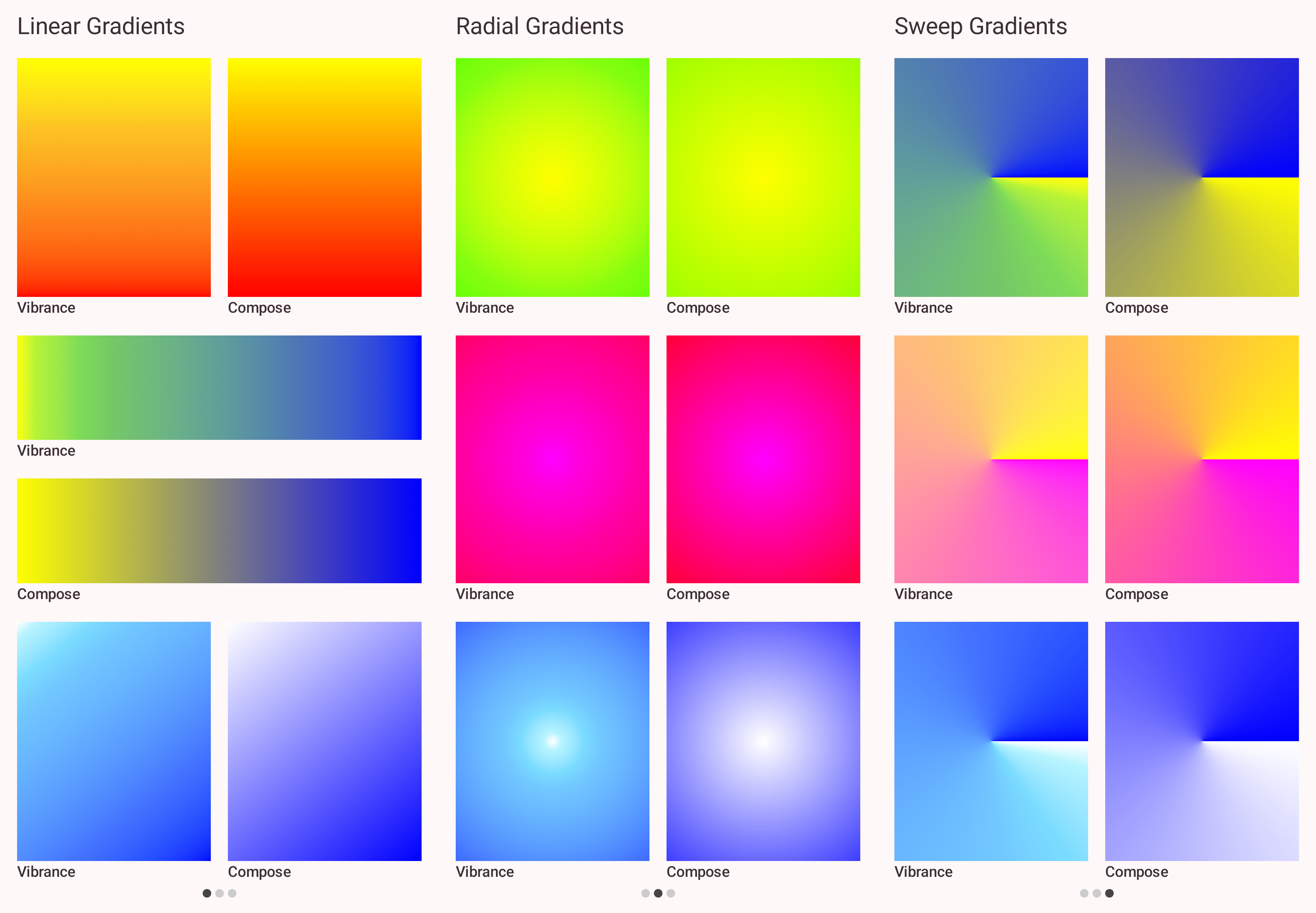
The screenshot below compares gradients generated by this library to gradients produced by Compose out of the box. In each pair, the left or top gradient was generated by Vibrance, and the right or bottom gradient was generated by Compose:
Features
- Subtractive color mixing: Interpolates sRGB colors by converting them to a latent color space
- Kotlin Multiplatform: Supports Android, JVM, iOS, macOS, JS, and Wasm.
- Jetpack Compose / Compose Multiplatform Support: Provides easy-to-use Compose APIs, including
Dependencies
[!WARNING]
Vibrance is not published yet. Stay tuned!
Add the following to your build.gradle.kts:
dependencies {
    // For core color mixing logic
    implementation("dev.romainguy:vibrance:0.x.0")
// For Compose APIs     implementation("dev.romainguy:vibrance-compose:0.x.0") }
Usage
Core library (vibrance)
The Vibrance class is the main entry point to mix colors. You can mix sRGB colors directly, or for performance-critical scenarios like animations, you can mix colors in the latent space.
import dev.romainguy.vibrance.Vibrance
val vibrance = Vibrance()
// 1. Direct color mixing // Mix blue and yellow by 25% (amount is between 0.0f and 1.0f) val color = vibrance.colorsMix(     srcR = 0.0f, srcG = 0.0f, srcB = 1.0f, // Blue     dstR = 0.0f, dstG = 1.0f, dstB = 1.0f, // Yellow     amount = 0.25f )
// 2. Optimized mixing via latent colors // Upscaling to latent color space is the most expensive operation. // If you are interpolating frequently, pre-compute the latent colors. val latentBlue = vibrance.colorToLatentColor(0.0f, 0.0f, 1.0f) val latentYellow = vibrance.colorToLatentColor(0.0f, 1.0f, 1.0f)
// Interpolate the latent colors, which is much faster val color = vibrance.latentColorsMix(latentBlue, latentYellow, 0.25f)
You can also explicitly supply an array of floats to prevent allocations:
val latentBlue = FloatArray(6)
vibrance.colorToLatentColor(0.0f, 0.0f, 1.0f, latentBlue)
Jetpack Compose (vibrance-compose)
Modifiers
If you are using Jetpack Compose or Compose Multiplatform, you can easily create natural gradients using the provided modifiers:
import androidx.compose.ui.Modifier
import androidx.compose.ui.graphics.Color
import dev.romainguy.vibrance.compose.horizontalPaintGradient
import dev.romainguy.vibrance.compose.verticalPaintGradient
// Vertical paint gradient from Blue to Yellow Column(Modifier     .fillMaxSize()     .verticalPigmentsGradient(         startColor = Color.Blue,         endColor = Color.Yellow     ) ) {     // ... }
// Horizontal paint gradient from Red to Green Row(Modifier     .fillMaxWidth()     .horizontalPigmentsGradient(         startColor = Color.Red,         endColor = Color.Green     ) ) {     // ... }
Here are all the available gradient modifiers:
Modifier.horizontalPigmentsGradientModifier.verticalPigmentsGradientModifier.linearPigmentsGradientModifier.radialPigmentsGradientModifier.sweepPigmentsGradient
TileMode.Clamp: default behavior, hold the start/end colors outside its bounds.TileMode.Repeated: restarts the gradient outside its bounds.TileMode.Mirror: repeats and mirrors the gradient outside its bounds.TileMode.Decal: output fully transparent pixels outside the gradient bounds.
Brushes
Modifiers are a convenient way to add a gradient as a background to a Composable. For more flexibility, Vibrance offers a set of Brush APIs:
Brush.horizontalPigmentsGradientBrush.verticalPigmentsGradientBrush.linearPigmentsGradientBrush.radialPigmentsGradientBrush.sweepPigmentsGradient
Row(Modifier
    .fillMaxWidth()
    .background(Brush.horizontalPigmentsGradient(Color.Red, Color.Green))
) {
    // ...
}
Or to paint text with a gradient:
Text(
    "Mixing colors as pigments generates natural and vibrant looking gradients.",
    style = MaterialTheme.typography.titleLarge.copy(
        brush = Brush.verticalPigmentsGradient(Color.Cyan, Color.Magenta)
    )
)
Colors
The vibrance-compose module adds a series of extensions to the Vibrance class that accept and return androidx.compose.ui.graphics.Color types instead of raw Float values.
License
This library is available under Apache 2.0. See LICENSE.


