
Text layout for Compose to flow text around arbitrary shapes.
Combo Breaker



Composable widget for Jetpack Compose that allows to flow text around arbitrary shapes over multiple columns. The TextFlow composable behaves as a Box layout and will automatically flow the text content around its children.
Features
- Multi-column layout
- Styled strings (
AnnotatedString) - Default rectangular shapes
- Arbitrary shapes (any
Path) - Justification
- Hyphenation
- Compatible with API 29+
Design Systems
Combo Breaker provides two levels of APIs depending on what design system you use:
BasicTextFlowfrom thedev.romainguy:combo-breakerartifact, which works with any design systemTextFlowfrom thedev.romainguy:combo-breaker-material3artifact, which works with Material3
BasicTextFlow if you do not have or do not want a dependency on
androidx.compose.material3:material3.
Examples
The following code defines two images to flow text around:
TextFlow(
    SampleText,
    style = TextStyle(fontSize = 14.sp),
    columns = 2
) {
    Image(
        bitmap = letterT.asImageBitmap(),
        contentDescription = "",
        modifier = Modifier
            .flowShape(FlowType.OutsideEnd)
    )
Image(         bitmap = badgeBitmap.asImageBitmap(),         contentDescription = "",         modifier = Modifier             .align(Alignment.Center)             .flowShape(margin = 6.dp)     ) }

Any child of TextFlow allows text to flow around a rectangular shape of the same dimensions of the child. The flowShape modifier is used to control where text flows around the shape (to the right/end of the T) and around both the left and right sides of the landscape photo (default behavior). In addition, you can define a margin around the shape.
The flowShape modifier also lets you specify a specific shape instead of a default rectangle. This can be done by passing a Path or a lambda that returns a Path. The lambda alternative is useful when you need to create a Path based on the dimensions of the TextFlow or the dimensions of its child.
Here is an example of a TextFlow using non-rectangular shapes:
val microphoneShape = microphoneBitmap.toPath(alphaThreshold = 0.5f).asComposePath()
val badgeShape = badgeShape.toPath(alphaThreshold = 0.5f).asComposePath()
TextFlow(     SampleText,     style = TextStyle(fontSize = 14.sp),     columns = 2 ) {     Image(         bitmap = microphoneBitmap.asImageBitmap(),         contentDescription = "",         modifier = Modifier             .offset { Offset(-microphoneBitmap.width / 4.5f, 0.0f).round() }             .flowShape(FlowType.OutsideEnd, 6.dp, microphoneShape)     )
Image(         bitmap = badgeBitmap.asImageBitmap(),         contentDescription = "",         modifier = Modifier             .align(Alignment.Center)             .flowShape(FlowType.Outside, 6.dp, badgeShape)     ) }
The non-rectangular Path shape is created using the extension Bitmap.toPath from the pathway library. Using that API, a shape can be extracted from a bitmap and used as the flow shape for the desired child:

TextFlow supports multiple text styles and lets you control justification and hyphenation. In the example below, both justification and hyphenation are enabled:

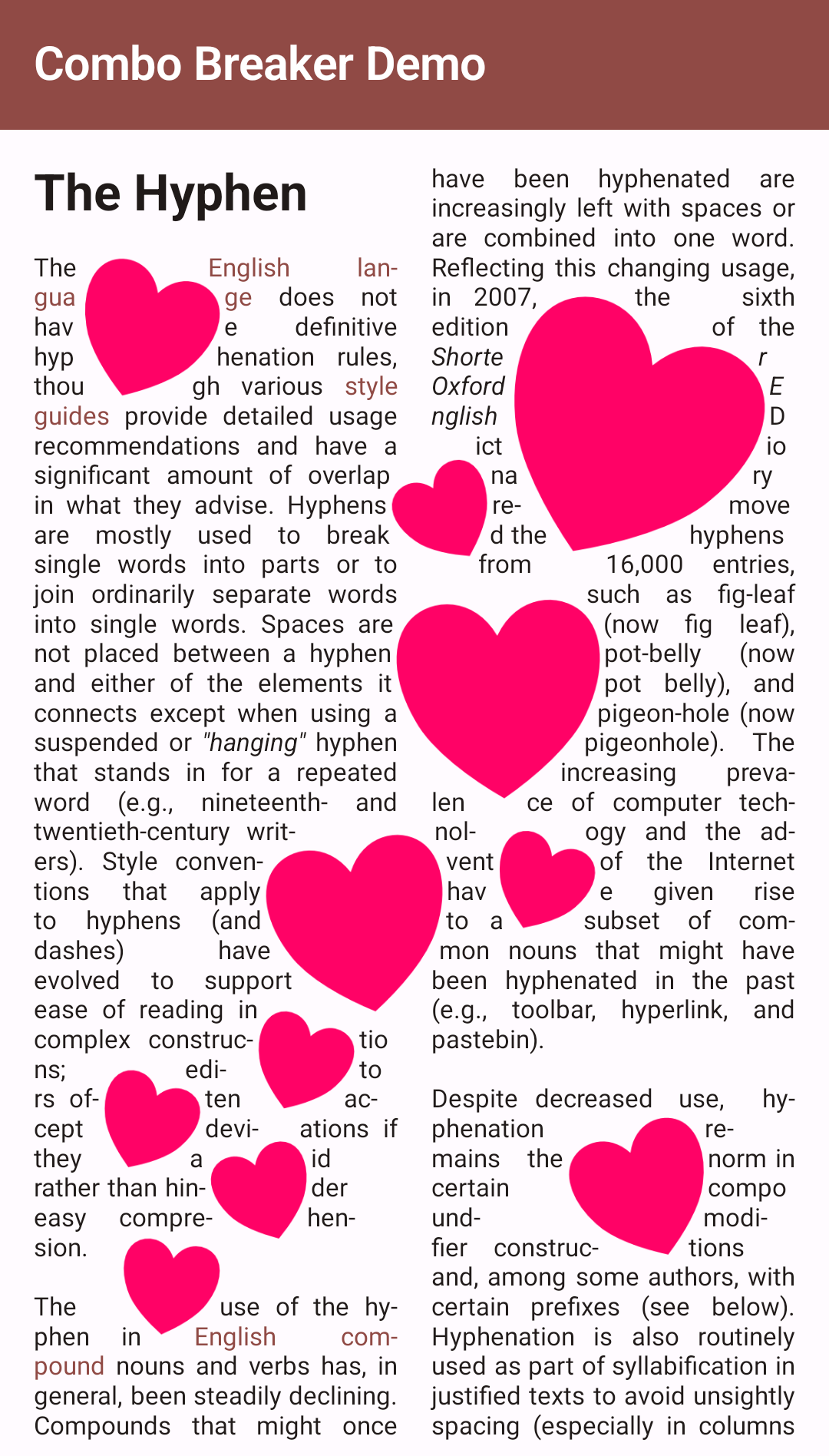
You can also specify multiple shapes for any given element by using the flowShapes modifiers instead of flowShape. flowShapes accepts/returns list of paths instead of a single path. For instance, with pathway you can easily extract a list of paths from a Bitmap by using Bitmap.toPaths() instead of Bitmap.toPath().
val heartsShapes = heartsBitmap.toPaths().map { it.asComposePath() }
TextFlow(     SampleText,     style = TextStyle(fontSize = 12.sp),     columns = 2 ) {     Image(         bitmap = heartsBitmap.asImageBitmap(),         contentDescription = "",         modifier = Modifier             .align(Alignment.Center)             .flowShapes(FlowType.Outside, 4.dp, heartsShapes)     ) }
This creates many shapes around which the text can flow:
Maven
repositories {
    // ...
    mavenCentral()
}
dependencies {     // Use this library and BasicTextFlow() if you don't want a dependency on material3     implementation 'dev.romainguy:combo-breaker:0.9.0'
// Use this library and TextFlow() if you use material3     implementation 'dev.romainguy:combo-breaker-material3:0.9.0' }
Roadmap
- Backport to earlier API levels.
- Lines containing styles of different line heights can lead to improper flow around certain shapes.
- More comprehensive
TextFlowLayoutResult. - Add support to ellipsize the last line when the entire text cannot fit in the layout area.
- Add support for text-relative placement of flow shapes.
- Implement margins support without relying on
Path.opwhich can be excessively expensive with
- BiDi text hasn't been tested yet, and probably doesn't work properly (RTL layouts are however
- Improve performance of contours extraction from an image (could be multi-threaded for instance).
- Investigate an alternative and simpler way to handle placement around shapes (beam cast instead
- Support flowing text inside shapes.
License
Please see LICENSE.
Attribution
The render of the microphone was made possible thanks to RCA 44-BX Microphone by Tom Seddon, licensed under Creative Commons Attribution.
Sample text taken from the Wikipedia Hyphen article.


