
Extract receipt info
tinvois-parser
An API to extract information from images of invoices/receipts. It extracts date, total amount, amount excluding VAT and the merchant name.
Try it here: https://tinvois-parser.azurewebsites.net. (http://tinvois-parser.azurewebsites.net shows the swagger UI). The authorization token is "github_users". See example jupyter notebook for sample code how to call.
Why I made it?
We wanted to develop an app to help freelancers in tax declaration, specifically organizing receipts. It is available here: https://tinvois.de. We wanted to keep extra costs including 3rd party tools and marketing really low to be able to keep the price of the app small.
One steps is to extract information from receipts photos. The open source solutions were not good enough. There are commercial API's which either do not work or are too expensive or both. So I developed it myself.
Considering that Google charges only 1.5$ for OCRing each 1K images, even gives 1K calls per month for free, it is almost free. So let's make it really good.
How it works
In the following steps
- Sending the image to google Cloud Vision API to extract text
- Putting the results in a pandas DataFrame (I am a data scientist, I love DataFrames :))
- Preprocess the results as follows
- Extracting information as follows
- Merchant name: I listed the most common merchants in Germany. It first tries to string match one from that list. If none of them found, it uses simply the first line in the image. Turns out it works fine.
Sample result
Input image
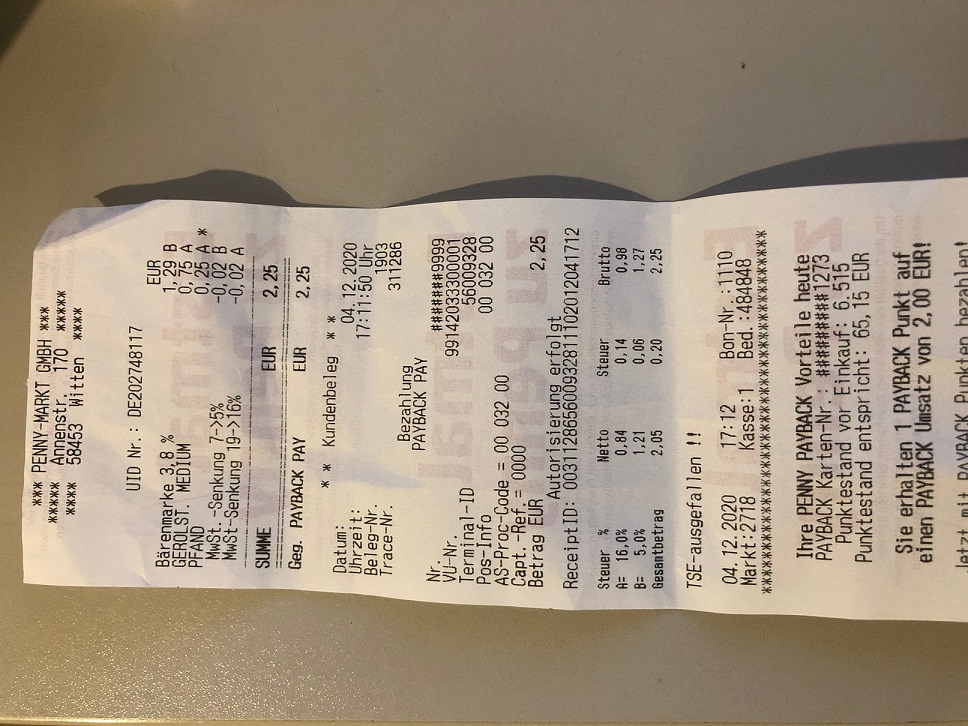
Result
{
    "data": {
        "rotation": 90,
        "amount": 225,
        "amountexvat": 205,
        "merchant_name": "Penny",
        "date": "2020-12-04T00:00:00",
        "hash": "0000000000000000071f7fffffffffffffbfffbefffefffbffff001f0000f800"
    }
}
How to use
You can start the API locally either via python or docker desktop.
Common steps
Rename it to google_auth.jsonUsing python
- Put the googleauth.json in
app/googleauth folder - Install requirements
- Put an environmental variable called SERVERTOSERVER_TOKEN in your system containing a
- In terminal navigate to app folder and run python .\manage-local.py
Using docker
There are two options
Option 1 (won't work in windows as mounting folder is not possible)
- Put the google_auth.json in a folder
- Run this commend
docker run --name tinvois-parser -d \
    -p 5001:5001 \
    -v <path to folder containing googleauth.json>:/app/googleauth \
    -e SERVERTOSERVER_TOKEN=<some string which will be used as authorization token> \
    -e BIND=0.0.0.0:5001 \
    -e MODULE_NAME=manage \
    -e WEB_CONCURRENCY=2 \
    srhumir/tinvois-parser:latest
Option 2
- Base64 encode the content of google_auth.json
- Run this command (you might need to remove "\\"'s and put the whole command in one line in Windows)
docker run --name tinvois-parser -d \
    -p 5001:5001 \
    -e GOOGLE_AUTH=<the base64 encoded string you get above> \
    -e SERVERTOSERVER_TOKEN=<some string which will be used as authorization token> \
    -e BIND=0.0.0.0:5001 \
    -e MODULE_NAME=manage \
    -e WEB_CONCURRENCY=2 \
srhumir/tinvois-parser:latestThe API is accessible in localhost:5001. Enter it in your browser to see the swagger UI
What else it can do
- I added endpoints for detecting edges of paper in the image and also making bird
Acknowledgements
- The first ideas and some implementation such as data and merchant parsing came from here
- I got the tokenizing idea from here
- The document edge detection and bird eye view is highly dependent on
- Last but not least. I used these two tutorials to learn how to develop a proper Flask Rest-API
TODO's (not necessarily comprehensive)
- Guess the category of the receipt (grocery, gas, travel etc.)
- Guess the payment method of the receipt
- Extend the tests to proper unit tests
- Run tests using github actions on commit
- Make it to be able to use Azure OCR API
- Extract merchant address (maybe using this approach https://doi.org/10.1145/2494188.2494193
- Implement a small WebUI
- Produce data for training ML algorithm
Do proper image hashingAdd some python code for testing the API- ~~Improve how it gets the google json file so mounting a folder in the docker command is not
Prepare a runnable windows PowerShell docker commandOptionally return automatically edited image in parse endpointDeploy the API in a (free) server so that people can test it


