
Traffic Flow Optimization with Airflow and Kafka
Traffic Flow Optimization with Airflow and Kafka


Disclaimer
This repository contains my submission for the Final Assignment, consisting of Hands-on Lab: Build an ETL Pipeline using Bash with Airflow and Hands-on Lab: Build a Streaming ETL Pipeline using Kafka. The original files were provided by the IBM Skills Network as part of the ETL and Data Pipelines with Shell, Airflow and Kafka course on Coursera.
Usage
- You are welcome to use this repository as a reference or starting point for your own assignment.
- If you choose to fork this repository, please ensure that you comply with the terms of the Apache License and give proper credit to the orginal authors.
Objectives
- Create an ETL pipeline using an Airflow DAG
- Build a streaming ETL pipeline using Kafka
Project Scenario
As a data engineer, I am tasked with a project that seeks to alleviate congestion on national highways. To do so, I must analyze road traffic data from various toll plazas. Here’s the catch: each highway is managed by a different toll operator, and their IT systems employ different file formats. My challenge lies in harmonizing this disparate data to derive meaningful insights and contribute to smoother traffic flow. Following that, I need to create a data pipeline to collect the timestamp data streamed to Kafka and load it into a database. The high-level approach was to:
- Collect data available in different formats and consolidate it into a single file.
- Create a data pipeline that collects the streaming data and loads it into a database.
Project layout
This repository contains all of the source files, scripts, and output files for the final assignment. Additional scripts have been provided in lieu of screenshots for various tasks.
├── bash <- Build an ETL Pipeline using Bash with Airflow
│ └── airflow/ <- AIRFLOW_HOME
│ └── dags/ <- DAGS_FOLDER
│ ├── csv_data.csv <- Extracted data from vehicle-data.csv
│ ├── ETLtolldata.py <- ETLtolldata DAG using BashOperator
│ ├── ExtractTransformdata.sh <- Shell script for ETL tasks
│ ├── extracted_data.csv <- Consolidated data from extracted files
│ ├── fixedwidthdata.csv <- Extracted data from payment-data.txt
│ ├── payment-data.txt <- Fixed width file
│ ├── tolldata.tgz <- Source data tarball
│ ├── tollplaza-data.tsv <- Tab-separated values file (see Notes)
│ ├── transformed_data.csv <- Transformed extracted data
│ ├── tsv_data.csv <- Extracted data from tollplaza-data.tsv
│ └── vehicle-data.csv <- Comma-separated values file
├── kafka <- Creating Streaming Data Pipelines using Kafka
│ ├── createtopictoll.sh <- Exercise 2.3 - Create a topic named 'toll'
│ ├── kafka_install.sh <- Exercise 1 - Prepare the lab environment (Steps 1-2)
│ ├── start_kafka.sh <- Exercise 2.2 - Start Kafka server
│ ├── start_zookeeper.sh <- Exercise 2.1 - Start Zookeeper
│ ├── streamingdatareader.py <- Customized Streaming Data Consumer program
│ └── tolltrafficgenerator.py <- Customized Toll Traffic Simulator program
├── mysql
│ ├── livetolldata_health.sh <- Exercise 2.9 - Health check of the streaming data pipeline
│ └── mysql_prep.sh <- Exercise 1 - Prepare the lab environment (Steps 3-9)
└── python <- Build an ETL Pipeline using Airflow *
└── airflow/ <- AIRFLOW_HOME
└── dags/ <- DAGS_FOLDER
└── finalassignment/ <- finalassignment folder
├── staging/ <- staging folder
│ ├── ETLtolldata.py <- ETLtolldata DAG using PythonOperator
│ └── transformed_data.csv <- Transformed extracted data
├── csv_data.csv <- Extracted data from vehicle-data.csv
├── extracted_data.csv <- Consolidated data from extracted files
├── fixedwidthdata.csv <- Extracted data from payment-data.txt
├── payment-data.txt <- Fixed width file
├── tolldata.tgz <- Source data tarball
├── tollplaza-data.tsv <- Tab-separated values file
├── transformed_data.csv <- Transformed extracted data
├── tsv_data.csv <- Extracted data from tollplaza-data.tsv
└── vehicle-data.csv <- Comma-separated values file
- NOTE: For the final assignment, you have the option to complete either the Bash or Python
lab for Airflow. Additionally, I’ve included an ETLtolldata DAG that utilizes
PythonOperator, an operator not covered in this course.Directions
Final Assignment (Part 1) - Creating ETL Data Pipelines using Bash with Apache Airflow
Create a python script ETLtolldata.py as the Apache Airflow DAG
- Define the DAG arguments as per the following details:
- Create a DAG as per the following details:
ETLtolldata |
| Schedule | Daily once |
| default_args | as you have defined in the previous step |
| description | Apache Airflow Final Assignment |
Create a shell script ExtractTransformdata.sh and add the following commands to your tasks:
- Write a command to unzip the data. Use the downloaded data from the url given and uncompress it into the destination directory.
- Update the shell script to add a command to extract data from csv file. You should extract the fields:
Rowid,Timestamp,Anonymized Vehicle number, andVehicle typefrom thevehicle-data.csvfile and save them into a file namedcsv_data.csv. - Update the shell script to add a command to extract data from tsv file. You should extract the fields:
Number of axles,Tollplaza id, andTollplaza codefrom thetollplaza-data.tsvfile and save it into a file namedtsv_data.csv. - Update the shell script to add a command to extract data from fixed width file. You should extract the fields:
Type of Payment code, andVehicle Codefrom the fixed width filepayment-data.txtand save it into a file namedfixedwidthdata.csv. - Update the shell script to add a command to consolidate data extracted from previous tasks. You should create a single csv file named
extracted_data.csvby combining data from the following files:
csv_data.csv
* tsv_data.csv
* fixedwidthdata.csv
The final csv file should use the fields in the order given below:
Rowid, Timestamp, Anonymized Vehicle number, Vehicle type, Number of axles, Tollplaza id, Tollplaza code, Type of Payment code, and Vehicle Code
- Update the shell script to add a command to transform and load the data. You should transform the
Vehicle typefield inextracteddata.csvinto capital letters and save it into a file namedtransformeddata.csv. - Create a task
extracttransformloadin theETLtolldata.pyto call the shell script. - Submit the DAG.
- Unpause the DAG.
- Monitor the DAG.
Final Assignment (Part 2) - Creating Streaming Data Pipelines using Kafka
- Start a MySQL Database server.
- Create a table to hold the toll data.
- Start Zookeeper server.
- Start Kafka server.
- Create a Kafka topic named
toll. - Download the Toll Traffic Simulator
tolltrafficgenerator.pyprogram. - Configure the Toll Traffic Simulator and set the topic to
toll. - Run the Toll Traffic Simulator program.
- Download the Streaming Data Consumer
streamingdatareader.pyprogram. - Customize the consumer program to write into a MySQL database table.
- Run the Streaming Data Consumer program.
- Verify that streamed data is being collected in the database table.
Notes
While working on the final assignment, I encountered an issue with the tollplaza-data.tsv file within the tolldata.tgz compressed tarball. It turned out that this TSV file contained ^M characters, which are carriage return characters. These characters likely originated from an incorrect file transfer mode. As a consequence, the consolidated extracted data within extracted_data.csv was split into two lines per row.
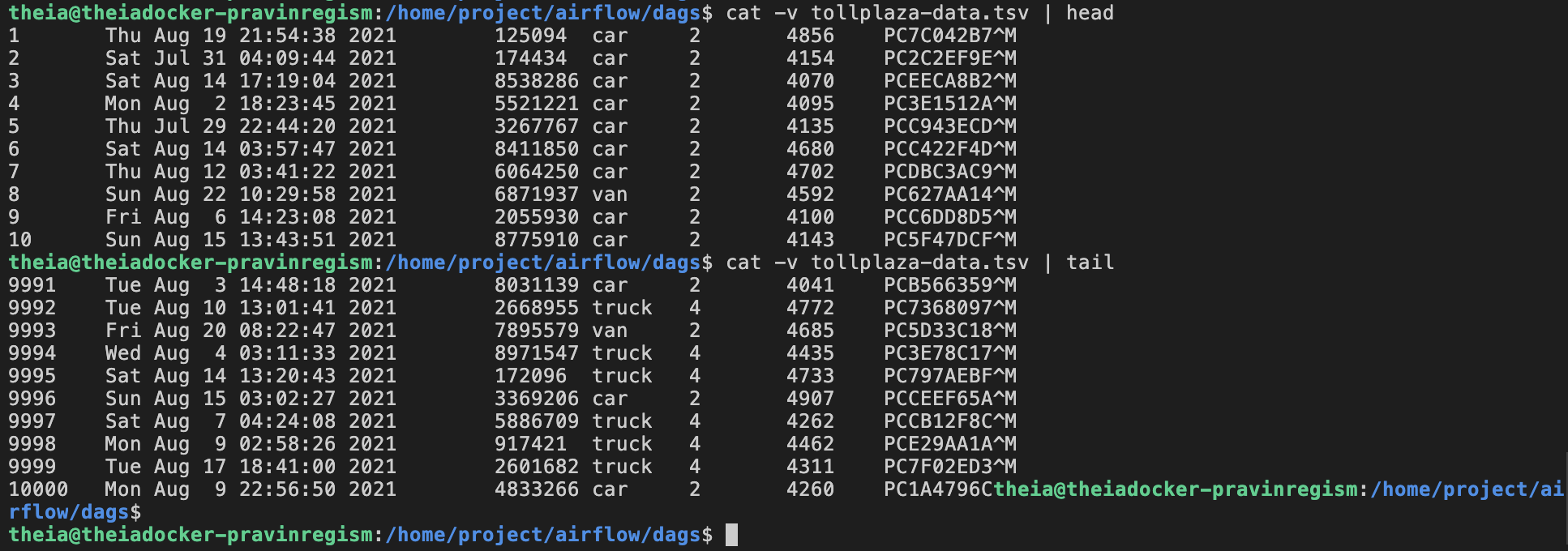
In response to this issue, I’ve presented two potential solutions:
Solution 1: Update tollplaza-data.tsv File in tolldata.tgz
Decompress the TGZ file:
gzip -d tolldata.tgzExtract the files from the tolldata.tar archive
tar xvf tolldata.tarUse the stream editor sed to remove the ^M characters.
To enter ^M, hold down the CTRL key then press V and M in succession.
sed 's/^M//' tollplaza-data.tsv > _tollplaza-data.tsvRename _tollplaza-data.tsv to original filename:
mv _tollplaza-data.tsv tollplaza-data.tsvNext, update the archive with the modified file:
tar -uf tolldata.tar tollplaza-data.tsvFinally, compress the updated archive:
gzip tolldata.tarRename compressed tarball to .tgz extension:
mv tolldata.tar.gz tolldata.tgzSolution 2: Use awk to Remove Carriage Return Characters
Using awk '{gsub(/\r/,""); print}' to globally replace carriage return characters with an empty string. The resulting modified line is then available for further processing.
cut -f5-7 /home/project/airflow/dags/tollplaza-data.tsv | awk '{gsub(/\r/,""); print}' | tr "\t" "," > /home/project/airflow/dags/tsv_data.csvBoth solutions will successfully correct the problem and ensured that the consolidated data remains intact.
Setup
Install the required libraries using the provided requirements.txt file. The command syntax is:
python3 -m pip install -r requirements.txtCreate a directory structure for staging area as follows:
sudo mkdir -p /home/project/airflow/dags/finalassignment/stagingExecute the folllowing commands to avoid any permission issues:
# bash
sudo chown -R 100999 /home/project/airflow/dags
sudo chmod -R g+rw /home/project/airflow/dags
python
sudo chown -R 100999 /home/project/airflow/dags/finalassignment
sudo chmod -R g+rw /home/project/airflow/dags/finalassignment
sudo chown -R 100999 /home/project/airflow/dags/finalassignment/staging
sudo chmod -R g+rw /home/project/airflow/dags/finalassignment/staging
Download the required dataset to the destination specified using the terminal command:
# bash
sudo wget -P /home/project/airflow/dags https://cf-courses-data.s3.us.cloud-object-storage.appdomain.cloud/IBM-DB0250EN-SkillsNetwork/labs/Final%20Assignment/tolldata.tgz
python
sudo wget -P /home/project/airflow/dags/finalassignment https://cf-courses-data.s3.us.cloud-object-storage.appdomain.cloud/IBM-DB0250EN-SkillsNetwork/labs/Final%20Assignment/tolldata.tgz
Download Toll Traffic Simulator program:
sudo wget https://cf-courses-data.s3.us.cloud-object-storage.appdomain.cloud/IBM-DB0250EN-SkillsNetwork/labs/Final%20Assignment/tolltrafficgenerator.pyDownload Streaming Data Consumer program:
sudo wget https://cf-courses-data.s3.us.cloud-object-storage.appdomain.cloud/IBM-DB0250EN-SkillsNetwork/labs/Final%20Assignment/streamingdatareader.pyLearner
Acknowledgments
- IBM Skills Network © IBM Corporation 2021. All rights reserved.


