
Easily add website to your IOS/Android/Desktop homescreen.
Add-to-Homescreen 📱💻



 [
[ ]()
]()
Easily add a website to your IOS/Android/Desktop homescreen (demo, npm).
Motivation
Add to home screen allows websites and PWA's to work like native apps without registering in the Apple or Google App Stores. Currently, it is very difficult to get users to add web apps to their home screen, limiting the utility of such websites compared to native apps. See related Medium blog post.
This Library
This drop-in JS Library for websites effectively guides a user to add the website to their home screen on IOS, Android and Desktop. Instructions and UI in this library have been "battle-tested" and have yielded an ~85% home screen install rate on IOS and Android across all ages in past implementations.
Here is a demo (please open on your phone) of library use within a hypothetical app "Aardvark"
Language Support
Translated to 20+ languages.
Browser Support
All major browsers with > 10% market share on IOS/Android/Desktop are supported. Here are the guides shown for each platform/browser:
IOS - Safari browser
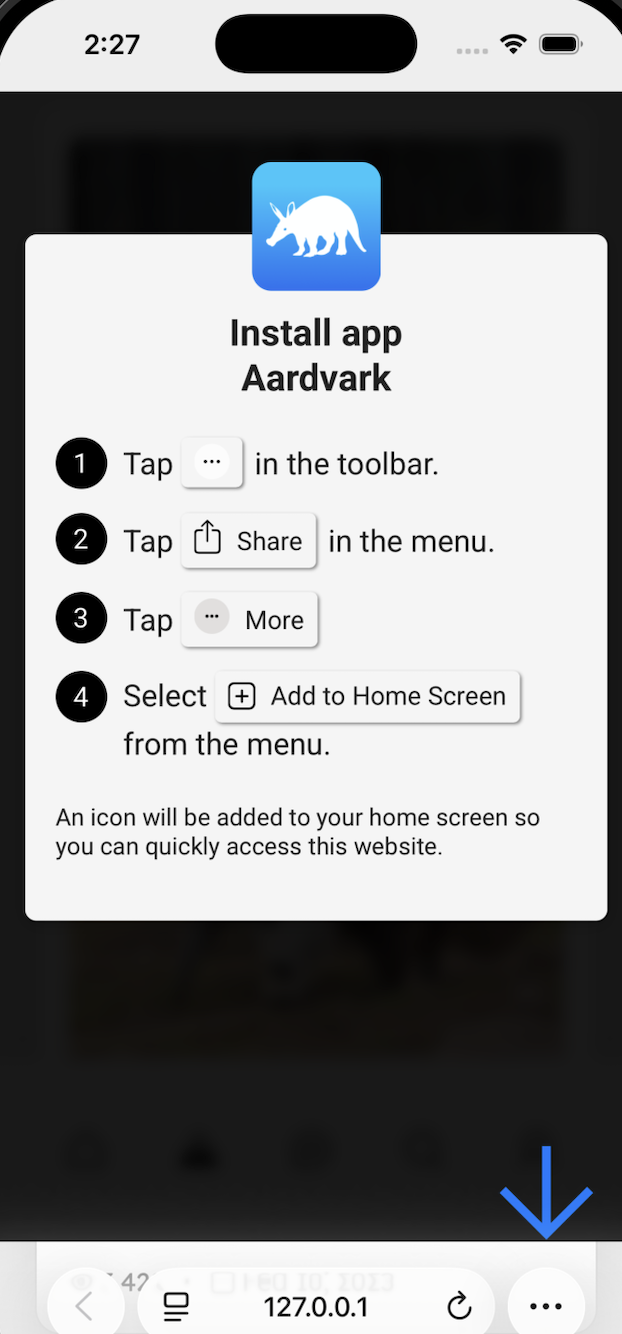
IOS - Safari browser (IOS < 26)
IOS - Chrome browser
Android - Chrome browser
Android - Edge browser
IPad - Safari browser
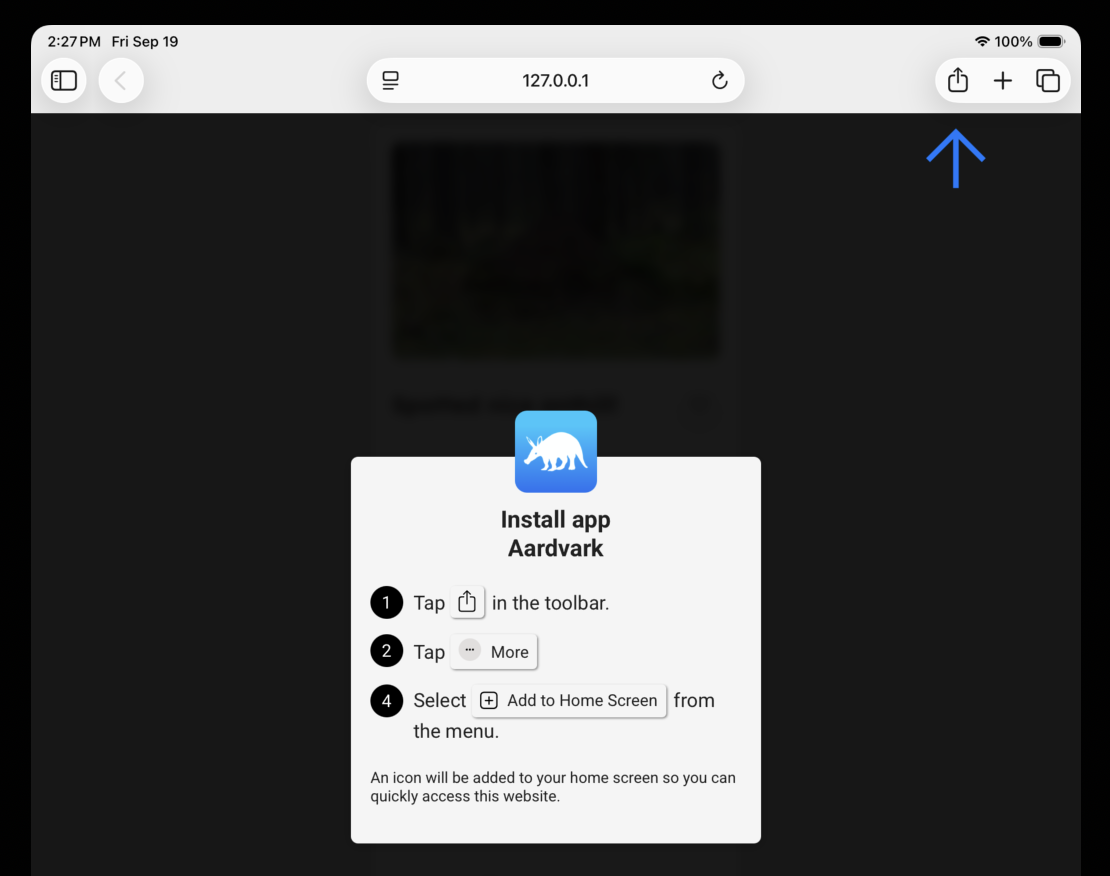
iPad - Safari browser (IOS < 26)
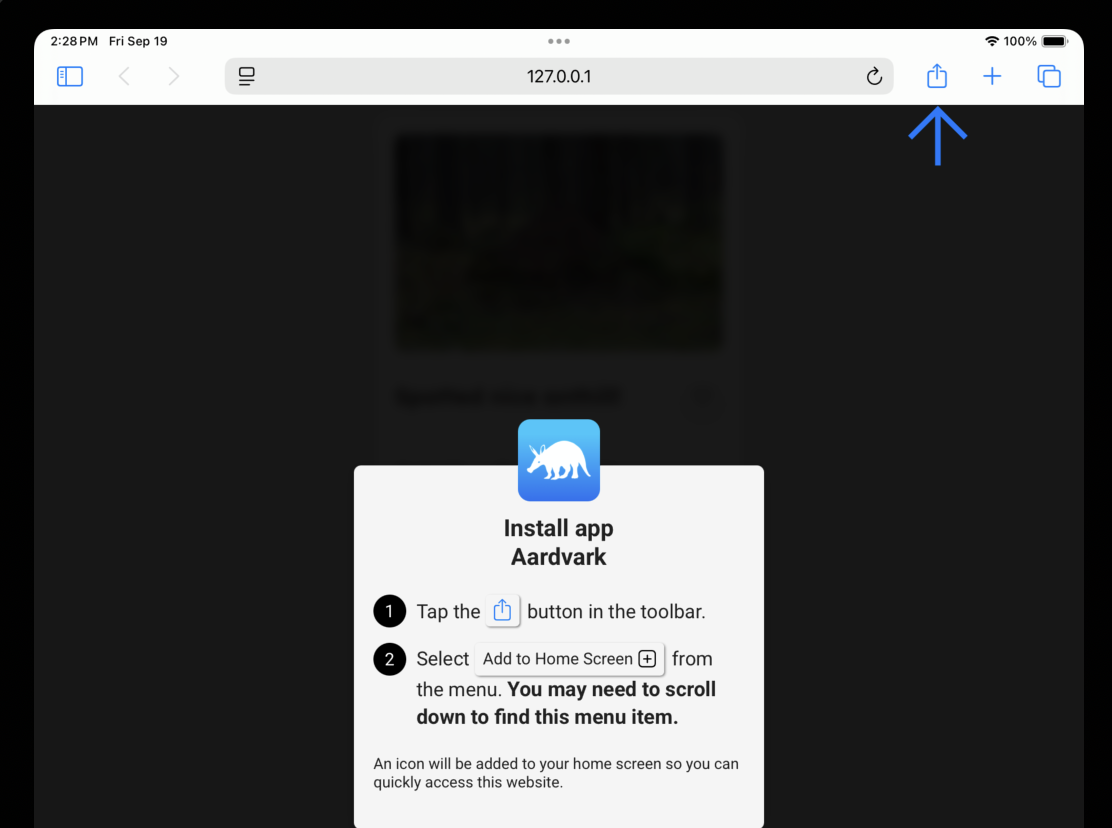
Desktop Windows & Mac - Chrome & Edge browsers
Desktop Mac - Safari browser
In-App Mobile Browsers
In-App browsers on popular social apps are supported. Users are guided to open the link in the system browser, then the standard add-to-homescreen flow appears.
Apps Supported: * Instagram (IOS, Android) * Facebook (IOS, Android) * X / Twitter (IOS, Android - opens in system browser)
Installation
Prerequisite: Make your website a proper PWA (Progressive Web App)
Make sure your website meets the minimum requirements for installing a web app on homescreen for IOS and Android and Desktop.
- At
https://your-website.com/apple-touch-icon.png, include a square icon of your app that is (1) at least 40 x 40 pixels and (2) specifically namedapple-touch-icon.png(example). - At
https://your-website.com/manifest.json, include a web manifest filemanifest.json(example). Reference the manifest in your index HTML file.
index.html
<head>
     ...
     <link rel="manifest" crossorigin="use-credentials" href="manifest.json" />
     ..
   </head>
Usage
This should be a quick drop-in library into your website.
- Install the package via npm:
npm install pwa-add-to-homescreen- Include the library JavaScript and CSS files in your header from the local
node_modulesdirectory:
index.html
<head>
     ...
     <link
       rel="stylesheet"
       href="node_modules/pwa-add-to-homescreen/dist/add-to-homescreen.min.css"
     />

     ...
   </head>
The code above will include a JavaScript file containing all the available translations for the locales this library supports. It is highly optimized to be small and quick to deliver over mobile networks. If however you want to be even more highly optimized, the library also has JavaScript files built with just a single locale of translations, which is about 60% smaller.
For example, the Spanish file add-to-homescreen_es.min.js can be included as below. If you have a dynamic server environment and know the user's preferred locale, this can be a good option. To see all the supported locales, look in the dist folder.
<head>
      <!-- This is the Spanish locale-only version of the library.  -->
     ...
     <link
       rel="stylesheet"
       href="node_modules/pwa-add-to-homescreen/dist/add-to-homescreen.min.css"
     />

     ...
</head>- Call the library onload.
index.html
</body>Here's an example implementation.
Special Case: calling the UI later
3-alternate. if you're calling the UI NOT onload, but sometime after (for example, in an onclick() handler for an "Install App" button), then you should still create your the instance onload, but call your UI later on the instance variable with .show()):
index.html
</body>This is because some handlers must be created onload.
Dependencies
No dependencies. This is written in raw ES6 javascript and all css is namespaced to minimize codebase conflict and bloat.
Contributors
- Thanks to Shane O'Sullivan for a a massive refactor to improve performance and i18n.
License


