
The missing Apple TV remote app for macOS
Itsytv





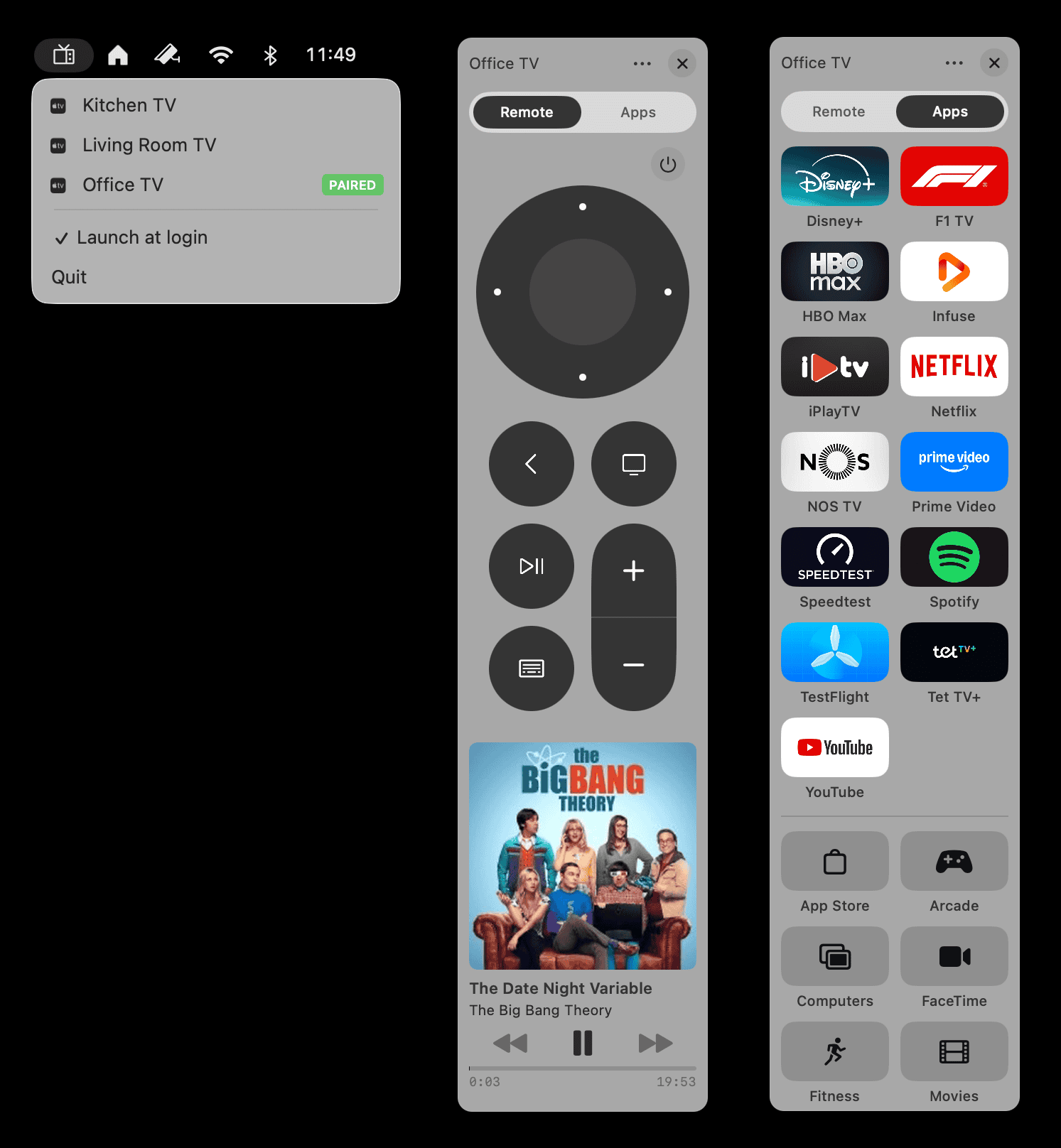
A native macOS menu bar app for controlling your Apple TV. macOS has no built-in Apple TV remote – Itsytv fills the gap: d-pad, keyboard navigation, live text input, now playing, and an app launcher, speaking the same local-network protocol the Siri Remote uses. Free and open source (MIT), installable via Homebrew.

Also on iPhone
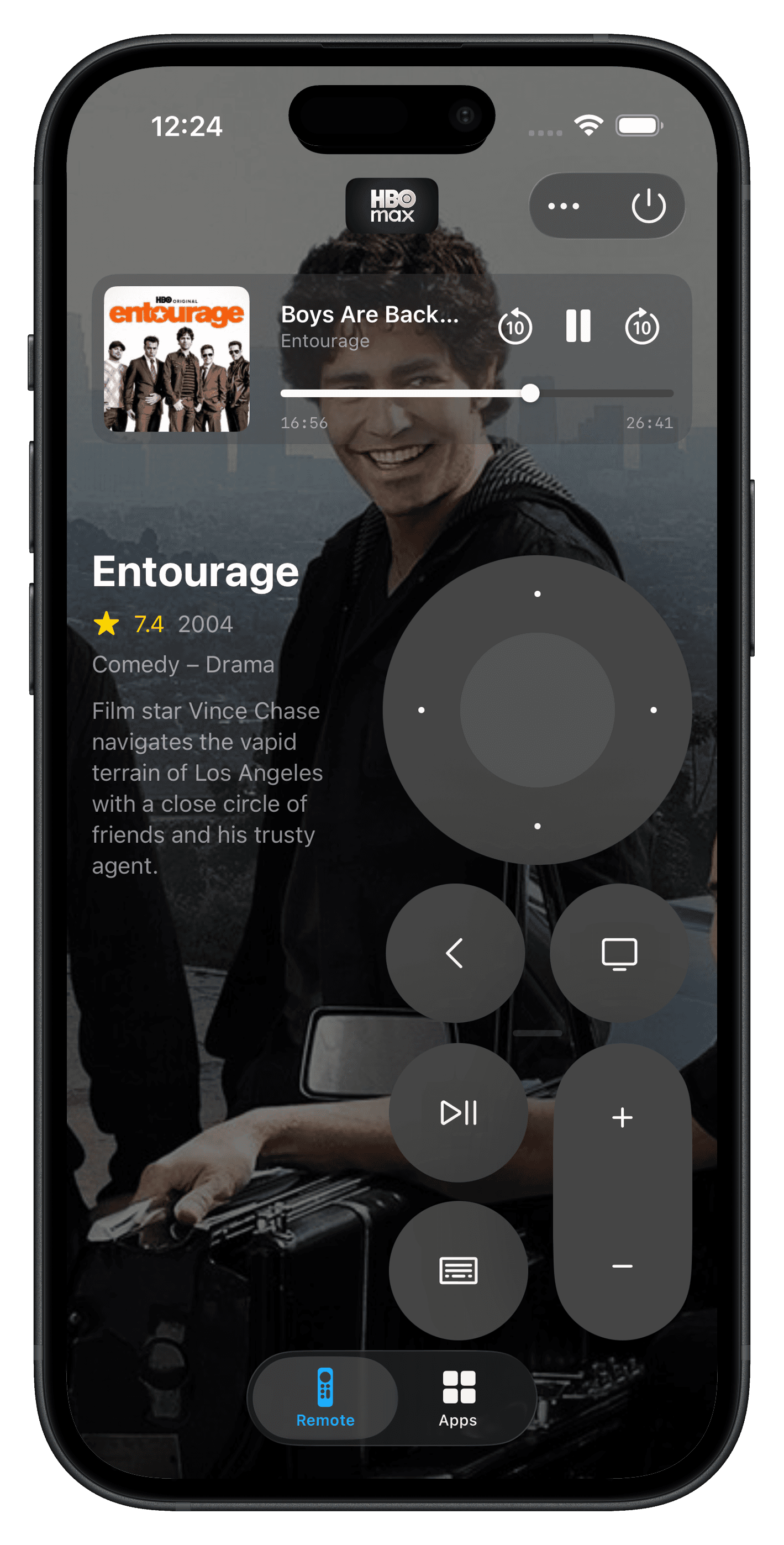
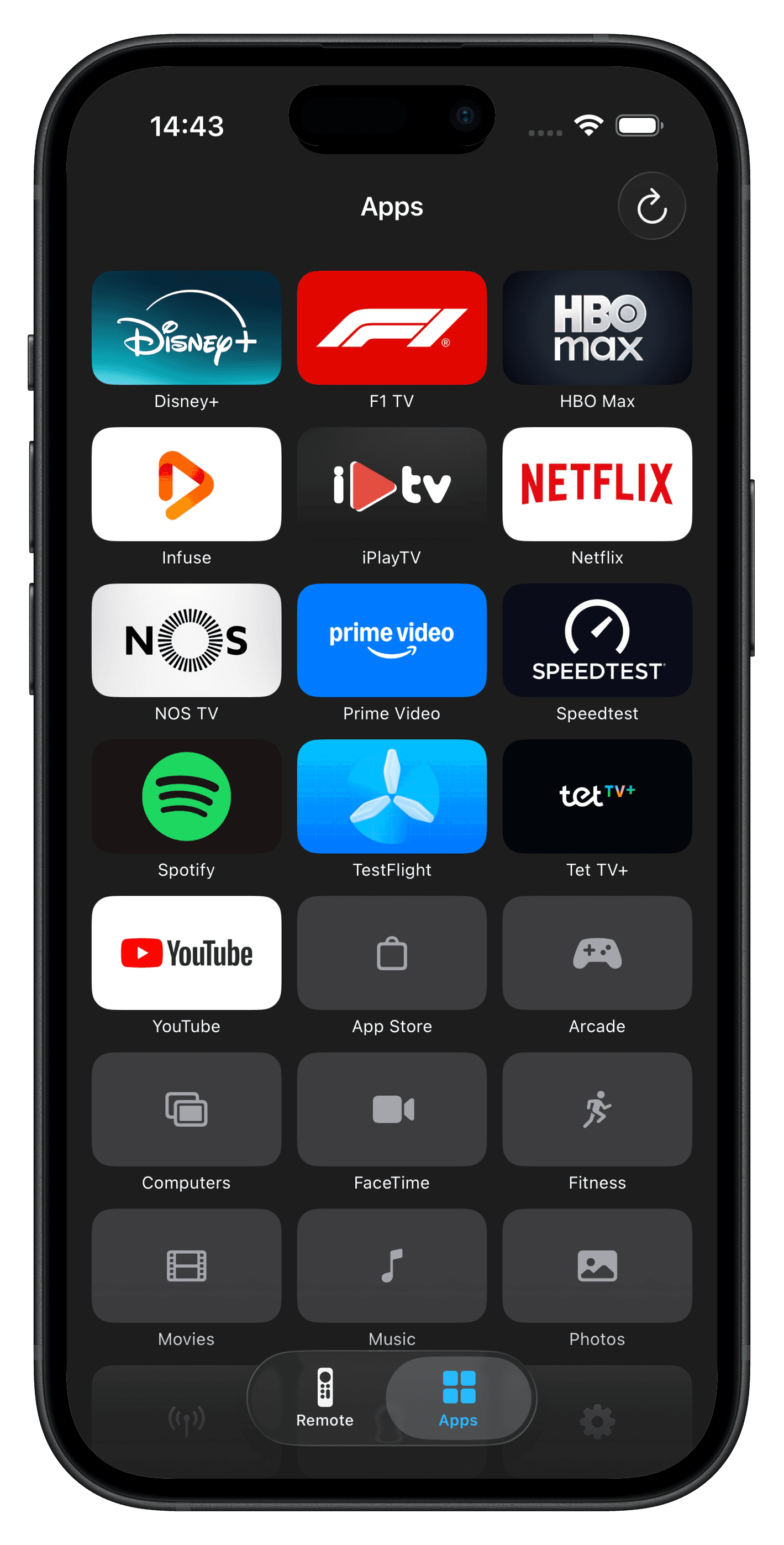
Itsytv is now available on iOS with the same core experience plus features designed for mobile:
- TMDB lookup for what's playing – poster art, ratings, and details for movies and TV shows
- Ergonomic design for left- and right-handed use

Features
- Menu bar remote – control your Apple TV from a compact floating panel
- D-pad and buttons – circular d-pad with directional navigation, select, home, menu/back, play/pause
- Keyboard navigation – arrow keys, Return, Backspace, Escape, Space mapped to remote buttons
- Text input – type directly into Apple TV text fields with a live keyboard
- Now playing – artwork, title, artist, progress bar, and playback controls
- App launcher – grid of installed apps with icons fetched from the App Store; drag to reorder
- Multiple devices – pair and switch between multiple Apple TVs
- Global hotkeys – assign keyboard shortcuts to instantly open the remote for specific Apple TVs
- Per-device panel position – remembers where you placed the remote for each Apple TV
- Launch at login – optional auto-start from the menu bar
- Unpair – remove pairing credentials from the panel menu
- AppleScript & Shortcuts – script play/pause from anything that runs AppleScript
AppleScript and Shortcuts automation
Itsytv exposes AppleScript commands, so the Apple TV becomes scriptable from Shortcuts, Keyboard Maestro, Hammerspoon, Raycast, or a plain shell:
osascript -e 'tell application "itsytv" to pause'
osascript -e 'tell application "itsytv" to play'
Both commands are no-ops when nothing is playing, so they are safe to fire blindly. Some ideas:
- A Shortcuts automation that pauses the Apple TV when a calendar meeting starts (Run AppleScript action)
- A Hammerspoon or Keyboard Maestro hotkey that toggles playback without touching a remote
- A cron job or
attimer that pauses playback at bedtime
Perfect companion to Itsyhome
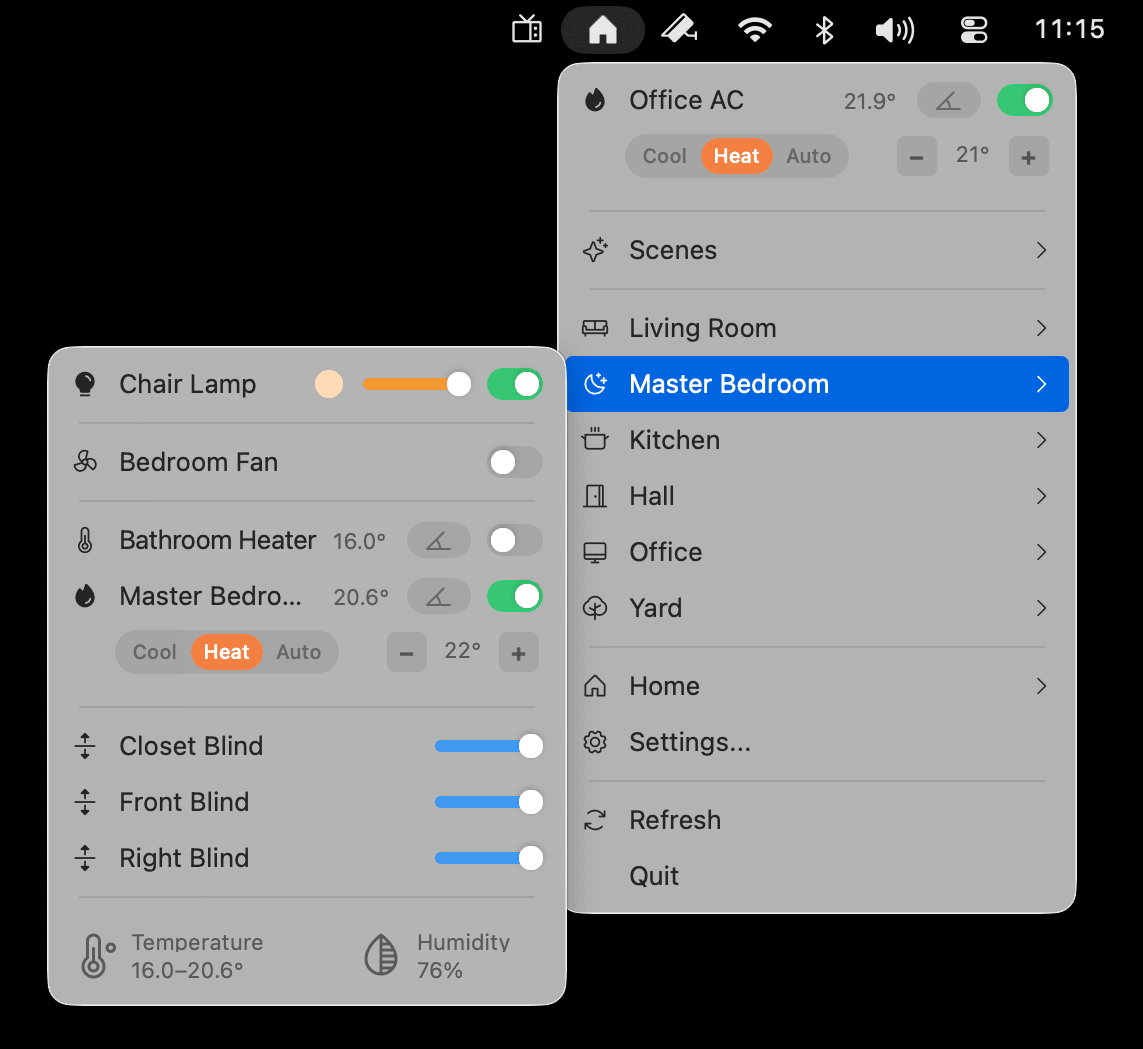
Itsytv pairs naturally with Itsyhome – a free macOS menu bar app for controlling your HomeKit devices. Manage lights, cameras, thermostats, locks, scenes, and 18+ accessory types without ever opening the Home app.
Install
brew install --cask itsytvOr download the latest DMG from GitHub releases.
Troubleshooting
Apple TV doesn't show a PIN code when pairing
If you send a pairing request but no PIN appears on your TV screen, your Apple TV is likely restricting which devices can connect to it. To fix this:
- Open Settings > AirPlay and Apple Home on your Apple TV
- Set Allow access to Anyone on the same network
- Set Require Password to Off (after pairing is completed, Require Password can be turned back on)
- Go to Settings > General > Restrictions
- Set both AirPlay Settings and Remote App Pairing to Allow
Remote disappears after a few seconds
If the remote panel closes on its own shortly after connecting, your Apple TV's AirPlay access setting is likely set to Only people sharing this home. Open Settings on your Apple TV, go to AirPlay and Apple Home, and change Allow access to Anyone on the same network.
Nothing happens when I launch the app
Itsytv is a menu bar app – it lives in the top-right area of your screen as a small TV icon, not in the Dock. On MacBooks with a notch, macOS hides menu bar icons that don't fit behind the notch – silently, with no warning. If your menu bar is crowded, the itsytv icon may be there but invisible.
To fix this, hold Cmd and drag any icons you don't need off the menu bar. Once itsytv appears, Cmd-drag it to the right so it stays visible.
FAQ
Is it free? On the Mac, yes – free via Homebrew or the DMG, MIT-licensed open source. The Mac App Store version is a one-time $4.99 universal purchase that also covers iPhone and iPad. No subscription, ads, or in-app purchases anywhere.
Which Apple TVs work? Apple TV 4th generation or later running tvOS 15+, on the same local network as the Mac. Older Apple TVs don't support the protocol.
Do I need the physical Siri Remote to pair? No. The Apple TV shows a four-digit PIN on the TV screen and you type it into Itsytv. Credentials are stored in the macOS Keychain and the connection is end-to-end encrypted.
How is this different from other Apple TV remote apps? Itsytv speaks Apple's native MediaRemote/Companion protocol over the local network – the same one the Siri Remote uses – so input is instant, with no cloud service or polling in between. Most remote apps in this category charge a subscription; Itsytv doesn't, and on the Mac you can read the source to verify what it does.
Can it change the TV volume? Yes, when the Apple TV controls volume over HDMI-CEC (Settings → Remotes and Devices → Volume Control on the Apple TV). Learned infrared volume codes only work from the physical remote, since Macs have no IR blaster.
More guides: control Apple TV from your Mac · Apple TV pairing troubleshooting · all Apple TV remote guides
Architecture
This app is a thin macOS UI layer on top of itsytv-core – a Swift package that implements the Apple TV Companion Link and AirPlay protocols. The same core powers both the macOS and iOS apps.
itsytv-macos/
├── itsytvApp.swift              # App entry point
├── UI/
│   ├── AppController.swift      # NSStatusItem, menu, floating panel, keyboard monitor
│   ├── MenuBarView.swift        # SwiftUI views: remote, now playing, app grid
│   └── AppIconLoader.swift      # App icons from iTunes Lookup API
├── DesignSystem/
│   ├── DesignSystem.swift       # Colours, typography, spacing, sizing tokens
│   └── HighlightingMenuItemView.swift
├── AppIntents/
│   └── OpenRemoteIntent.swift   # Shortcuts action to open the remote for a specific Apple TV
├── MRP/
│   └── Proto/                   # Protobuf definitions (.proto files)
└── Utilities/
    ├── UpdateChecker.swift      # GitHub release checker
    └── HotkeyManager.swift      # Global hotkey registration
All protocol, crypto, discovery, and device management code lives in itsytv-core.
Requirements
- macOS 14.0 or later
- Xcode 16.0 or later
- XcodeGen for project generation
- Apple TV running tvOS 15 or later on the same local network
Setup
1. Clone the repositories
git clone https://github.com/nickustinov/itsytv-macos.git
git clone https://github.com/nickustinov/itsytv-core.git
Both repositories must be side by side – the Xcode project references ../itsytv-core as a local Swift package.
2. Install XcodeGen
brew install xcodegen3. Generate the Xcode project
cd itsytv-macos
xcodegen generate
4. Open and run
open itsytv.xcodeprojSelect the itsytv scheme and run.
Building
The project uses XcodeGen to generate the Xcode project from project.yml. After making changes to project configuration:
xcodegen generateReleasing
- Bump
MARKETINGVERSIONandCURRENTPROJECT_VERSIONinproject.yml - Update
CHANGELOG.md - Build, sign, and package the DMG:
bash scripts/build-release.sh- Notarize and staple:
xcrun notarytool submit dist/Itsytv-<VERSION>.dmg \
    --apple-id <APPLEID> --team-id <TEAMID> \
    --password <APPSPECIFICPASSWORD> --wait
xcrun stapler staple dist/Itsytv-<VERSION>.dmg- Create the GitHub release:
gh release create v<VERSION> dist/Itsytv-<VERSION>.dmg \
--title "v<VERSION>" --notes "Release notes here"- Homebrew cask – itsytv is in the official homebrew-cask repository with autobump enabled. BrewTestBot automatically detects new GitHub releases and opens a PR within ~3 hours. No manual action needed.
License
MIT License (c) 2026 Nick Ustinov – see LICENSE for details.
Author
Nick Ustinov – @nickustinov
Acknowledgements
Protocol implementation informed by pyatv, the comprehensive Python library for Apple TV control.


