
Library to change Android launcher App Icon and App Name programmatically !
AppIconNameChanger
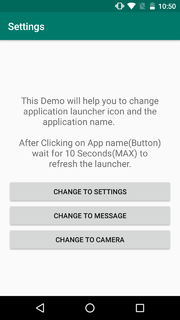
Change Android App launcher Icon and App Name programmatically ! `
` 
` 
Download Demo APK from HERE
Kindly use the following links to use this library:
In build.gradle (Project)
allprojects { repositories { ... maven { url "https://jitpack.io" } } }dependencies { compile 'com.github.myinnos:AppIconNameChanger:1.0.7' }Step 1: set activity alias in manifest file : #Example
<application          .........                 <!-- main activity-->        <activity android:name=".MainActivity" />
<!-- setting activity-alias names-->         <activity-alias             android:name="in.myinnos.changeappiconandname.MainActivitySettings"             android:enabled="true"  //enabled by default launcher             android:icon="@drawable/ic_settings"  //app icon             android:label="@string/app_settings"  //app label/name             android:targetActivity=".MainActivity">             <intent-filter>                 <action android:name="android.intent.action.MAIN" />                 <category android:name="android.intent.category.LAUNCHER" />             </intent-filter>         </activity-alias>
<activity-alias             android:name="in.myinnos.changeappiconandname.MainActivityCamera"             android:enabled="false"             android:icon="@drawable/ic_camera"  //app icon             android:label="@string/app_camera" //app label/name             android:targetActivity=".MainActivity">             <intent-filter>                 <action android:name="android.intent.action.MAIN" />                 <category android:name="android.intent.category.LAUNCHER" />             </intent-filter>         </activity-alias>
.........
</application>
// Active alias name String activeName = "in.myinnos.changeappiconandname.MainActivitySettings";
// Disable alias names List<String> disableNames = new ArrayList<String>(); disableNames.add("in.myinnos.changeappiconandname.MainActivityCamera"); disableNames.add("in.myinnos.changeappiconandname.MainActivityMessage");
// Initiate App Icon Name Changer new AppIconNameChanger.Builder(MainActivity.this)                 .activeName(activeName) // String                 .disableNames(disableNames) // List<String>                 .packageName(BuildConfig.APPLICATION_ID)                 .build()                 .setNow();
Any Queries? or Feedback, please let me know by opening a new issue!
Contact
Prabhakar Thota
- :globewithmeridians: Website: myinnos.in
- :email: e-mail: contact@myinnos.in
- :magright: LinkedIn: PrabhakarThota
- :thumbsup: Twitter: @myinnos
- :camera: Instagram: @prabhakart_
If you appreciate my work, consider buying me a cup of :coffee: to keep me recharged :metal: by PayPal
License
Copyright 2019 MyInnos
Licensed under the Apache License, Version 2.0 (the "License"); you may not use this file except in compliance with the License. You may obtain a copy of the License at
http://www.apache.org/licenses/LICENSE-2.0
Unless required by applicable law or agreed to in writing, software distributed under the License is distributed on an "AS IS" BASIS, WITHOUT WARRANTIES OR CONDITIONS OF ANY KIND, either express or implied. See the License for the specific language governing permissions and limitations under the License.


