
A custom view to enter otp of different sizes used usually in cases of authentication.
Compose OtpView/PinView



A custom control to enter a code usually in cases of authentication.
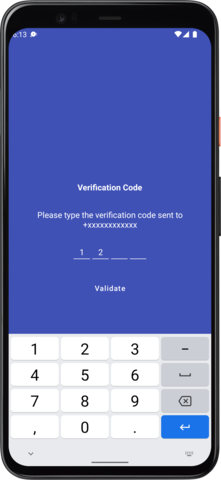
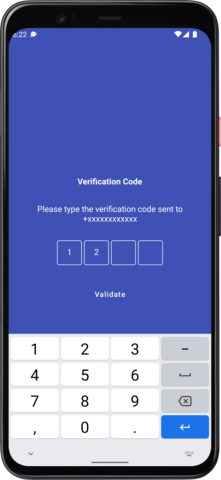

Supporting Compose OtpView/PinView
Compose PinView/OtpView is an independent project with ongoing development and support made possible thanks to your donations.
How to integrate into your app?
Integrating the project is simple. All you need to do is follow the below stepsStep 1. Add the JitPack repository to your build file. Add it in your root build.gradle at the end of repositories:
allprojects {
  repositories {
    ...
    maven { url "https://jitpack.io" }
  }
}dependencies {
implementation 'com.github.mukeshsolanki.android-otpview-pinview:otpview-compose:3.1.0'
}for View system
dependencies { implementation 'com.github.mukeshsolanki.android-otpview-pinview:otpview:3.1.0' }How to use the library?
Okay seems like you integrated the library in your project but how do you use it? Well its really easy.- Using Compose
OtpView composable where you need to display the view like.
var otpValue by remember { mutableStateOf("") }
OtpView(
    otpText = otpValue,
    onOtpTextChange = {
        otpValue = it
        Log.d("Actual Value", otpValue)
    },
    type = OTPVIEWTYPE_BORDER,
    password = true,
    containerSize = 48.dp,
    passwordChar = "•",
    keyboardOptions = KeyboardOptions(keyboardType = KeyboardType.Number),
    charColor = Color.White
)- Using Older View System (aka XML)
<com.mukeshsolanki.OtpView
    android:id="@+id/otp_view"
    android:layoutwidth="wrapcontent"
    android:layoutheight="wrapcontent"
    android:layout_marginTop="72dp"
    android:inputType="text"
    android:itemBackground="@drawable/bgotpitem"
    android:textAllCaps="true"
    android:textColor="@android:color/white"
    app:OtpHideLineWhenFilled="true"
    app:OtpItemCount="6"
    app:OtpItemSpacing="6dp"
    app:OtpLineColor="@color/otpitemstate"
    app:OtpState_filled="true"
    app:OtpViewType="line"
/>otp_view to a variable like
val otpView = findViewById(R.id.otp_view)otpView.setOtpCompletionListener {
Log.d("Actual Value", it)
}Author
Maintained by Mukesh SolankiContribution

- Bug reports and pull requests are welcome.
License
MIT License
Copyright (c) 2018 Mukesh Solanki
Permission is hereby granted, free of charge, to any person obtaining a copy of this software and associated documentation files (the "Software"), to deal in the Software without restriction, including without limitation the rights to use, copy, modify, merge, publish, distribute, sublicense, and/or sell copies of the Software, and to permit persons to whom the Software is furnished to do so, subject to the following conditions:
The above copyright notice and this permission notice shall be included in all copies or substantial portions of the Software.
THE SOFTWARE IS PROVIDED "AS IS", WITHOUT WARRANTY OF ANY KIND, EXPRESS OR IMPLIED, INCLUDING BUT NOT LIMITED TO THE WARRANTIES OF MERCHANTABILITY, FITNESS FOR A PARTICULAR PURPOSE AND NONINFRINGEMENT. IN NO EVENT SHALL THE AUTHORS OR COPYRIGHT HOLDERS BE LIABLE FOR ANY CLAIM, DAMAGES OR OTHER LIABILITY, WHETHER IN AN ACTION OF CONTRACT, TORT OR OTHERWISE, ARISING FROM, OUT OF OR IN CONNECTION WITH THE SOFTWARE OR THE USE OR OTHER DEALINGS IN THE SOFTWARE.


