
An Exploratory Toolkit for Recommender Systems Datasets and Splits

🌟 SplitLight: Explore Your RecSys Dataset and Split




SplitLight is a lightweight framework for auditing recommender-system datasets and evaluating splitting results. Its main goal is to help you produce trustworthy data preprocessing and splits and justify split choices via transparent, data-driven diagnostics. SplitLight can be used in Jupyter/Python scripts for comprehensive analysis and offers an easy-to-use Streamlit UI for interactive exploration, health checks, and side-by-side comparisons.
Why SplitLight?
- Trustworthy evaluation — Poor or inconsistent train/validation/test splits lead to overoptimistic metrics and non-reproducible research. SplitLight helps you detect leakage, cold-start issues, and distribution shifts before training.
- Transparent diagnostics — Instead of treating the split as a black box, you get concrete stats: shared interactions, temporal overlap, leaked targets, cold user/item shares, and temporal deltas between input and target.
- Flexible workflow — Use the Streamlit app for ad-hoc audits, or call
src/statsandsrc/splitsfrom your own pipelines and notebooks (see the demo notebook).
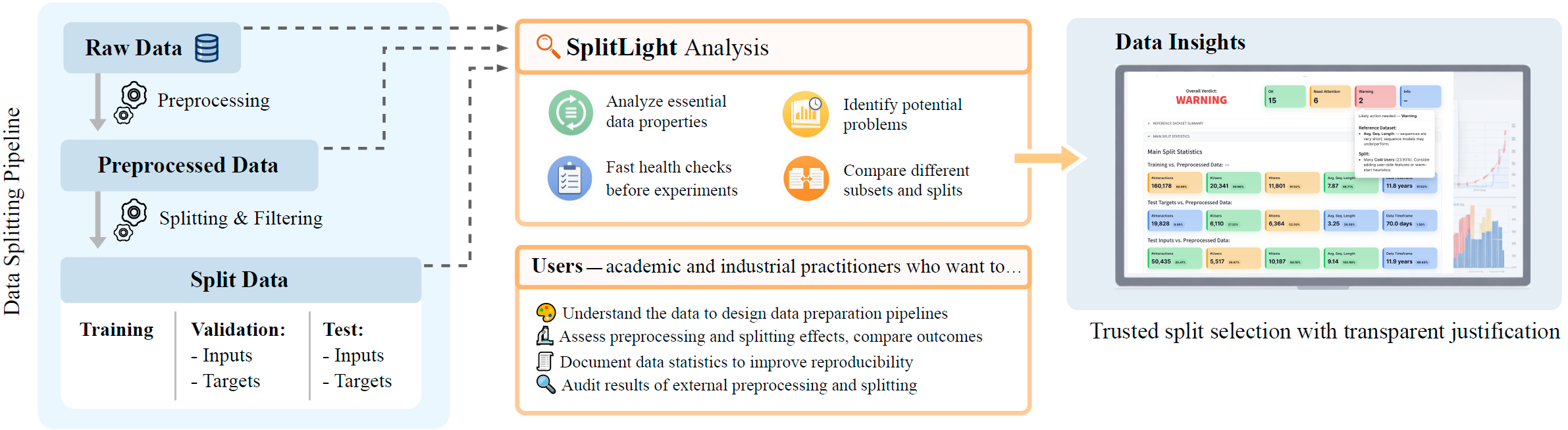
SplitLight in a data-preparation pipeline. From the raw dataset to split subsets, SplitLight audits data, flags problems, and enables side-by-side comparison of alternative splits to justify the selected evaluation protocol.
[!NOTE]
See short video walkthrough of SplitLight motivation and usage.
Quick Start
pip install -r requirements.txt
export PYTH
export SEQSPLITSDATA_PATH=$(pwd)/data- Requirements file:
requirements.txt - Your datasets live under
data/(see layout below).
Data Layout
SplitLight expects each dataset under data/<DatasetName>/ with either a raw.csv (original schema) or preprocessed.csv (standard schema).
raw.csv(optional): original column names are defined inruns/configs/dataset/<DatasetName>.yamlpreprocessed.csv: standardized columns:userid,itemid,timestamp(seconds)- After splitting, a per-split subfolder contains:
train.csv,validationinput.csv,validationtarget.csv,testinput.csv,testtarget.csv
data/
├── Beauty/
│   ├── raw.csv                          # optional
│   ├── preprocessed.csv
│   └── leave-one-out/                   # example split folder
│       ├── train.csv
│       ├── validation_input.csv
│       ├── validation_target.csv
│       ├── test_input.csv
│       └── test_target.csv
└── Diginetica/
    ├── preprocessed.csv
    └── GTS-q09-valbytime-target_last/
        ├── train.csv
        ├── validation_input.csv
        ├── validation_target.csv
        ├── test_input.csv
        └── test_target.csv
Streamlit UI
Launch the app for interactive dataset and split audits.
export PYTH
export SEQSPLITSDATA_PATH=$(pwd)/data
streamlit run SplitLight.py
For better experience, zoom out the page to adjust to your screen size.
What you can explore:
- Core and temporal statistics per subset and vs. reference
- Interactions distribution over time
- Repeated consumption patterns (non-unique and consecutive repeats)
- Temporal leakage: shared interactions, overlap, and “leakage from future”
- Cold-start exposure of users and items
- Compare splits side-by-side and analyze time-gap deltas between input and target
What SplitLight Checks
| Category | Description | | ----------------------- | ---------------------------------------------------------------------------------------------------------------------------------------------------------------------------------------------------- | | Dataset and Subsets | Analyze raw and preprocessed data in terms of core and temporal statistics and compare. Identify repeated consumption patterns. Visualize interactions distribution over time. | | Subsets and Splits | Analyze split data in terms of core and temporal statistics and compare subsets with full data. Identify and visualize presence of data leakage. Quantify and visualize user and item cold start. | | Compare splits | Compare different splits in terms of core and temporal statistics. Identify distribution shifts for target subset. |
You can also run these checks manually using functions from thesrc/statsmodule for custom analyses or integration into your own pipelines (seedemo notebook).
Streamlit Summary Page
 The Summary page in the Streamlit UI provides a high-level overview of dataset and split health. It aggregates key diagnostics into a single dashboard, helping you quickly identify quality issues and distribution imbalances.
What It Provides
- Instant snapshot of dataset quality and split integrity
- Compact visualization of core, temporal, and leakage statistics
- Color-coded signals to highlight potential issues at a glance
- 🟢 OK — within expected bounds
- 🟡 Need Attention — mild irregularity detected
- 🔴 Warning — potential data issue or leakage risk
▶ Click to play the short SplitLight's Summary Page showcase.
Configuration
Thresholds and color rules for the Summary view can be customized instreamlit_ui/config/summary.yml.
Project Structure (Key Parts)
src/stats/— Core diagnostics:base(core/temporal stats),leaks,cold,duplicates,temporal,plots. Use these in scripts or notebooks for custom analyses.streamlit_ui/pages/— Streamlit pages for load, Summary, core/temporal stats, repeated consumption, leakage, cold start, and split comparison.runs/— CLI entrypoints and Hydra configs:preprocess.py,split.py,trainrs.py; configs underruns/configs/(dataset, split, preprocess, trainrs, model).
FAQ
- Q: Can I use Parquet files?
.csv and .parquet are supported. On the UI home page, choose the file format (e.g. .parquet or both).
- Q: Do I need
raw.csv?
preprocessed.csv in the standard schema (userid, itemid, timestamp). raw.csv is optional when you want to run the preprocessing pipeline from raw logs.
- Q: What time unit is
timestamp?
- Q: I only have raw interaction logs. How do I start?
runs/configs/dataset/<Name>.yaml mapping your columns to userid, itemid, timestamp. (2) Put raw.csv (or raw data) under data/<DatasetName>/. (3) Run your own preprocessing script or use example python runs/preprocess.py +dataset=<DatasetName> to get preprocessed.csv. (4) Run your split script or use example python runs/split.py to create a split, then open the Streamlit app or jupyter notebook (see demo notebook) to audit dataset and split.
- Q: How do I use SplitLight in my own Python code?
src.stats (e.g. leaks.getleaks, cold.shareofcold, base.basestats) and call them on your DataFrames. See the demo notebook for examples.
- Q: Why should I care about split quality?
A: The split defines what you are actually evaluating. Leaky or inconsistent splits lead to overestimated metrics and results that don’t transfer to real deployment. SplitLight helps you document and justify your split choice and catch issues early.
CLI Utilities For Experimenting
These CLI tools are provided to illustrate a complete pipeline for preprocessing and splitting datasets. The results of the preprocessing and splitting could be audited using the SplitLight. To train a sequential model on the split data and evaluate, how different data preprocessing and splitting strategies affect the model performance, use the example python runs/train_rs.py.
See runs/README.md for more detailed explanation on CLI tools and experimental setup for splitting results in
/data dir.
Preprocess
Standardize and clean your raw interaction logs.
<pre><code class="lang-bash">export SEQSPLITSDATA_PATH=$(pwd)/data python runs/preprocess.py +dataset=Beauty</code></pre>
- Config:
runs/configs/preprocess.yaml
Dataset column mapping: runs/configs/dataset/
Output: data/
Split
Split your dataset using
Leave-One-Out (LOO) or Global Time Split (GTS) strategies. See src/splits.py for implementation details.
<pre><code class="lang-bash"># Leave-one-out (LOO) python runs/split.py splittype=leave-one-out splitparams.removecolditems=True
Global time split (GTS)
python runs/split.py \
dataset=Beauty \
splittype=globaltimesplit \
split_params.quantile=0.9 \
splitparams.validationtype=by_time \
splitparams.targettype=last</code></pre>
- Common options:
- dataset=: must match a YAML in runs/configs/dataset/
- removecoldusers=true|false
- removecolditems=true|false
- GTS options:
- split_params.quantile (required) — global time threshold
- splitparams.validationtype — bytime | byuser | lasttrainitem
- splitparams.validationsize — number of users for by_user
- splitparams.validationquantile — time for by_time
- splitparams.targettype — all | first | last | random
- Config:
runs/configs/split.yaml
Output: splits are saved under data/
Train Recommender Model on Selected Data Split
<pre><code class="lang-bash">export PYTH export SEQSPLITSDATA_PATH=$(pwd)/data python runs/trainrs.py dataset=Beauty splitname=leave-one-out</code></pre>
- Config:
runs/configs/train_rs.yaml`
Contributing
We welcome and appreciate all forms of contributions to make SplitLight better! If you have ideas to improve SplitLight, please feel free to submit a Pull Request.Citation
If you use SplitLight in research or production, please consider citing our paper:@misc{splitlight2026,
title={SplitLight: An Exploratory Toolkit for Recommender Systems Datasets and Splits},
author={Anna Volodkevich and Dmitry Anikin and Danil Gusak and Anton Klenitskiy and Evgeny Frolov and Alexey Vasilev},
year={2026},
eprint={2602.19339},
archivePrefix={arXiv},
primaryClass={cs.IR}
}


