
This solution accelerator provides the architecture and working solution for real-time intelligence for operations. Key features include real-time dashboard, anomaly detection, and fabric data agent.
Real-Time Intelligence for Operations Solution Accelerator
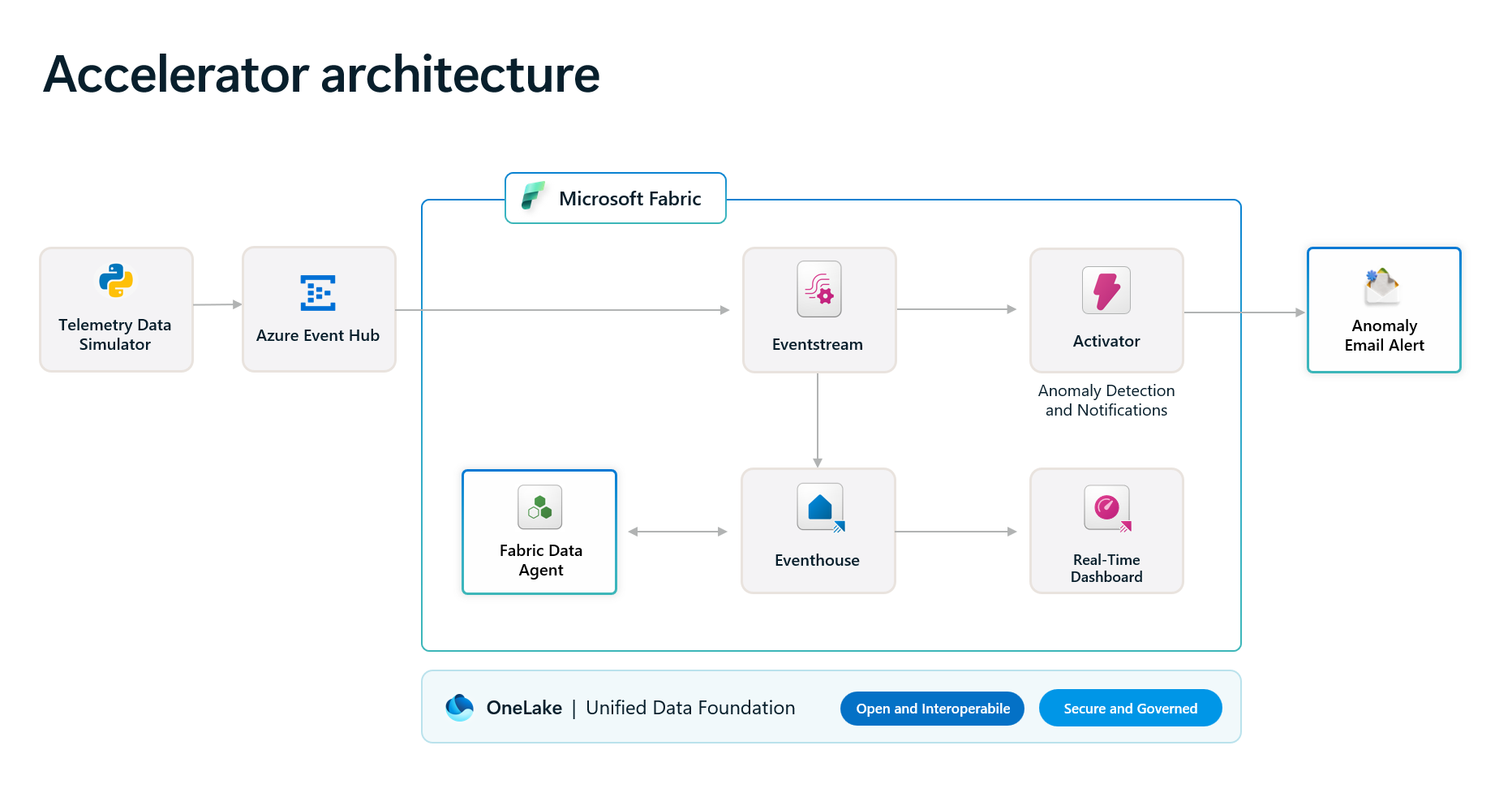
This solution accelerator provides a complete real-time intelligence platform for manufacturing operations. It analyzes live and historical telemetry data through interactive dashboards, automatically detects anomalies with email alerts, and includes an AI-powered data agent for conversational insights. The architecture and approach can be easily extended to other industries for broad adoption.
Key use cases include:
- Real-time dashboard with up-to-date analysis and reporting.
- Anomaly detection and notification.
- Customized data agent answering users' questions with intelligence derived from the data.
 Solution overview
This solution accelerator delivers comprehensive asset monitoring, real-time anomaly detection, and automated notifications for manufacturing operations.
Solution architecture
Below diagram illustrates the solution architecture. Synthetic telemetry data is generated by the Telemetry Data Simulator. The architecture easily adapts to other industries by connecting your own data sources to Azure Event Hub and customizing the dashboards and queries. For technical details, see the Solution Architecture Overview.
|  | | -------------------------------------------------------- | | |
How to customize
If you'd like to customize the solution accelerator, here are some common areas to start:- Data generation and collection: You can customize the data simulator to generate data that is closely aligned with your own industry or your own company.
- Update the KQL queries for the tiles in Real-Time Intelligence dashboard.
- Update the Activator rules to meet your business needs.
- Update the instructions to the Fabric Data Agent to align with your own business goals and data insights.
Resources
What's New in Microsoft Fabric
What Is Real-Time Intelligence in Microsoft Fabric?
Features
Click to learn more about the key features this solution enables
- Fabric Data Ingestion Program and Real-Time Event Simulator
One-time batch historical data simulator and real-time telemetry data simulator are provided. For more details, please refer to Fabric Data Ingestion Guide and Event Simulator Guide.
- Real-Time Intelligence Operations Dashboard
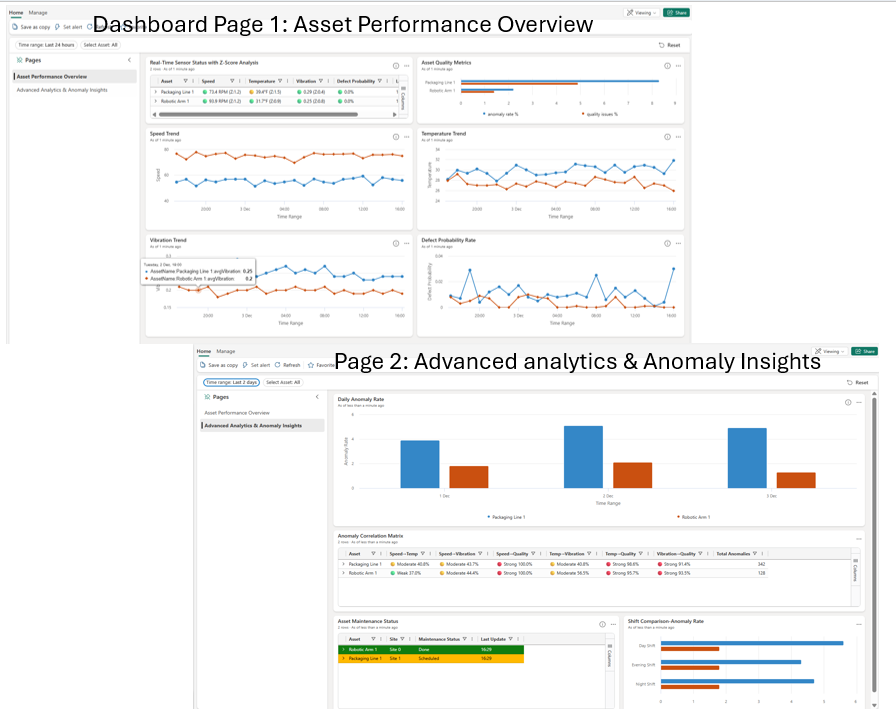
Real-Time Intelligence Operations Dashboard provides an overview of how manufacturing assets are performing, and shows individual sensor data trends. For details, please refer to Real-Time Intelligence Dashboard Guide.
- Fabric EventHouse with Customized Fabric Data Agent
Manufacturing telemetry data is hosted in Fabric EventHouse. You can use conversational interface powered by Fabric Data Agent for live operational queries. For details, please refer to Fabric Data Agent Guide.
- Anomaly Detection and Alerts through Fabric Activator
Microsoft Activator is configured with anomaly detection rules that trigger Outlook email notifications when an anomaly occurs. For more details, please refer to Activator Guide.
- Useful Data Analysis and Performance Metrics KQL Code
Reusable KQL code is provided to get you started quickly. For details, please refer to Data Analysis KQL Guide and Performance Metrics KQL Queryset Guide.
- Demonstrator's Guide
After successful deployment of the solution accelerator, you or your colleague who has required access can demonstrate this solution by following the steps outlined in the Demonstrator's Guide.
 Quick deploy
Getting Started
How to install or deploy
Follow these steps to deploy the solution to your own Azure subscription:
| 


One-command deployment - Deploy everything with Azure Developer CLI and Azure CLI (check prerequisites):
# Clone and navigate to repository
git clone https://github.com/microsoft/real-time-intelligence-operations-solution-accelerator.git
cd real-time-intelligence-operations-solution-accelerator
Authenticate (required)
azd auth login # Required to deploy with azd up
az login # Required to use the Azure CLI commands that connect Azure resources to Fabric workspace
Recommended: set email to receive alerts
azd env set FABRICACTIVATORALERTS_EMAIL "myteam@company.com"
Optional: Customize resource names
azd env set FABRICWORKSPACENAME "My RTI Workspace"
azd env set FABRICWORKSPACEADMINISTRATORS "user@company.com,12345678-1234-abcd-1234-123456789abc" # comma-separated
azd env set FABRICEVENTHOUSENAME "mycustomeventhouse"
azd env set FABRICEVENTHOUSEDATABASENAME "mycustomkqldb"
azd env set FABRICEVENTHUBCONNECTIONNAME "myeventhubconnection"
azd env set FABRICRTIDASHBOARDNAME "My Custom Dashboard"
azd env set FABRICEVENTSTREAMNAME "mycustomeventstream"
azd env set FABRICACTIVATORNAME "mycustomactivator"
Deploy everything
azd up
For additional deployment configuration and detailed setup instructions, see the deployment guide.
Prerequisites and costs
Microsoft Fabric Capacity is enabled for your organization. Please refer to Enable Microsoft Fabric for your organization for more information.To deploy this solution accelerator, ensure you have access to an Azure subscription with the necessary permissions to create resource groups, resources, app registrations, and assign roles at the resource group level. This should include Contributor role at the subscription level and Role Based Access Control role on the subscription and/or resource group level. Follow the steps in Azure Account Set Up.
Licensing and cost for establishing Fabric can be found at Microsoft Fabric concepts and licenses and Microsoft Fabric Pricing.
Consumption model and pricing information for Azure Databricks can be found at Serverless DBU consumption by SKU - Azure Databricks.
Note: This is not meant to outline all costs as selected SKUs, scaled use, customizations, and integrations into your own tenant can affect the total consumption of this sample solution. The sample pricing sheet is meant to give you a starting point to customize the estimate for your specific needs.
| Product | Description | Cost | |---|---|---| | Microsoft Fabric | Core Medallion Architecture in Microsoft Fabric, and Unified Data Platform for integration with other platforms such as Azure Databricks and Snowflakes. | Pricing |
>⚠️ Important: To avoid unnecessary costs, remember to take down your app if it's no longer in use, either by deleting the resource group in the Portal or running azd down.
 Business use case
Use cases can be summarized as below:
- For manufacturing plants, the plant manager or other business stakeholders can use the Fabric Data Agent to get business and operations intelligence quickly without the need to create query code. For details, please refer to Fabric Data Agent Guide.
- For manufacturing plants, the designated operations team receives email notification when an anomaly occurs. The solution can also be configured to send anomaly notifications to a Teams Channel. For rule configuration options (Email or Teams), please refer to Activator Guide.
- Plant manager uses real-time dashboard to analyze manufacturing plant asset performance, key telemetry data over time.
|  | | ------------------------------------------------ |
⚠️ The sample data used in this repository is synthetic and generated using Python Programs. The data is intended for use as sample data only.
Business value
Click to learn more about what value this solution provides
- The solution provides multiple business functions with a simple architecture
The deployed solution provides real-time telemetry data monitoring, analysis, summarization, graphical reports, anomaly detection and notifications with a quick to deploy, secure, and simple architecture.
- A Fabric Data Agent getting quick business intelligence without programming effort
The Fabric Data Agent can be quickly configured with instructions delivered in this solution accelerator, providing quick and accurate insights from data effortlessly. No programming skills are necessary.
- Real-Time Intelligence for Operations Dashboard
The deployed solution accelerator provides a working architecture with best practices, security, components integration, and real-time intelligence for operations dashboard.
- Configurable Activator providing anomaly detection and notifications
The deployed and configurable Activator provides real-time anomaly detection and alert notifications out of the box. The rules are easily configurable.
- Reusable and updatable real-time event simulator and batch data update program
Real-time telemetry data simulator and batch data ingestion / update program are provided to help to bring the solution to simulate a real-time environment quickly.
 Supporting documentation
Guidance
Security guidelines
This template uses Azure Key Vault to store all connections to communicate between resources.
This template also uses Managed Identity for local development and deployment.
To ensure continued best practices in your own repository, we recommend that anyone creating solutions based on our templates ensure that the GitHub secret scanning setting is enabled.
You may want to consider additional security measures, such as:
- Enabling Microsoft Defender for Cloud to secure your Azure resources.
- Protecting the Azure Container Apps instance with a firewall and/or Virtual Network.
Frequently asked questions
Click here to learn more about common questions about this solution.
Cross references
Check out similar solution accelerators| Solution Accelerator | Description | |---|---| | Unified Data Foundation with Microsoft Fabric | Unified Data Foundation with Microsoft Fabric with Options to Integrate with Azure Databricks and Microsoft Purview. | | Agentic applications for unified data foundation | Agentic AI application that provides natural language query of the data using unified data foundation. Description of solution accelerator. |
💡 Want to get familiar with Microsoft's AI and Data Engineering best practices? Check out our playbooks to learn more
| Playbook | Description | |:---|:---| | AI playbook | The Artificial Intelligence (AI) Playbook provides enterprise software engineers with solutions, capabilities, and code developed to solve real-world AI problems. | | Data playbook | The data playbook provides enterprise software engineers with solutions which contain code developed to solve real-world problems. Everything in the playbook is developed with, and validated by, some of Microsoft's largest and most influential customers and partners. |
Provide feedback (To update the link)
Have questions, find a bug, or want to request a feature? Submit a new issue on this repo and we'll connect.
Responsible AI Transparency FAQ (To update the Transparency FAQs)
Please refer to Transparency FAQ for responsible AI transparency details of this solution accelerator.Disclaimers
To the extent that the Software includes components or code used in or derived from Microsoft products or services, including without limitation Microsoft Azure Services (collectively, “Microsoft Products and Services”), you must also comply with the Product Terms applicable to such Microsoft Products and Services. You acknowledge and agree that the license governing the Software does not grant you a license or other right to use Microsoft Products and Services. Nothing in the license or this ReadMe file will serve to supersede, amend, terminate or modify any terms in the Product Terms for any Microsoft Products and Services.
You must also comply with all domestic and international export laws and regulations that apply to the Software, which include restrictions on destinations, end users, and end use. For further information on export restrictions, visit https://aka.ms/exporting.
You acknowledge that the Software and Microsoft Products and Services (1) are not designed, intended or made available as a medical device(s), and (2) are not designed or intended to be a substitute for professional medical advice, diagnosis, treatment, or judgment and should not be used to replace or as a substitute for professional medical advice, diagnosis, treatment, or judgment. Customer is solely responsible for displaying and/or obtaining appropriate consents, warnings, disclaimers, and acknowledgements to end users of Customer’s implementation of the Online Services.
You acknowledge the Software is not subject to SOC 1 and SOC 2 compliance audits. No Microsoft technology, nor any of its component technologies, including the Software, is intended or made available as a substitute for the professional advice, opinion, or judgement of a certified financial services professional. Do not use the Software to replace, substitute, or provide professional financial advice or judgment.
BY ACCESSING OR USING THE SOFTWARE, YOU ACKNOWLEDGE THAT THE SOFTWARE IS NOT DESIGNED OR INTENDED TO SUPPORT ANY USE IN WHICH A SERVICE INTERRUPTION, DEFECT, ERROR, OR OTHER FAILURE OF THE SOFTWARE COULD RESULT IN THE DEATH OR SERIOUS BODILY INJURY OF ANY PERSON OR IN PHYSICAL OR ENVIRONMENTAL DAMAGE (COLLECTIVELY, “HIGH-RISK USE”), AND THAT YOU WILL ENSURE THAT, IN THE EVENT OF ANY INTERRUPTION, DEFECT, ERROR, OR OTHER FAILURE OF THE SOFTWARE, THE SAFETY OF PEOPLE, PROPERTY, AND THE ENVIRONMENT ARE NOT REDUCED BELOW A LEVEL THAT IS REASONABLY, APPROPRIATE, AND LEGAL, WHETHER IN GENERAL OR IN A SPECIFIC INDUSTRY. BY ACCESSING THE SOFTWARE, YOU FURTHER ACKNOWLEDGE THAT YOUR HIGH-RISK USE OF THE SOFTWARE IS AT YOUR OWN RISK.


