
ML DevOps using GitHub Actions and Azure Machine Learning
INFO: We have built a new and even simpler method to do MLOps with GitHub Actions. Please visit this repository to get started: https://github.com/machine-learning-apps/ml-template-azure
/badge.svg)
ML DevOps with GitHub Actions and Azure ML
This repository demonstrates how to automate the machine learning lifecycle using the CI/CD pipeline tools of GitHub Actions and Azure Machine Learning for training and deployment. The repository does not make use of Azure DevOps, but uses GitHub Actions as a future proof backend system for workflow automation.
The repository includes the following features:
- GitHub Actions for the continuous integration (CI) and continuous delivery (CD) pipeline
- Azure Machine Learning as a backend for training and deployment of machine learning models
- CI/CD pipeline as code: the repository uses the Azure Machine Learning Python SDK to define the CI/CD steps and implements almost all features of this framework
- Central settings file in json format to enable quick customization of of each step of the pipline
Implemented Azure ML features in the CI/CD pipeline
The repository and the CI/CD pipeline makes use of the following key features of Azure Machine Learning:
- Loading or deployment of Workspace
- Training on different compute engines: Azure Machine Learning Compute, Data Science VM, Remote VM
- Granular adjustment of training process
- Comparison of models before registration in workspace
- Model profiling after training has completed successfully
- Deployment with testing in three phases:
- And many others ...
What is ML DevOps?
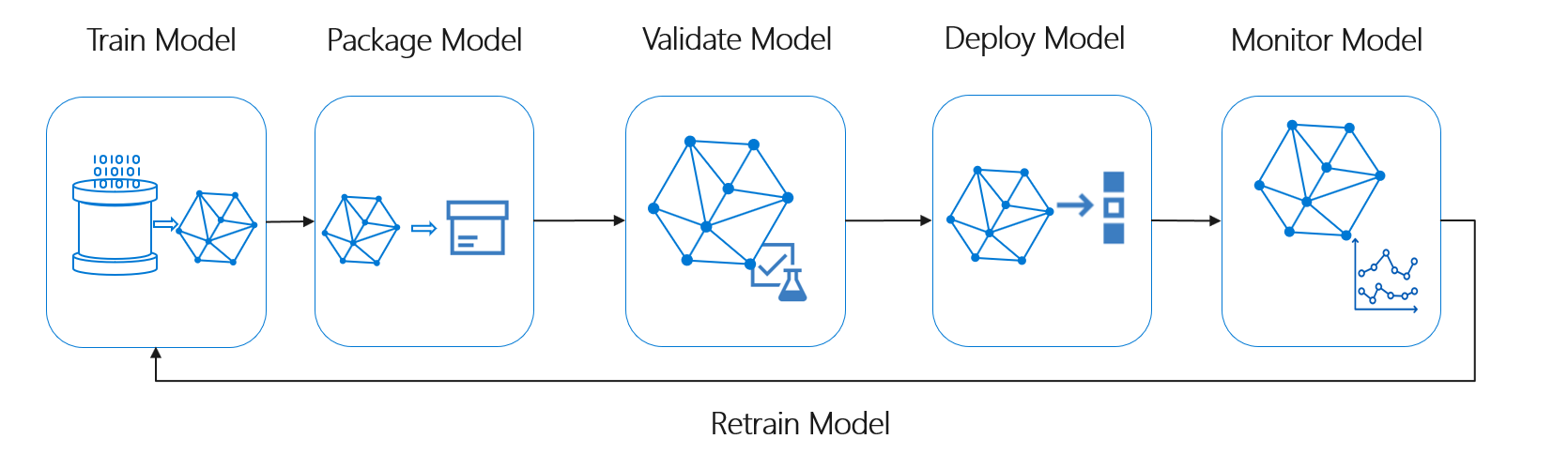
MLOps empowers data scientists and app developers to bring together their knowledge and skills to simplify the model development as well as the release and deployment of them. ML DevOps enables you to track, version, test, certify and reuse assets in every part of the machine learning lifecycle and provides orchestration services to streamline managing this lifecycle. This allows to automate the end to end machine Learning lifecycle to frequently update models, test new models, and continuously roll out new ML models alongside your other applications and services.
This repository enables Data Scientists to focus on the training and deployment code of their machine learning project (code folder of this repository). Once new code is checked into the code folder of the master branch of this repository, the CI/CD pipeline is triggered and the training process starts automatically in the linked Azure Machine Learning workspace. Once the training process is completed successfully, the deployment of the model takes place in three stages: dev, test and production stage.
Key challenges solved by ML DevOps
Model reproducibility & versioning
- Track, snapshot & manage assets used to create the model
- Enable collaboration and sharing of ML pipelines
- Maintain asset integrity & persist access control logs
- Certify model behavior meets regulatory & adversarial standards
- Support model portability across a variety of platforms
- Certify model performance meets functional and latency requirements
- Release models with confidence
- Monitor & know when to retrain by analyzing signals such as data drift
Prerequisites
The following prerequisites are required to make this repository work:
- Azure subscription
- Contributor access to the Azure subscription
- Access to the GitHub Actions Beta
Settings file
The repository uses a central settings file in /amlservice/settings.json to enable quick customizations of the end to end pipeline. The file can be found here and can be used to adjust the parameters of:
- The compute engines for training and deployment,
- The training process (experiment and run) and
- The deployment process.
GitHub Workflow
The GitHub Workflow requires the follwing secrets:
AZURECREDENTIALS: Used for the az login action in the GitHub Actions Workflow. Please visit this website for a tutorial of this GitHub Action.FRIENDLY_NAME: Friendly name of the Azure ML workspace.LOCATION: Location of the workspace (e.g.westeurope, etc.)RESOURCE_GROUP: Resource group where Azure Machine Learning was or will be deployed.SUBSCRIPTION_ID: ID of the Azure subscription that should be used.WORKSPACE_NAME: Name of your workspace or the workspace that should be created by the pipeline.
Further Links
- GitHub Actions Documentation
- Azure Machine Learning Documentation
- Azure Machine Learning Python SDK Reference
TODO
- Implement automatic Swagger generation
- Handover of model name to training script
- Bugfix in model evaluation
- stop pileine failing if model performs worse: use features in GitHub Actions for improvement


