
Make a cascading timeline from markdown-like text. Supports simple American/European date styles, ISO8601, images, links, locations, and more.
Markwhen is alive and well, just not in this repository
Markwhen's components have been separated and live in other repositories under the mark-when organization.
The web app (the editor) is the only thing that isn't open source. Everything else (including the timeline itself and the vs code extension) is - check out the links below and the diagram of repositories image.
Markwhen
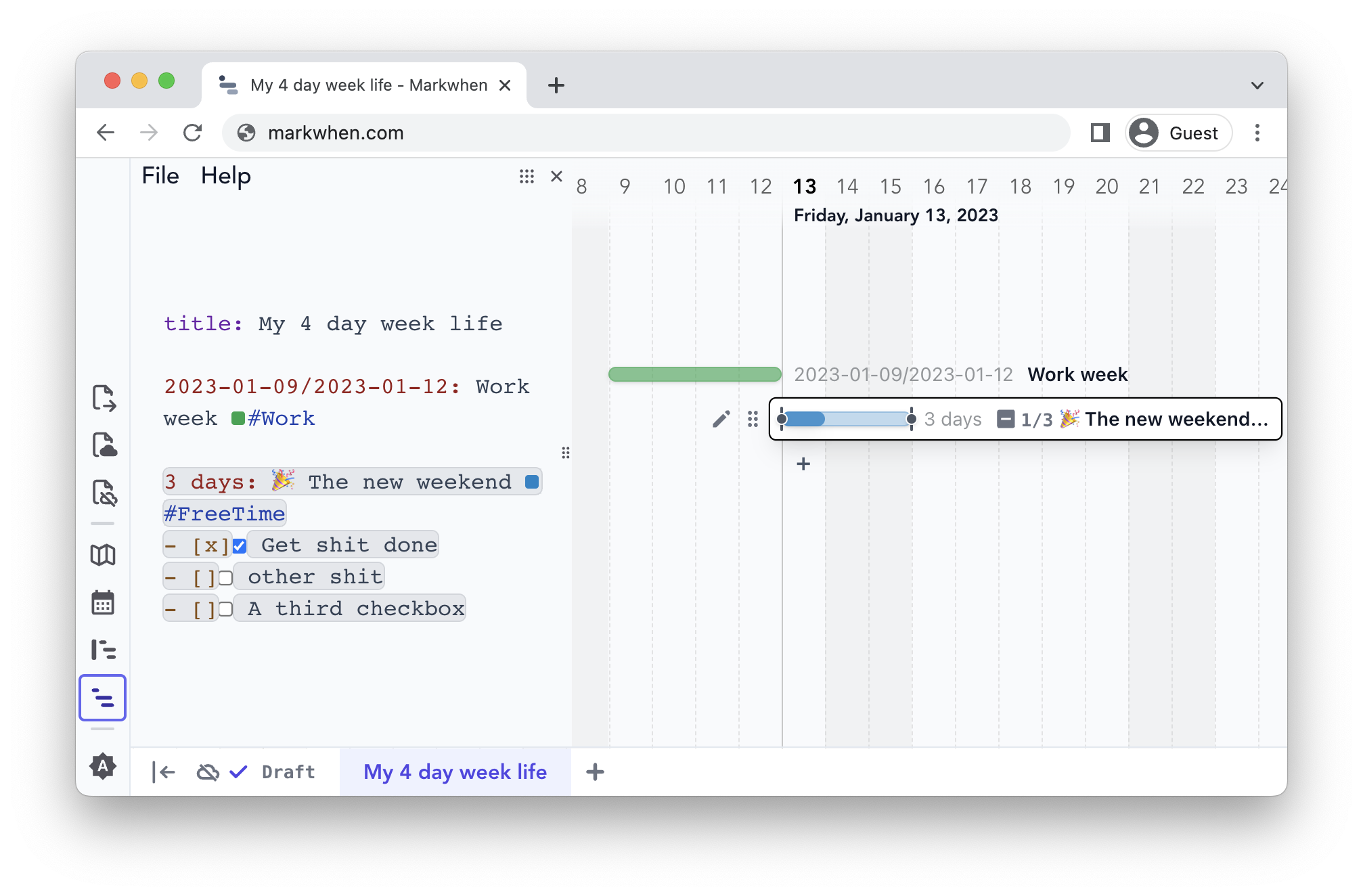
Markwhen is an interactive text-to-timeline tool. Write markdown-ish text and it gets converted into a nice looking cascading timeline.
Use the editor here.
This repo is for the view container, not the editor. The editor (markwhen.com) and VSCode extension are built on top of the view container.
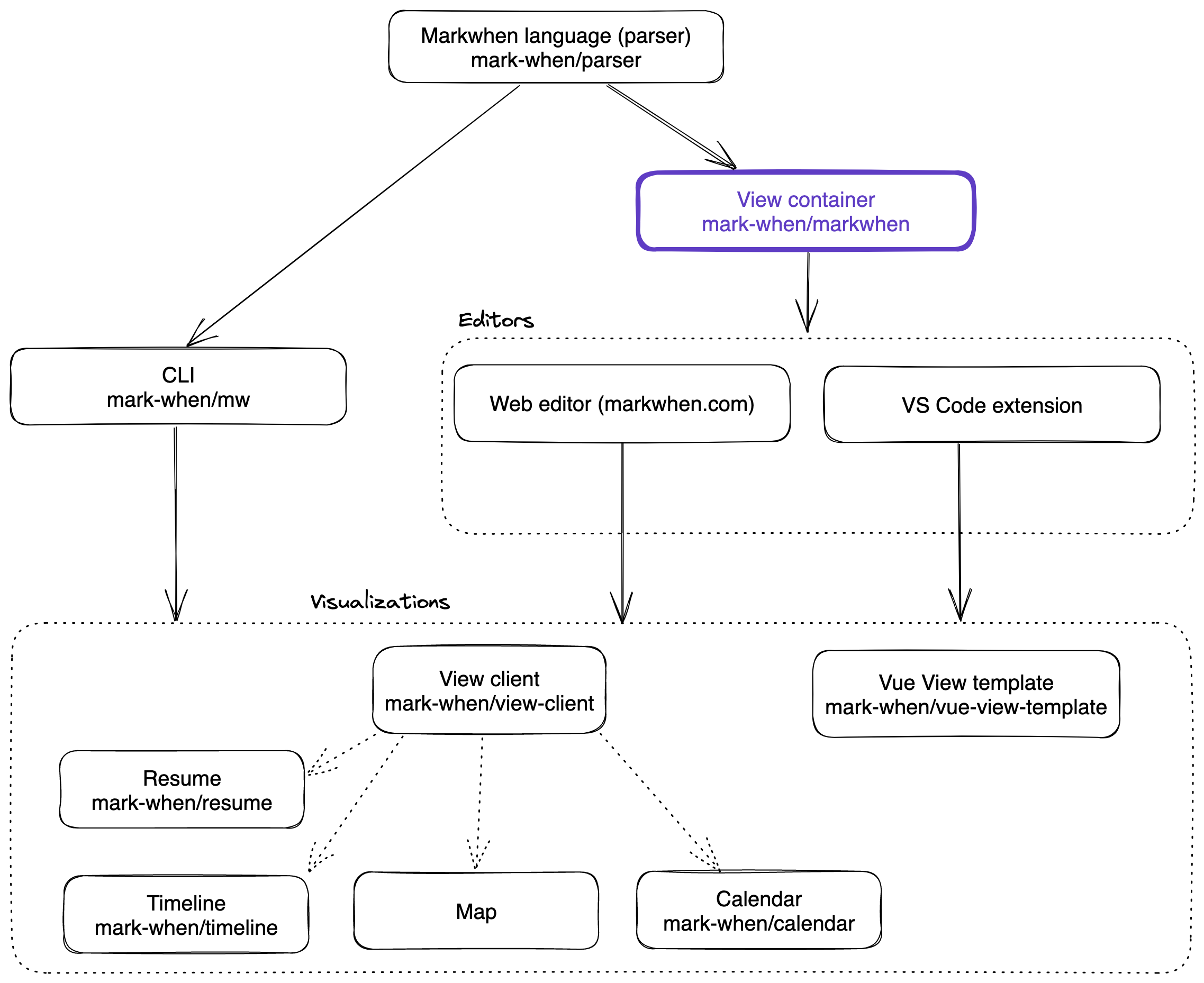
The view container renders different views, like the timeline and the calendar. It is possible to create your own views using the view client library.
| Links | | | ----------------------------------------------- | ---------------------------------------------------------------------------------------------------------------------------------------------- | | Editor | https://markwhen.com | | VSCode extension | https://marketplace.visualstudio.com/items?itemName=Markwhen.markwhen | | Documentation | https://docs.markwhen.com | | Blog | https://blog.markwhen.com | | Parser | https://github.com/mark-when/parser | | Timeline View | https://github.com/mark-when/timeline | | Calendar View | https://github.com/mark-when/calendar | | Resume View | https://github.com/mark-when/resume | | View Client Library (for making your own views) | https://github.com/mark-when/view-client | | Vue view template | https://github.com/mark-when/vue-view-template |
Get updated
If you'd like to be kept up-to-date about markwhen's feature development, add your email here.
VSCode Extension
Get the VSCode extension here.
To switch between the text editor and the timeline view, select View: Reopen editor with... from the command palette and choose Text Editor.
Self-hosted views
⚠️ Note that if you intend to run markwhen locally you may also want to host views locally ⚠️
The default view is hosted from https://timeline.markwhen.com. You may want to run your own local instance of the timeline (or other view) and update useViewProviders accordingly:
/ src/Views/useViewProviders.ts /
...
export const useTimelineExternalProvider = () => ({ id: "markwhen.timeline", name: "Timeline",
- url: "https://timeline.markwhen.com",
- url: "http://localhost:5173"
... })Quick start
View container:> git clone git@github.com:mark-when/markwhen.git
> cd markwhen
> npm i
> npm run dev(Optional) Run the timeline view locally:
> git clone git@github.com:mark-when/timeline.git > cd timeline > npm i > npm run dev(Optional) Update useViewProviders:
/ src/Views/useViewProviders.ts /
...
export const useTimelineExternalProvider = () => ({ id: "markwhen.timeline", name: "Timeline",
- url: "https://timeline.markwhen.com",
- url: "http://localhost:5173"
... })The renderer renders whatever is given to the markwhenStore.
To enable editing from the timeline view, set editorOrchestrator.editable to true:
const editable = ref(true);Dockerized
> git clone git@github.com:mark-when/markwhen.git
> cd markwhen
> docker build -t markwhen .
> docker run -p8080:8080 markwhen
This should build a development markwhen image from the Dockerfile and run it on port 8080. Once running, it should be available at http://localhost:8080
Documentation
Documentation is located here.


