
Jetpack Compose + Kotlin + Coroutines + Koin + Coil + Klock + Spotless + Ktlint + Detekt + MVVM + MVI
Last updated Jun 3, 2026
100
Stars
12
Forks
0
Issues
0
Stars/day
Attention Score
22
Topics
Language breakdown
No language data available.
▸ Files
click to expand
README
MovieBox Compose 🚧 [Work in progress] 🚧



Project characteristics and tech-stack
Tech-stack
+ Coroutines - perform background operations- Networking: Retrofit
- Jetpack Compose
- Accompanist - collection of extension libraries for
- Klock - multiplatform Date and time library for Kotlin
- Architecture
- Dependency Injection: Koin
- Static analysis tools
- Gradle: Gradle Kotlin DSL +
- Loggers: Kotlin Logging
- **Dependency
- Git: Specification - Conventional Commits
Architecture
Multi-module architecture
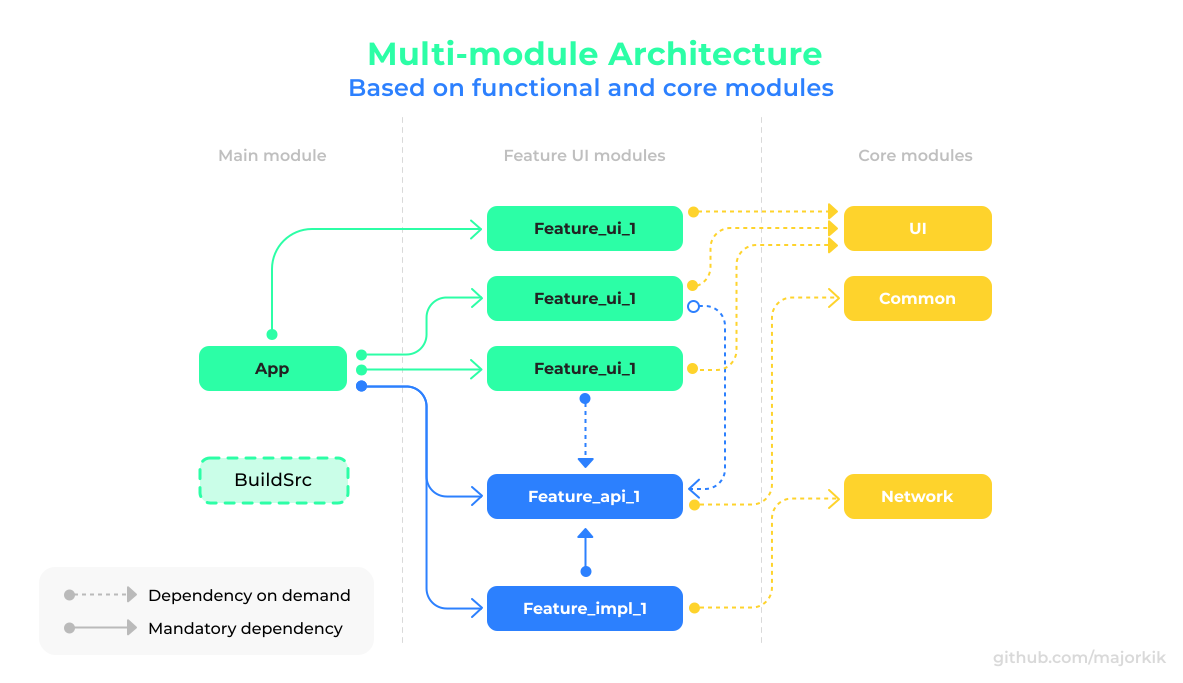
- App module: the entry point to the application, contains almost no code, depends on the
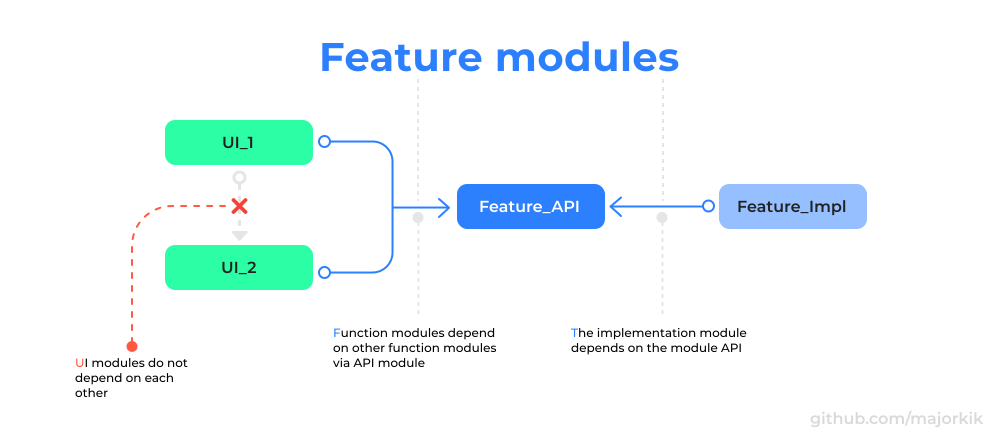
- Feature module: contain specific functionality. By structure, these modules can contain all
- Core module: contains helper code that can be used in more than one module. These can be
- BuildSrc: can contain application configuration, dependency versions and custom gradle tasks.
Future modules
Getting started
The project has a set of githooks. In order for git to detect them, you need to add them to the config.
git config --local core.hooksPath .githooksThere are a few ways to open this project.
Android Studio
Android Studio->File->New->From Version control->Git- Enter
https://github.com/majorkik/MovieBox-Compose.gitinto URL field an pressClonebutton
Command-line + Android Studio
- Run
git clone https://github.com/majorkik/MovieBox-Compose.gitcommand to clone project - Open
Android Studioand selectFile | Open...from the menu. Select cloned directory and
Open button
Project configuration
Add parameters in the locale.properties file as shown in the example below.
keyTmdb="Your TMDb Key"Where can I get a TMDb API key?
- Open TheMovieDatabase ->
Login/Join TMDb->Profile
Settings -> API -> Copy API Key (v3 auth)
- Paste copied key into
local.propertiesfile (keyTmdb)
Links
Here I will leave useful links to utilities, projects or articles that may come in handy when developing mobile applications.
Projects:
- Jetpack compose samples - official Jetpack Compose
ToDo
- [ ] Add git-hooks
- [ ] Implement networking with Ktor
- [ ] Try to implement a network layer in Rust (Experiment)
- [ ] Write tests (unit/instrumental)
- [ ] Update readme (naming and code conventions)
- [ ] Add data caching
- [ ] Add debug menu
Useful links:
- Gradle plugins - Plugin search
- GitIgnore.io - .gitignore builder


