
A Data Engineering Project that implements an ETL data pipeline using Dagster, Apache Spark, Streamlit, MinIO, Metabase, Dbt, Polars, Docker. Data from kaggle and youtube-api
🌄 Youtube-ETL-Pipeline
In this project, I build a simple data pipeline following the ETL(extract - transform - load) model using Youtube-Trending-Video dataset, perform data processing, transformation and calculation using Apache Spark big data technology, serving the video search and recommendation system🔦 About Project
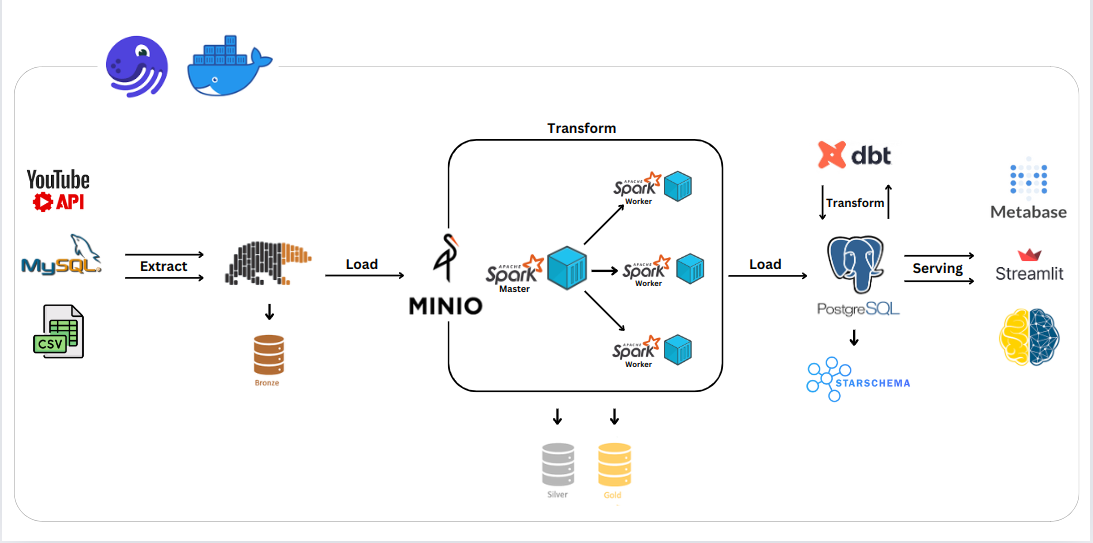
- Data Source: This project uses two main data sources: Youtube Trending Video data and Youtube API - Youtube Trending Video data is downloaded from Kaggle.com with .csv file format, then loaded into MySQL, considered as a data source - Using Video ID and Category ID from Youtube Trending Video data, we collect some additional information fields from Youtube API such as Video Link and Video Category - Extract Data: Extract the above data sources using Polars DataFrame, now we have the raw layer, then load the data into MinIO datalake - Tranform Data: From MinIO, we use Apache Spark, specifically PySpark - convert from Polars DataFrame to PySpark DataFrame for processing and calculation, we get silver and gold layers - Data stored in MinIO is in .parquet format, providing better processing performance - Load Data: Load the gold layer into the PostgreSQL data warehouse, perform additional transform with dbt to create an index, making video searching faster - Serving: The data was used for visualization using Metabase and creating a video recommendation application using Streamlit - package and orchestrator: Use Docker to containerize and package projects and Dagster to coordinate assets across different tasks
⚡ Workflow

📦 Technologies
-MySQL
- Youtube API
- Polars
- MinIO
- Apache Spark
- PostgreSQL
- Dbt
- Metabase
- Streamlit
- Dagster
- Docker
- Apache Superset
- Unittest
- Pytest
🦄 Features
Here's what you can do with: - You can completely change the logic or create newassets in the data pipeline as you wish, perform aggregate calculations on the assets in the pipeline according to your purposes.
- You can also create new data charts as well as change existing charts as you like with extremely diverse chart types on Metabase and Apache Superset.
- You can also create new or change my existing dashboards as you like
- Search videos quickly with any keyword, for Video Recommendation Apps
- Search in many different languages, not just English such as: Japanese, Canadian, German, Indian, Russian
- Recommend videos based on category and tags video
👩🏽🍳 The Process
📚 What I Learned
During this project, I learned important skills, understood complex ideas, knew how to install and set up popular and useful tools, which brought me closer to becoming a Data Engineer. - Logical thinking: I learned how to think like a data person, find the cause of the data problem and then come up with the most reasonable solution to achieve high data accuracy. - Architecture: I understand and grasp the ideas and architecture of today's popular and popular big data processing tool, Apache Spark. - Installation: I learned how to install popular data processing, visualization and storage tools such as: Metabase, Streamlit, MinIO,... with Docker - Setup: I know how to setup Spark Standalone Cluster using Docker with three Worker Nodes on my local machine
📈 Overall Growth:
Each part of this project has helped me understand more about how to build a data engineering, data management project. Learn new knowledge and improve my skills in future work💭 How can it be improved?
- Add moredata sources to increase data richness.
- Refer to other data warehouses besides PostgreSQL such as Amazon Redshift or Snowflake.
- Perform more cleaning and optimization processing of the data.
- Perform more advanced statistics, analysis and calculations with Apache Spark.
- Check out other popular and popular data orchestration tools like Apache Airflow.
- Separate dbt into a separate service (separate container) in docker when the project expands
- Setup Spark Cluster on cloud platforms instead of on local machines
- Refer to cloud computing services if the project is more extensive
- Learn about dbt packages like dbt-labs/dbt_utils to help make the transformation process faster and more optimal.
🚦 Running the Project
To run the project in your local environment, follow these steps:- Run command after to clone the
repositoryto yourlocal machine.
- Run the following commands to build the images from the
Dockerfile, pull images fromdocker huband launch services
- Run the following commands to access the
SQL editoron theterminaland Check iflocal_infilewas turned on
SET GLOBAL local_infile=TRUE; SHOW VARIABLES LIKE "local_infile"; exit ~~~
- Run the following commands to create tables with schema for
MySQL, load data fromCSVfile toMySQLand create tables with schema forPostgreSQL
- Open http://localhost:3001 to view
Dagster UIand clickMaterialize allbutton to run the Pipeline - Open http://localhost:9001 to view
MinIO UIand check the data to be loaded - Open http://localhost:8080 to view
Spark UIand threeworkersare running - Open http://localhost:3030 to see charts and
dashboardsonMetabase - Open http://localhost:8501 to try out the
video recommendationapp onStreamlit


