
A most fully customization calendar for Apple platforms 📅




KVKCalendar
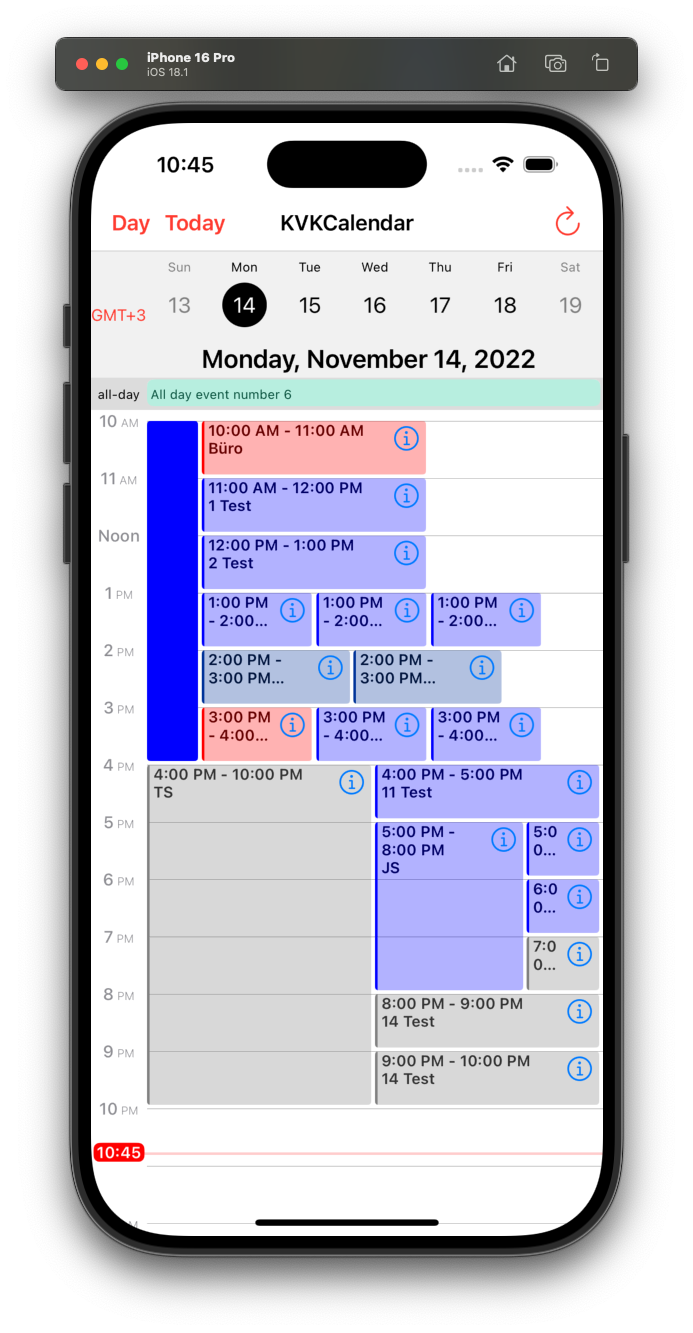
KVKCalendar is a most fully customization calendar. Library consists of five modules for displaying various types of calendar (day, week, month, year, list of events). You can choose any module or use all. It is designed based on a standard iOS calendar, but with additional features. Timeline displays the schedule for the day and the week.
Additional features:
- [x] Switch between time zones
- [x] Dark mode
- [ ] Skeleton loading (month/list)
- [x] Custom event view
- [x] Custom date cell
- [x] Custom header view and collection view
- [x] Custom calendar localization
- [x] Event list mode for weekly viewing
- [x] Ability to set a divider line (day/week)
- [x] Supporting Multiple Windows on iPad
- [x] UIMenu supports in event view (iOS and Mac Catalyst 14.0+)
- [x] Ability to configure the frame for viewing events
Need Help?
If you have a question about how to use KVKCalendar in your application, ask it on StackOverflow using the KVKCalendar tag.
Please, use Issues only for reporting bugs or requesting a new features in the library.
Requirements
- iOS 13.0+, iPadOS 13.0+, MacOS 11.0+ (supports Mac Catalyst)
- Swift 5.0+
Installation
KVKCalendar is available through CocoaPods or Swift Package Manager.
CocoaPods
~~~bash pod 'KVKCalendar' ~~~Adding Pods to an Xcode project
Swift Package Manager (Xcode 12 or higher)
- In Xcode navigate to File → Swift Packages → Add Package Dependency...
- Select a project
- Paste the repository URL (
https://github.com/kvyatkovskys/KVKCalendar) and click Next. - For Rules, select Version (Up to Next Major) and click Next.
- Click Finish.
Usage for UIKit
Import KVKCalendar. Create a subclass view CalendarView and implement CalendarDataSource protocol. Create an array of class [Event] and return the array.
import KVKCalendar
final class KVKCalendarVC: UIViewController {     var events = [Event]()
override func viewDidLoad() {         super.viewDidLoad()                  let calendar = CalendarView()         calendar.dataSource = self         view.addSubview(calendar)                  calendar.translatesAutoresizingMaskIntoConstraints = false         let top = calendar.topAnchor.constraint(equalTo: view.topAnchor)         let leading = calendar.leadingAnchor.constraint(equalTo: view.leadingAnchor)         let trailing = calendar.trailingAnchor.constraint(equalTo: view.trailingAnchor)         let bottom = calendar.bottomAnchor.constraint(equalTo: view.bottomAnchor)         NSLayoutConstraint.activate([top, leading, trailing, bottom])         calendarView.layoutIfNeeded()                  createEvents { (events) in             self.events = events             self.calendarView.reloadData()         }     }          override func viewDidLayoutSubviews() {         calendarView.layoutIfNeeded()     } }
extension KVKCalendarVC {     func createEvents(completion: ([Event]) -> Void) {         let models = // Get events from storage / API                  let events = models.compactMap({ (item) in             var event = Event(ID: item.id)             event.start = item.startDate // start date event             event.end = item.endDate // end date event             event.color = item.color             event.isAllDay = item.allDay             event.isContainsFile = !item.files.isEmpty             event.recurringType = // recurring event type - .everyDay, .everyWeek                      // Add text event (title, info, location, time)             if item.allDay {                 event.text = "\(item.title)"             } else {                 event.text = "\(startTime) - \(endTime)\n\(item.title)"             }             return event         })         completion(events)     } }
extension KVKCalendarVC: CalendarDataSource {     func eventsForCalendar(systemEvents: [EKEvent]) -> [Event] {         // if you want to get events from iOS calendars         // set calendar names to style.systemCalendars = ["Test"]         let mappedEvents = systemEvents.compactMap { Event(event: $0) }         return events + mappedEvents     } }
Implement CalendarDelegate to handle user action and control calendar behaviour.
calendar.delegate = selfTo use a custom view for specific event or date you need to create a new view of class EventViewGeneral and return the view in function.
class CustomViewEvent: EventViewGeneral {
    override init(style: Style, event: Event, frame: CGRect) {
        super.init(style: style, event: event, frame: frame)
    }
}
// an optional function from CalendarDataSource func willDisplayEventView(_ event: Event, frame: CGRect, date: Date?) -> EventViewGeneral? {     guard event.ID == id else { return nil }          return customEventView }

To use a custom date cell, just subscribe on this optional method from CalendarDataSource (works for Day/Week/Month/Year views).
func dequeueCell<T>(parameter: CellParameter, type: CalendarType, view: T, indexPath: IndexPath) -> KVKCalendarCellProtocol? where T: UIScrollView { switch type { case .year: let cell = (view as? UICollectionView)?.dequeueCell(indexPath: indexPath) { (cell: CustomYearCell) in // configure the cell } return cell case .day, .week, .month: let cell = (view as? UICollectionView)?.dequeueCell(indexPath: indexPath) { (cell: CustomDayCell) in // configure the cell } return cell case .list: let cell = (view as? UITableView)?.dequeueCell { (cell: CustomListCell) in // configure the cell } return cell } }
Usage for SwiftUI
- Create a struct
KVKCalendarWrapperand declare the protocolUIViewControllerRepresentable - Use the created calendar controller
import SwiftUI
private struct KVKCalendarWrapper: UIViewControllerRepresentable {     func makeUIViewController(context: Context) -> some UIViewController {         KVKCalendarVC()     }          func updateUIViewController(_ uiViewController: UIViewControllerType, context: Context) {} }
struct CalendarContentView: View {     var body: some View {         NavigationStack {             KVKCalendarWrapper()         }     } }
Styles
To customize calendar create an object Style and add to init class CalendarView.
public struct Style {
    public var event = EventStyle()
    public var timeline = TimelineStyle()
    public var week = WeekStyle()
    public var allDay = AllDayStyle()
    public var headerScroll = HeaderScrollStyle()
    public var month = MonthStyle()
    public var year = YearStyle()
    public var list = ListViewStyle()
    public var locale = Locale.current
    public var calendar = Calendar.current
    public var timezone = TimeZone.current
    public var defaultType: CalendarType?
    public var timeHourSystem: TimeHourSystem = .twentyFourHour
    public var startWeekDay: StartDayType = .monday
    public var followInSystemTheme: Bool = false
    public var systemCalendars: Set<String> = []
}
Author
License
KVKCalendar is available under the MIT license


