
Jupyter extensions for running an RStudio rsession proxy
jupyter-rsession-proxy

jupyter-rsession-proxy provides Jupyter server and notebook extensions to proxy RStudio.
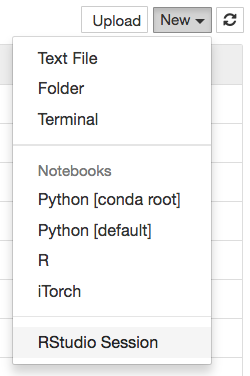
If you have a JupyterHub deployment, jupyter-rsession-proxy can take advantage of JupyterHub's existing authenticator and spawner to launch RStudio in users' Jupyter environments. You can also run this from within Jupyter. Note that RStudio Server Pro has more featureful authentication and spawning than the standard version, in the event that you do not want to use Jupyter's.
This extension used to proxy Shiny server as well, however that functionality has been separated.
Installation
Pre-reqs
Install rstudio
Use condaconda install rstudio or download the corresponding package for your platform
Note that rstudio server is needed to work with this extension.
Install jupyter-rsession-proxy
Install the library via pip:
pip install jupyter-rsession-proxyconda: conda install -c conda-forge jupyter-rsession-proxyTraitlets configuration
You may also manually configure this extension inside a traitlets configuration file for jupyter-server-proxy. This also allows you to configure multiple different RStudio applications, for instance using different versions of R:
from jupyterrsessionproxy import setup_rserver
update the jupyter-server-proxy config by adding two RStudio servers
c.ServerProxy.servers.update({
  "rstudio1": setuprserver(prefix="rstudio1", rpath="/usr/bin/R", launcher_title="RStudio (default R)"),
  "rstudio2": setuprserver(prefix="rstudio2", rpath="/opt/miniconda3/bin/R", launcher_title="RStudio (other R)")
})
note that the prefix and the dict key are the same for each server (both "rstudio1" and "rstudio2", respectively).
this is necessary for everything to work correctly:
if prefix and dict key differ, then the user would not be redirected to the right URL.
Note: in this scenario, jupyter-rsession-proxy must still first be installed (into the same environment as Jupyter) as described above.
Example
rocker/binder contains an example installation which you can run on binder.

Multiuser Considerations
This extension launches an RStudio server process from the Jupyter notebook server. This is fine in JupyterHub deployments where user servers are containerized since other users cannot connect to the RStudio server port. In non-containerized JupyterHub deployments, for example on multiuser systems running LocalSpawner or BatchSpawner, this is not secure if Rstudio server is listening on a TCP port. In that case, any user may connect to Rstudio server and run arbitrary code. However, if Rstudio is listening on a unix port, the socket will be protected using unix file permissions. Therefore, we recommend keeping the default configuration, which uses a unix socket and not a TCP port.
Configuration with Environment Variables
The following behavior can be configured with environment variables:| Environment Variable | Effect | Default Value | Notes | |-------------------------------------------|-----------------------------------------------------------------------|---------------------|---------------------------------------------------------------------------| | JUPYTERRSESSIONPROXYUSESOCKET | Whether to use unix socket | true | By default a unix socket is used. If set to case-insensitive no or false it will switch to using a TCP socket | | JUPYTERRSESSIONPROXYWWWFRAME_ORIGIN | The value of the www-frame-origin flag to rserver | same | | | RSERVER_TIMEOUT | Idle timeout flag to rserver in minutes | 15 | Must be numeric and positive | | RSESSION_TIMEOUT | Idle timeout flag to rsession in minutes | 15 | Must be numeric and positive | | NB_USER | Fallback name of the Notebook user, if password database lookup fails | getuser.getpass() | |


