
End to end data engineering project
Data engineering project: data extraction to analysis
For more details read the blog here
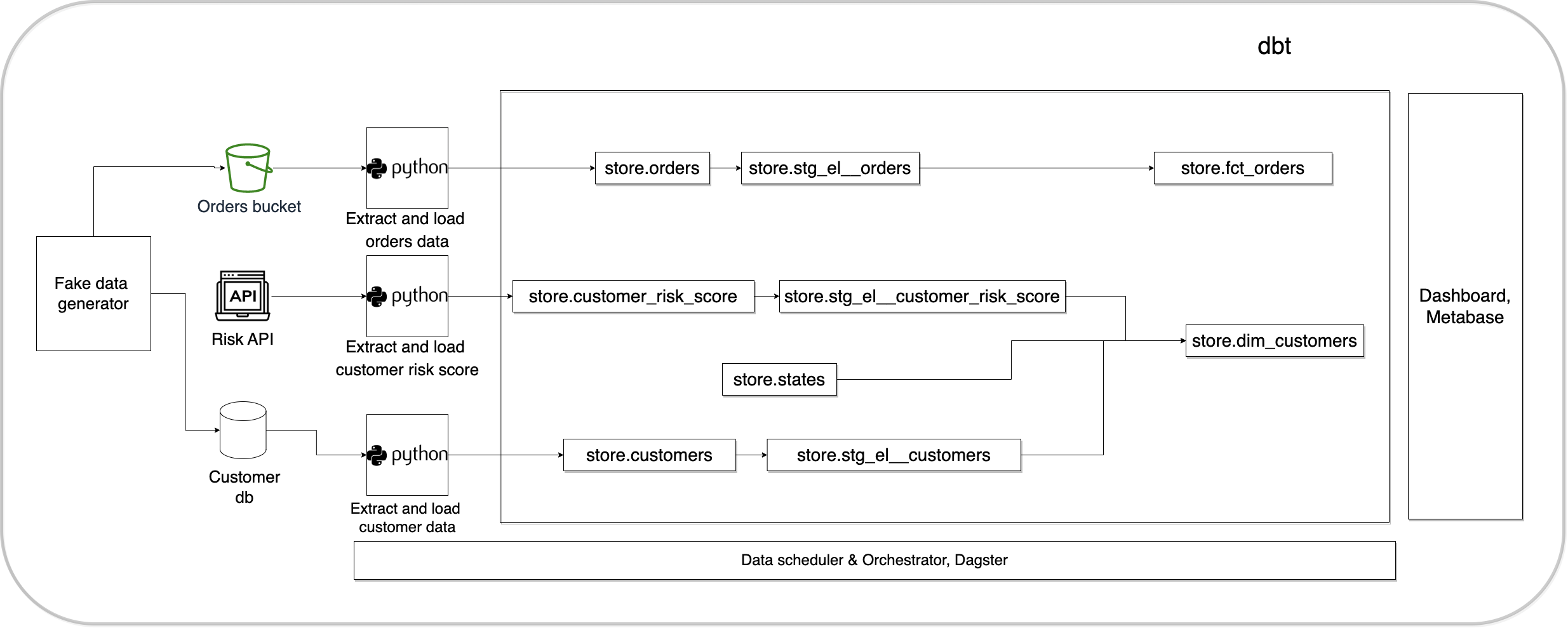
Architecture diagram
Setup
Pre-requisites
- git
- Github account
- Terraform
- AWS account
- AWS CLI installed and configured
- Docker with at least 4GB of RAM and Docker Compose v1.27.0 or later
Run these commands to setup your project locally and on the cloud.
# Clone the code as shown below.
git clone https://github.com/josephmachado/online_store.git
cd online_store
Local run & test
make up # start the docker containers on your computer & runs migrations under ./migrations
make ci # Runs auto formatting, lint checks, & all the test files under ./tests
Create AWS services with Terraform
make tf-init # Only needed on your first terraform run (or if you add new providers)
make infra-up # type in yes after verifying the changes TF will make
Wait until the EC2 instance is initialized, you can check this via your AWS UI
See "Status Check" on the EC2 console, it should be "2/2 checks passed" before proceeding
make cloud-metabase # this command will forward Metabase port from EC2 to your machine and opens it in the browser
make cloud-dagster # this command will forward Dagster port from EC2 to your machine and opens it in the browser
You can connect metabase (open this using make cloud-metabase) to the warehouse with the following credentials
WAREHOUSE_USER: sde
WAREHOUSE_PASSWORD: password
WAREHOUSE_DB: warehouse
WAREHOUSEHOST: warehousedb
WAREHOUSE_PORT: 5432
Create database migrations as shown below.
make db-migration # enter a description, e.g., create some schema
make your changes to the newly created file under ./migrations
make warehouse-migration # to run the new migration on your warehouse
For the continuous delivery to work, set up the infrastructure with terraform, & defined the following repository secrets. You can set up the repository secrets by going to Settings > Secrets > Actions > New repository secret.
SERVERSSHKEY: We can get this by runningterraform -chdir=./terraform output -raw privatekeyin the project directory and paste the entire content in a new Action secret called SERVERSSH_KEY.REMOTEHOST: Get this by runningterraform -chdir=./terraform output -raw ec2public_dnsin the project directory.REMOTE_USER: The value for this is ubuntu.
Tear down infra
After you are done, make sure to destroy your cloud infrastructure.
make down # Stop docker containers on your computer
make infra-down # type in yes after verifying the changes TF will make


