:round_pushpin: Location 是一个通过 Android 自带的 LocationManager 来实现的定位功能
Location







Location 是一个通过 Android 自带的 LocationManager 来实现的定位功能。
之所以写这个库的主要原因还需要从下面的场景说起:在开发某个App的过程当中,可能有个需求需要用到定位功能,但是又不那么重要;这个时候如果选择使用第三方的定位服务,需要先去申请相关的appKey和集成定位相关的SDK,显得太繁琐了。杀鸡焉用宰牛刀,我们只是需要一个简单的定位功能,使用自带的实现不香吗?因此就有了 Location。
效果展示
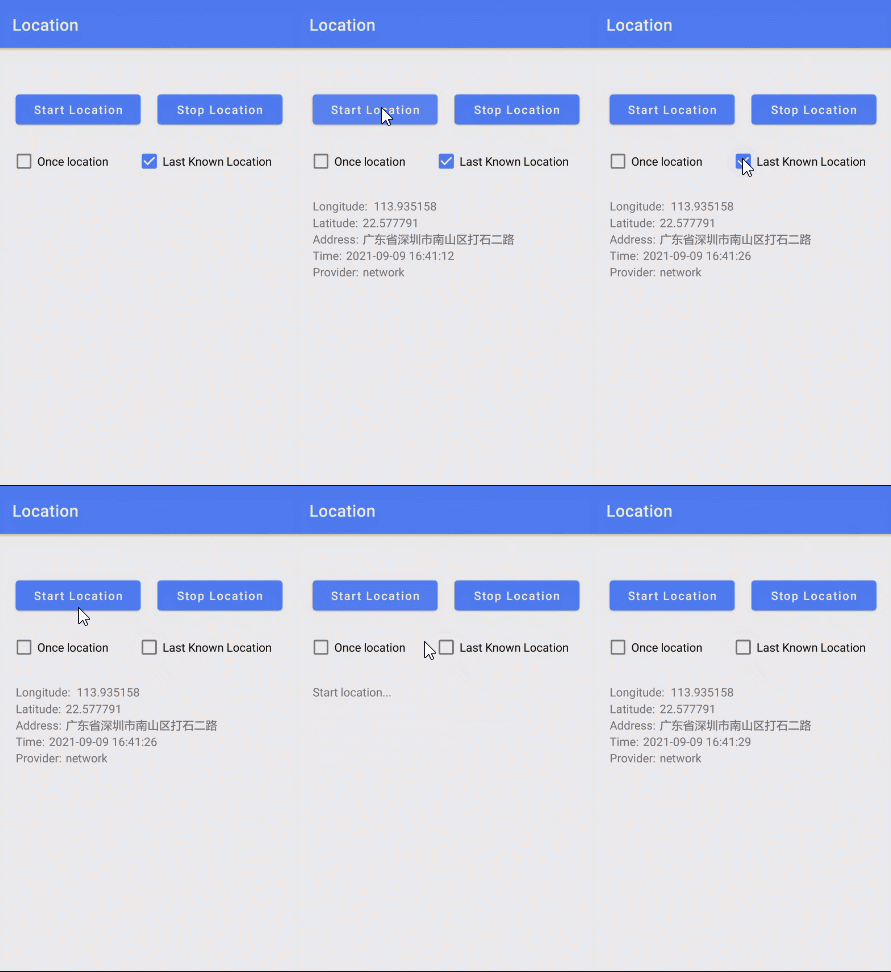
你也可以直接下载 演示App 体验效果
引入
Gradle:
- 在Project的 build.gradle 或 setting.gradle 中添加远程仓库
repositories {
        //...
        mavenCentral()
}- 在Module的 build.gradle 中添加依赖项
implementation 'com.github.jenly1314:location:1.0.0'使用
示例
主要方法调用示例
//初始化实例     val locationClient = LocationClient(this)
//可根据具体需求设置定位配置参数     val locationOption = locationClient.getLocationOption()         .setAccuracy(Criteria.ACCURACY_FINE)//设置位置精度:高精度         .setMinTime(10000)//设置位置更新最小时间间隔(单位:毫秒); 默认间隔:10000毫秒,最小间隔:1000毫秒         .setOnceLocation(false)//设置是否只定位一次,默认为 false,当设置为 true 时,则只定位一次后,会自动停止定位
//设置定位配置参数     locationClient.setLocationOption(locationOption)
//----------------------------------
//设置定位监听     locationClient.setOnLocationListener(object: OnLocationListener(){         override fun onLocationChanged(location: Location) {             //TODO 位置信息         }
})
//----------------------------------
//开始定位(建议先校验是否有定位权限,然后开始定位)     locationClient.startLocation()
//----------------------------------          //停止定位     locationClient.stopLocation()
完整示例
class MainActivity : AppCompatActivity() {
private val binding by lazy {         ActivityMainBinding.inflate(layoutInflater)     }
private val locationClient by lazy {         LocationClient(this)     }
private val geocoder by lazy {         Geocoder(this)     }
private val simpleDateFormat by lazy {         SimpleDateFormat("yyyy-MM-dd HH:mm:ss")     }
private var isPermissionGranted = false
companion object{         const val TAG = "MainActivity"         const val REQLOCATIONPERMISSION = 0x01     }
override fun onCreate(savedInstanceState: Bundle?) {         super.onCreate(savedInstanceState)         setContentView(binding.root)
binding.btnStartLocation.setOnClickListener {             isPermissionGranted = checkLocationPermission()             if(isPermissionGranted){                 startLocation()             }else{                 ActivityCompat.requestPermissions(this, arrayOf(Manifest.permission.ACCESSFINELOCATION), REQLOCATIONPERMISSION)             }         }
binding.btnStopLocation.setOnClickListener {             locationClient.stopLocation()             binding.tvLocation.text = ""         }
binding.cbOnceLocation.setOnCheckedChangeListener { buttonView, isChecked ->             locationClient.getLocationOption().setOnceLocation(isChecked)         }
binding.cbLastKnownLocation.setOnCheckedChangeListener { buttonView, isChecked ->             locationClient.getLocationOption().setLastKnownLocation(isChecked)         }
//可根据具体需求设置定位配置参数(这里只列出一些主要的参数)         val locationOption = locationClient.getLocationOption()             .setAccuracy(Criteria.ACCURACY_FINE)//设置位置精度:高精度             .setPowerRequirement(Criteria.POWER_LOW) //设置电量消耗:低电耗             .setMinTime(10000)//设置位置更新最小时间间隔(单位:毫秒); 默认间隔:10000毫秒,最小间隔:1000毫秒             .setMinDistance(0)//设置位置更新最小距离(单位:米);默认距离:0米             .setOnceLocation(false)//设置是否只定位一次,默认为 false,当设置为 true 时,则只定位一次后,会自动停止定位             .setLastKnownLocation(true)//设置是否获取最后一次缓存的已知位置,默认为 true         //设置定位配置参数         locationClient.setLocationOption(locationOption)
//设置定位监听         locationClient.setOnLocationListener(object: OnLocationListener(){             override fun onLocationChanged(location: Location) {                 //位置信息                 Log.d(TAG,"onLocationChanged(location = ${location})")                 val builder = StringBuilder()                 builder.append("Longitude: \t${location.longitude}\n")                     .append("Latitude: \t${location.latitude}\n")
//根据坐标经纬度获取位置地址信息(WGS-84坐标系)                 val list = geocoder.getFromLocation(location.latitude,location.longitude,1)                 if(list.isNotEmpty()){                     builder.append("Address: \t${list[0].getAddressLine(0)}\n")                 }
builder.append("Time: \t${simpleDateFormat.format(Date(location.time))}\n")                     .append("Provider: \t${location.provider}\n")
binding.tvLocation.text = builder.toString()             }
override fun onProviderEnabled(provider: String) {                 super.onProviderEnabled(provider)                 Log.d(TAG,"onProviderEnabled(provider = ${provider})")             }
override fun onProviderDisabled(provider: String) {                 super.onProviderDisabled(provider)                 Log.d(TAG,"onProviderDisabled(provider = ${provider})")             }
})
//设置异常监听         locationClient.setOnExceptionListener(object : OnExceptionListener{             override fun onException(@LocationErrorCode errorCode: Int, e: Exception) {                 //定位出现异常                 Log.w(TAG,"onException(errorCode = ${errorCode}, e = ${e})")                 binding.tvLocation.text = e.message             }         })     }
override fun onResume() {         super.onResume()         if(!isPermissionGranted){             if(checkLocationPermission()){                 isPermissionGranted = true                 binding.tvLocation.text = ""             }         }     }
/**      * 开始定位      */     private fun startLocation(){         if(locationClient.isStarted()){//如果已经开始定位,则先停止定位             locationClient.stopLocation()         }         binding.tvLocation.text = "Start location..."         locationClient.startLocation()
}
override fun onRequestPermissionsResult(         requestCode: Int,         permissions: Array<out String>,         grantResults: IntArray     ) {         super.onRequestPermissionsResult(requestCode, permissions, grantResults)         if(requestCode == REQLOCATIONPERMISSION){             isPermissionGranted = verifyPermissions(grantResults)             if(isPermissionGranted){//已授权                 startLocation()             }else{//未授权                 binding.tvLocation.text = "Location permission has not been granted."                 showMissingPermissionDialog()             }         }     }
/**      * 检测位置权限      */     private fun checkLocationPermission(): Boolean{         return ActivityCompat.checkSelfPermission(this,Manifest.permission.ACCESSFINELOCATION) == PackageManager.PERMISSION_GRANTED     }
/**      * 校验授权结果      */     private fun verifyPermissions(grantResults: IntArray): Boolean{         for(result in grantResults){             if(result != PackageManager.PERMISSION_GRANTED){                 return false             }         }         return true     }
/**      * 显示未授权提示对话框      */     private fun showMissingPermissionDialog(){         val builder = AlertDialog.Builder(this)         builder.setMessage("Location permission has not been granted.")             .setNegativeButton("Cancel"             ) { dialog, which ->
}             .setPositiveButton("Setting"             ) { dialog, which ->                 startAppSettings()             }         builder.show()     }
/**      * 跳转到 App 的设置详情界面      */     private fun startAppSettings(){         val intent = Intent(Settings.ACTIONAPPLICATIONDETAILS_SETTINGS)         intent.data = Uri.parse("package:${packageName}")         startActivity(intent)     }
}
在你项目的 AndroidManifest.xml 清单文件中添加定位相关权限
<!-- 允许程序访问CellID或WiFi热点来获取粗略的位置 --> <uses-permission android:name="android.permission.ACCESSCOARSELOCATION" /> <!-- 用于访问GPS定位 --> <uses-permission android:name="android.permission.ACCESSFINELOCATION" />更多使用详情,请查看app中的源码使用示例或直接查看API帮助文档
相关推荐
- MapHelper 一个整合了高德地图、百度地图、腾讯地图、谷歌地图等相关路线规划和导航的地图帮助类库。
版本日志
v1.0.0:2021-9-9
- Location初始版本