
Dimensional charting built to work natively with crossfilter rendered using d3.js
HEAVY.AI Charting
Dimensional charting built to work natively with crossfilter rendered using d3.js.
Screenshots
Flights Dataset: Brushing on timeline with Bubble Chart and Row Chart

Tweets Dataset: Brushing on timeline and hovering on Pointmap datapoint which displays row information

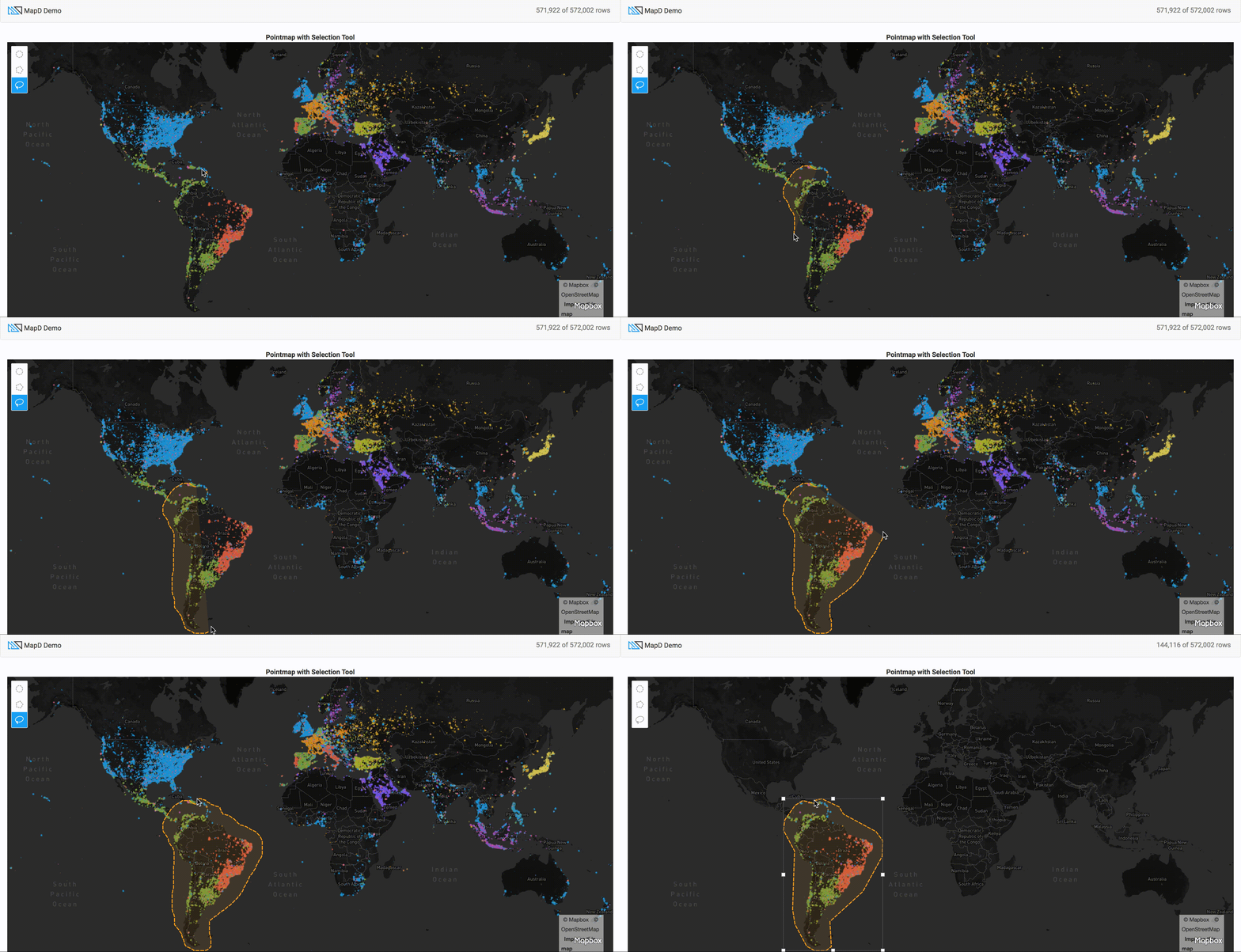
Tweets Dataset: Using draw-js tool on pointmap to select specific areas on a map
Examples
Visit our examples page for ideas of what can be created with HEAVY.AI Charting
Quick Start
Step 1: Install Dependencies
npm install #downloads all dependencies and devDependenciesStep 2: Run Start Script
npm run start
or
npm run watch
Synopsis
HEAVY.AI Charting is a superfast charting library that works natively with crossfilter that is based off dc.js. It is designed to work with HEAVY.AI Connector and HEAVY.AI Crossfilter to create charts instantly with our HeavyDB SQL Database. Please see examples for further understanding to quickly create interactive charts.
Our Tweetmap Demo was made only using HEAVY.AI Charting.
Documentation
Visit our API Docs for additional information on HEAVY.AI Charting
Testing
New components in HEAVY.AI Charting should be unit-tested and linted. All tests will be in the same folder as the new component.
+-- src
|   +-- /mixins/new-mixin-component.js
|   +-- /mixins/new-mixin-component.unit.spec.js
The linter and all tests run on
npm run testTo check only unit-tests run:
npm run test:unitLinting
Please lint all your code in @heavyai/charting/. The lint config file can be found in .eslintrc.json. For new components, please fix all lint warnings and errors.
Scripts
| Command | Description | --- | --- npm run start | Copies files for examples and then serves the example npm run build | Runs webpack and builds js and css in /dist npm run docs | Creates and opens docs npm run test | Runs both linting and unit tests npm run clean | Removes node modules, dist, docs, and example files
Documentation
The charting library uses documentation.js for API documentation. Docs can be built and viewed locally with thenpm run docs command.
Third-party vendor licenses
A full list of third-party npm packages and their licenses is maintained in thirdpartylicenses/THIRDPARTY_LICENSES.md. To regenerate it after dependency changes, run:
npx github:heavyai/js-license-listThis requires nodemodules to be installed (npm install). The script is maintained in the heavyai/js-license-list repo.
Every third-party module from npm that gets includes in the final, distributed bundle has its license verified and license text (if provided) or license type shipped in licenses.txt with the bundle. Licenses must be in the pre-approved list of permissive open-source licenses. If it's necessary to override a license for a module because it's missing or improperly tagged in its package.json, add an entry in license-overrides.json.
License descriptions and public license URLs are maintained in licenses.json as well, but they are not verified and might not be up to date.
Contributing
Interested in contributing? We'd love for you to help! Check out Contributing.MD
Variables and function names are used as convention and do not reference any commercial product.


