
Simple XML parsing in Swift
SWXMLHash





SWXMLHash is a relatively simple way to parse XML in Swift. If you're familiar with XMLParser (formerly NSXMLParser), this library is a wrapper around it. Conceptually, it provides a translation from XML to a dictionary of arrays (aka hash).
The API takes a lot of inspiration from SwiftyJSON.
Contents
Requirements
- iOS 8.0+ / Mac OS X 10.9+ / tvOS 9.0+ / watchOS 2.0+
- Xcode 8.0+
Installation
SWXMLHash can be installed using Swift Package Manager, CocoaPods, Carthage, or manually.
Swift Package Manager
The Swift Package Manager is a tool built by Apple as part of the Swift project for integrating libraries and frameworks into your Swift apps.
To add SWXMLHash as a dependency, update the dependencies in your Package.swift to include a reference like so:
dependencies: [
    .package(url: "https://github.com/drmohundro/SWXMLHash.git", from: "7.0.0")
]
swift build should then pull in and compile SWXMLHash to begin using.
CocoaPods
To install CocoaPods, run:
gem install cocoapodsThen create a Podfile with the following contents:
platform :ios, '10.0'
use_frameworks!
target 'YOURTARGETNAME' do   pod 'SWXMLHash', '~> 7.0.0' end
Finally, run the following command to install it:
pod installCarthage
To install Carthage, run (using Homebrew):
brew update
brew install carthage
Then add the following line to your Cartfile:
github "drmohundro/SWXMLHash" ~> 7.0Manual Installation
To install manually, you'll need to clone the SWXMLHash repository. You can do this in a separate directory, or you can make use of git submodules - in this case, git submodules are recommended so that your repository has details about which commit of SWXMLHash you're using. Once this is done, you can just drop all of the relevant swift files into your project.
If you're using a workspace, though, you can include the entire SWXMLHash.xcodeproj.
Getting Started
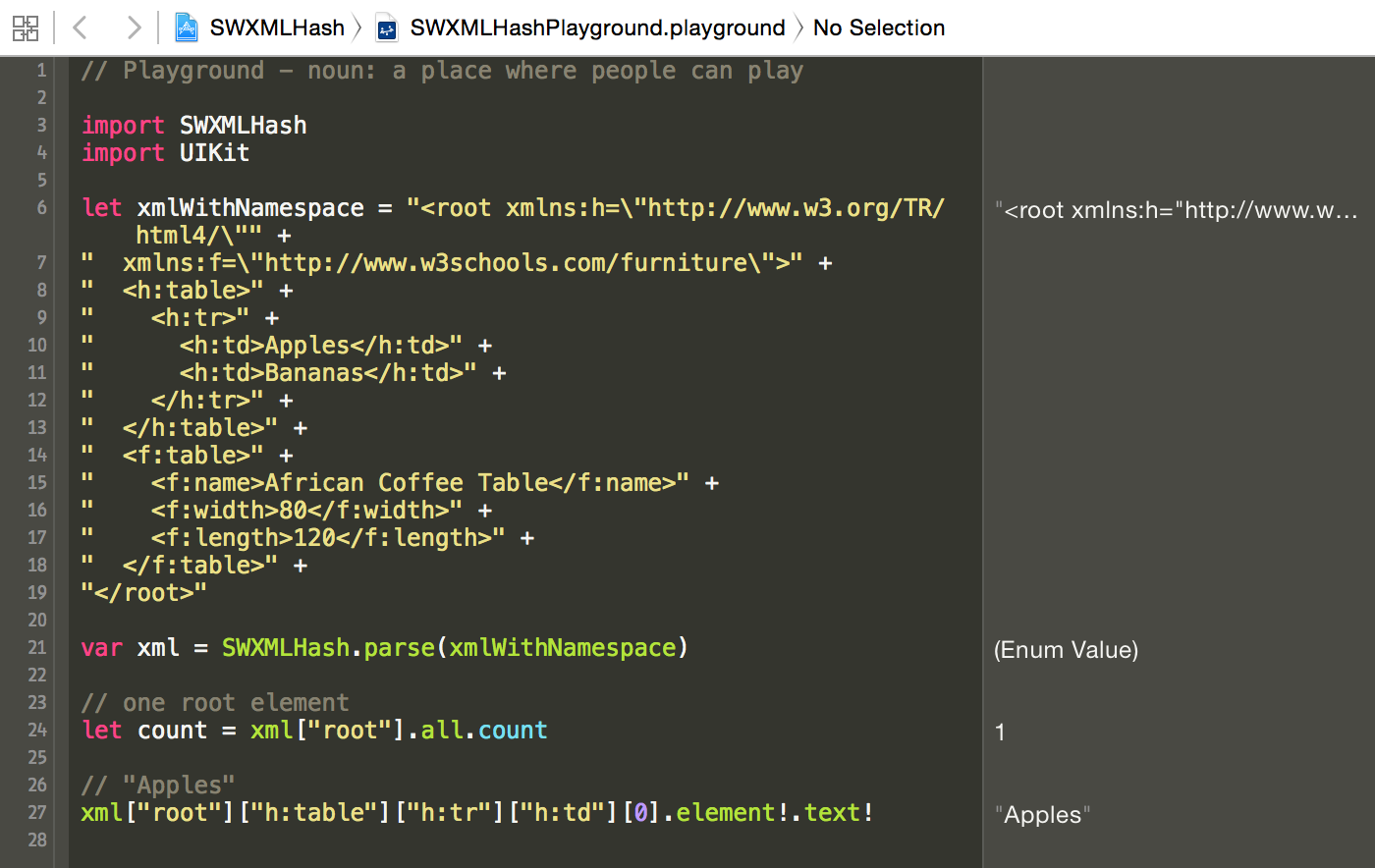
If you're just getting started with SWXMLHash, I'd recommend cloning the repository down and opening the workspace. I've included a Swift playground in the workspace which makes it easy to experiment with the API and the calls.
Configuration
SWXMLHash allows for limited configuration in terms of its approach to parsing. To set any of the configuration options, you use the configure method, like so:
let xml = XMLHash.config {
              config in
              // set any config options here
          }.parse(xmlToParse)
The available options at this time are:
shouldProcessLazily
false
shouldProcessNamespaces
NSXMLParser instance. It will
return any XML elements without their namespace parts (i.e. "\false
caseInsensitive
false
encoding
parse.
- Defaults to String.encoding.utf8
userInfo
Codable's userInfo property to allow the user to add
contextual information that will be used for deserialization.
- See
Codable's userInfo docs
- The default is [:]
detectParsingErrors
parse will return an
XMLIndexer.parsingError if any parsing issues are found.
- Defaults to false (because of backwards compatibility and because many
users attempt to parse HTML with this library)
Examples
All examples below can be found in the included specs.
Initialization
let xml = XMLHash.parse(xmlToParse)Alternatively, if you're parsing a large XML file and need the best performance, you may wish to configure the parsing to be processed lazily. Lazy processing avoids loading the entire XML document into memory, so it could be preferable for performance reasons. See the error handling for one caveat regarding lazy loading.
let xml = XMLHash.config {
              config in
              config.shouldProcessLazily = true
          }.parse(xmlToParse)
The above approach uses the config method, but there is also a lazy method directly off of XMLHash.
let xml = XMLHash.lazy(xmlToParse)Single Element Lookup
Given:
<root>
  <header>
    <title>Foo</title>
  </header>
  ...
</root>
Will return "Foo".
xml["root"]["header"]["title"].element?.textMultiple Elements Lookup
Given:
<root>
  ...
  <catalog>
    <book><author>Bob</author></book>
    <book><author>John</author></book>
    <book><author>Mark</author></book>
  </catalog>
  ...
</root>
The below will return "John".
xml["root"]["catalog"]["book"][1]["author"].element?.textAttributes Usage
Given:
<root>
  ...
  <catalog>
    <book id="1"><author>Bob</author></book>
    <book id="123"><author>John</author></book>
    <book id="456"><author>Mark</author></book>
  </catalog>
  ...
</root>
The below will return "123".
xml["root"]["catalog"]["book"][1].element?.attribute(by: "id")?.textAlternatively, you can look up an element with specific attributes. The below will return "John".
xml["root"]["catalog"]["book"].withAttribute("id", "123")["author"].element?.textReturning All Elements At Current Level
Given:
<root>
  ...
  <catalog>
    <book><genre>Fiction</genre></book>
    <book><genre>Non-fiction</genre></book>
    <book><genre>Technical</genre></book>
  </catalog>
  ...
</root>
The all method will iterate over all nodes at the indexed level. The code below will return "Fiction, Non-fiction, Technical".
", ".join(xml["root"]["catalog"]["book"].all.map { elem in
    elem["genre"].element!.text!
})
You can also iterate over the all method:
for elem in xml["root"]["catalog"]["book"].all {
    print(elem["genre"].element!.text!)
}
Returning All Child Elements At Current Level
Given:
<root>
  <catalog>
    <book>
      <genre>Fiction</genre>
      <title>Book</title>
      <date>1/1/2015</date>
    </book>
  </catalog>
</root>
The below will print "root", "catalog", "book", "genre", "title", and "date" (note the children method).
func enumerate(indexer: XMLIndexer) {
    for child in indexer.children {
        print(child.element!.name)
        enumerate(child)
    }
}
enumerate(indexer: xml)
Filtering elements
Given:
<root>
  <catalog>
    <book id="bk101">
      <author>Gambardella, Matthew</author>
      <title>XML Developer's Guide</title>
      <genre>Computer</genre><price>44.95</price>
      <publishdate>2000-10-01</publishdate>
    </book>
    <book id="bk102">
      <author>Ralls, Kim</author>
      <title>Midnight Rain</title>
      <genre>Fantasy</genre>
      <price>5.95</price>
      <publishdate>2000-12-16</publishdate>
    </book>
    <book id="bk103">
      <author>Corets, Eva</author>
      <title>Maeve Ascendant</title>
      <genre>Fantasy</genre>
      <price>5.95</price>
      <publishdate>2000-11-17</publishdate>
    </book>
  </catalog>
</root>
The following will return "Midnight Rain". Filtering can be by any part of the XMLElement class or by index as well.
let subIndexer = xml!["root"]["catalog"]["book"]
    .filterAll { elem, _ in elem.attribute(by: "id")!.text == "bk102" }
    .filterChildren { _, index in index >= 1 && index <= 3 }
print(subIndexer.children[0].element?.text)
Error Handling
Using Do-Catch with Errors:
do {
    try xml!.byKey("root").byKey("what").byKey("header").byKey("foo")
} catch let error as IndexingError {
    // error is an IndexingError instance that you can deal with
}
Or using the existing indexing functionality:
switch xml["root"]["what"]["header"]["foo"] {
case .element(let elem):
    // everything is good, code away!
case .xmlError(let error):
    // error is an IndexingError instance that you can deal with
}
Note that error handling as shown above will not work with lazy loaded XML. The lazy parsing doesn't actually occur until the element or all method are called - as a result, there isn't any way to know prior to asking for an element if it exists or not.
XML Deserialization Into Objects
Even more often, you'll want to deserialize an XML tree into an array of custom types. This is where XMLObjectDeserialization comes into play.
Given:
<root>
  <books>
    <book isbn="0000000001">
      <title>Book A</title>
      <price>12.5</price>
      <year>2015</year>
      <categories>
        <category>C1</category>
        <category>C2</category>
      </categories>
    </book>
    <book isbn="0000000002">
      <title>Book B</title>
      <price>10</price>
      <year>1988</year>
      <categories>
        <category>C2</category>
        <category>C3</category>
      </categories>
    </book>
    <book isbn="0000000003">
      <title>Book C</title>
      <price>8.33</price>
      <year>1990</year>
      <amount>10</amount>
      <categories>
        <category>C1</category>
        <category>C3</category>
      </categories>
    </book>
  </books>
</root>
with Book struct implementing XMLObjectDeserialization:
struct Book: XMLObjectDeserialization {
    let title: String
    let price: Double
    let year: Int
    let amount: Int?
    let isbn: Int
    let category: [String]
static func deserialize(_ node: XMLIndexer) throws -> Book {         return try Book(             title: node["title"].value(),             price: node["price"].value(),             year: node["year"].value(),             amount: node["amount"].value(),             isbn: node.value(ofAttribute: "isbn"),             category : node["categories"]["category"].value()         )     } }
The below will return an array of Book structs:
let books: [Book] = try xml["root"]["books"]["book"].value()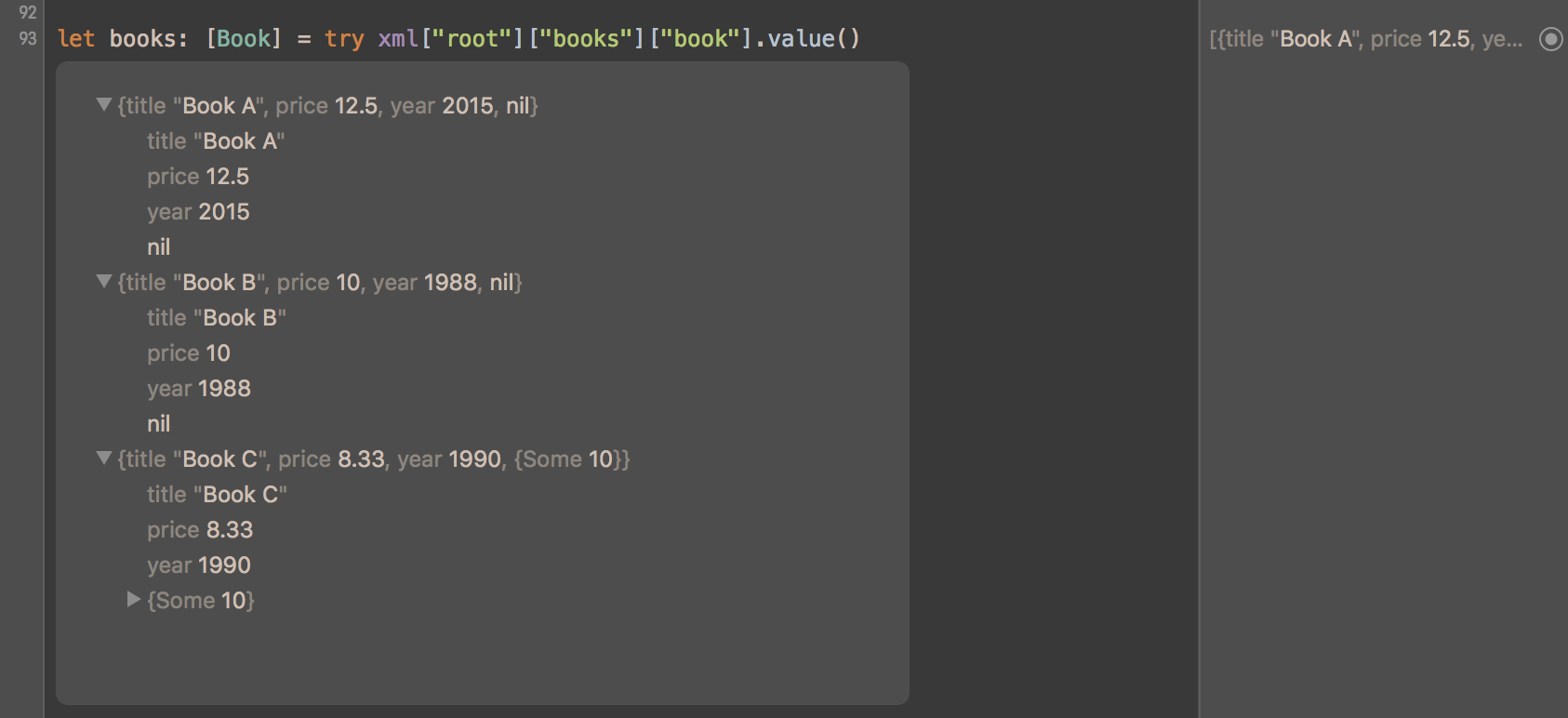
You can convert any XML to your custom type by implementing XMLObjectDeserialization for any non-leaf node (e.g. <book> in the example above).
For leaf nodes (e.g. <title> in the example above), built-in converters support Int, Double, Float, Bool, and String values (both non- and -optional variants). Custom converters can be added by implementing XMLElementDeserializable.
For attributes (e.g. isbn= in the example above), built-in converters support the same types as above, and additional converters can be added by implementing XMLAttributeDeserializable.
Types conversion supports error handling, optionals and arrays. For more examples, look into SWXMLHashTests.swift or play with types conversion directly in the Swift playground.
Custom Value Conversion
Value deserialization is where a specific string value needs to be deserialized into a custom type. So, date is a good example here - you'd rather deal with date types than doing string parsing, right? That's what the XMLValueDeserialization attribute is for.
Given:
<root>
  <elem>Monday, 23 January 2016 12:01:12 111</elem>
</root>
With the following implementation for Date value deserialization:
extension Date: XMLValueDeserialization {
    public static func deserialize(_ element: XMLHash.XMLElement) throws -> Date {
        let date = stringToDate(element.text)
guard let validDate = date else {             throw XMLDeserializationError.typeConversionFailed(type: "Date", element: element)         }
return validDate     }
public static func deserialize(_ attribute: XMLAttribute) throws -> Date {         let date = stringToDate(attribute.text)
guard let validDate = date else {             throw XMLDeserializationError.attributeDeserializationFailed(type: "Date", attribute: attribute)         }
return validDate     }
public func validate() throws {         // empty validate... only necessary for custom validation logic after parsing     }
private static func stringToDate(_ dateAsString: String) -> Date? {         let dateFormatter = DateFormatter()         dateFormatter.dateFormat = "EEEE, dd MMMM yyyy HH:mm:ss SSS"         return dateFormatter.date(from: dateAsString)     } }
The below will return a date value:
let dt: Date = try xml["root"]["elem"].value()FAQ
Does SWXMLHash handle URLs for me?
No - SWXMLHash only handles parsing of XML. If you have a URL that has XML content on it, I'd recommend using a library like AlamoFire to download the content into a string and then parsing it.
Does SWXMLHash support writing XML content?
No, not at the moment - SWXMLHash only supports parsing XML (via indexing, deserialization, etc.).
I'm getting an "Ambiguous reference to member 'subscript'" when I call .value()
.value() is used for deserialization - you have to have something that implements XMLObjectDeserialization (or XMLElementDeserializable if it is a single element versus a group of elements) and that can handle deserialization to the left-hand side of expression.
For example, given the following:
let dateValue: Date = try! xml["root"]["date"].value()You'll get an error because there isn't any built-in deserializer for Date. See the above documentation on adding your own deserialization support. In this case, you would create your own XMLElementDeserializable implementation for Date. See above for an example of how to add your own Date deserialization support.
I'm getting an EXCBADACCESS (SIGSEGV) when I call parse()
Chances are very good that your XML content has what is called a "byte order mark" or BOM. SWXMLHash uses NSXMLParser for its parsing logic and there are issues with it and handling BOM characters. See issue #65 for more details. Others who have run into this problem have just stripped the BOM out of their content prior to parsing.
How do I handle deserialization with a class versus a struct (such as with NSDate)?
Using extensions on classes instead of structs can result in some odd catches that might give you a little trouble. For example, see this question on StackOverflow where someone was trying to write their own XMLElementDeserializable for NSDate which is a class and not a struct. The XMLElementDeserializable protocol expects a method that returns Self - this is the part that gets a little odd.
See below for the code snippet to get this to work and note in particular the private static func value<T>() -> T line - that is the key.
extension NSDate: XMLElementDeserializable {
    public static func deserialize(_ element: XMLElement) throws -> Self {
        guard let dateAsString = element.text else {
            throw XMLDeserializationError.nodeHasNoValue
        }
let dateFormatter = NSDateFormatter()         dateFormatter.dateFormat = "EEE, dd MMM yyyy HH:mm:ss zzz"         let date = dateFormatter.dateFromString(dateAsString)
guard let validDate = date else {             throw XMLDeserializationError.typeConversionFailed(type: "Date", element: element)         }
// NOTE THIS         return value(validDate)     }
// AND THIS     private static func value<T>(date: NSDate) -> T {         return date as! T     } }
How do I handle deserialization with an enum?
Check out this great suggestion/example from @woolie up at
I'm seeing an ""'XMLElement' is ambiguous" Error
This is related to XMLElement has actually been renamed multiple times to attempt to avoid conflicts, but the easiest approach is to just scope it via XMLHash.XMLElement.
Will SWXMLHash work in a web context (e.g. Vapor)?
See
#if canImport(FoundationNetworking)
import FoundationNetworking
#endif
Have a different question?
Feel free to shoot me an email, post a question on StackOverflow, or open an issue if you think you've found a bug. I'm happy to try to help!
Another alternative is to post a question in the Discussions.
Changelog
See CHANGELOG for a list of all changes and their corresponding versions.
Contributing
See CONTRIBUTING for guidelines to contribute back to SWXMLHash.
License
SWXMLHash is released under the MIT license. See LICENSE for details.


