
Learn Apache Spark in Scala, Python (PySpark) and R (SparkR) by building your own cluster with a JupyterLab interface on Docker. :zap:
Apache Spark Standalone Cluster on Docker
The project was featured on an article at MongoDB official tech blog! :scream:
The project just got its own article at Towards Data Science Medium blog! :sparkles:
Introduction
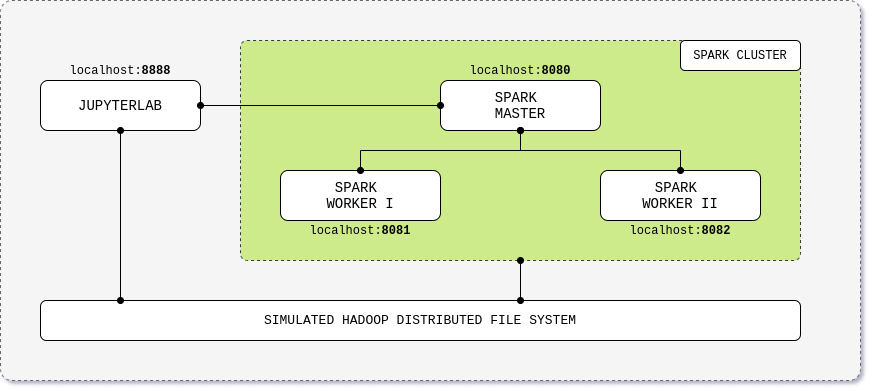
This project gives you an Apache Spark cluster in standalone mode with a JupyterLab interface built on top of Docker. Learn Apache Spark through its Scala, Python (PySpark) and R (SparkR) API by running the Jupyter notebooks with examples on how to read, process and write data.






TL;DR
curl -LO https://raw.githubusercontent.com/cluster-apps-on-docker/spark-standalone-cluster-on-docker/master/assets/docker-compose.yml
docker-compose up
Contents
Quick Start
Cluster overview
| Application | URL | Description | |-----------------|------------------------------------------|------------------------------------------------------------| | JupyterLab | localhost:8888 | Cluster interface with built-in Jupyter notebooks | | Spark Driver | localhost:4040 | Spark Driver web ui | | Spark Master | localhost:8080 | Spark Master node | | Spark Worker I | localhost:8081 | Spark Worker node with 1 core and 512m of memory (default) | | Spark Worker II | localhost:8082 | Spark Worker node with 1 core and 512m of memory (default) |
Prerequisites
- Install Docker and Docker Compose, check infra supported versions
Download from Docker Hub (easier)
- Download the docker compose file;
curl -LO https://raw.githubusercontent.com/cluster-apps-on-docker/spark-standalone-cluster-on-docker/master/assets/docker-compose.yml- Edit the docker compose file with your favorite tech stack version, check apps supported versions;
- Start the cluster;
docker-compose up- Run Apache Spark code using the provided Jupyter notebooks with Scala, PySpark and SparkR examples;
- Stop the cluster by typing
ctrl+con the terminal; - Run step 3 to restart the cluster.
Build from your local machine
Note: Local build is currently only supported on Linux OS distributions.
- Download the source code or clone the repository;
- Move to the build directory;
cd build- Edit the build.yml file with your favorite tech stack version;
- Match those version on the docker compose file;
- Build up the images;
chmod +x build.sh ; ./build.sh- Start the cluster;
docker-compose up- Run Apache Spark code using the provided Jupyter notebooks with Scala, PySpark and SparkR examples;
- Stop the cluster by typing
ctrl+con the terminal; - Run step 6 to restart the cluster.
Tech Stack
- Infra
- Languages
- Apps
Metrics
| Image | Size | Downloads | |----------------------------------------------------------------|------------------------------------------------------------------------------------------------|---------------------------------------------------------------------------| | JupyterLab | 





Contributing
We'd love some help. To contribute, please read this file.
Contributors
A list of amazing people that somehow contributed to the project can be found in this file. This project is maintained by:
André Perez - dekoperez - andre.marcos.perez@gmail.com
Support
Support us on GitHub by staring this project :star:
Support us on Patreon. :sparklingheart:


