
OpenDLV - A modern microservice-based software ecosystem powered by libcluon to make vehicles autonomous.
Moved to https://git.opendlv.org.
OpenDLV has moved to its own GitLab environment at git.opendlv.org/explore. Tutorials were also added att opendlv.org/learn.html.
OpenDLV - A modern microservice-based software ecosystem for self-driving vehicles.
OpenDLV is a modern open source software environment to support the development and testing of self-driving vehicles driven by the following design principles:
- Implemented using high quality and modern C++14 with a strong focus is on code clarity, portability, and performance.
- Based entirely on microservices.
amd64, armhf, and aarch64
- Realized with libcluon - the world's first and only single-file, header-only middleware for distributed systems for robotic applications.
- CI-Status:

- License:

Table of Contents
- What is an OpenDLV session?
- Dependencies
- Usage
- Build from sources on the example of Ubuntu 16.04 LTS
- License
- Publications
What is an OpenDLV session?
Applications based on OpenDLV are grouped in UDP multicast sessions belonging to IPv4 address 225.0.0.X, where X is from the within the range [1,254]. All microservices belonging to the same UDP multicast group are able to communicate with each other; thus, two applications running in different UDP multicast sessions do not see each other and are completely separated.
The actual UDP multicast session is selected using the commandline parameter --cid=111, where 111 would define the UDP multicast address 225.0.0.111. Microservices exchange data using the message Envelope that contains besides the actual message to send further meta information like sent and received timestamp and the point in time when the contained message was actually sampled. All messages are encoded in Google's Protobuf data format (example) that has been adjusted to preserve forwards and backwards compatibility using libcluon's native implementation of Protobuf.
An Envelope contains in its field serializedData the actually message to be exchanged that is encoded in Protobuf. Furthermore, the Envelope itself is also encoded in Protobuf but prepended with the byte sequence 0x0D 0xA4 as magic number, followed by three bytes 0xXX 0xYY 0xZZ describing the length in bytes of the Protobuf-encoded Envelope. The sequence 0xA4 0xXX 0xYY 0xZZ is encoded in little endian and 0xZZ is usually 0 in practice.
As participants in a UDP multicast session automatically receive any exchanged Envelopes, a receiver can differentiate what message to expect by checking Envelope's field dataType, which is referring to a message identifier (for instance, Envelope's message identifier is 1).
OpenDLV's microservices conform to the OpenDLV Standard Message Set that enables exchangeability across hardware/software interfaces to decouple high-level application logic from low-level device drivers. For instance, OpenDLV's hardware/software interface to access an Applanix GPS unit is called opendlv-device-gps-pos according to Applanix' internal data format POS that is used across several units in their product portfolio. The microservice opendlv-device-gps-pos provides GPS information in messages GeodeticWgs84Reading and GeodeticHeadingReading.
As the microservices for the various GPS units (like, for instance Trimble and Applanix) all broadcast the aforementioned messages, the hardware units can be exchanged transparently for the high-level application logic. However, when several GPS units shall be operated in parallel, it is necessary to distinguish between them. Therefore, the commandline parameter --id=Y can be provided, where Y is a positive number to differentiate between messages of the same type. At the receiving end, the value Y is made available in Envelope's field senderStamp. As an example, when using an Applanix unit next to a Trimble unit, the respective microservices could be supplied with the suffixes --id=1 and --id=2.
Dependencies
You need a C++14-compliant compiler to compile this project as it ships the following dependencies as part of the source distribution:- libcluon -
 For building cluon-rec2fuse, libfuse is required.
Usage
We are providing the following microservices as multi-platform (amd64/x86_64, armhf, aarch64) Docker images:OpenDLV.OS
Complete ArchLinux-based OpenDLV OS Operating System (start here if you want to initialize a blank computing unit - WARNING! All data will be erased!)
Hardware/Software Interfaces:
Gamepad (such as PS3 or PS4 controllers):




- Provides: device-specific messages
- Command to run with Docker for PS3 controllers:
docker run --rm -ti --init --net=host --device /dev/input/js0 chalmersrevere/opendlv-device-gamepad-multi:v0.0.10 --device=/dev/input/js0 --axisleftright=0 --axisupdown=3 --freq=100 --accmin=0 --accmax=50 --decmin=0 --decmax=-10 --steeringmin=-10 --steeringmax=10 --steeringmaxrate=5.0 --cid=111 --verbose - Command to run with Docker for PS4 controllers:
docker run --rm -ti --init --net=host --device /dev/input/js0 chalmersrevere/opendlv-device-gamepad-multi:v0.0.10 --device=/dev/input/js0 --axisleftright=0 --axisupdown=4 --freq=100 --accmin=0 --accmax=50 --decmin=0 --decmax=-10 --steeringmin=-10 --steeringmax=10 --steeringmaxrate=5.0 --cid=111 --verbose - Section for
docker-compose.ymlfor PS3 controllers:
version: '2' # Must be present exactly once at the beginning of the docker-compose.yml file services: # Must be present exactly once at the beginning of the docker-compose.yml file dev-ps3controller: container_name: dev-ps3controller image: chalmersrevere/opendlv-device-gamepad-multi:v0.0.10 restart: on-failure network_mode: "host" devices: - "/dev/input/js0:/dev/input/js0" command: "--device=/dev/input/js0 --axisleftright=0 --axisupdown=3 --freq=100 --accmin=0 --accmax=50 --decmin=0 --decmax=-10 --steeringmin=-10 --steeringmax=10 --steeringmaxrate=5.0 --cid=111"- Section for
docker-compose.ymlfor PS4 controllers:
version: '2' # Must be present exactly once at the beginning of the docker-compose.yml file
services:    # Must be present exactly once at the beginning of the docker-compose.yml file
    dev-ps4controller:
        container_name: dev-ps4controller
        image: chalmersrevere/opendlv-device-gamepad-multi:v0.0.10
        restart: on-failure
        network_mode: "host"
        devices:
        - "/dev/input/js0:/dev/input/js0"
        command: "--device=/dev/input/js0 --axisleftright=0 --axisupdown=4 --freq=100 --accmin=0 --accmax=50 --decmin=0 --decmax=-10 --steeringmin=-10 --steeringmax=10 --steeringmaxrate=5.0 --cid=111"
GPS devices
Applanix POS GPS/INSS units:

- Provides: Latitude/Longitude (OpenDLV Standard Message Set v0.9.1)
- Provides: Heading (OpenDLV Standard Message Set v0.9.1)
- Provides: device-specific messages
- Command to run with Docker:
docker run --init --rm --net=host chalmersrevere/opendlv-device-gps-pos-multi:v0.0.11 --posip=192.168.1.77 --posport=5602 --cid=111 --verbose - Section for
docker-compose.yml:
version: '2' # Must be present exactly once at the beginning of the docker-compose.yml file
services:    # Must be present exactly once at the beginning of the docker-compose.yml file
    dev-gps-pos:
        container_name: dev-gps-pos
        image: chalmersrevere/opendlv-device-gps-pos-multi:v0.0.11
        restart: on-failure
        network_mode: "host"
        command: "--posip=10.42.42.40 --posport=5602 --cid=111"
OxTS GPS/INSS units:

- Provides: Latitude/Longitude (OpenDLV Standard Message Set v0.9.5)
- Provides: Altitude (OpenDLV Standard Message Set v0.9.5)
- Provides: Heading (OpenDLV Standard Message Set v0.9.5)
- Provides: Latitude/Longitude/Altitude/Heading (OpenDLV Standard Message Set v0.9.5)
- Provides: GroundSpeed (OpenDLV Standard Message Set v0.9.5)
- Provides: Acceleration X/Y/Z (OpenDLV Standard Message Set v0.9.5)
- Provides: Angular Velocity X/Y/Z (OpenDLV Standard Message Set v0.9.5)
- Provides: Equilibrioception (OpenDLV Standard Message Set v0.9.5)
- Command to run with Docker:
docker run --init --rm --net=host chalmersrevere/opendlv-device-gps-ncom-multi:v0.0.17 --ncomip=0.0.0.0 --ncomport=3000 --cid=111 --verbose - Section for
docker-compose.yml:
version: '2' # Must be present exactly once at the beginning of the docker-compose.yml file
services:    # Must be present exactly once at the beginning of the docker-compose.yml file
    dev-gps-ncom:
        container_name: dev-gps-ncom
        image: chalmersrevere/opendlv-device-gps-ncom-multi:v0.0.17
        restart: on-failure
        network_mode: "host"
        command: "--ncomip=0.0.0.0 --ncomport=3000 --cid=111"
PEAK CAN GPS units:

- Provides: Latitude/Longitude (OpenDLV Standard Message Set v0.9.7)
- Provides: Altitude (OpenDLV Standard Message Set v0.9.7)
- Provides: Heading (OpenDLV Standard Message Set v0.9.7)
- Provides: GroundSpeed (OpenDLV Standard Message Set v0.9.7)
- Provides: Temperature (OpenDLV Standard Message Set v0.9.7)
- Provides: AccelerationReading (OpenDLV Standard Message Set v0.9.7)
- Provides: AngularVelocityReading (OpenDLV Standard Message Set v0.9.7)
- Provides: MagneticFieldReading (OpenDLV Standard Message Set v0.9.7)
- Provides: device-specific messages
- Command to run with Docker:
docker run --init --rm --net=host --privileged chalmersrevere/opendlv-device-gps-peak-multi:v0.0.8 --can=can0 --cid=111 --verbose - Section for
docker-compose.yml:
version: '2' # Must be present exactly once at the beginning of the docker-compose.yml file
services:    # Must be present exactly once at the beginning of the docker-compose.yml file
    dev-gps-peak:
        container_name: dev-gps-peak
        image: chalmersrevere/opendlv-device-gps-peak-multi:v0.0.8
        restart: on-failure
        network_mode: "host"
        privileged: true
        command: "--can=can0 --cid=111"
Trimble GPS/INSS units:

- Provides: Latitude/Longitude (OpenDLV Standard Message Set v0.9.1)
- Provides: Heading (OpenDLV Standard Message Set v0.9.1)
- Command to run with Docker to connect to an NMEA stream provided from a given TCP server:
docker run --init --rm --net=host chalmersrevere/opendlv-device-gps-nmea-multi:v0.0.14 --nmeaip=10.42.42.112 --nmeaport=9999 --cid=111 --verbose - Command to run with Docker to let an NMEA stream reach this microservice with UDP (this application is listening for incoming UDP packets):
docker run --init --rm --net=host chalmersrevere/opendlv-device-gps-nmea-multi:v0.0.14 --udp --nmeaip=0.0.0.0 --nmeaport=9999 --cid=111 --verbose - Section for
docker-compose.yml(to connect to a TCP server):
version: '2' # Must be present exactly once at the beginning of the docker-compose.yml file services: # Must be present exactly once at the beginning of the docker-compose.yml file dev-gps-nmea: container_name: dev-gps-nmea image: chalmersrevere/opendlv-device-gps-nmea-multi:v0.0.14 restart: on-failure network_mode: "host" command: "--nmeaip=10.42.42.112 --nmeaport=9999 --cid=111"- Section for
docker-compose.yml(to let this microservice listen for UDP packets):
version: '2' # Must be present exactly once at the beginning of the docker-compose.yml file
services:    # Must be present exactly once at the beginning of the docker-compose.yml file
    dev-gps-nmea:
        container_name: dev-gps-nmea
        image: chalmersrevere/opendlv-device-gps-nmea-multi:v0.0.14
        restart: on-failure
        network_mode: "host"
        command: "--udp --nmeaip=0.0.0.0 --nmeaport=9999 --cid=111"
LIDAR devices
Velodyne HDL32e lidar units:

- Provides: PointCloudReading (OpenDLV Standard Message Set v0.9.1)
- Command to run with Docker:
docker run --init --rm --net=host chalmersrevere/opendlv-device-lidar-hdl32e-multi:v0.0.14 --hdl32eip=0.0.0.0 --hdl32eport=2368 --cid=111 --verbose - Section for
docker-compose.yml:
version: '2' # Must be present exactly once at the beginning of the docker-compose.yml file
services:    # Must be present exactly once at the beginning of the docker-compose.yml file
    dev-lidar-hdl32e:
        container_name: dev-lidar-hdl32e
        image: chalmersrevere/opendlv-device-lidar-hdl32e-multi:v0.0.14
        restart: on-failure
        network_mode: "host"
        command: "--hdl32eip=0.0.0.0 --hdl32eport=2368 --nogpstime --cid=111"
Velodyne VLP32c lidar units:

- Provides: PointCloudReading (OpenDLV Standard Message Set v0.9.7)
- Command to run with Docker:
docker run --init --rm --net=host chalmersrevere/opendlv-device-lidar-vlp32c-multi:v0.0.3 --vlp32cip=0.0.0.0 --vlp32cport=2368 --cid=111 --verbose - Section for
docker-compose.yml:
version: '2' # Must be present exactly once at the beginning of the docker-compose.yml file
services:    # Must be present exactly once at the beginning of the docker-compose.yml file
    dev-lidar-vlp32c:
        container_name: dev-lidar-vlp32c
        image: chalmersrevere/opendlv-device-lidar-vlp32c-multi:v0.0.3
        restart: on-failure
        network_mode: "host"
        command: "--vlp32cip=0.0.0.0 --vlp32cport=2368 --cid=111"
Velodyne VLP16 lidar units:

- Provides: PointCloudReading (OpenDLV Standard Message Set v0.9.1)
- Command to run with Docker:
docker run --init --rm --net=host chalmersrevere/opendlv-device-lidar-vlp16-multi:v0.0.10 --vlp16ip=0.0.0.0 --vlp16port=2368 --cid=111 --verbose - Section for
docker-compose.yml:
version: '2' # Must be present exactly once at the beginning of the docker-compose.yml file
services:    # Must be present exactly once at the beginning of the docker-compose.yml file
    dev-lidar-vlp16c:
        container_name: dev-lidar-vlp16c
        image: chalmersrevere/opendlv-device-lidar-vlp16-multi:v0.0.10
        restart: on-failure
        network_mode: "host"
        command: "--vlp16ip=0.0.0.0 --vlp16port=2368 --cid=111"
RPLidar lidar units:

- Provides: PointCloudReading (OpenDLV Standard Message Set v0.9.9)
- Command to run with Docker:
docker run --init --rm --net=host chalmersrevere/opendlv-device-lidar-rplidar-multi:v0.0.4 --device=/dev/ttyUSB0 --cid=111 --verbose - Section for
docker-compose.yml:
version: '2' # Must be present exactly once at the beginning of the docker-compose.yml file
services:    # Must be present exactly once at the beginning of the docker-compose.yml file
    dev-lidar-rplidar:
        container_name: dev-lidar-rplidar
        image: chalmersrevere/opendlv-device-lidar-rplidar-multi:v0.0.4
        restart: on-failure
        network_mode: "host"
        devices:
        - "/dev/ttyUSB0:/dev/ttyUSB0"
        command: "--device=/dev/ttyUSB0 --cid=111"
Ultrasound devices
SRF08 devices connected via I2C bus:
- Provides: PointCloudReading
- Command to run with Docker:
docker run --rm -ti --net=host --privileged --device=/dev/i2c-1 chalmersrevere/opendlv-device-ultrasonic-srf08-multi:v0.0.10 opendlv-device-ultrasonic-srf08 --dev=/dev/i2c-1 --bus-address=112 --cid=111 --freq=5 --id=0 - Section for
docker-compose.yml:
version: '2' # Must be present exactly once at the beginning of the docker-compose.yml file
services:    # Must be present exactly once at the beginning of the docker-compose.yml file
    dev-ultrasonic-srf08:
        container_name: dev-ultrasonic-srf08
        image: chalmersrevere/opendlv-device-ultrasonic-srf08-multi:v0.0.10
        restart: on-failure
        network_mode: "host"
        privileged: true
        devices:
        - "/dev/i2c-1:/dev/i2c-1"
        command: "opendlv-device-ultrasonic-srf08 --dev=/dev/i2c-1 --bus-address=112 --cid=111 --freq=5 --range=100 --gain=1 --id=0 --cid=111"
Camera devices and video processing
OpenDLV contains a highly modular and easy-to-use framework to grab video frames from various cameras, share them via shared memory, and encode/decode them into h264 frames to broadcast into an OD4Session for OpenDLV. The microservices are divided into video sources (e.g., opendlv-device-camera-v4l, opendlv-device-camera-opencv, opendlv-device-camera-ueye), or opendlv-device-camera-rpi) and video sinks (e.g., opendlv-video-h264-encoder) to process incoming video frames. Video sinks provide frames in two image formats: I420-encoded image and ARGB. The former format can be directly used for video compression (e.g., h264 encoding), while the latter can be directly used for image detection algorithms (opendlv-examples).
Video4Linux cameras (e.g., /dev/video0):

- This microservice interfaces with a Video4Linux-supported camera and provides both, an I420-encoded image and an ARGB-encoded image residing in two separate shared memory areas. Other OpenDLV microservices can attach to this shared memory area for further processing (for instance opendlv-video-h264-encoder).
- The following image formats are supported:
- Command to run with Docker:
docker run --rm -ti --init --ipc=host -v /tmp:/tmp -e DISPLAY=$DISPLAY --device /dev/video0 chalmersrevere/opendlv-device-camera-v4l-multi:v0.0.8 --camera=/dev/video0 --width=640 --height=480 --freq=20 --verbose - Section for
docker-compose.yml:
version: '2' # Must be present exactly once at the beginning of the docker-compose.yml file
services:    # Must be present exactly once at the beginning of the docker-compose.yml file
    dev-camera-v4l:
        container_name: dev-camera-v4l
        image: chalmersrevere/opendlv-device-camera-v4l-multi:v0.0.8
        restart: on-failure
        ipc: "host"
        volumes:
        - /tmp:/tmp
        devices:
        - "/dev/video0:/dev/video0"
        command: "--camera=/dev/video0 --width=640 --height=480 --freq=20"
OpenCV-supported cameras:

- This microservice interfaces with an OpenCV-supported camera and provides both, an I420-encoded image and an ARGB-encoded image residing in two separate shared memory areas. Other OpenDLV microservices can attach to this shared memory area for further processing (for instance opendlv-video-h264-encoder). This microservice also allows to interface with network-attached cameras (i.e., those providing an MJPEG stream for example).
- Command to run with Docker:
docker run --rm -ti --init --ipc=host -e DISPLAY=$DISPLAY --device /dev/video0 -v /tmp:/tmp chalmersrevere/opendlv-device-camera-opencv-multi:v0.0.11 --camera=/dev/video0 --width=640 --height=480 --freq=20 - Section for
docker-compose.yml:
version: '2' # Must be present exactly once at the beginning of the docker-compose.yml file
services:    # Must be present exactly once at the beginning of the docker-compose.yml file
    dev-camera-opencv:
        container_name: dev-camera-opencv
        image: chalmersrevere/opendlv-device-camera-opencv-multi:v0.0.11
        restart: on-failure
        ipc: "host"
        volumes:
        - /tmp:/tmp
        devices:
        - "/dev/video0:/dev/video0"
        command: "--camera=/dev/video0 --width=640 --height=480 --freq=20"
RaspberryPi camera:
- This microservice interfaces with an RPi camera and provides both, an I420-encoded image and an ARGB-encoded image residing in two separate shared memory areas. Other OpenDLV microservices can attach to this shared memory area for further processing (for instance opendlv-video-h264-encoder).
- Command to run with Docker:
docker run --rm -ti --init --ipc=host -e DISPLAY=$DISPLAY --device /dev/video0 -v /tmp:/tmp chalmersrevere/opendlv-device-camera-rpi-armhf:v0.0.6 --width=640 --height=480 --freq=20 - Section for
docker-compose.yml:
version: '2' # Must be present exactly once at the beginning of the docker-compose.yml file
services:    # Must be present exactly once at the beginning of the docker-compose.yml file
    dev-camera-rpi:
        container_name: dev-camera-rpi
        image: chalmersrevere/opendlv-device-camera-rpi-armhf:v0.0.6
        restart: on-failure
        ipc: "host"
        volumes:
        - /tmp:/tmp
        command: "--width=640 --height=480 --freq=20"
IDS uEye cameras:

- This microservice interfaces with an IDS uEye camera and provides both, an I420-encoded image and an ARGB-encoded image residing in two separate shared memory areas. Other OpenDLV microservices can attach to this shared memory area for further processing (for instance opendlv-video-h264-encoder).
- Command to run with Docker:
docker run --rm -ti --init --ipc=host -v /tmp:/tmp --pid=host -v /var/run:/var/run -e DISPLAY=$DISPLAY chalmersrevere/opendlv-device-camera-ueye-multi:v0.0.5 --width=752 --height=480 --pixel_clock=10 --freq=20 - Section for
docker-compose.yml:
version: '2' # Must be present exactly once at the beginning of the docker-compose.yml file
services:    # Must be present exactly once at the beginning of the docker-compose.yml file
    dev-camera-ueye:
        container_name: dev-camera-ueye
        image: chalmersrevere/opendlv-device-camera-ueye-multi:v0.0.5
        restart: on-failure
        ipc: "host"
        pid: "host"
        volumes:
        - /tmp:/tmp
        - /var/run:/var/run
        command: "--width=752 --height=480 --pixel_clock=10 --freq=20"
Pylon-based GiGE cameras (ie., Basler):
:- This microservice interfaces with a pylon-based GiGE camera (eg., Basler cameras) and provides both, an I420-encoded image and an ARGB-encoded image residing in two separate shared memory areas. Other OpenDLV microservices can attach to this shared memory area for further processing (for instance opendlv-video-h264-encoder).
- Section for
docker-compose.yml:
version: '2' # Must be present exactly once at the beginning of the docker-compose.yml file
services:    # Must be present exactly once at the beginning of the docker-compose.yml file
    device-camera-pylon-amd64:
        build:
            context: https://github.com/chalmers-revere/opendlv-device-camera-pylon.git
            dockerfile: Dockerfile.amd64
        restart: on-failure
        ipc: "host"
        volumes:
        - /tmp:/tmp
        command: "--camera=0 --width=640 --height=480"
opendlv-video-h264-encoder to encode video frames from a shared memory into h264 frames (OpenH264 Video Codec provided by Cisco Systems, Inc.) as ImageReading (OpenDLV Standard Message Set v0.9.6):
- This microservice attaches to an I420-encoded image residing in a shared memory area to encode it into an h264 frame to be broadcasted to other OpenDLV microservices.
- During the Docker-ized build process for this microservice, Cisco's binary library is downloaded from Cisco's webserver and installed on the user's computer due to legal implications arising from the patents around the AVC/h264 format.
- End user's notice according to AVC/H.264 Patent Portfolio License Conditions:
- Section for
docker-compose.yml:
version: '2' # Must be present exactly once at the beginning of the docker-compose.yml file
services:    # Must be present exactly once at the beginning of the docker-compose.yml file
    video-h264-encoder-amd64:
        build:
            context: https://github.com/chalmers-revere/opendlv-video-h264-encoder.git
            dockerfile: Dockerfile.amd64
        restart: on-failure
        network_mode: "host"
        ipc: "host"
        volumes:
        - /tmp:/tmp
        command: "--cid=111 --name=video0.i420 --width=640 --height=480"
opendlv-video-h264-decoder to decode h264 video frames from an ImageReading (OpenDLV Standard Message Set v0.9.6) into a shared memory (OpenH264 Video Codec provided by Cisco Systems, Inc.):
- During the Docker-ized build process for this microservice, Cisco's binary library is downloaded from Cisco's webserver and installed on the user's computer due to legal implications arising from the patents around the AVC/h264 format.
- End user's notice according to AVC/H.264 Patent Portfolio License Conditions:
- Section for
docker-compose.yml:
version: '2' # Must be present exactly once at the beginning of the docker-compose.yml file
services:    # Must be present exactly once at the beginning of the docker-compose.yml file
    video-h264-decoder-amd64:
        container_name: video-h264-decoder-amd64
        build:
            context: https://github.com/chalmers-revere/opendlv-video-h264-decoder.git
            dockerfile: Dockerfile.amd64
        restart: on-failure
        network_mode: "host"
        ipc: "host"
        volumes:
        - /tmp:/tmp
        environment:
        - DISPLAY=${DISPLAY}
        command: "--cid=111 --name=imageData"
opendlv-video-x264-encoder to encode video frames from a shared memory into h264 frames as ImageReading (OpenDLV Standard Message Set v0.9.6):
- This microservice attaches to an I420-encoded image residing in a shared memory area to encode it into an h264 frame to be broadcasted to other OpenDLV microservices.
- Due to legal implications arising from the patents around the AVC/h264 format, we are not distributing binaries or Docker images but only provide build instructions that can be easily integrated with a
docker-compose.ymlfile. - Section for
docker-compose.ymlto build foramd64:
version: '2' # Must be present exactly once at the beginning of the docker-compose.yml file services: # Must be present exactly once at the beginning of the docker-compose.yml file video-x264-encoder-amd64: container_name: video-x264-encoder-amd64 build: context: https://github.com/chalmers-revere/opendlv-video-x264-encoder.git dockerfile: Dockerfile.amd64 restart: on-failure network_mode: "host" ipc: "host" volumes: - /tmp:/tmp command: "--cid=111 --name=video0.i420 --width=640 --height=480"- Section for
docker-compose.ymlto build forarmhf:
version: '2' # Must be present exactly once at the beginning of the docker-compose.yml file services: # Must be present exactly once at the beginning of the docker-compose.yml file video-x264-encoder-armhf: container_name: video-x264-encoder-armhf build: context: https://github.com/chalmers-revere/opendlv-video-x264-encoder.git dockerfile: Dockerfile.armhf restart: on-failure network_mode: "host" ipc: "host" volumes: - /tmp:/tmp command: "--cid=111 --name=video0.i420 --width=640 --height=480"- Section for
docker-compose.ymlto build foraarch64:
version: '2' # Must be present exactly once at the beginning of the docker-compose.yml file
services:    # Must be present exactly once at the beginning of the docker-compose.yml file
    video-x264-encoder-aarch64:
        container_name: video-x264-encoder-aarch64
        build:
            context: https://github.com/chalmers-revere/opendlv-video-x264-encoder.git
            dockerfile: Dockerfile.aarch64
        restart: on-failure
        network_mode: "host"
        ipc: "host"
        volumes:
        - /tmp:/tmp
        command: "--cid=111 --name=video0.i420 --width=640 --height=480"
opendlv-video-vpx-encoder to encode video frames from a shared memory into VP8 or VP9 frames as ImageReading (OpenDLV Standard Message Set v0.9.6):
- Command to run with Docker:
docker run --rm -ti --init --net=host --ipc=host -v /tmp:/tmp chalmersrevere/opendlv-video-vpx-encoder-multi:v0.0.7 --cid=111 --name=video0.i420 --width=640 --height=480 --vp8 - Section for
docker-compose.yml:
version: '2' # Must be present exactly once at the beginning of the docker-compose.yml file
services:    # Must be present exactly once at the beginning of the docker-compose.yml file
    video-vpx-encoder:
        container_name: video-vpx-encoder
        image: chalmersrevere/opendlv-video-vpx-encoder-multi:v0.0.7
        restart: on-failure
        network_mode: "host"
        ipc: "host"
        volumes:
        - /tmp:/tmp
        environment:
        - DISPLAY=${DISPLAY}
        command: "--cid=111 --name=video0.i420 --width=640 --height=480 --vp8"
opendlv-video-vpx-decoder to decode h264 video frames from an ImageReading (OpenDLV Standard Message Set v0.9.6) into a shared memory:
- Command to run with Docker:
docker run --rm -ti --init --net=host --ipc=host -v /tmp:/tmp -e DISPLAY=$DISPLAY chalmersrevere/opendlv-video-vpx-decoder-multi:v0.0.7 --cid=253 --name=video0.arg0 --verbose - Section for
docker-compose.yml:
version: '2' # Must be present exactly once at the beginning of the docker-compose.yml file
services:    # Must be present exactly once at the beginning of the docker-compose.yml file
    video-vpx-decoder:
        container_name: video-vpx-decoder
        image: chalmersrevere/opendlv-video-vpx-decoder-multi:v0.0.7
        restart: on-failure
        network_mode: "host"
        ipc: "host"
        volumes:
        - /tmp:/tmp
        environment:
        - DISPLAY=${DISPLAY}
        command: "--cid=111 --name=imageData"
Streaming Tools:
cluon-record to record Envelopes from a running OD4Session with remote control start/stop for recordings; the remote control can be triggered from OpenDLV Vehicle View:
- Example for a
docker-compose.yml:
ymlversion: '2' # Must be present exactly once at the beginning of the docker-compose.yml file services: # Must be present exactly once at the beginning of the docker-compose.yml file cluon-record: container_name: cluon-record image: chrberger/cluon-record-multi:v0.0.1 restart: on-failure network_mode: "host" volumes: - ~/recordings:/recordings working_dir: /recordings command: "--cid=111 --remote"
Data Post Processing:
rec2csv-png to extract messages as .csv and h264 frames as separate .png files from a .rec file from a recorded OpenDLV session (OpenH264 Video Codec provided by Cisco Systems, Inc.):
- Example for a
docker-compose.yml:

#### cluon-rec2fuse to mount a recording file to a folder and dynamically map its content as .csv files:---
Visualizations:
cluon-livefeed to display any messages exchanged in the communication session 111 on console: docker run --rm -ti --init --net=host chrberger/cluon-livefeed-multi:v0.0.122 --cid=111
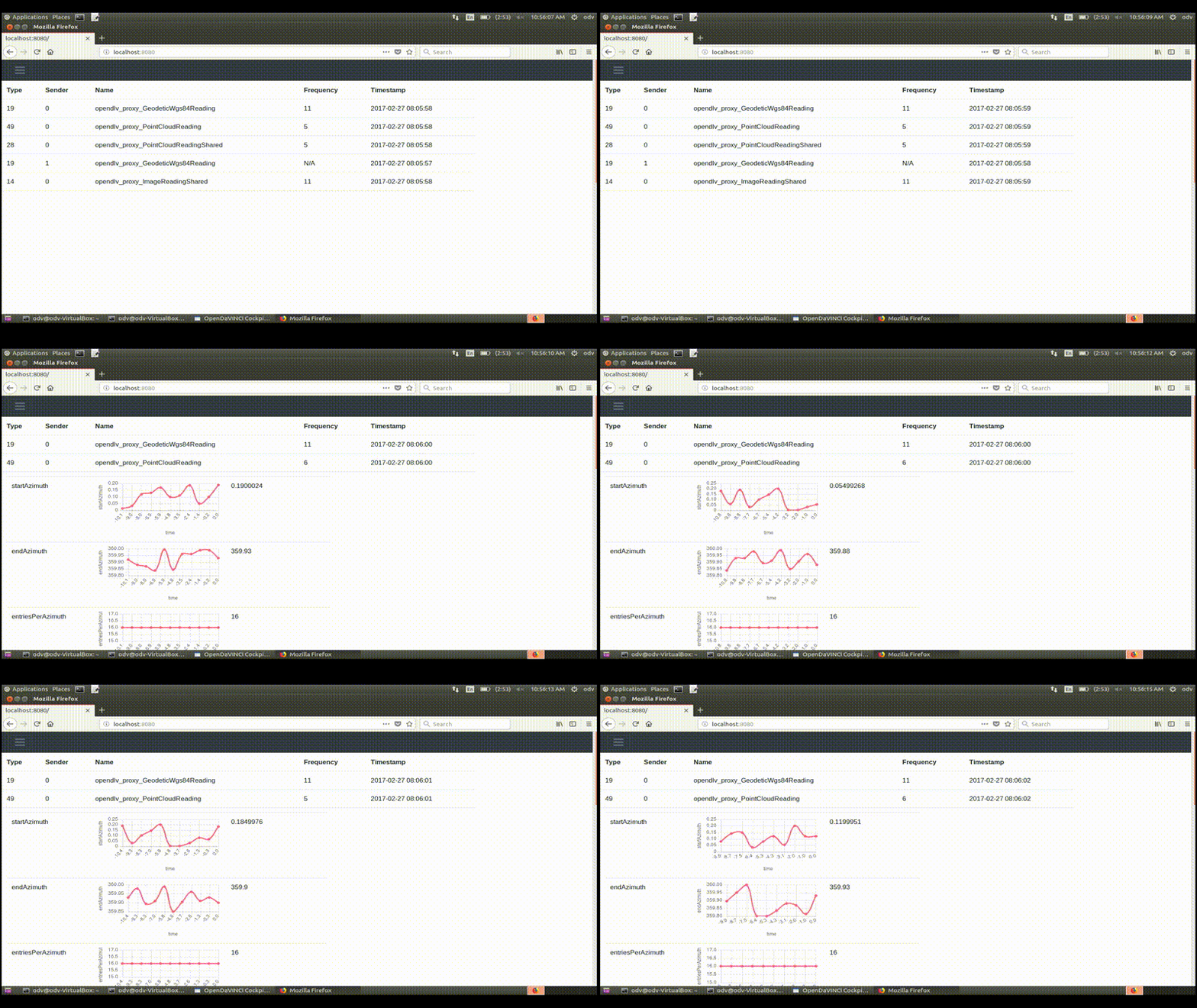
opendlv-signal-viewer to view any messages from the OpenDLV Standard Message Set exchanged in the communication session 111 (after starting this microservice, point your web-browser to the computer's IP address, port 8080): docker run --rm --net=host -p 8080:8080 chalmersrevere/opendlv-signal-viewer-multi:v0.0.8 --cid=111
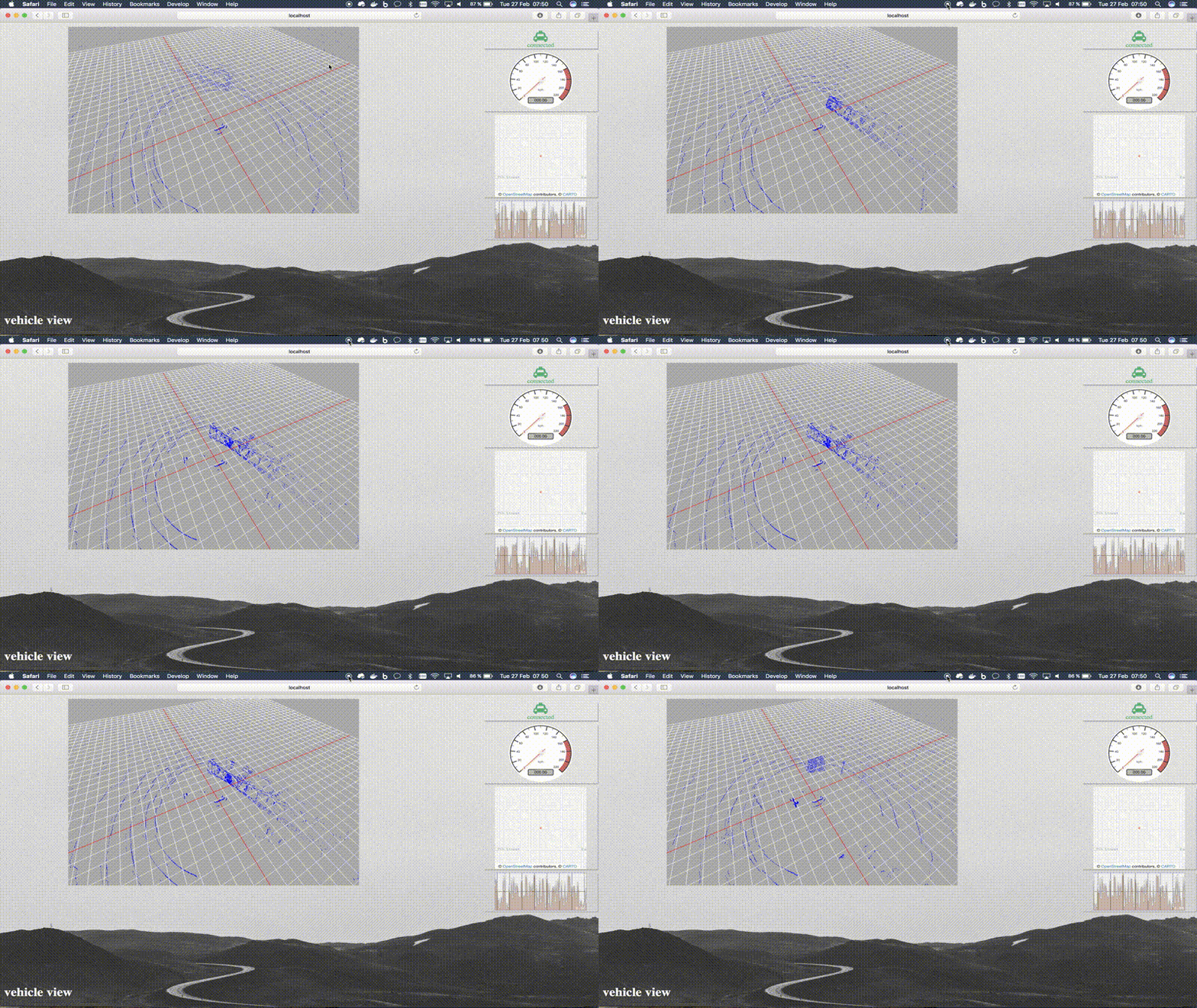
opendlv-vehicle-view to view vehicle messages from the OpenDLV Standard Message Set exchanged in the communication session 111 (after starting this microservice, point your web-browser to the computer's IP address, port 8081): docker run --rm --net=host --name=opendlv-vehicle-view -v ~/recordings:/opt/vehicle-view/recordings -v /var/run/docker.sock:/var/run/docker.sock -p 8081:8081 chalmersrevere/opendlv-vehicle-view-multi:v0.0.60
Build from sources on the example of Ubuntu 16.04 LTS
To build this software, you need cmake, C++14 or newer, and make. Having these
preconditions, update the contained submodules first.Now, you can change into the various sub-folders and run cmake and make as follows:License
- This project is released under the terms of the GNU GPLv3 License.
Publications
The following list contains publications related to the OpenDLV Software Ecosystem:
- O. Benderius, C. Berger, V. Malmsten Lundgren: "The Best Rated Human-Machine Interface Design for Autonomous Vehicles in the 2016 Grand Cooperative Driving Challenge".
- H. Yin, C. Berger: "When to use what data set for your self-driving car algorithm: An overview of publicly available driving datasets"
- F. Giaimo, C. Berger, C. Kirchner: "Considerations About Continuous Experimentation for Resource-Constrained Platforms in Self-driving Vehicles"
- H. Yin, C. Berger: "Mastering data complexity for autonomous driving with adaptive point clouds for urban environments"
- C. Berger, B. Nguyen, O. Benderius: "Containerized Development and Microservices for Self-Driving Vehicles: Experiences & Best Practices"
- F. Giaimo, C. Berger: "Design Criteria to Architect Continuous Experimentation for Self-Driving Vehicles"
- P. Masek, M. Thulin, H. Andrade, C. Berger, O. Benderius: "Systematic Evaluation of Sandboxed Software Deployment for Real-time Software on the Example of a Self-Driving Heavy Vehicle"
- C. Berger: "An Open Continuous Deployment Infrastructure for a Self-driving Vehicle Ecosystem"
- F. Giaimo, C. Berger, I. Crnkovic: "
- H. Yin, F. Giaimo, H. Andrade, C. Berger, I. Crnkovic: "Adaptive Message Restructuring Using Model-Driven Engineering"


