
🐍 This is the most complete course in Python, completely practical and all the lessons are explained with examples, so that they can be easily understood. 🍫
Learn Python Programming from Zero to Hero #1 | Building Projects







 Pythonista or Pythoneer |
HackerRank Python Certificate


Tabla de contenidos
Numeration | Check | Topic | Quantization | Edit Gitpot | Downloads | link | | ------------ |--------|-------------- |----------------- |------------------ |---------------- |-------- | | 003 |:heavycheckmark: | Creador | :hourglass: | | 💾 | Atras | | 005 |:heavycheckmark: | Ejemplos | :hourglass: | | 💾 | Atras | | 006 |:heavycheckmark: | Comandos | :hourglass: | | 💾 | Atras | | 007 |:heavycheckmark: | Variables | :hourglass: | | 💾 | Atras | | 008 |:heavycheckmark: | Tuplas | :hourglass: | | 💾 | Atras | | 009 |:heavycheckmark: | Instalación | :hourglass: | | 💾 | Atras | | 010 |:heavycheckmark: | Ramas | :hourglass: | | 💾 | Atras | | 011 |:heavycheckmark: | POO Programación orientada a objetos | :hourglass: | | 💾 | Atras | | 012 |:heavycheckmark: | Install Jupyter Notebook | :hourglass: | | 💾 | Atras | | 013 |:heavycheckmark: | Anaconda | :hourglass: | | 💾 | Atras | | 014 |:heavycheckmark: | Buenas Practicas En Commits De Git | :hourglass: | | 💾 | Atras | | 015 |:heavycheckmark: | Build A Foreign Language Flashcard App | :hourglass: | | 💾 | Atras | | 016 |:heavycheckmark: | Archivos Externos I| :hourglass: | | 💾 | Atras | | 017 |:heavycheckmark: | Archivos Externos II| :hourglass: | | 💾 | Atras | | 018 |:heavycheckmark: | BBDD | :hourglass: | | 💾 | Atras | | 019 |:heavycheckmark: | A I Programming with Python | :hourglass: | | 💾 | Atras | | 020 |:heavycheckmark: | Bucles | :hourglass: | | 💾 | Atras | | 021 |:heavycheckmark: | Cadenas | :hourglass: | | 💾 | Atras | | 022 |:heavycheckmark: | Christmas Tree | :hourglass: | | 💾 | Atras | | 023 |:heavycheckmark: | Colas | :hourglass: | | 💾 | Atras | | 024 |:heavycheckmark: | Condicionales | :hourglass: | | 💾 | Atras | | 025 |:heavycheckmark: | Conjuntos | :hourglass: | | 💾 | Atras | | 026 |:heavycheckmark: | Datos por teclado | :hourglass: | | 💾 | Atras | | 027 |:heavycheckmark: | Decoradores | :hourglass: | | 💾 | Atras | | 028 |:heavycheckmark: | Diccionarios | :hourglass: | | 💾 | Atras | | 029 |:heavycheckmark: | Documentacion y Pruebas | :hourglass: | |💾 | Atras | | 030 |:heavycheckmark: | Email | :hourglass: | | - | Atras | | 031 |:heavycheckmark: | Errores y Excepciones | :hourglass: | | 💾 | Atras | | 032 |:heavycheckmark: | Estructura General | :hourglass: | | 💾 | Atras | | 033 |:heavycheckmark: | Excepciones | :hourglass: | | 💾 | Atras | | 034 |:heavycheckmark: | Estructura General | :hourglass: | | 💾 | Atras | | 035 |:heavycheckmark: | Funciones Establecidas | :hourglass: | | 💾 | Atras | | 036 |:heavycheckmark: | Funciones | :hourglass: | | 💾 | Atras | | 037 |:heavycheckmark: | Git | :hourglass: | | 💾 | Atras | | 038 |:heavycheckmark: | Generadores | :hourglass: | | 💾 | Atras | | 039 |:heavycheckmark: | Generacion Ejecutables | :hourglass: | | 💾 | Atras | | 040 |:heavycheckmark: | Geographic Map of Peru | :hourglass: | | 💾 | Atras | | 041 |:heavycheckmark: | Geographical plottings | :hourglass: | | 💾 | Atras | | 042 |:heavycheckmark: | Guardado Permanenete | :hourglass: | | 💾 | Atras | | 043 |:heavycheckmark: | Interfas Grafica | :hourglass: | | 💾 | Atras | | 044 |:heavycheckmark: | Listas | :hourglass: | | 💾 | Atras | | 045 |:heavycheckmark: | Metodos de Cadenas | :hourglass: | | 💾 | Atras | | 046 |:heavycheckmark: | Modulos Usabiidad | :hourglass: | | 💾 | Atras | | 047 |:heavycheckmark: | Modulos | :hourglass: | | 💾 | Atras | | 048 |:heavycheckmark: | POO | :hourglass: | | 💾 | Atras | | 049 |:heavycheckmark: | Paquetes | :hourglass: | | 💾 | Atras | | 050 |:heavycheckmark: | Paquetes Distribuibles | :hourglass: | | 💾 | Atras | | 051 |:heavycheckmark: | Simulando Pilas | :hourglass: | | 💾 | Atras | | 052 |:heavycheckmark: | Plotly and cufflinks | :hourglass: | | 💾 | Atras | | 053 |:heavycheckmark: | Practica Guiada | :hourglass: | | 💾 | Atras | | 054 |:heavycheckmark: | Proyect Dictionary | :hourglass: | | 💾 | Atras | | 055 |:heavycheckmark: | Proyect Game hangmen | :hourglass: | | 💾 | Atras | | 056 |:heavycheckmark: | Reconocimiento Facial | :hourglass: | | 💾 | Atras | | 057 |:heavycheckmark: | Robot | :hourglass: | | 💾 | Atras | | 058 |:heavycheckmark: | Salida por pantalla | :hourglass: | | 💾 | Atras | | 059 |:heavycheckmark: | Screenpet | :hourglass: | | 💾 | Atras | | 060 |:heavycheckmark: | Serializacion | :hourglass: | | 💾 | Atras | | 062 |:heavycheckmark: | Sets | :hourglass: | | 💾| Atras | | 062 |:heavycheckmark: | Strings | :hourglass: | | 💾 | Atras | | 063 |:heavycheckmark: | Test SQLServer | :hourglass: | | 💾 | Atras | | 064 |:heavycheckmark: | Tipos de datos | :hourglass: | | 💾 | Atras | | 065 |:heavycheckmark: | ValidacionEmail | :hourglass: | | 💾 | Atras |
Pyhotn QT Designer
Numeration | Check | Topic | Quantization | Edit Gitpot | Downloads | link | | ------------ |--------|-------------- |----------------- |------------------ |---------------- |-------- | | 066 |:heavycheckmark: | QT Designer | :hourglass: | ✅ | 💾 | Atras | | 067 |:heavycheckmark: | QT-Formulario | :hourglass: | ✅ | 💾 | Atras | | 068 |:heavycheckmark: | QT-Formulario | :hourglass: | ✅ | 💾 | Atras | | 069 |:heavycheckmark: | QT-PySide | :hourglass: | ✅ |💾 | Atras | | 070 |:heavycheckmark: | QT-RegisterUI | :hourglass: | ✅ | 💾 | Atras | | 071 |:heavycheckmark: | QT-RenderTimeCalculator | :hourglass: | ✅ | 💾 | Atras | | 072 |:heavycheckmark: | QT-Toogle Menu | :hourglass: | ✅ | 💾 | Atras |
Pyhotn Tkinter
Numeration | Check | Topic | Quantization | Edit Gitpot | Downloads | link | | ------------ |--------|-------------- |----------------- |------------------ |---------------- |-------- | | 073 |:heavycheckmark: | Interface Grafica TKINTER | :hourglass: | ✅ | 💾 | Atras | | 074 |:heavycheckmark: | Pyhton Tkinter Add ZipCode | :hourglass: | ✅ | 💾 | Atras | | 074 |:heavycheckmark: | Pyhton Tkinter Get Height and Width | :hourglass: | ✅ | 💾 | Atras | | 075 |:heavycheckmark: | Python TKinter Build An MP3 Player | :hourglass: | ✅ | 💾 | Atras | | 076 |:heavycheckmark: | Python TKinter Button Bitmaps | :hourglass: | ✅ | 💾 | ⬅️ Atras | | 077 |:heavycheckmark: | Python TKinter Changing The Mouse Cursor | :hourglass: | ✅ | 💾 | Atras | | 078 |:heavycheckmark: | Python TKinter How To Ring The System Bell | :hourglass: | ✅ | 💾 | Atras | | 079 |:heavycheckmark: | Python TKinter Using Entry Boxes On Canvas | :hourglass: | ✅ | 💾 | Atras | | 100 |:heavycheckmark: | Python TKinter Using config to update widget | :hourglass: | ✅ | 💾 | Atras | | 101 |:heavycheckmark: | Python Tkinter Add Images to Text Box | :hourglass: | ✅ | 💾 | ⬅️ Atras | | 102 |:heavycheckmark: | Python Tkinter Add Input Boxes For Our CRM Tool | :hourglass: | ✅ | 💾 | Atras | | 103 |:heavycheckmark: | Python Tkinter Add Scrollbars to List Boxes | :hourglass: | ✅ | 💾 | Atras | | 104 |:heavycheckmark: | Python Tkinter Adding Frames | :hourglass: | ✅ | 💾 | Atras | | 105 |:heavycheckmark: | Python Tkinter Adding Full Screen ScrollBar | :hourglass: | ✅ | 💾 | Atras | | 106 |:heavycheckmark: | Python Tkinter Adding a Status Bar | :hourglass: | ✅ | 💾 | Atras | | 107 |:heavycheckmark: | Python Tkinter All List | :hourglass: | ✅ | 💾 | Atras | | 108 |:heavycheckmark: | Python Tkinter Ballon Text Tools | :hourglass: | ✅ | 💾 | Atras | | 109 |:heavycheckmark: | Python Tkinter Basic Search and Autofill | :hourglass: | ✅ | 💾 | Atras | | 110 |:heavycheckmark: | Python Tkinter Binding Dropdown Menus and Combo Boxes | :hourglass: | ✅ | 💾 | Atras | | 111 |:heavycheckmark: | Python Tkinter Bitcoin Price Web Scraper With BeautifulSoup | :hourglass: | ✅ | 💾 | Atras | | 112 |:heavycheckmark: | Build A Foreign Language Flashcard App | :hourglass: | ✅ | 💾 | Atras | | 123 |:heavycheckmark: | Python Tkinter Build A text Editor | :hourglass: | ✅ | 💾 | Atras | | 124 |:heavycheckmark: | Python Tkinter Build a Paint APP | :hourglass: | ✅ | 💾 | Atras | | 125 |:heavycheckmark: | Python Tkinter Build an Imagen Viewer | :hourglass: | ✅ | 💾 | Atras | | 126 |:heavycheckmark: | Python Tkinter Building out Database | :hourglass: | ✅ | 💾 | Atras | | 127 |:heavycheckmark: | Python Tkinter Button Mouse on Hover Popup Message | :hourglass: | ✅ | 💾 | Atras | | 128 |:heavycheckmark: | Python Tkinter Change Colors Weather App | :hourglass: | ✅ | 💾 | Atras | | 129 |:heavycheckmark: | Python Tkinter Checkboxes | :hourglass: | ✅ | 💾 | Atras | | 130 |:heavycheckmark: | Python Tkinter Classes | :hourglass: | ✅ | 💾 | Atras | | 131 |:heavycheckmark: | Python Tkinter Color Changing Number Guessing Game | :hourglass: | ✅ | 💾 | Atras | | 132 |:heavycheckmark: | Python Tkinter Color Picker | :hourglass: | ✅ | 💾 | Atras | | 133 |:heavycheckmark: | Python Tkinter Create CRM database Tool | :hourglass: | ✅ | 💾 | Atras | | 134 |:heavycheckmark: | Python Tkinter Create New Windows | :hourglass: | ✅ | 💾 | Atras | | 135 |:heavycheckmark: | Python Tkinter Create Tab in Your GUI | :hourglass: | ✅ | 💾 | Atras | | 136 |:heavycheckmark: | Python Tkinter Create a Data Picker Calendar | :hourglass: | ✅ | 💾 | Atras | | 137 |:heavycheckmark: | Python Tkinter Create a Database and Table CRM | :hourglass: | ✅ | 💾 | Atras | | 138 |:heavycheckmark: | Python Tkinter Creating Buttons | :hourglass: | ✅ | 💾 | Atras | | 139 |:heavycheckmark: | Python Tkinter Creating Input fields | :hourglass: | ✅ | 💾 | Atras | | 140 |:heavycheckmark: | Python Tkinter Creating Multiple Entry Boxes Automatically | :hourglass: | ✅ | 💾 | Atras | | 141 |:heavycheckmark: | Python-Tkinter-Custom-Message-Box-Popups | :hourglass: | ✅ | 💾 | Atras | | 142 |:heavycheckmark: | Python Tkinter Dates and 2020 Countdown App | :hourglass: | ✅ | 💾 | Atras | | 143 |:heavycheckmark: | Python Tkinter Delete Frame Children Widgets | :hourglass: | ✅ | 💾 | Atras | | 144 |:heavycheckmark: | Python Tkinter Delete Frame Children Widgets | :hourglass: | ✅ | 💾 | Atras | | 145 |:heavycheckmark: | Python Tkinter Delete a Record | :hourglass: | ✅ | 💾 | Atras | | 146 |:heavycheckmark: | Python Tkinter Dependent Drop Downs and List Boxes | :hourglass: | ✅ | 💾 | Atras | | 147 |:heavycheckmark: | Python Tkinter Dont Packon the same Line | :hourglass: | ✅ | 💾 | ⬅️ Atras | | 148 |:heavycheckmark: | Python Tkinter Drag and Drop Images With the Mouse | :hourglass: | ✅ | 💾 | Atras | | 149 |:heavycheckmark: | Python Tkinter Drag and Drop Images With the Mouse | :hourglass: | ✅ | 💾 | Atras | | 150 |:heavycheckmark: | Python Tkinter Drop Box Database Search CRM | :hourglass: | ✅ | 💾 | ⬅️ Atras | | 151 |:heavycheckmark: | Python Tkinter Dropdown Menus | :hourglass: | ✅ | 💾 | Atras | | 152 |:heavycheckmark: | Python Tkinter Dybamically Resize Buttons when Resizing a Window | :hourglass: | ✅ | 💾 | Atras | | 153 |:heavycheckmark: | Python Tkinter Dynamically Resize Background Images | :hourglass: | ✅ | 💾 | Atras | | 154 |:heavycheckmark: | Python Tkinter Export CRM Database to Excel File | :hourglass: | ✅ | 💾 | Atras | | 155 |:heavycheckmark: | Python Tkinter How Draw Lines and Shapes with Canvas | :hourglass: | ✅ | 💾 | Atras | | 156 |:heavycheckmark: | Python Tkinter How To Animate Widgets | :hourglass: | ✅ | 💾 | Atras | | 157 |:heavycheckmark: | Python Tkinter How To Define Custom Fonts | :hourglass: | ✅ | 💾 | Atras | | 158 |:heavycheckmark: | Python Tkinter How To Dynamically Resize Button Text | :hourglass: | ✅ | 💾 | Atras | | 159 |:heavycheckmark: | Python Tkinter How To Read A PDF File | :hourglass: | ✅ | 💾 | Atras | | 160 |:heavycheckmark: | Python Tkinter How To Resize Your App With The Sizegrip Widget | :hourglass: | ✅ | 💾 | Atras | | 161 |:heavycheckmark: | Python Tkinter How To Risize Entry Box heigh | :hourglass: | ✅ | 💾 | Atras | | 162 |:heavycheckmark: | Python Tkinter How To Use HTML In Your Tkinter App | :hourglass: | ✅ | 💾 | Atras | | 163 |:heavycheckmark: | Python Tkinter How To Use Images as Backgrounds | :hourglass: | ✅ | 💾 | Atras | | 164 |:heavycheckmark: | Python Tkinter How To Use The Message Widget For Blocks of Text | :hourglass: | ✅ | 💾 | Atras | | 165 |:heavycheckmark: | Python Tkinter How To add Excel Spreadsheet columns to listbox | :hourglass: | ✅ | 💾 | Atras | | 166 |:heavycheckmark: | Python Tkinter How To ser Tab Order and Focus | :hourglass: | ✅ | 💾 | Atras | | 167 |:heavycheckmark: | Python Tkinter How Validate an Entry Widget Integer | :hourglass: | ✅ | 💾 | Atras | | 168 |:heavycheckmark: | Python Tkinter How to Center Windows on the Screen | :hourglass: | ✅ | 💾 | Atras | | 169 |:heavycheckmark: | Python Tkinter How to Open External Programns | :hourglass: | ✅ | 💾 | Atras | | 170 |:heavycheckmark: | Python Tkinter How to Reset a Spinbox with Tkinter | :hourglass: | ✅ | 💾 | Atras | | 171 |:heavycheckmark: | Python Tkinter How to Resize Images | :hourglass: | ✅ | 💾 | Atras | | 172 |:heavycheckmark: | Python Tkinter How to Resize a Window Dynamically | :hourglass: | ✅ | 💾 | Atras | | 173 |:heavycheckmark: | Python Tkinter How to Unlock the Hidden Keys of f a Widget | :hourglass: | ✅ | 💾 | Atras | | 174 |:heavycheckmark: | Python Tkinter Image Buttons and Rounded Buttons | :hourglass: | ✅ | 💾 | Atras | | 175 |:heavycheckmark: | Python Tkinter Keyboard Event Binding | :hourglass: | ✅ | 💾 | Atras | | 176 |:heavycheckmark: | Python Tkinter List Boxes | :hourglass: | ✅ | 💾 | Atras | | 177 |:heavycheckmark: | Python Tkinter Lookup Customer By Last Name CRM | :hourglass: | ✅ | 💾 | Atras | | 178 |:heavycheckmark: | Python Tkinter Lookup all CustomersCRM | :hourglass: | ✅ | 💾 | Atras | | 179 |:heavycheckmark: | Python Tkinter MariaDB | :hourglass: | ✅ | 💾 | Atras | | 180 |:heavycheckmark: | Python Tkinter Matplolib Charts | :hourglass: | ✅ | 💾 | Atras | | 181 |:heavycheckmark: | Python Tkinter Menu Bars | :hourglass: | ✅ | 💾 | Atras | | 182 |:heavycheckmark: | Python Tkinter Message Boxes | :hourglass: | ✅ | 💾 | Atras | | 183 |:heavycheckmark: | Python Tkinter Mouse On Hover Image Animation | :hourglass: | ✅ | 💾 | Atras | | 184 |:heavycheckmark: | Python Tkinter Move Canvas shapes with Arrow Keys | :hourglass: | ✅ | 💾 | Atras | | 185 |:heavycheckmark: | Python Tkinter Multiple CRM search Results | :hourglass: | ✅ | 💾 | Atras | | 186 |:heavycheckmark: | Python Tkinter On Off Button Switch | :hourglass: | ✅ | 💾 | Atras | | 187 |:heavycheckmark: | Python Tkinter Open Excell Spreadsheet | :hourglass: | ✅ | 💾 | Atras | | 188 |:heavycheckmark: | Python Tkinter Open Files Dialog Box | :hourglass: | ✅ | 💾 | Atras | | 189 |:heavycheckmark: | Python Tkinter Overwrite Grid Labels | :hourglass: | ✅ | 💾 | Atras | | 190 |:heavycheckmark: | Python Tkinter Paned Windows | :hourglass: | ✅ | 💾 | Atras | | 191 |:heavycheckmark: | Python Tkinter Positioning | :hourglass: | ✅ | 💾 | Atras | | 192 |:heavycheckmark: | Python Tkinter Progress Bars | :hourglass: | ✅ | 💾 | Atras | | 193 |:heavycheckmark: | Python Tkinter Radio Butttons | :hourglass: | ✅ | 💾 | Atras | | 194 |:heavycheckmark: | Python Tkinter Random Winner Generador | :hourglass: | ✅ | 💾 | Atras | | 195 |:heavycheckmark: | Python Tkinter Read and Write to Text Files | :hourglass: | ✅ | 💾 | Atras | | 196 |:heavycheckmark: | Python Tkinter Remove Labels | :hourglass: | ✅ | 💾 | Atras | | 197 |:heavycheckmark: | Python Tkinter Right Click Menu Popups | :hourglass: | ✅ | 💾 | Atras | | 198 |:heavycheckmark: | Python Tkinter Rock Paper Scissors Game | :hourglass: | ✅ | 💾 | Atras | | 199 |:heavycheckmark: | Python Tkinter Save To Dat File Instead of Databases | :hourglass: | ✅ | 💾 | Atras | | 200 |:heavycheckmark: | Python Tkinter Secret Label Copying Hach | :hourglass: | ✅ | 💾 | Atras | | 201 |:heavycheckmark: | Python Tkinter Sliders | :hourglass: | ✅ | 💾 | Atras | | 202 |:heavycheckmark: | Python Tkinter Sounds and Music | :hourglass: | ✅ | 💾 | Atras | | 203 |:heavycheckmark: | Python Tkinter Spinboxes | :hourglass: | ✅ | 💾 | Atras | | 204 |:heavycheckmark: | Python Tkinter Standalone EXE Executable | :hourglass: | ✅ | 💾 | Atras | | 205 |:heavycheckmark: | Python Tkinter Text Box | :hourglass: | ✅ | 💾 | Atras | | 206 |:heavycheckmark: | Python Tkinter Threading | :hourglass: | ✅ | 💾 | Atras | | 207 |:heavycheckmark: | Python Tkinter Tic Tac Toe Game | :hourglass: | ✅ | 💾 | Atras | | 208 |:heavycheckmark: | Python Tkinter Tile Matching Game | :hourglass: | ✅ | 💾 | Atras | | 209 |:heavycheckmark: | Python Tkinter Timers and Clocks | :hourglass: | ✅ | 💾 | Atras | | 210 |:heavycheckmark: | Python Tkinter Transparent Windows | :hourglass: | ✅ | 💾 | Atras | | 211 |:heavycheckmark: | Python Tkinter Treeview | :hourglass: | ✅ | 💾 | Atras | | 213 |:heavycheckmark: | Python Tkinter Undo and Redo Text Button | :hourglass: | ✅ | 💾 | Atras | | 214 |:heavycheckmark: | Python Tkinter Unicode Character & Special Characters | :hourglass: | ✅ | 💾 | Atras | | 215 |:heavycheckmark: | Python | :hourglass: | ✅ | 💾 | Atras | | 216 |:heavycheckmark: | Python Tkinter Unicode Character & Special Characters | :hourglass: | ✅ | 💾 | Atras | | 217 |:heavycheckmark: | Python Tkinter Update MariaDb records | :hourglass: | ✅ | 💾 | Atras | | 218 |:heavycheckmark: | Python Tkinter Update a Record | :hourglass: | ✅ | 💾 | Atras | | 219 |:heavycheckmark: | Python Tkinter Using Config to update | :hourglass: | ✅ | 💾 | Atras | | 220 |:heavycheckmark: | Python Tkinter Using Database | :hourglass: | ✅ | 💾 | ⬅️ Atras | | 221 |:heavycheckmark: | Python Tkinter Using Excel Spreadsheets | :hourglass: | ✅ | 💾 | Atras | | 222 |:heavycheckmark: | Python Tkinter Using Frames with Menus | :hourglass: | ✅ | 💾 | Atras | | 223 |:heavycheckmark: | Python Tkinter Using Icons Image | :hourglass: | ✅ | 💾 | Atras | | 224 |:heavycheckmark: | Python Tkinter Using Other Python Programs in you App | :hourglass: | ✅ | 💾 | Atras | | 225 |:heavycheckmark: | Python Tkinter Window Resizer Control Panel | :hourglass: | ✅ | 💾 | Atras | | 226 |:heavycheckmark: | Python Tkinter Word Jumble Game | :hourglass: | ✅ | 💾 | Atras | | 227 |:heavycheckmark: | Python Tkinter how To Create a Splash Screen | :hourglass: | ✅ | 💾 | Atras | | 228 |:heavycheckmark: | Python Tkinter one SIded Widget Padding | :hourglass: | ✅ | 💾 | Atras | | 229 |:heavycheckmark: | Python tkinter How to Disable or Delete a Menu item | :hourglass: | ✅ | 💾 | Atras | | 230 |:heavycheckmark: | Build A Wikipedia Search App | :hourglass: | ✅ | 💾 | Atras | | 231 |:heavycheckmark: | Build A Strong Password Generator App | :hourglass: | ✅ | 💾 | Atras | | 232 |:heavycheckmark: | Python Tkinter Build A Currency Converter App | :hourglass: | ✅ | 💾 | Atras | | 233 |:heavycheckmark: | Add Functionality To Treeview CRM App | :hourglass: | ✅ | 💾 | Atras |
Python Advance
Numeration | Check | Topic | Quantization | Edit Gitpot | Downloads | link | | ------------ |--------|-------------- |----------------- |------------------ |---------------- |-------- | | B1 |:heavycheckmark: | Easy recognition | :hourglass: | ✅ | 💾 | Atras | | B2 |:heavycheckmark: | Keylogger | :hourglass: | ✅ | 💾 | ⬅️ Atras |
Extra
Numeration | Check | Topic | Quantization | Edit Gitpot | Downloads | link | | ------------ |--------|-------------- |----------------- |------------------ |---------------- |-------- | | A |:heavycheckmark: | A I Programming with Python| :hourglass: | ✅ | 💾| ⬅️ Atras | | B |:heavycheckmark: | Python Django| :hourglass: | ✅ | 💾| ⬅️ Atras | | C |:heavycheckmark: | Python-Kivy| :hourglass: | ✅ | 💾| ⬅️ Atras | | D |:heavycheckmark: | Play List Spotify | :hourglass: | ✅ | 💾 | ⬅️ Atras | | E |:heavycheckmark: | Book| :hourglass: | ✅ | 💾| ⬅️ Atras |
|
Ejemplos
print("Hello, World!")>>> 2 + 3
5Comandos
Verifica la versión de Python
python --versiongit updateActualiza el PIP de Python
python -m pip install --upgrade pipCreacion de un Instalador
pip install pyinstallerCreacion de un .exe
pyinstaller --windowed nombreArchivo.pyCreacion de un .exe - un solo archivo
pyinstaller --windowed --onefile nombreArchivo.pyListado de Modulos instalados en Python
pip listDesinstalar Modulos
pip uninstall nombreModuloConector Base de datos - SQL SERVER
pip install pyodbcConector Base de datos - MariaDB
pip3 install mariadbConector Base de datos - Mysql
pip install mysql-connectorpip install mysql-connector-pythonpip install mysql-connector-python-rfInstalar Pillow
pip install pillowInstalar Requests
pip install requestsInstalar Numpy
pip install numpyInstalar Matplotlib
pip install matplotlibInstalar tkcalendar
pip install tkcalendarpip install pyttsx3pip install pip-reviewActualizar todos lo Paquetes
pip-review --local --interactiveInstalar Pygame
pip install pygameInstalar Openpyxl
pip install openpyxlInstalar Pandas
pip install pandasInstalar xlrd
pip install xlrdInstalar Jupyter
pip install jupyterInstalar Freeze
pip install freezeInstalar pyqt5
pip install pyqt5Instalar pyside2
pip install pyside2Instalar PyPDF2
pip install PyPDF2Instalar pytimeparse
pip install pytimeparseBeautifulSoup
pip install beautifulsoup4Mysqlclient
pip install mysqlclientpip install requests
pip install requestsDjango
[https://www.djangoproject.com/download/]
Kivy
python -m pip install kivyWikipedia
pip install wikipediaInstalación
📦 Install Python Instalador de Python.
📦 Install Anaconda Intalador de Anaconda.
BLOG.
📦 Install Visual studio Code Intalador de Visual Studio Code 📦 Install Pycharm Intalador de Pycharm
| Caracteristicas | Visual Code | Anaconda | |----------------------------|:-----------:|:------------:| | Codigo Abierto | ❌ | ✔️ | | Multiplataforma | ✔️ | ✔️ | | Soporte | ✔️ | ✔️ | | Ciencia de datos | ❌ | ✔️ | | Rapidez | ✔️ | ✔️ |
Notas
- Puedes utilizar otro editor de código pero no tendrás soporte. se recomienda usar los editores mencionados.
Ramas
Ver todas las Ramas Ramas
POO Programación orientada a objetos
La programación orientada a objetos (POO, u OOP según sus siglas en inglés) es un paradigma de programación que viene a innovar la forma de obtener resultados. Los objetos manipulan los datos de entrada para la obtención de datos de salida específicos, donde cada objeto ofrece una funcionalidad especial.
- herencia.
- cohesión.
- abstracción.
- polimorfismo.
- acoplamiento.
- encapsulación.
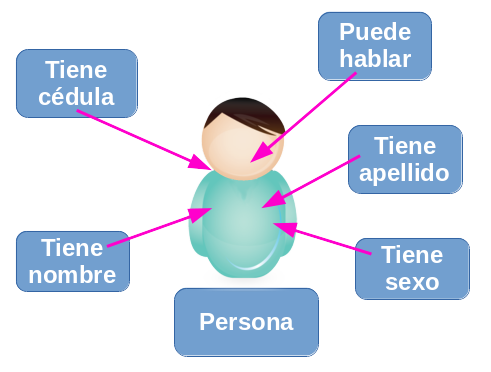
Muchos de los objetos prediseñados de los lenguajes de programación actuales permiten la agrupación en bibliotecas o librerías, sin embargo, muchos de estos lenguajes permiten al usuario la creación de sus propias bibliote
#!/usr/bin/env python3
import tkinter as tk
class Application(tk.Frame):     def init(self, master=None):         tk.Frame.init(self, master)         self.grid()         self.createWidgets()          def createWidgets(self):         self.mondialLabel = tk.Label(self, text='Hola, Mundo!')         self.mondialLabel.config(bg="#00ffff")         self.mondialLabel.grid()         self.quitButton = tk.Button(self, text='Quit', command=self.quit)         self.quitButton.grid()
if name == 'main':     app = Application()     app.master.title('Aplicación de muestra')     app.mainloop()
Los siguientes son los pasos para crear una aplicación Tkinter junto con la sintaxis:
- Primero, necesitamos importar el módulo Tkinter.
- En segundo lugar, necesitamos crear una ventana de contenedor.
- Luego, agregamos cualquier número de widgets a la ventana del contenedor.
- Por último, aplicamos el activador de eventos en los widgets.
Buenas Practicas En Commits De Git
- Estructura del Mensaje
El mensaje de un commit consiste en 3 diferentes partes separadas por una linea en blanco: el titulo, un cuerpo opcional y un pie opcional. Algo como lo siguiente:
Udacity Git Commit Message Style Guide
type: subject
body
footer
- Example Commit Message
feat: Summarize changes in around 50 characters or less
More detailed explanatory text, if necessary. Wrap it to about 72 characters or so. In some contexts, the first line is treated as the subject of the commit and the rest of the text as the body. The blank line separating the summary from the body is critical (unless you omit the body entirely); various tools like log, shortlog and rebase can get confused if you run the two together.
Explain the problem that this commit is solving. Focus on why you are making this change as opposed to how (the code explains that). Are there side effects or other unintuitive consequenses of this change? Here's the place to explain them.
Further paragraphs come after blank lines.
- Bullet points are okay, too
- Typically a hyphen or asterisk is used for the bullet, preceded    by a single space, with blank lines in between, but conventions    vary here
If you use an issue tracker, put references to them at the bottom, like this:
Resolves: #123 See also: #456, #789
Install Jupyter Notebook

pip install jupyter- Ejecuta Jupyter
jupyter notebook- Instalar Temas
pip install jupyterthemes- Actualizar Jupyter
pip install --upgrade jupyterthemespip install --upgrade notebook- Seleccionar un Tema
jt -lSeleccionar
jt -t nombretemaAnaconda
Anaconda Navigator
Anaconda es un distribución libre y abierta1 de los lenguajes Python y R, utilizada en ciencia de datos, y aprendizaje automático (machine learning). Esto incluye procesamiento de grandes volúmenes de información, análisis predictivo y cómputos científicos. Está orientado a simplificar el despliegue y administración de los paquetes de software. WIKIPEDIA).
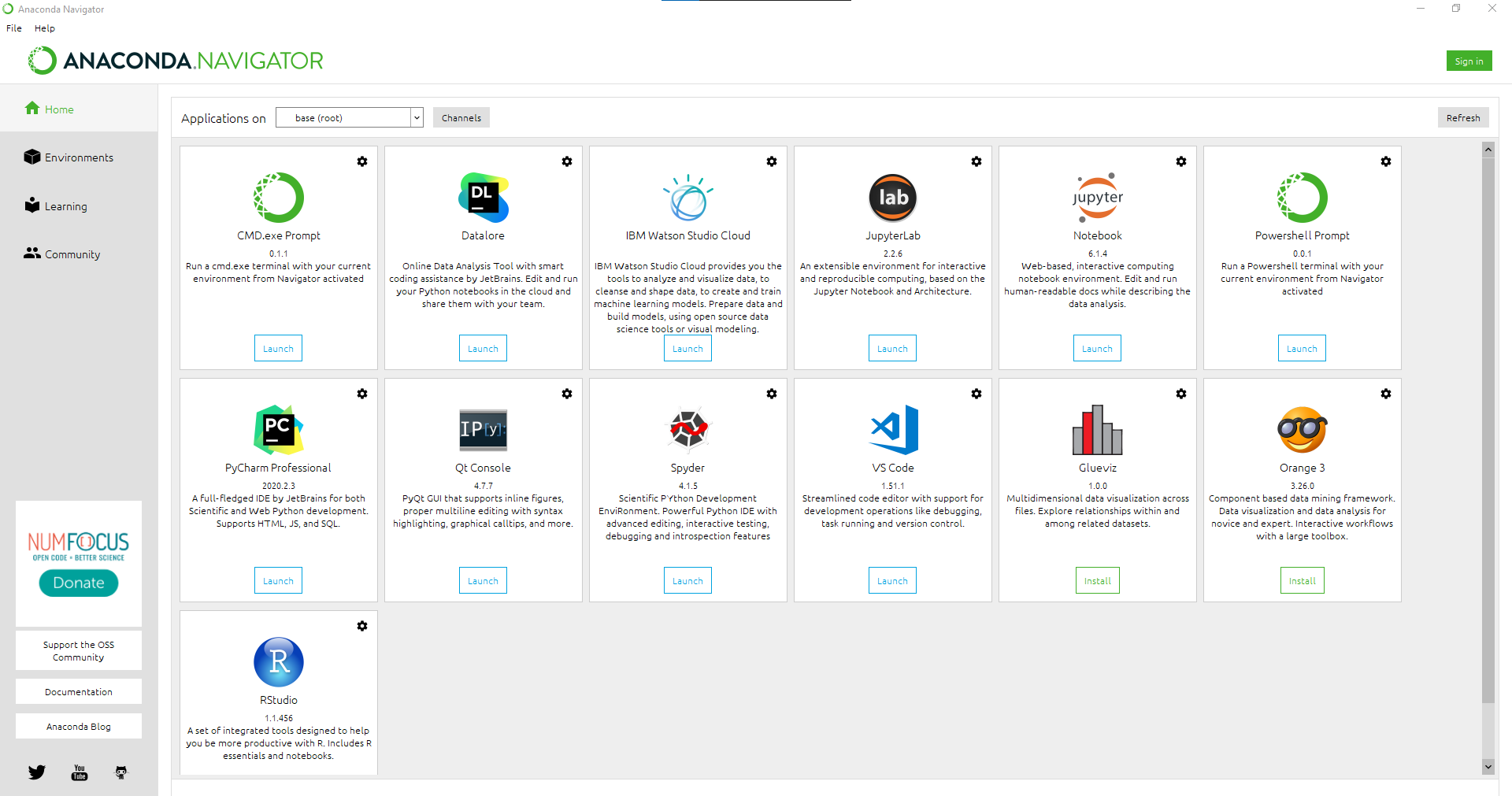
📦 Install Anaconda Intalador de Anaconda.
Archivos Externos I
| Carpeta | Link | Home | Code | Version | Estado | |--------------|:-----------:|:-----------:|:-----------:|:-----------:|:-----------:| | Archivos Externos I | :heavycheckmark: | ⬅️ Atras | yes | yes | :heavycheck_mark: |
Archivos Externos II
| Carpeta | Link | Home | Code | Version | Estado | |--------------|:-----------:|:-----------:|:-----------:|:-----------:|:-----------:| | Archivos Externos II | :heavycheckmark: | ⬅️ Atras | yes | yes | :heavycheck_mark: |
BBDD
| Carpeta | Link | Home | Code | Version | Estado | |--------------|:-----------:|:-----------:|:-----------:|:-----------:|:-----------:| | BBDD I | :heavycheckmark: | ⬅️ Atras | yes | yes | :heavycheck_mark: | | BBDD II | :heavycheckmark: | ⬅️ Atras | yes | yes | :heavycheck_mark: | | BBDD III | :heavycheckmark: | ⬅️ Atras | yes | yes | :heavycheck_mark: | | BBDD IV | :heavycheckmark: | ⬅️ Atras | yes | yes | :heavycheck_mark: |
Bucles
| Carpeta | Link | Home | Code | Version | Estado | |--------------|:-----------:|:-----------:|:-----------:|:-----------:|:-----------:| | Bucles | :heavycheckmark: | ⬅️ Atras | yes | yes | :heavycheck_mark: |
Cadenas
| Carpeta | Link | Home | Code | Version | Estado | |--------------|:-----------:|:-----------:|:-----------:|:-----------:|:-----------:| | Cadenas | :heavycheckmark: | ⬅️ Atras | yes | yes | :heavycheck_mark: |
Christmas Tree
| Carpeta | Link | Home | Code | Version | Estado | |--------------|:-----------:|:-----------:|:-----------:|:-----------:|:-----------:| | Christmas Tree | :heavycheckmark: | ⬅️ Atras | yes | yes | :heavycheck_mark: |
Colas
| Carpeta | Link | Home | Code | Version | Estado | |--------------|:-----------:|:-----------:|:-----------:|:-----------:|:-----------:| | Colas | :heavycheckmark: | ⬅️ Atras | yes | yes | :heavycheck_mark: |
Condicionales
| Carpeta | Link | Home | Code | Version | Estado | |--------------|:-----------:|:-----------:|:-----------:|:-----------:|:-----------:| | Condicionales | :heavycheckmark: | ⬅️ Atras | yes | yes | :heavycheck_mark: |
Conjuntos
| Carpeta | Link | Home | Code | Version | Estado | |--------------|:-----------:|:-----------:|:-----------:|:-----------:|:-----------:| | Conjuntos | :heavycheckmark: | ⬅️ Atras | yes | yes | :heavycheck_mark: |
Datos por teclado
| Carpeta | Link | Home | Code | Version | Estado | |--------------|:-----------:|:-----------:|:-----------:|:-----------:|:-----------:| | Datos por teclado | :heavycheckmark: | ⬅️ Atras | yes | yes | :heavycheck_mark: | | Ingreso por Teclado | :heavycheckmark: | ⬅️ Atras | yes | yes | :heavycheck_mark: |
Decoradores
| Carpeta | Link | Home | Code | Version | Estado | |--------------|:-----------:|:-----------:|:-----------:|:-----------:|:-----------:| | Decoradores I | :heavycheckmark: | ⬅️ Atras | yes | yes | :heavycheck_mark: | | Decoradores II | :heavycheckmark: | ⬅️ Atras | yes | yes | :heavycheck_mark: |
Diccionarios
| Carpeta | Link | Home | Code | Version | Estado | |--------------|:-----------:|:-----------:|:-----------:|:-----------:|:-----------:| | Diccionarios | :heavycheckmark: | ⬅️ Atras | yes | yes | :heavycheck_mark: | | Diccionario Simple | :heavycheckmark: | ⬅️ Atras | yes | yes | :heavycheck_mark: |
Documentacion y Pruebas
| Carpeta | Link | Home | Code | Version | Estado | |--------------|:-----------:|:-----------:|:-----------:|:-----------:|:-----------:| | Documentacion y Pruebas I | :heavycheckmark: | ⬅️ Atras | yes | yes | :heavycheck_mark: | | Documentacion y Pruebas II | :heavycheckmark: | ⬅️ Atras | yes | yes | :heavycheck_mark: | | Documentacion y Pruebas III | :heavycheckmark: | ⬅️ Atras | yes | yes | :heavycheck_mark: |
| Carpeta | Link | Home | Code | Version | Estado | |--------------|:-----------:|:-----------:|:-----------:|:-----------:|:-----------:| | Email | :heavycheckmark: | ⬅️ Atras | yes | yes | :heavycheck_mark: |
Errores y Excepciones
| Carpeta | Link | Home | Code | Version | Estado | |--------------|:-----------:|:-----------:|:-----------:|:-----------:|:-----------:| | Errores y Excepciones | :heavycheckmark: | ⬅️ Atras | yes | yes | :heavycheck_mark: |
Estructura General
| Carpeta | Link | Home | Code | Version | Estado | |--------------|:-----------:|:-----------:|:-----------:|:-----------:|:-----------:| | Estructura General | :heavycheckmark: | ⬅️ Atras | yes | yes | :heavycheck_mark: |
Excepciones
| Carpeta | Link | Home | Code | Version | Estado | |--------------|:-----------:|:-----------:|:-----------:|:-----------:|:-----------:| | Excepciones | :heavycheckmark: | ⬅️ AREADME truncated. [View on GitHub


