
Guidance for Clickstream Analytics on AWS source code
Clickstream Analytics on AWS Guidance
Table of Contents
- Cost - Architecture Overview - Operating System - AWS account requirements - aws cdk bootstrap - Supported Regions- Deployment Steps
- Deployment Validation
- Running the Guidance
- Next Steps
- Test
- Local development for web console
- Local build spark ETL jar
- Cleanup
- FAQ, known issues, additional considerations, and limitations
- Revisions
- Notices
Overview
This solution collects, ingests, analyzes, and visualizes clickstream events from your websites and mobile applications. Clickstream data is critical for online business analytics use cases, such as user behavior analysis, customer data platform, and marketing analysis. This data derives insights into the patterns of user interactions on a website or application, helping businesses understand user navigation, preferences, and engagement levels to drive product innovation and optimize marketing investments.
With this solution, you can quickly configure and deploy a data pipeline that fits your business and technical needs. It provides purpose-built software development kits (SDKs) that automatically collect common events and easy-to-use APIs to report custom events, enabling you to easily send your customers’ clickstream data to the data pipeline in your AWS account. The solution also offers pre-assembled dashboards that visualize key metrics about user lifecycle, including acquisition, engagement, activity, and retention, and adds visibility into user devices and geographies. You can combine user behavior data with business backend data to create a comprehensive data platform and generate insights that drive business growth.
For more information, refer to [the doc][doc-solution-overview]
Architecture Overview
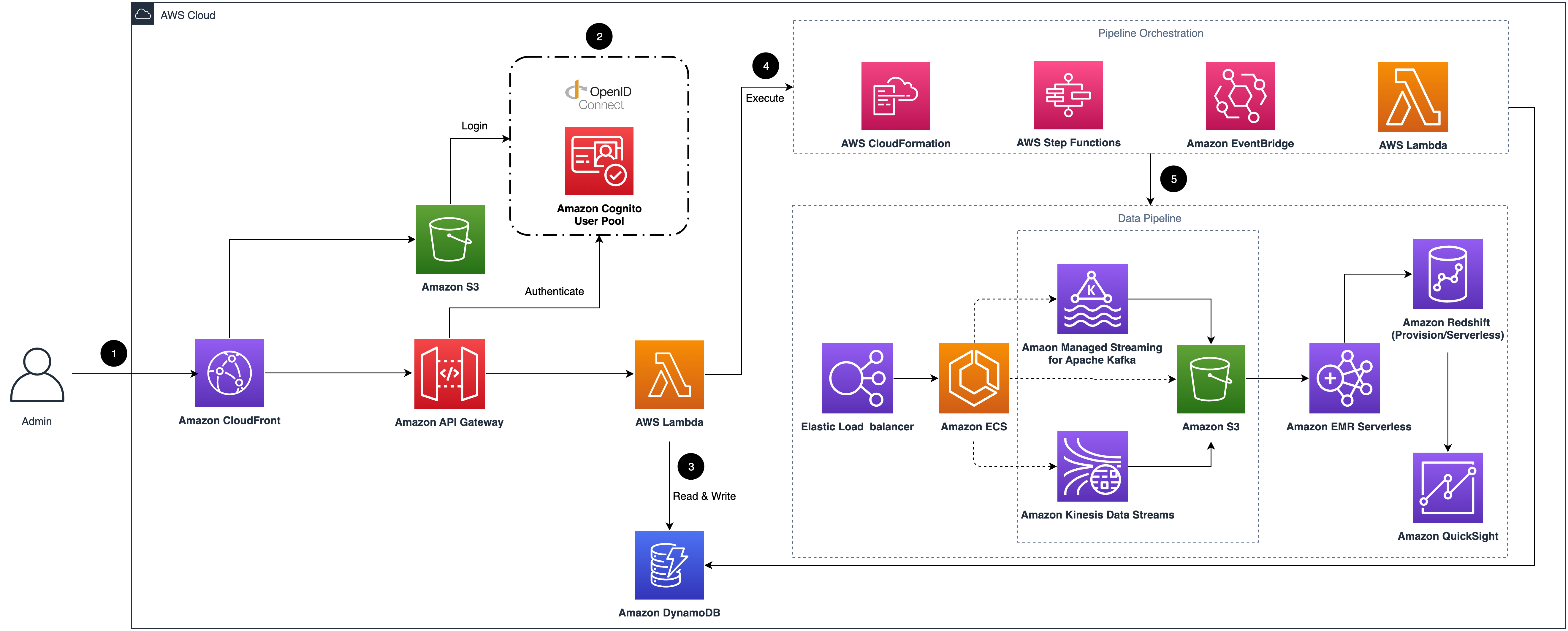
- Amazon CloudFront distributes the frontend web UI assets hosted in the Amazon S3 bucket, and the backend APIs hosted
- The Amazon Cognito user pool or OpenID Connect (OIDC) is used for authentication.
- The web UI console uses Amazon DynamoDB to store persistent data.
- AWS Step Functions, AWS CloudFormation, AWS Lambda, and Amazon EventBridge are used for orchestrating the lifecycle
- The data pipeline is provisioned in the Region specified by the system operator. It consists of Application Load
For more information, refer to [the doc][doc-arch].
Cost
The Clickstream Analytics costs are primarily driven by the data pipeline, with following main components:
- Ingestion module, cost varies based on ingestion server size and selected data sink type
- Data processing and modeling module (optional), cost determined by module activation and configuration settings
- Enabled Dashboards (optional), cost based on module activation and selected configuration options
- Additional features
Prerequisites
- At least four vacant S3 buckets.
Operating System
These deployment instructions are optimized to best work on macOS, Linux, or Windows. The following packages and tools are required:
- AWS Command Line Interface
- Python 3.11 or newer
- Pypi/Pip 25.0 or newer
- Node.js 20.12.0 or newer
- AWS CDK 2.140.0 or newer
- pnpm 9.15.3
- Docker
- AWS access key ID and secret access key
AWS account requirements
You need an AWS account with AdministratorAccess equivalent permissions to deploy this solution.
aws cdk bootstrap
This Guidance uses aws-cdk. If you are using aws-cdk for the first time, please perform the bootstrapping:
cdk bootstrap --cloudformation-execution-policies arn:aws:iam::aws:policy/AdministratorAccessSupported Regions
Clickstream Analytics uses services which may not be currently available in all AWS Regions. Launch this solution in an AWS Region where required services are available.
[Supported AWS Regions][doc-supported-aws-regions]
Deployment Steps
- Clone the repository:
git clone https://github.com/aws-solutions/clickstream-analytics-on-aws.git
cd clickstream-analytics-on-aws- Install pnpm and dependencies:
npm install -g pnpm@9.15.3
pnpm install && pnpm projen && pnpm nx build @aws/clickstream-base-lib- Bootstrap CDK (if not done before):
npx cdk bootstrap- Deploy the stack:
cd deployment
sh solution-deploy.sh --region <AWS Region> --profile <AWS Profile Name> --email <User Email> --template-deploy- Note the CloudFront URL from the outputs to access the web console.
Deployment Validation
After deploying the solution, you can validate the deployment by:
- Open the AWS CloudFormation console and verify the status of the stack is CREATE_COMPLETE.
- Navigate to the CloudFront URL provided in the CloudFormation outputs to access the web console.
- Sign in with the credentials sent to the email address you provided during deployment.
- Verify you can access the dashboard and create a new data pipeline.
- For CDK deployment, you can validate by checking the CloudFormation stacks in the console or by running:
aws cloudformation describe-stacks --stack-name cloudfront-s3-control-plane-stack-globalRunning the Guidance
After successful deployment, you can start using the Clickstream Analytics solution by following these steps:
- Access the Web Console:
- Create a Data Pipeline:
- Create an App:
- Integrate SDK with Your Application:
- View Analytics:
For step-by-step instructions on building a serverless data pipeline that collects application data, please refer to the [implementation guide][doc-get-started].
Next Steps
After successfully deploying and running the Clickstream Analytics, consider these next steps to enhance your implementation:
- Customize Data Collection:
- Enhance Data Processing:
- Integrate with Other AWS Services:
- Scale Your Implementation:
- Develop Custom Dashboards:
- Implement Data Governance:
For more information, refer to the [Pipeline Management][doc-pipeline-management] section in the implementation guide.
Cleanup
To clean up all resources deployed by this solution, follow these steps:
- Delete Data Pipelines First:
- Delete Apps:
- Delete CloudFormation Stacks:
aws cloudformation delete-stack --stack-name <stack-name>- Delete S3 Buckets (optional)
Test
pnpm testLocal development for web console
- Step1: Deploy the solution control plane(create DynamoDB tables, State Machine and other resources).
- Step2: Open Amazon Cognito console, select the corresponding User pool, click the App integration tab, select application details in the App client list, edit Hosted UI, and set a new URL:
http://localhost:3000/signininto Allowed callback URLs. - Step3: Goto the folder:
src/control-plane/local
cd src/control-plane/local# run backend server local
bash start.sh -s backend# run frontend server local
bash start.sh -s frontendLocal build spark ETL jar
- Step1: Build ETL common
cd src/data-pipeline/etl-common
./gradlew clean build install- Step2: Build spark ETL jar
cd src/data-pipeline/spark-etl
build with unit tests
./gradlew clean build
or only build jar and skip all unit tests
./gradlew clean build -x test -x :coverageCheck
check the jar file
ls -l ./build/libs/spark-etl-*.jar
FAQ, known issues, additional considerations, and limitations
- When deploying in regions with limited availability for some AWS services, you may encounter deployment failures. Always check the [supported regions documentation][doc-supported-aws-regions] before deployment.
- Large data volumes may require adjustments to the default configuration settings for optimal performance.
- The first-time ETL job may take longer to complete as it initializes the processing environment.
- For detailed troubleshooting information, refer to the [troubleshooting guide][doc-troubleshooting].
Revisions
Check the CHANGELOG.md file in the repo to see all notable changes and updates to the software. The changelog provides a clear record of improvements and fixes for each version.
Notices
*Customers are responsible for making their own independent assessment of the information in this Guidance. This Guidance: (a) is for informational purposes only, (b) represents AWS current product offerings and practices, which are subject to change without notice, and (c) does not create any commitments or assurances from AWS and its affiliates, suppliers or licensors. AWS products or services are provided “as is” without warranties, representations, or conditions of any kind, whether express or implied. AWS responsibilities and liabilities to its customers are controlled by AWS agreements, and this Guidance is not part of, nor does it modify, any agreement between AWS and its customers.*
[android-sdk]: https://github.com/aws-solutions/clickstream-analytics-on-aws-android-sdk [swift-sdk]: https://github.com/aws-solutions/clickstream-analytics-on-aws-swift-sdk [flutter-sdk]: https://github.com/aws-solutions/clickstream-analytics-on-aws-flutter-sdk [react-native-sdk]: https://github.com/aws-solutions/clickstream-analytics-on-aws-react-native-sdk [web-sdk]: https://github.com/aws-solutions/clickstream-analytics-on-aws-web-sdk [wechat-sdk]: https://github.com/awslabs/clickstream-wechat [http-api]: https://aws-solutions.github.io/clickstream-analytics-on-aws/en/latest/sdk-manual/http-api/ [configure-aws-cli]: https://docs.aws.amazon.com/zh_cn/cli/latest/userguide/cli-chap-configure.html [aws-cdk]: https://aws.amazon.com/cdk/ [doc-arch]: https://docs.aws.amazon.com/solutions/latest/clickstream-analytics-on-aws/architecture-overview.html [doc-deployment]: https://docs.aws.amazon.com/solutions/latest/clickstream-analytics-on-aws/deployment.html [sdk-samples]: https://github.com/aws-samples/clickstream-sdk-samples [doc-solution-overview]: https://docs.aws.amazon.com/solutions/latest/clickstream-analytics-on-aws/solution-overview.html [doc-cost]: https://docs.aws.amazon.com/solutions/latest/clickstream-analytics-on-aws/cost.html [doc-supported-aws-regions]: https://docs.aws.amazon.com/solutions/latest/clickstream-analytics-on-aws/supported-aws-regions.html [doc-get-started]: https://docs.aws.amazon.com/solutions/latest/clickstream-analytics-on-aws/getting-started.html [doc-pipeline-management]: https://docs.aws.amazon.com/solutions/latest/clickstream-analytics-on-aws/pipeline-management.html [doc-sdk-manaul]: https://docs.aws.amazon.com/solutions/latest/clickstream-analytics-on-aws/sdk-manual.html [doc-troubleshooting]: https://docs.aws.amazon.com/solutions/latest/clickstream-analytics-on-aws/troubleshooting.html


