
https://avishayil.medium.com/serverless-jupyter-hub-with-aws-fargate-and-cdk-2160154187a1
Welcome to Jupyter ECS Service CDK project!
Motivation
I found myself using Jupyter notebooks for various use-cases:
- Machine learning
- Data analysis & Visualisations
- Documentation
Architecture
The main idea is to use serverless services in order to remove the need from managing servers. This architecture is using EFS as a shared, persistent storage for storing the Jupyter notebooks.
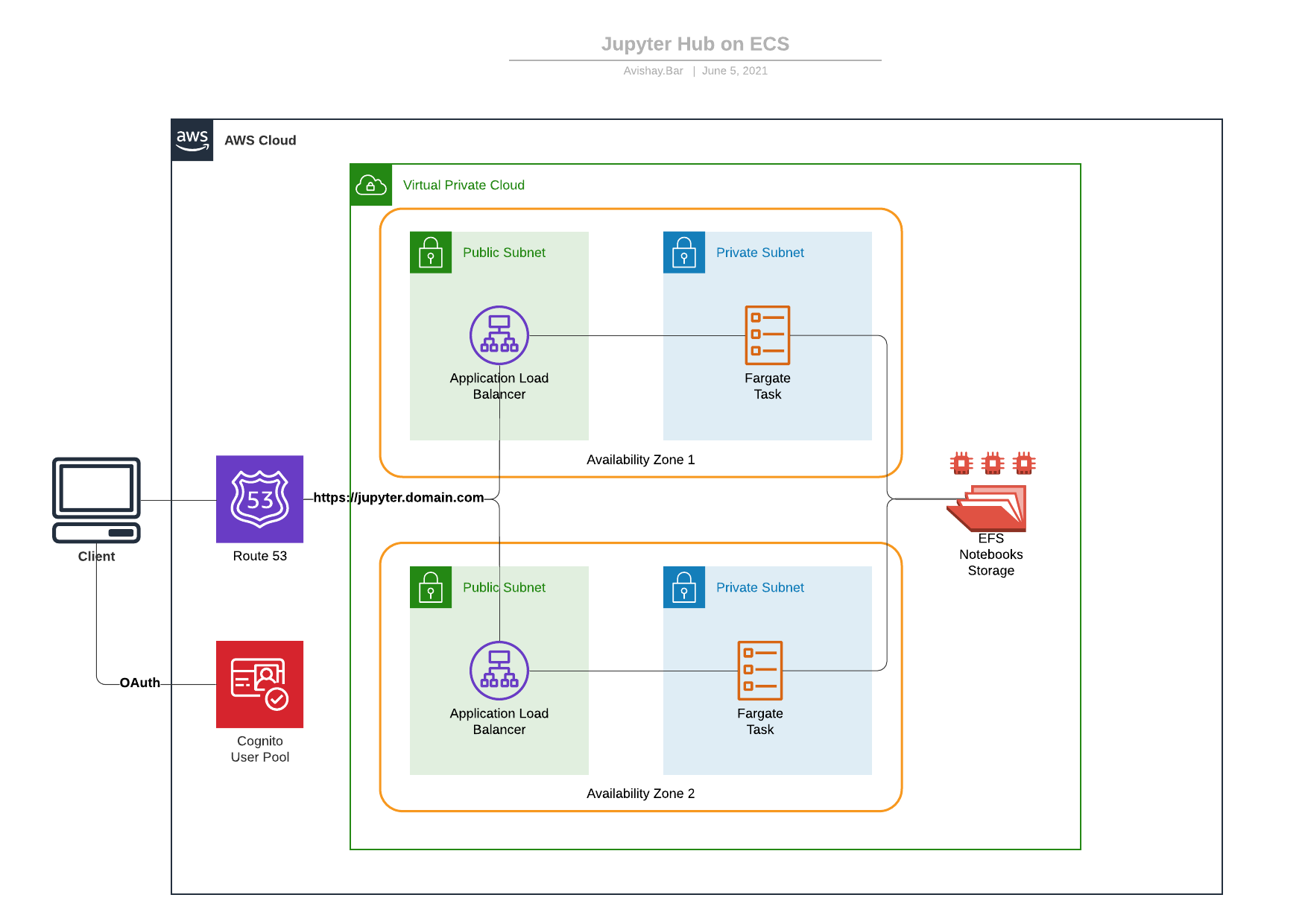
Usage
Pre-requisites
- Domain name managed with a public hosted zone on AWS Route 53.
config.yaml file with the hosted zone name and hosted zone id from Route 53.
- MacOS / Linux computer with Docker: https://docs.docker.com/get-docker/
- NodeJS 12 or later AWS CDK command line interface installed on your computer.
npm:
$ npm install -g aws-cdk- Python 3.6 and up with Pipenv dependencies & virtual environment management framework.
pip:
$ pip install --upgrade pipenvPreparing the CDK Environment
To initiate the virtualenv on MacOS and Linux and install the required dependencies:
$ pipenv install --devAfter the init process completes, and the virtualenv is created, you can use the following step to activate your virtualenv.
$ pipenv shellAt this point you can now synthesize the CloudFormation template for this code.
$ cdk synthTo add additional dependencies, for example other CDK libraries, just add them to your setup.py file and run pipenv --lock && pipenv sync command.
Deployment
You can now deploy the CloudFormation template:
$ cdk deployDon't forget to approve the template and security resources before the deployment. By default, the template will spawn 1 task. I encountered some problems when trying to spawn more than 1 task during the OAuth flow. If you would like to change the number of running tasks ,you can configure it in the config.yaml file.
Docker
In order for the service to run, the ECS service containers will pull the compatible container image and provision containers according to the desired capacity. For your convenience, I published an image that contains the same code. However, for security concerns you will use your own image hosted on your private repository (ECR). You can find the updated source code on the docker folder and build it yourself:
$ cd docker
$ docker build -t jupyter-ecs-service .
$ docker tag jupyter-ecs-service your-docker-repo/jupyter-ecs-service:latest
$ docker push
Jupyter Admin User
The CDK stack will provision the jupyter administrator user according to the list provided on the docker/admins file. The default user that ships with the public docker image is jupyter. However, if you're using your own docker image you can change the admin user list using the docker/admins.
Security
- You should configure the admin user temporary password on the
config.yamlfile. - Authentication to the Jupyter hub is done by AWS Cognito user pool. When a user is logging in to the system, a user directory is automatically created for him.
- Jupyter
Shutdown on logoutis activated, To make sure that ghost processes are closed. - ECS containers are running in non-privileged mode, according to the docker best practices.
- During the deployment time, the cdk stack will try to determine your public ip address automatically using
checkip.amazonaws.com.
- TLS termination are being done on the application load balancer using A SSL certificate generated on the deployment time by CDK, with DNS record validation on the configured hosted zone.
- Elastic File System is encrypted with a CMK generated by AWS KMS. Key policy is restricted to the account identities.
- Permanent resources, such as EFS, CMK, and Cognito User Pool are defined to be destroyed when the stack is deleted.
License
See LICENSE.md file.


