
Stata CLI for Agent; Stata CLI Is All Reg Monkeys Need
stata-cli
Stata CLI Is All Reg Monkeys Need
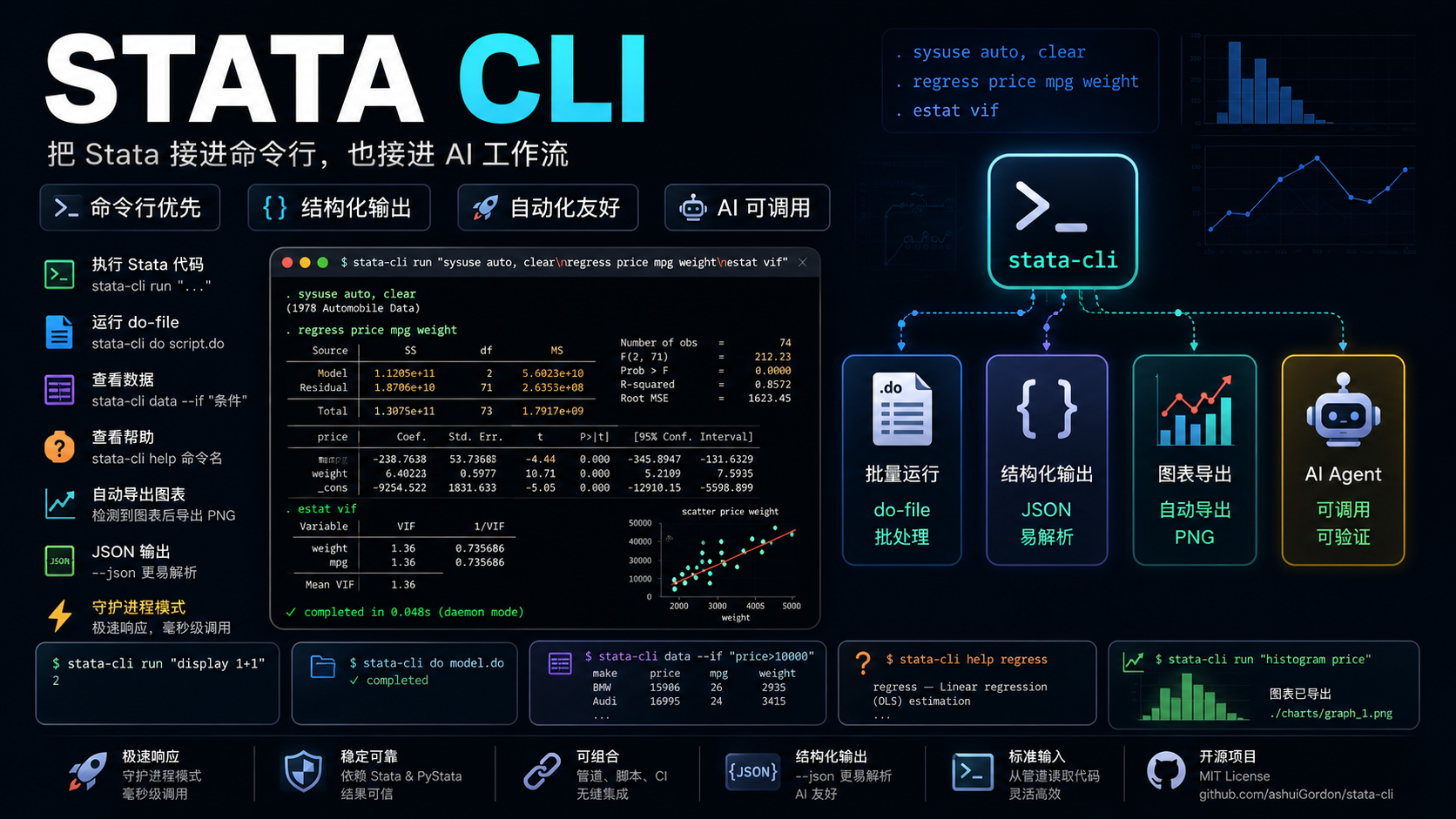


A command-line interface for Stata via PyStata — built for humans and AI Agents. Run Stata code, .do files, view data, get help, and export graphs, all from the terminal. Includes a daemon mode for sub-second execution.
Install · AI Agent · Commands · Daemon · Advanced · Contributing
Why stata-cli?
- Agent-Native Design — Structured JSON output, exit codes, and a SKILL.md definition out of the box — AI Agents can operate Stata with zero extra setup
- Sub-Second Execution — Daemon mode keeps PyStata alive in the background, reducing startup from ~2-3s to ~85ms (35x speedup)
- Full Coverage — Run code, execute
.dofiles, view data, browse help, export graphs, interrupt execution — everything you need from one binary - AI-Friendly & Optimized — Compact output mode, token limit management, structured JSON responses, and graph auto-naming — designed for Agent tool-use
- Open Source, Zero Barriers — MIT license, ready to use, just
pip install - Up and Running in Seconds — Auto-detects your Stata installation, from install to first command in 2 steps
Features
| Category | Capabilities | |----------|-------------| | Run Code | Execute inline Stata code, multi-line blocks, or pipe from stdin | | Do Files | Run .do files with /// line continuation support and graph auto-naming | | Data Viewer | View current dataset as JSON with if-condition filtering and row limits | | Variable Metadata | Inspect variable names, types, formats, and labels via vars | | Stored Results | Retrieve r(), e(), s() results as structured JSON via return | | Matrix Access | Read Stata matrices (e.g. e(b), e(V)) as JSON via matrix | | Value Labels | List and inspect value labels via labels | | Macro Access | Get/set Stata macros including c(), e(), r() system macros | | Frame Management | List Stata frames and current working frame via frame | | Help System | Browse Stata help topics with SMCL-to-plain-text conversion | | Graph Export | Auto-detect and export graphs as PNG/SVG/PDF to ~/.stata-cli/graphs/ | | Daemon Mode | Persistent background process for sub-second execution; parallel sessions via --session | | Output Control | Compact mode, JSON output, token limit management, log file output | | Interruption | Send break signal to stop long-running commands | | Skill Library | Built-in Stata reference with 57 topics: syntax, econometrics, causal inference, packages |
Installation & Quick Start
Requirements
- Stata 17+ installed on your machine (provides the PyStata library)
- Python 3.9+
Quick Start (Human Users)
Install
Choose one of the following methods:
Option 1 — From pip (recommended):
pip install stata-cliOption 2 — From npm / npx (zero Python setup):
# One-shot usage
npx stata-cli run "display 1+1"
Global install
npm install -g stata-cli
The npm package is a thin wrapper that delegates to uvx, pipx, or python3.
Option 3 — From source:
git clone https://github.com/ashuiGordon/stata-cli.git
cd stata-cli
pip install -e ".[data]"
Use
# 1. Verify Stata is detected
stata-cli detect
2. Run your first command
stata-cli run "display 1+1"
3. Start daemon for fast execution
stata-cli daemon start
stata-cli run "sysuse auto, clear"    # ~85ms!
Quick Start (AI Agent)
The following steps are for AI Agents calling stata-cli via the Bash tool.
Step 1 — Install
pip install stata-cliStep 2 — Verify Stata path
stata-cli detectStep 3 — Start daemon (recommended)
stata-cli daemon startStep 4 — Run commands
# Inline code
stata-cli run "sysuse auto, clear
regress price mpg weight
predict yhat"
Structured JSON output
stata-cli --json run "summarize price"
View data
stata-cli data --if "price>10000" --rows 50
Lookup command syntax
stata-cli help regress
Commands
run — Execute Stata Code
stata-cli run "sysuse auto, clear"
Multi-line
stata-cli run "sysuse auto, clear
summarize price mpg
regress price mpg weight"
Pipe from stdin
echo "display 42" | stata-cli run -
do — Execute a .do File
stata-cli do analysis.do
stata-cli --compact do long_script.do
Do files are preprocessed: /// line continuations are joined, and unnamed graph commands are auto-named for reliable export.
data — View Current Dataset
stata-cli data
stata-cli data --if "price>5000" --rows 50
Returns the current dataset as JSON with columns, data, types, and row counts.
help — Browse Stata Help
stata-cli help regress
stata-cli help summarize
Displays help as plain text (SMCL markup is automatically converted).
stop — Interrupt Execution
stata-cli stopSends a break signal to the running Stata command (daemon mode).
detect — Find Stata Installation
stata-cli detectPrints the auto-detected Stata installation path.
return — Retrieve Stored Results
stata-cli return r         # r() results (after summarize, etc.)
stata-cli return e         # e() results (after regress, etc.)
stata-cli return s         # s() results
Returns r(), e(), or s() stored results as structured JSON — scalars, macros, and matrix references.
vars — Variable Metadata
stata-cli vars                # all variables
stata-cli vars price mpg      # specific variables
Returns variable names, types, formats, and labels as JSON. More structured than describe.
matrix — Read Stata Matrices
stata-cli matrix e(b)         # coefficient vector
stata-cli matrix e(V)         # variance-covariance matrix
Returns matrix data, dimensions, and row/column names as JSON.
labels — Value Labels
stata-cli labels               # list all value label names
stata-cli labels origin        # show value-label mapping
stata-cli labels --var foreign # show label attached to a variable
macro — Get/Set Macros
stata-cli macro get "c(current_date)"
stata-cli macro get "e(cmd)"
stata-cli macro set myvar "hello"
Access Stata macros including system macros (c(), e(), r()).
frame — List Frames
stata-cli frameShows all Stata frames and the current working frame.
skill — Stata Reference Library
stata-cli skill                # overview: gotchas, patterns, topic routing table
stata-cli skill --list         # list all 57 topics with descriptions
stata-cli skill regression     # linear regression reference
stata-cli skill did            # modern DiD packages (csdid, did_multiplegt)
stata-cli skill reghdfe        # reghdfe package guide
Built-in reference library covering data management, econometrics, causal inference, graphics, Mata programming, and 20+ community packages. Aliases supported (e.g. did for difference-in-differences, panel for panel-data).
Daemon Mode
The daemon keeps PyStata alive in the background — reduces execution time from ~2-3s to ~85ms (35x speedup).
stata-cli daemon start       # Start background daemon
stata-cli run "display 1"    # Fast — auto-routes through daemon
stata-cli daemon status      # Check daemon state (PID, uptime, idle)
stata-cli daemon restart     # Clean restart (reset Stata state)
stata-cli daemon stop        # Shut down
| Command | Description | |---------|-------------| | daemon start | Start the background daemon process | | daemon stop | Graceful shutdown | | daemon stop --all | Stop all running sessions | | daemon status | Show all running sessions (PID, uptime, idle) | | daemon restart | Stop + start (clean Stata state) |
Commands auto-route through the daemon when it is running. Use --no-daemon to force direct execution.
The daemon auto-shuts down after 1 hour of inactivity (configurable with --idle-timeout).
Parallel Sessions
Run multiple independent Stata instances — like opening multiple Stata windows:
# Start named sessions
stata-cli --session proj_a daemon start
stata-cli --session proj_b daemon start
Each session has its own data, estimates, and macros
stata-cli --session proja run "use projecta.dta, clear"
stata-cli --session projb run "use projectb.dta, clear"
Route any command to a specific session
stata-cli --session proj_a run "regress price mpg weight"
stata-cli --session proj_b return e
Advanced Usage
Global Options
| Option | Description | Default | |--------|-------------|---------| | --stata-path PATH | Stata installation directory | auto-detected | | --edition [mp\|se\|be] | Stata edition | mp | | --session NAME | Daemon session name (for parallel sessions) | default | | --compact | Strip verbose output noise | off | | --json | Structured JSON output | off | | --timeout SECONDS | Execution timeout | 600 | | --max-tokens N | Max output tokens (0=unlimited) | 0 | | --no-daemon | Force direct execution | off | | --graphs-dir PATH | Graph export directory | ~/.stata-cli/graphs/ | | --graph-format [png\|svg\|pdf] | Graph export format | png | | --log PATH | Save output to a log file | off |
JSON Output
stata-cli --json run "display 1+1"{
"success": true,
"output": ". display 1+1\n2",
"error": "",
"execution_time": 0.04,
"return_code": 0,
"extra": {}
}| Field | Type | Description | |-------|------|-------------| | success | bool | Whether the command succeeded | | output | string | Stata output text | | error | string | Error message (if any) | | execution_time | float | Seconds elapsed | | return_code | int | Stata r-code (0 = ok) | | extra | dict | May contain graphs list with exported file paths |
Graph Export
When Stata code creates graphs, they are automatically detected and exported as PNG:
stata-cli run "sysuse auto, clear
scatter price mpg"
[graph] graph1: /Users/you/.stata-cli/graphs/exec-.../graph1.pngIn JSON mode, graph paths appear under extra.graphs.
Token Limit Management
For long outputs, use --max-tokens to truncate and save the full output to a file:
stata-cli --max-tokens 500 run "sysuse auto, clear
describe"
When output exceeds the limit, a preview is shown with a path to the full saved output.
Environment Variables
| Variable | Description | |----------|-------------| | STATA_PATH | Override Stata installation path | | STATACLIGRAPHS_DIR | Override graph export directory |
Exit Codes
| Code | Meaning | |------|---------| | 0 | Success | | 1 | Stata command error | | 2 | CLI usage error | | 3 | Stata not found / init failure |
Agent Usage Pattern
# Full analysis workflow
stata-cli run "sysuse auto, clear
summarize price mpg
regress price mpg weight
predict yhat
list make price yhat in 1/5"
Retrieve regression results as structured JSON
stata-cli return e
Get coefficient matrix
stata-cli matrix e(b)
Inspect variable metadata
stata-cli vars price mpg weight
Check value labels
stata-cli labels --var foreign
Read system macros
stata-cli macro get "c(N)"
Check data after loading
stata-cli data --if "price>10000"
Lookup command syntax
stata-cli help anova
Compact mode for less noise
stata-cli --compact run "sysuse auto, clear
describe"
JSON mode for structured parsing
stata-cli --json run "display 1+1"
Export graph as SVG
stata-cli --graph-format svg run "scatter price mpg"
Contributing
Community contributions are welcome! If you find a bug or have feature suggestions, please submit an Issue or Pull Request.
For major changes, we recommend discussing with us first via an Issue.
License
This project is licensed under the MIT License.


