
A search view that implements a floating search bar also known as persistent search
Floating Search View  =============
An implementation of a floating search box with search suggestions, also called persistent search bar.

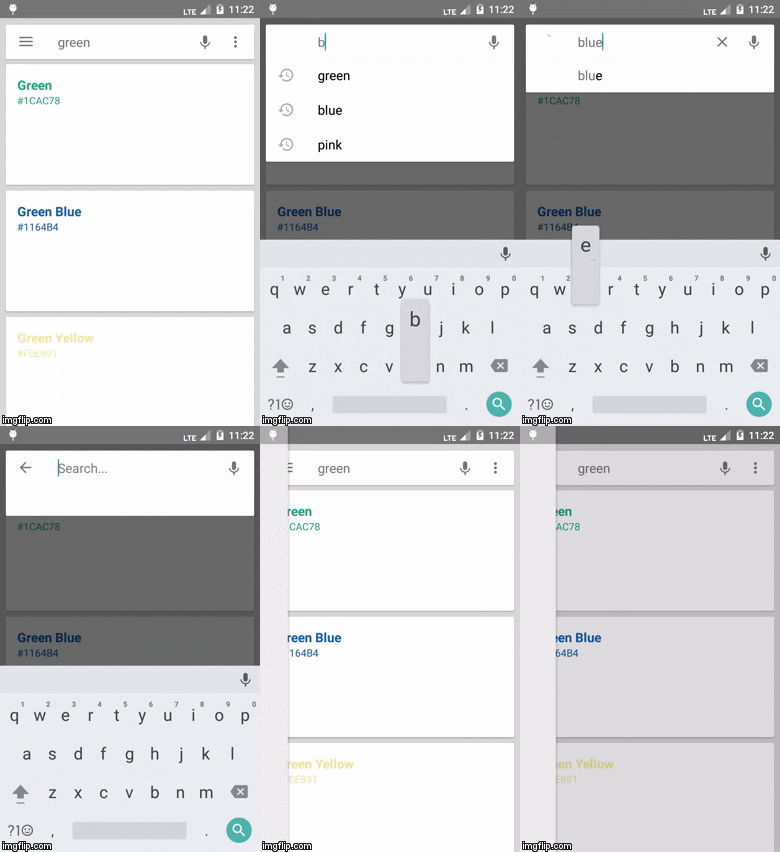
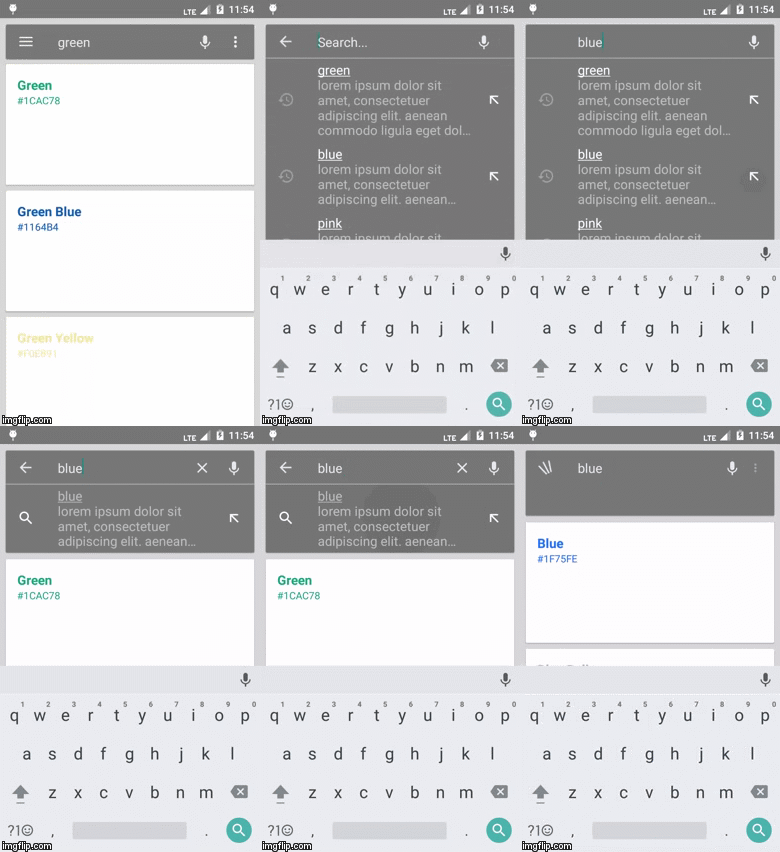
Note
This project is not being actively maintained. Have a look here for information that might help you make changes to your own copy of the code base.
...
Usage
- In your dependencies, add
compile 'com.github.arimorty:floatingsearchview:2.1.1'- Add a FloatingSearchView to your view hierarchy, and make sure that it takes
- Listen to query changes and provide suggestion items that implement SearchSuggestion
<com.arlib.floatingsearchview.FloatingSearchView
                android:id="@+id/floatingsearchview"
                android:layoutwidth="matchparent"
                android:layoutheight="matchparent"
                app:floatingSearchsearchBarMarginLeft="@dimen/searchview_inset"
                app:floatingSearchsearchBarMarginTop="@dimen/searchview_inset"
                app:floatingSearchsearchBarMarginRight="@dimen/searchview_inset"
                app:floatingSearch_searchHint="Search..."
                app:floatingSearch_suggesti
                app:floatingSearch_showSearchKey="false"
                app:floatingSearch_leftActi
                app:floatingSearchmenu="@menu/menumain"
                app:floatingSearchclosesearch_/>
mSearchView.setOnQueryChangeListener(new FloatingSearchView.OnQueryChangeListener() {
@Override
public void onSearchTextChanged(String oldQuery, final String newQuery) {
//get suggestions based on newQuery
//pass them on to the search view mSearchView.swapSuggestions(newSuggestions); } });
Left action mode:
The left action can be configured as follows:
Add
app:floatingSearch_leftActi| showHamburger |  |
| showSearch |  |
| showHome |  |
| noLeftAction |  |
Listen to hamburger button clicks:
mSearchView.setOnLeftMenuClickListener( new FloatingSearchView.OnLeftMenuClickListener() { ...} );To quickly connect your NavigationDrawer to the hamburger button:
mSearchView.attachNavigationDrawerToMenuButton(mDrawerLayout);Listen to home (back arrow) button clicks:
mSearchView.setOnHomeActionClickListener( new FloatingSearchView.OnHomeActionClickListener() { ... });Configure menu items:

Add a menu resource
app:floatingSearchmenu="@menu/menumain"In the menu resource, set items'
:showAsAction="[insert one of the options described in the table below]"| never | Puts the menu item in the overflow options popup |
| ifRoom | Shows an action icon for the menu if the following conditions are met: 1. The search is not focused. 2. There is enough room for it. |
| always | Shows an action icon for the menu if there is room, regardless of whether the search is focused or not. |
Listen for item selections
mSearchView.setOnMenuItemClickListener(new FloatingSearchView.OnMenuItemClickListener() { @Override public void onMenuItemSelected(MenuItem item) { } });Configure suggestion item:
First, implement SearchSuggestion
Optional:
Set a callback for when a given suggestion is bound to the suggestion list.
For the history icons to show, you would need to implement this. Refer to the sample app for an example implementation.
mSearchView.setOnBindSuggestionCallback(new SearchSuggestionsAdapter.OnBindSuggestionCallback() {             @Override             public void onBindSuggestion(View suggestionView, ImageView leftIcon, TextView textView, SearchSuggestion item, int itemPosition) {
//here you can set some attributes for the suggestion's left icon and text. For example,                        //you can choose your favorite image-loading library for setting the left icon's image.              }
});
Styling:


Available styling:
<style name="SearchView">
           <item name="floatingSearch_backgroundColor"></item>
           <item name="floatingSearch_viewSearchInputTextColor"></item>
           <item name="floatingSearch_viewSuggestionItemTextColor"></item>
           <item name="floatingSearch_hintTextColor"></item>
           <item name="floatingSearch_dividerColor"></item>
           <item name="floatingSearch_clearBtnColor"></item>
           <item name="floatingSearch_leftActionColor"></item>
           <item name="floatingSearch_menuItemIconColor"></item>
           <item name="floatingSearch_suggestionRightIconColor"></item>
           <item name="floatingSearch_actionMenuOverflowColor"></item>
   </style>
RxBinding Extension
The RxBinding library allows you to listen for query changes using RxJava Obervables.Observable<CharSequence> queryObservable = RxFloatingSearchView.queryChanges(view);
queryObservable.doOnNext { query -> Toast.makeText(this, "Query is %s".format(query), Toast.LENGTH_LONG).show() }.subscribe();The Kotlin Extension
The Kotlin extension adds an extension function to the view for more goodness.view.queryChanges(5).doOnNext { query -> Toast.makeText(this, "Query is %s".format(query), Toast.LENGTH_LONG).show() }.subscribe()License =======
Copyright (C) 2015 Ari C.
Licensed under the Apache License, Version 2.0 (the "License"); you may not use this file except in compliance with the License. You may obtain a copy of the License at
http://www.apache.org/licenses/LICENSE-2.0
Unless required by applicable law or agreed to in writing, software distributed under the License is distributed on an "AS IS" BASIS, WITHOUT WARRANTIES OR CONDITIONS OF ANY KIND, either express or implied. See the License for the specific language governing permissions and limitations under the License.


