
drone infrastructure in AWS
drone-terraform
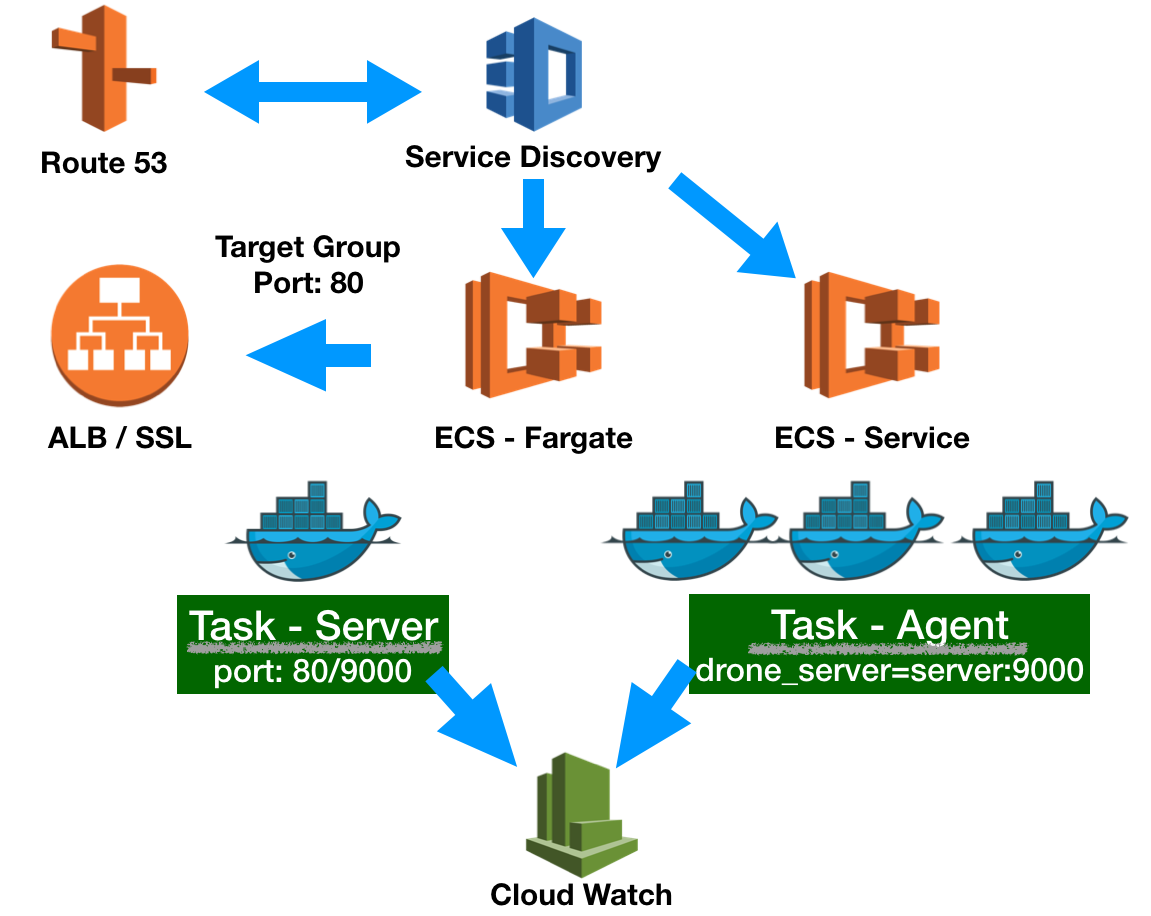
Drone CI/CD infrastructure using [Terraform][3] in AWS.
Requirement
AWS Fargate with Amazon ECS is currently only available in the following regions:
| Region Name | Region | | --- | --- | | US East \(N\. Virginia\) | us\-east\-1 | | US East \(Ohio\) | us\-east\-2 | | US West \(Oregon\) | us\-west\-2 | | EU \(Ireland\) | eu\-west\-1 | | EU \(London\) | eu\-west\-2 | | EU \(Frankfurt\) | eu\-central\-1 | | Asia Pacific \(Tokyo\) | ap\-northeast\-1 | | Asia Pacific \(Singapore\) | ap\-southeast\-1 | | Asia Pacific \(Sydney\) | ap\-southeast\-2 |
See [AWS Fargate on Amazon ECS][1] to get more detail information. Service discovery is available in the following AWS Regions:
| Region Name | Region | | --- | --- | | US East \(N\. Virginia\) | us\-east\-1 | | US East \(Ohio\) | us\-east\-2 | | US West \(N\. California\) | us\-west\-1 | | US West \(Oregon\) | us\-west\-2 | | Asia Pacific \(Mumbai\) | ap\-south\-1 | | Asia Pacific \(Seoul\) | ap\-northeast\-2 | | Asia Pacific \(Singapore\) | ap\-southeast\-1 | | Asia Pacific \(Sydney\) | ap\-southeast\-2 | | Asia Pacific \(Tokyo\) | ap\-northeast\-1 | | EU \(Frankfurt\) | eu\-central\-1 | | EU \(Ireland\) | eu\-west\-1 | | EU \(London\) | eu\-west\-2 | | EU \(Paris\) | eu\-west\-3 | | South America \(São Paulo\) | sa\-east\-1 | | Canada \(Central\) | ca\-central\-1 |
See [AWS Service Discovery][2] to get more detail information. Before you begin, make sure you've read the limition.
[1]:https://docs.aws.amazon.com/AmazonECS/latest/developerguide/AWS_Fargate.html [2]:https://docs.aws.amazon.com/AmazonECS/latest/developerguide/service-discovery.html [3]:https://www.terraform.io/
Configuration
create new file with terraform.tfvars filename and put the following variable:
awsaccesskey = "xxx"
awssecretkey = "xxx"
dronegithubclient = "xxxx"
dronegithubsecret = "xxxx"
sshpublickey = "ssh-rsa xxxxxx appleboy@xxxx"
Build Infrastructure
The first command to run for a new configuration
$ terraform init
Initializing the backend...
Initializing provider plugins...
- downloading plugin for provider "aws"...
$ terraform applyYou will see the output:
Outputs:
alb_hostname = http://drone-front-alb-xxxxxxx.us-east-1.elb.amazonaws.com databaserootpassword = <sensitive> region = us-east-1
How to testing
$ go test -timeout 30m -v .


