
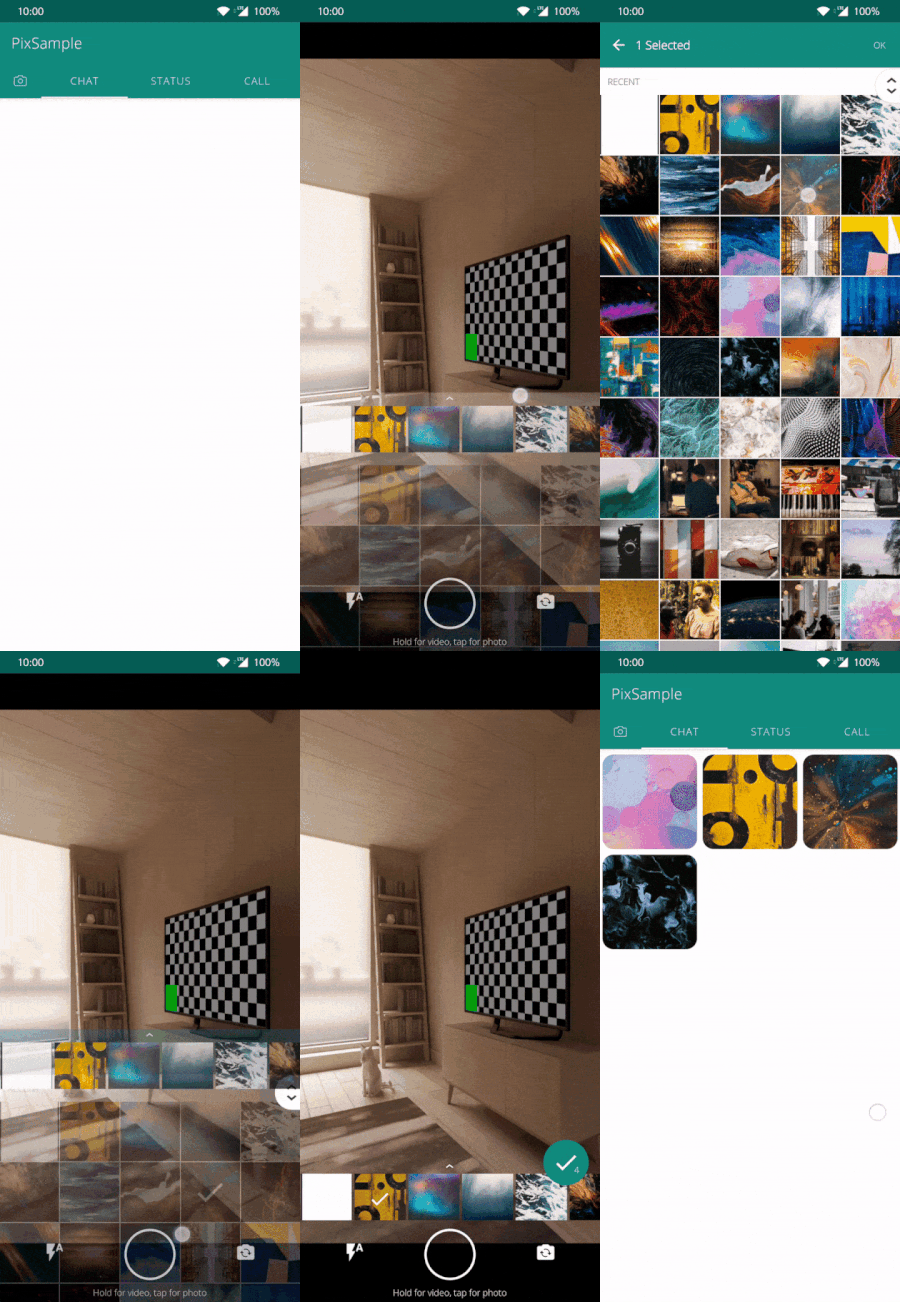
Pix is a Whatsapp image picker replica. with this, you can integrate an image picker just like WhatsApp.
Last updated Apr 19, 2026
873
Stars
220
Forks
2
Issues
0
Stars/day
Attention Score
86
Topics
Language breakdown
No language data available.
▸ Files
click to expand
README

Pix (WhatsApp Style Image and Video Picker)
Pix is a WhatsApp image picker replica. with this you can integrate a image picker just like WhatsApp.









Demo
Usage
set configuration asval options = Options().apply{
ratio = Ratio.RATIO_AUTO //Image/video capture ratio
count = 1 //Number of images to restrict selection count
spanCount = 4 //Number for columns in grid
path = "Pix/Camera" //Custom Path For media Storage
isFrontFacing = false //Front Facing camera on start
videoDurationLimitInSeconds = 10 //Duration for video recording
mode = Mode.All //Option to select only pictures or videos or both
flash = Flash.Auto //Option to select flash type
preSelectedUrls = ArrayList<Uri>() //Pre selected Image Urls
videoOptions : VideoOptions //Video configurations
}RATIO43, RATIO169, RATIO_AUTOAll, Picture, VideoaddPixToActivity(R.id.container, options) {
when (it.status) {
PixEventCallback.Status.SUCCESS -> //use results as it.data
PixEventCallback.Status.BACK_PRESSED -> // back pressed called
}
}private val pixFragment = pixFragment(options)pixFragment(options){
when (it.status) {
PixEventCallback.Status.SUCCESS -> //use results as it.data
PixEventCallback.Status.BACK_PRESSED -> // back pressed called
}
}PixBus.results {
when (it.status) {
PixEventCallback.Status.SUCCESS -> //use results as it.data
PixEventCallback.Status.BACK_PRESSED -> // back pressed called
}
}Customise
Theme
include these items in colors.xml with custom color codes<resources>
<color name="videocountercolor_pix">#E53935</color>
<color name="primarycolorpix">#075e54</color>
<color name="primarylightcolor_pix">#80075e54</color>
<color name="surfacecolorpix">#ffffff</color>
<color name="textcolorpix">#807f7f</color>
</resources>Thanks to
- [Glide] - [FastScroll] - [Header-decor] - [CameraX] - [Coroutines]Backers
Become a backer and help us sustain our activities! 🙏🙏
Download
Download or grab via Gradle: include in app level build.gradlerepositories {
mavenCentral()
}implementation 'io.ak1.pix:piximagepicker:1.6.8'<dependency>
<groupId>io.ak1.pix</groupId>
<artifactId>piximagepicker</artifactId>
<version>1.6.8</version>
<type>pom</type>
</dependency><dependency org='io.ak1.pix' name='piximagepicker' rev='1.6.8'>
<artifact name='pix' ext='pom' ></artifact>
</dependency>Find docs for old versions in wiki for 1.5.6 and 1.2.5
Also you can find the source for version 1.5.6 here.
Development
Code Quality Tools
This project uses modern code quality tools to maintain high standards:
- Spotless: Automatic code formatting with ktlint
- Detekt: Static code analysis for Kotlin best practices
- Dokka: API documentation generation
Setup
- Install the pre-commit hook:
chmod +x .git/hooks/pre-commit- Run code formatting:
./gradlew :pix:spotlessApply- Run static analysis:
./gradlew :pix:detekt- Generate documentation:
./gradlew :pix:dokkaHtmlpix/build/dokka/html/index.html
Available Tasks
# Spotless
./gradlew :pix:spotlessCheck      # Check formatting
./gradlew :pix:spotlessApply      # Apply formatting
Detekt
./gradlew :pix:detekt             # Run analysis
./gradlew :pix:detektCreateBaseline # Create baseline for existing violations
Dokka
./gradlew :pix:dokkaHtml          # Generate HTML docs
./gradlew :pix:dokkaHtmlOpen      # Generate and open docs
Combined
./gradlew :pix:check              # Run all checks
./gradlew :pix:build              # Full build with checks
Star History
Contributing
Before submitting a PR:
- Ensure code is formatted:
./gradlew :pix:spotlessCheck - Pass static analysis:
./gradlew :pix:detekt - Add documentation to public APIs
- Write tests for new features
git commit. You can bypass it with
git commit --no-verify if needed (not recommended).
WIP for KMP migration.
License
Licensed under the Apache License, Version 2.0, click here for the full license.Author & support
This project was created by Akshay Sharma.If you appreciate my work, consider buying me a cup of :coffee: to keep me recharged :metal: by PayPal
I love using my work and I'm available for contract work. Freelancing helps to maintain and keep my open source projects up to date!
[Glide]:


