🔥🔥🔥微信公众号:Cydiapps🔥🔥🔥 => Cydia插件 Logos语言 开发Tweak.xm Cydia Substrate 注入dylib iOS逆向工程开发 越狱Jailbreak deb插件 - fishhook / Frida / iOSOpenDev / Cycript / MachOView / IDA / Hopper Disassembler / MonkeyDev / Class-dump / Theos / Reveal / Dumpdecryptd / FLEX / 汇编Assembly / CaptainHook / lldb/LLVM/XNU/Darwin/iOS Reverse
iOS应用逆向工程-Cydia越狱-Tweaks插件开发
巨魔二代 iOS15.0-16.6.1 新手指南
我的微信公众号-> Cydiapps
XLsn0w's Cydia Repo: https://XLsn0w.github.io/tweak/
XLsn0w's Cydia Repo: https://XLsn0w.github.io/tweaks/
Cydiapp's Cydia Repo: https://XLsn0w.github.io/Cydiapp/
🔥🔥🔥 我的博客: https://xlsn0w.github.io 🔥🔥🔥

Welcome to XLsn0w’s Blog.
Apple Developer iPhone Hacker
我的Github-> https://github.com/XLsn0w
我的微信公众号-> Cydiapps
我的微信公众号-> Cydiapps我的个人博客-> https://xlsn0w.github.io
我的简书-> http://www.jianshu.com/u/eacc1a5d2fda

// ooOoo // o8888888o // 88" . "88 // (| -_- |) // O\ = /O // _/. // / \\||| : |||// \ // / _||||| -:- |||||- \ // | | \\\ - /// | | // | \_| ''\---/'' | | // \ .-\---'\_ // . ' \\| |//-_/-. / // _. .' /--.--\. . // ."" '<.\<|>/.' >'"". // | | :- \.;\ _ /;./ -: | | // \ \-. \ \ / / .-/ / // ======-._-.\/.-__.-'====== //=---=' // // ............................................. // 佛祖镇楼 逆向寻根 // 佛曰: // 写字楼里写字间,写字间里程序员; // 程序人员写程序,又拿程序换酒钱。 // 酒醒只在网上坐,酒醉还来网下眠; // 酒醉酒醒日复日,网上网下年复年。 // 但愿老死电脑间,不愿鞠躬老板前; // 奔驰宝马贵者趣,公交自行程序员。 // 别人笑我忒疯癫,我笑自己命太贱; // 不见满街漂亮妹,哪个归得程序员?</code></pre>`` 解决方案 打开 https://www.ipaddress.com/ 输入访问不了的域名iOS Jailbreak Develop + iPhone App Reverse
我的微信公众号: Cydiapps
XLsn0w's Cydia Repo: https://XLsn0w.github.io/tweak/
XLsn0w's Cydia Repo: https://XLsn0w.github.io/tweaks/
<img src="https://github.com/XLsn0w/Cydiapp/blob/main/XLsn0w's%20Cydia%20Repo.png?raw=true" alt="XLsn0w" width="470" height="224" align="bottom" />
iOS刷Android -安卓越狱苹果
跳转=>iOS刷Android -安卓越狱苹果Mac电脑 修改hosts文件 以访问Github
- 打开 https://ping.chinaz.com/ 搜索github.com
德国 140.82.121.4 美国华盛顿西雅图 GitHub <1ms
- 找一个快的ip地址 我这里找的是
打开终端,输入命令
sudo vi /etc/hosts 输入密码后,使用vi编辑hosts文件:增加
140.82.121.4 github.com (相当于访问github.com 切换成 140.82.121.4)
1) 按i进入编辑模式,开始编辑
2) 编辑完成后按esc退出 3) 再按:wq回车保存
巨魔商店优点
<pre><code class="lang-">完全免费 手机端直装任何的IPA 安装 IPA 后永不过期(不掉签) 无需帐户,无需证书,无需越狱</code></pre> 🔴iOS 14.0bata 1 及更早版本 + iOS 17.0.1及更高版本,永不支持安装巨魔!🔴iOS 16.7 – 16.7.5 不支持安装(没有支持漏洞)
🟢iOS 17.0 beta1-5 支持安装,但是目前成功率不高,可以试试!!!
TrollRecorder 巨魔录音机
🟡仅限使用 巨魔 TrollStore 用户
🔴支持系统:iOS 15.0 至 16.6.1 和 17.0 系统
🔵TrollRecorder中文名:巨魔录音机,是一款纯巨魔版通话录音,无需越狱环境
🟢国人开发团队开发,核心功能可免费使用。通话录音功能免费,使用简单,大家放心使用
巨魔录音机特点:
🟢UI界面风格好看 🟢录音支持所有(VX、YX) 🟢能实现自动启动通话录音 🟢支持应用程序启动期间启用生物识别验证 🟢能记录录音地址及搜索能力 🟢能为录音选择音频质量和格式 高级功能功能,需要付费38元,有验证的,最多 5台设备使用。
免费版:https://github.com/Lessica/TrollRecorder 付费版:https://havoc.app/package/trollrecorder
iOS16 Bootstrap 半越狱工具
Bootstrap 官方地址: https://github.com/RootHide/BootstrapBootstrap 官方下载: https://github.com/roothide/Bootstrap/releases
iOS巨魔商店 利用的漏洞
https://github.com/advisories/GHSA-fj3m-2r8f-m4x9Description A certificate validation issue was addressed. This issue is fixed in iOS 16.7 and iPadOS 16.7, OS 17.0.1 and iPadOS 17.0.1, watchOS 9.6.3, macOS Ventura 13.6, watchOS 10.0.1. A malicious app may be able to bypass signature validation. Apple is aware of a report that this issue may have been actively exploited against versions of iOS before iOS 16.7.
References
https://nvd.nist.gov/vuln/detail/CVE-2023-41991
https://support.apple.com/en-us/HT213926
https://support.apple.com/en-us/HT213927
https://support.apple.com/en-us/HT213928
https://support.apple.com/en-us/HT213929
https://support.apple.com/en-us/HT213931
https://support.apple.com/kb/HT213926
http://seclists.org/fulldisclosure/2023/Sep/14
http://seclists.org/fulldisclosure/2023/Sep/15
http://seclists.org/fulldisclosure/2023/Sep/16
http://seclists.org/fulldisclosure/2023/Sep/17
http://seclists.org/fulldisclosure/2023/Sep/19
http://seclists.org/fulldisclosure/2023/Oct/5
Dopamine 2.0

多巴胺二代 iOS 15.0 - 16.6.1 越狱指南 Dopamine 2.0 分享下载
教程指南: 多巴胺二代越狱指南
iOS巨魔二代发布了
安装包下载: https://github.com/opa334/TrollStore/releases
有问题可以 联系公众号Cydiapps
iOS巨魔V2.0 安装指南 TrollStore 二代

<p align="left"> <img align="left" height="200" src="https://cdn.discordapp.com/attachments/1157757093097521162/1181224754993184848/App_Store-removebg-preview.png" alt="misaka" style="float: left; border-radius: 10px;"/> </p>
巨魔辅助安装器 Misaka
misaka.ipa 支持Beta系统安装巨魔2代
下载链接: https://pan.baidu.com/s/1yDhkZ0fwbfcPr2sYTYKqNg?pwd=heddiOS customisation tool for KFD & MDC <div> <a href="https://github.com/straight-tamago/misaka/releases"><img src="https://img.shields.io/github/downloads/straight-tamago/misaka/total?color=d774d5" /></a> <a href="https://github.com/straight-tamago/misaka/releases/latest"><img src="https://img.shields.io/github/v/release/straight-tamago/misaka?color=d774d5" /></a> <a href="https://bento.me/straight-tamago"><img src="https://img.shields.io/static/v1?style=social&message=@straight-tamago&color=768CFF&logo=X&logoColor=000000&label=" /></a> </div> <div class="clear"></div>
# About ====== The purpose of this application is to give iPhone users the ability to customise their phones without a jailbreak.
At this time we have over 24 default repositories and more than 400 tweaks available.
Misaka is offered at no charge if somebody tried to sell it to you, report it # Versions Supported ====== | iOS Versions | MDC | KFD | | - | - | - | | 15.0 - 15.7.1 | ✓ | - | | 15.7.2 - 15.7.6 | - | ✓ | | 16.0 - 16.1.2 | ✓ | - | | 16.2 - 16.6 beta 1 | - | ✓ | | 17.0 & up | - | - |
17.0 & up can use PiP tweaks
Download ====== <h3>You can download the latest version of misaka from here:</h3>
Misaka is available at no cost, you can install it through AltStore, Sideloadly or TrollStore
Screenshots ==========
<p align="left"> <img src="https://media.discordapp.net/attachments/1157757093097521162/1181245992822128640/out.png" alt="misaka" width="MISAKA" height="600"/> </p>
Installing TrollStore with misaka ====== Official Guide
ipa下载: https://github.com/straight-tamago/misaka
TrollStore2 安装指南 https://github.com/XLsn0w/TrollStore2
安装指南: 巨魔2代安装教程
巨魔2砸壳工具
下载: https://github.com/donato-fiore/TrollDecrypt/releases巨魔状态栏修改网速神器
下载: https://github.com/leminlimez/Helium
TrollSpeed 状态栏网速显示
下载地址: https://github.com/Lessica/TrollSpeed
实现高版本watchOS绑定到低版本iOS
实现指南: 实现高版本watchOS绑定到低版本iOS教程
A8-A14 devices on iOS 14.0-14.3 越狱源代码
仓库地址: https://github.com/XLsn0w/Taurine-kfd-Jailbreak
Linus Henze 大神已经被 Apple 聘请了
之前 Linus Henze 大神提到过,如果苹果亲自邀请他,他必定会答应,这次真的来了,现在已经成功应聘上。
也就是说!未来的 Linus Henze 大神所挖掘的漏洞,都属于 Apple 官方的了,他不能私自公开。
根据我的了解得知,在安全研究实验室中,发现新的漏洞,都是属于团队的,不属于个人,自己是没权利公开。
#《生化危机:村庄》iOS 版本
《生化危机:村庄》定价 4990 日元(当前约 244 元人民币), 《生化危机:村庄》可免费下载,这是一款“先玩后买”App
不过卡普空宣布 10 月 30 日至 11 月 20 日期间立减 60%,折后 含税 1990 日元(当前约 97 元人民币)。
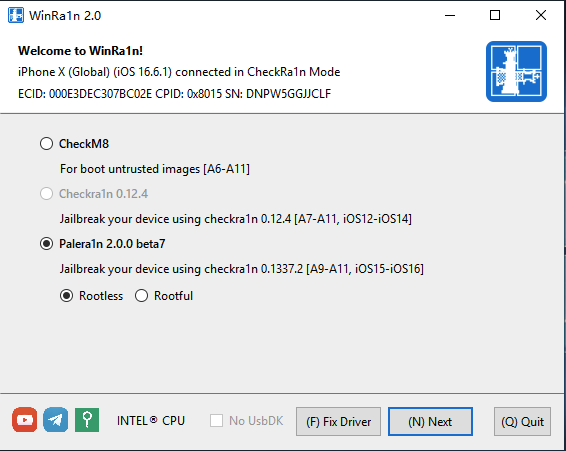
WinRa1n越狱工具电脑版
是由iKeystools团队开发的一款苹果iOS系统越狱工具。它的功能十分强大, 支持iOS 12.2 ~ 16.7直接越狱,支持iPhone 5s ~ X,完美支持Windows平台,免费下载。 【支持三种越狱模式】 1、CheckM8 支持引导未签名的img4文件,说明白就是进入Pwndfu模式。新手用不上。2、Checkra1n 0.12.4 是我们熟知的checkra1n越狱,支持越狱iOS 12.2 ~ 14.8.1版本。
3、Palera1n 2.0.0 beta7是iOS15 以上的越狱,可以越狱iOS 15.0 ~ 16.6.1的A8X ~ A11处理器。
iOS kfd漏洞 源代码
<pre><code class="lang-">// // krw.m // kfd // // Created by Seo Hyun-gyu on 2023/08/10. //#import <Foundation/Foundation.h> #include "KernelRwWrapper.h" #import "libkfd.h"
static uint64t kfd = 0; static uint64t self_task = 0; static uint64t self_proc = 0; static uint64t kslide = 0;
static uint64t kread64(uint64t where) { uint64_t out; kread(kfd, where, &out, sizeof(uint64_t)); return out; }
static void kwrite64(uint64t where, uint64t what) { u64 _buf[1] = {}; _buf[0] = what; kwrite((u64)(kfd), &_buf, where, sizeof(u64)); }
static uint64t getselftask(void) { return selftask; }
static uint64t getselfproc(void) { return selfproc; }
static uint64t getkslide(void) { return _kslide; }
static void set_selftask(void) { selftask = ((struct kfd*)kfd)->info.kernel.currenttask; }
static void set_selfproc(void) { selfproc = ((struct kfd*)kfd)->info.kernel.currentproc; }
static void set_kslide(void) { kslide = ((struct kfd*)kfd)->info.kernel.kernel_slide; }
static void do_kclose(void) { kclose(_kfd); }
uint64t dokopen(uint64t puafpages, uint64t puafmethod, uint64t kreadmethod, uint64t kwritemethod) { kfd = kopen(puafpages, puafmethod, kreadmethod, kwritemethod);//kopenintermediate(puafpages, puafmethod, kreadmethod, kwritemethod); set_selfproc(); set_selftask(); set_kslide(); ourprockAddr = get_selfproc(); usleep(10000); initKernRw(get_selftask(), kread64, kwrite64); printf("isKernRwReady: %d\n", isKernRwReady()); if(isKernRwReady()) { usleep(10000); do_kclose(); } return _kfd; }
static void dokread(uint64t kaddr, void* uaddr, uint64_t size) { kread(kfd, kaddr, uaddr, size); }
static void dokwrite(void* uaddr, uint64t kaddr, uint64_t size) { kwrite(kfd, uaddr, kaddr, size); }
static uint64t getkernproc(void) { return ((struct kfd*)kfd)->info.kernel.kernelproc; }
static uint8t kread8(uint64t where) { uint8_t out; kread(kfd, where, &out, sizeof(uint8_t)); return out; } static uint32t kread16(uint64t where) { uint16_t out; kread(kfd, where, &out, sizeof(uint16_t)); return out; } static uint32t kread32(uint64t where) { uint32_t out; kread(kfd, where, &out, sizeof(uint32_t)); return out; }
static void kwrite8(uint64t where, uint8t what) { uint8t buf[8] = {}; _buf[0] = what; _buf[1] = kread8(where+1); _buf[2] = kread8(where+2); _buf[3] = kread8(where+3); _buf[4] = kread8(where+4); _buf[5] = kread8(where+5); _buf[6] = kread8(where+6); _buf[7] = kread8(where+7); kwrite((u64)(kfd), &_buf, where, sizeof(u64)); }
static void kwrite16(uint64t where, uint16t what) { u16 _buf[4] = {}; _buf[0] = what; _buf[1] = kread16(where+2); _buf[2] = kread16(where+4); _buf[3] = kread16(where+6); kwrite((u64)(kfd), &_buf, where, sizeof(u64)); }
static void kwrite32(uint64t where, uint32t what) { u32 _buf[2] = {}; _buf[0] = what; _buf[1] = kread32(where+4); kwrite((u64)(kfd), &_buf, where, sizeof(u64)); }
static void kreadbuf(uint64t kaddr, void* output, sizet size) { uint64_t endAddr = kaddr + size; uint32_t outputOffset = 0; unsigned char outputBytes = (unsigned char)output; for(uint64_t curAddr = kaddr; curAddr < endAddr; curAddr += 4) { uint32_t k = kread32(curAddr);
unsigned char kb = (unsigned char)&k; for(int i = 0; i < 4; i++) { if(outputOffset == size) break; outputBytes[outputOffset] = kb[i]; outputOffset++; } if(outputOffset == size) break; } }</code></pre>
iOS或iPadOS 15.0-15.1.1的A12-A15芯片设备 XinaA15越狱工具
这是xina520越狱(临时)的官方下载网站 https://discord.gg/vFpnTUSD4H工具下载: xina520越狱下载
iOS APP运行 编译过程及库
在分析app启动之前,我们需要先了解iOSapp代码的编译过程以及动态库和静态库。其中编译过程如下图所示,主要分为以下几步:
源文件:载入.h、.m、.cpp等文件
预处理:替换宏,删除注释,展开头文件,产生.i文件
编译:将.i文件转换为汇编语言,产生.s文件
汇编:将汇编文件转换为机器码文件,产生.o文件
链接:对.o文件中引用其他库的地方进行引用,生成最后的可执行文件
dyld加载流程分析 根据dyld源码,以及libobjc、libSystem、libdispatch源码协同分析
什么是dyld?
dyld(the dynamic link editor)是苹果的动态链接器,是苹果操作系统的重要组成部分, 在app被编译打包成可执行文件格式的Mach-O文件后,交由dyld负责连接,加载程序
========| 微信公众号Cydiapps |========
========| XLsn0w博客文章 |========
iOS重签名.dylib动态库
1)让可执行文件链接动态库
可执行文件是不会主动启用自定义动态库,所以需要注入.dylib
insertdylib @executablepath/[动态库名称] [可执行文件名称] --all-yes --weak [新可执行文件名称]
insert_dylib :动态库加载路径
--all-yes:后面所有的选择都为yes
--weak:即使动态库找不到也不会报错
insert_dylib的本质是往Mach-O文件的Load Commands中
添加了一个LCLOADDYLIB活LCLOADWEAK_DYLIB。
可以通过otool查看Mach-O的动态库依赖信息
otool -L Mach-O文件
2)修改CydiaSubstrate文件路径
查看动态库(ResignTweak.dylib)的依赖库
可以看到ResignTweak.dylib依赖的CydiaSubstrate路径为/Library/Frameworks/CydiaSubstrate.framework/CydiaSubstrate。
修改CydiaSubstrate路径
因CydiaSubstrate路径变更,所以需要对它进行修改。
installnametool -change [原路径] @loader_path/CydiaSubstrate [动态库名称]
再次执行otool -L ResignTweak.dylib查看,可以看出CydiaSubstrate路径已经修改了。
3)对动态库和CydiaSubstrate文件重签名
codesign -fs [证书id] [文件名称]
4)对APP包重签名并安装验证
ra1ncloud Fugu15 不完美越狱工具
https://github.com/iarchiveml/ra1ncloudiOS巨魔盒子
iOS巨魔盒子下载: https://share.weiyun.com/VdSYtnBm 就个人而言,我喜欢将所有内容整合在一起的应用程序的想法。这意味着我的主屏幕上的混乱更少,并且在单个应用程序中发生更多事情。请注意,TrollBox仅适用于TrollStore,因此它仅支持支持TrollStore(越狱与否)的设备,即运行iOS或iPadOS 14.0-15.4.1(以及一些15.5测试版)的设备。
RootHide Dopamine Jailbreak 屏蔽越狱检测 越狱工具
下载: https://github.com/RootHide/Dopamine-roothide RootHide is a completely hidden rootless jailbreak solution without to inject/modify/patch/hook apps.This project is the RootHide implementation based on Dopamine Jailbreak.
AppsManager从备份恢复应用Pro会员教程 --->使用教程
ESign轻松签+iOS安装教程 --->安装教程
永久签名工具版【轻松签+】,和巨魔支持的范围一样, 支持 iOS 14.0 - iOS 15.4.1 以及 iOS 15.5 Beta 1 - Beta 4 系统, 支持 A12 - A15 设备(即包括iPhone13pm以下设备)。 意味着最高 iPhone13 Pro Max (15.5B4以下系统)可以摆脱证书限制
iOS巨魔商店有可能更新V2.0 目前开发者证实漏洞存在 但安装方式还需要研究
iOS巨魔商店

TrollStore版本1.5.0 更新功能:
–加高深设置选项卡,其中包含在已安装和自定义卸载方法 之间切换的功能 - 将Idid更新与TrollStore更新分开;最新的 Idid 更新解决了 TrollStore 以前需要破解解决方法的错误,并且该解决方法现已删除 – 如果尚未安装或安装的版本太过时,Idid 现在将在启动 TrollStore 时自动安装和/或更新,无法正确 使用它 – 修复了卸载某些应用程序会失败 的问题 – 自动使重新加载图标缓存按钮修复了一个股票 iOS 问题,其中臃肿的图标缓存可能导致应用程序安装和更新导致严重的系统范围滞后峰值 – 修复了应用程序插件的组容器可能被错误注册 的错误 – 切换到 TrollStore 自己的 CoreTrust 证书,以支持以前值得做得不好的证书
边店SideStore自签名IPA工具
软件官网下载: https://sidestore.io/
simctl Xcode模拟器命令行管理工具
simctl类似于安卓的adb命令非常相似。
虽然苹果官方文档没有对它进行任何说明。但是我们可以通过Applications/Xcode.app/Contents/Developer/usr/bin/simctl路径找到它。
由于是XCode内置的命令,所以在使用的时候要在该命令前面加上xcrun。我们可以通过以下命令来查看该命令所有的功能选项。
Xcode15 官网下载 iOS17Simulator_Runtime.dmg 后 手动添加模拟器SDK <pre><code class="lang-">sudo xcode-select -s /Applications/Xcode.app Password: h3lix@i0smX ~ % xcodebuild -runFirstLaunch h3lix@i0smX ~ % xcrun simctl runtime add "/Users/h3lix/Downloads/iOS17.0.1Simulator_Runtime.dmg" D: 432C1CED-ADBC-45F7-A7C8-A3A8FF031397 iOS (17.0.1 - 21A342) (Ready)</code></pre>
iOS汇编概述
使用助记符代替机器指令的一种编程语言
汇编和机器指令是一一对应的关系,拿到二进制就可以反汇编
由于汇编和CPU的指令集是对应的,所以汇编不具备移植性
2、总线:是由一堆导线的集合
地址总线:其宽度决定了寻址能力
数据总线:其宽度决定了CPU数据的吞吐量
控制总线:其宽度决定了CPU对其他器件的控制能力
3、进制
任意进制都是由对应个数的符号组成的,符号可以自定义
2/8/16是相对完美的进制,他们之间的关系
3个二进制 使用一个8进制标识
4个二进制 使用一个16进制标识
两个16进制可以标识一个字节,即8位
数量单位
1024 = 1k,1024k = 1M,1024M = 1G
容量单位
1024 = 1KB,1024KB = 1MB,1024MB = 1GB
数据的宽度
计算机中的数据是有宽度的,超过了就会溢出
4、寄存器:CPU为了性能,自内部开辟了一小块临时存储区域
浮点向量寄存器:用于浮点数/向量的存储及运算
异常状态寄存器
通用寄存器:除了存放数据有时也有特殊的用途
ARM64拥有32个64位的通用寄存器X0-X30以及XZR(零寄存器)
为了兼容32位,所以arm64位拥有W0-W28以及WZR 30个32位寄存器
32位寄存器并不是独立存在的,例如 W0是X0的低32位
PC寄存器:指令指针寄存器
PC寄存器里面的值保存的就是CPU接下来需要执行的指令地址
改变PC的值可以改变程序的执行流程
mov指令不能更改PC寄存器的值,需要通过bl跳转指令来改变PC寄存器的值
函数本质(重点掌握!!!!!)
1、栈:是一种具有特殊的访问方式的存储空间(后进先出,Last in First out, LIFO)
ARM64里面对栈的操作是16字节对齐的
2、SP和FP寄存器
SP寄存器在任意时刻会保存栈顶的地址 FP寄存器也称为x29寄存器,属于通用寄存器,但是在某些时刻利用它保存栈底的地址
3、栈的读写指令
读:ldr(load register)指令 LDR、LDP
写:str(store register)指令 STR、STP
4、bl指令
跳转指令:bl 标号,表示程序执行到标号处,将下一条指令的地址保存到lr寄存器
B代表着跳转
L表示lr(x30)寄存iosreverse02器
5、ret指令
类似函数的return 让CPU执行lr寄存器所指向的指令
6、避免嵌套函数无法回去:需要保护bl(即lr寄存器,存放回家的路),保存在当前函数自己的栈空间
7、函数参数
arm64中,参数是放在x0-x7的8个寄存器中
如果是浮点数,就会用浮点数寄存器
如果超过8个参数就会用栈传递
8、函数返回值
一般函数的返回值使用x0寄存器保存
如果返回值大于了8个字节(x0寄存器大小是8个字节),就会利用内存传递返回值
9、函数局部变量
局部变量存储在栈空间
10、函数的嵌套调用:会将x29、x30寄存器入栈保护
11、状态(标志)寄存器 - CPSR
arm64中cpsr寄存器(32位)为状态寄存器
最高4位(28、29、30、31)为标志位
N标志(负标记位)
执行结果为负数N=1
执行结果非负数N=0
Z标志(0标记位)
结果为0则Z=1
结果非0则Z=0
C标志(无符号溢出)
加法:进位 C=1,否则C=0
减法:借位 C=0,否则C=1
V标志(有符号溢出)
正数+正数=负数,则V=1
正数+负数=正数,则V=0
循环选择指令(需要多实际操作) 1、全局变量和常量
获取全局变量和常量时,会出现adrp和add两条指令获得一个地址的情况
ADRP(Address Page)
adrp x0,1
将PC寄存器的低12位清零
将1的值,左移12位
以上两个结果相加放入x0寄存器
通过ADD指令获取这页内存中的偏移值
2、条件判断
CMP把一个寄存器的内容和另一个寄存器的内容或立即数进行比较,但不存储结果,只是正确的更改标志(CMP后面跟的是B.LE,即else的条件) 一般CMP做完判断后会进行跳转,后面通常会跟上B指令
BL 标号:跳转到标号处执行
B.LT 标号:比较结果是小于(less than ),执行标号,否则不跳转
B.LE 标号:比较结果是小于等于(less than or equal to),执行标号,否则不跳转
B.GT 标号:比较结果是大于(greater than),执行标号,否则不跳转
B.GE 标号:比较结果是大于等于(greater than or equal to),执行标号,否则不跳转
B.EQ 标号:比较结果是等于,执行标号,否则不跳转
B.NE 标号:比较结果是不等于(not equal),执行标号,否则不跳转
B.HI 标号:比较结果是无符号大于,执行标号,否则不跳转
B.HS 标号:比较结果是无符号大于等于,执行标号,否则不跳转
3、循环
do-while循环:判断条件在后面,满足条件往外跳
for循环和while循环很像:判断条件在里面,不满足就往外跳
4、switch
1、假设switch语句的分支比较少时(例如3,少于4的时候没有意义),没有必要使用次结构,相当于if-else
2、各个分支常量的差值较大时,编译器会在效率还是内存进行取舍,这时编译器还是会编译成类似于if-else的结构
3、在分支比较多的时候,在编译的时候会生成一个表(跳转表每个地址四个字节)。
OC反汇编(需要多实际操作)
1、编译器优化:
1、设置:BuildSetting->Optimization Level
2、优化原则:对结果没有任何影响的代码会被编译器优化
3、编译器优化,本质是LLVM的优化过程,实际上优化的是汇编代码(可以理解为汇编指令会减少)
2、指针:
1、指针的自增自减和指向的数据类型宽度有关,是按照指向的数据类型来运算的(即指针的宽度 - 步长)
2、指针的运算单位是指向的数据类型的宽度
3、指针可以通过if-else比大小,因为类型是可以相互转换的
3、[[self alloc] init] 优化过程
在最初的版本(iOS9)中,相当于两次消息发送 objc_msgSend
iOS11版本 是一次消息发送 objcalloc + objcmsgSend
iOS13.5.1以上版本,已经没有objcmsgSend,而是objcalloc_init
4、反汇编分析方式:
通过LLDB动态调试
Fugu15 不过期 iOS15.4越狱教程
1.用手机Safari浏览器打开下面链接,下载Fugu15越狱安装包
2.找到IPA文件,选项共享,选择巨魔TrollStore打开进行安装
<pre><code class="lang-">下载ipa包: https://share.weiyun.com/WiBhQ7aP</code></pre>BlizzardBoard
<pre><code class="lang-">BlizzardBoard支持越狱和非越狱iOS设备,通过TrollStore安装, 对主屏应用程序图标进行主题修改。</code></pre>iOS 15.4.1 Fugu15越狱
<pre><code class="lang-">https://xlsn0w.github.io/jekyll/2022/08/30/XLsn0w/</code></pre>Linus Henze开源 Fugu15越狱代码
<pre><code class="lang-">我的博客 https://xlsn0w.github.io/</code></pre>
10月初,Linus Henze 展示了他在运行 iOS15.4.1的 iPhone 上的 Fugu15越狱,他用一种巧妙的新安装方法让我们想起了 JailbreakMe 的日子。
现在,它已经正式发布,并在 Henze 的 GitHub 页面上开源。
https://github.com/pinauten/Fugu15
现在 TrollStore 正式支持 Fugu15越狱应用程序,这意味着用户可以使用 TrollStore 在他们兼容的设备上加载和永久签署 Fugu15越狱应用程序。
以前,用户需要用自己的域名安装一个基于 web 的安装程序,或者将他们的设备连接到 Mac 上,用 Xcode 安装 Fugu15。
公众号Cydiapps 已经发文详细讲解Fugu15
\(^o^)/~
h5打开App方法
最常见的就是抖音里面的一些广告,如果你点击了广告,他判断你手机装了对应APP,那他就会去打开那个APP, 如果没安装,他会帮你跳转到应用商店去下载,这个还算人性化一点的,有些直接后台给你去下载,你完全无感知, 流氓技术点。
哈哈,是不是觉得这种技术很神奇,今天我们就一起来看看它是如何实现的~
唤端技术 体验过后,我们就来聊一聊它的实现技术是怎样的,唤端技术我们也称之为deep link技术。当然,不同平台的实现方式有些不同,一般常见的有这几种,分别是: <pre><code class="lang-">URL Scheme(通用) Universal Link (iOS) App Link、Chrome Intents(android)</code></pre>
URL Scheme(通用)这种方式是一种比较通用的技术,各平台的兼容性也很好,它一般由协议名、路径、参数组成。这个一般是由Native开发的同学提供,我们前端同学再拿到这个scheme之后,就可以用来打开APP或APP内的某个页面了。
URL Scheme 组成 [scheme:][//authority][path][?query][#fragment] 常用APP的 URL Scheme APP 微信 支付宝 淘宝 QQ 知乎 URL Scheme weixin:// alipay:// taobao:// mqq:// zhihu:// 打开方式 常用的有以下这几种方式
直接通过window.location.href跳转 window.location.href = 'zhihu://' 通过iframe跳转 const iframe = document.createElement('iframe') iframe.style.display = 'none' iframe.src = 'zhihu://' document.body.appendChild(iframe) 直接使用a标签进行跳转 通过js bridge来打开 window.miduBridge.call('openAppByRouter', {url: 'zhihu://'}) 判断是否成功唤起 当用户唤起APP失败时,我们希望可以引导用户去进行下载。那么我们怎么才能知道当前APP是否成功唤起呢?
我们可以监听当前页面的visibilitychange事件,如果页面隐藏,则表示唤端成功,否则唤端失败,跳转到应用商店。
OK,我们尝试来实现一下:
首先我手机上并没有安装腾讯微博,所以也就无法唤起,我们让他跳到应用商店对应的应用下载页,这里就用淘宝的下载页来代替一下~
<template> <div class="open_app"> <div class="openapptitle">前端南玖唤端测试Demo</div> <div class="open_btn" @click="open">打开腾讯微博</div> </div> </template>
<style lang="less"> .openapptitle { font-size: (20/@rem); } .open_btn{ margin-top:(20/@rem); padding:(10/@rem) 0; border-radius: (8/@rem); background: salmon; color: #fff; font-size: (16/@rem); } </style> 8.open_weibo.gif
适用性 URL Scheme 这种方式兼容性好,无论安卓或者 iOS 都能支持,是目前最常用的方式。从上图我们能够看出它也有一些比较明显的缺点:
无法准确判断是否唤起成功,因为本质上这种方式就是打开一个链接,并且还不是普通的 http 链接,所以如果用户没有安装对应的 APP,那么尝试跳转后在浏览器中会没有任何反应,通过定时器来引导用户跳到应用商店,但这个定时器的时间又没有准确值,不同手机的唤端时间也不同,我们只能大概的估计一下它的时间来实现,一般设为3000ms左右比较合适; 从上图中我们可以看到会有一个弹窗提示你是否在对应 APP中打开,这就可能会导致用户流失; 有 URL Scheme 劫持风险,比如有一个 app 也向系统注册了 zhihu:// 这个 scheme ,唤起流量可能就会被劫持到这个 app 里; 容易被屏蔽,app 很轻松就可以拦截掉通过 URL Scheme 发起的跳转,比如微信内经常能看到一些被屏蔽的现象。 Universal Link (iOS) Universal Link 是在iOS 9中新增的功能,使用它可以直接通过https协议的链接来打开 APP。 它相比前一种URL Scheme的优点在于它是使用https协议,所以如果没有唤端成功,那么就会直接打开这个网页,不再需要判断是否唤起成功了。并且使用 Universal Link,不会再弹出是否打开的弹出,对用户来说,唤端的效率更高了。
原理 在 APP 中注册自己要支持的域名; 在自己域名的根目录下配置一个 apple-app-site-association 文件即可。(具体的配置前端同学不用关注,只需与iOS同学确认好支持的域名即可) 打开方式 openByUniversal () { // 打开知乎问题页 window.location.href = 'https://oia.zhihu.com/questions/64966868' // oia.zhihu.com }, 9.open_zhihu.gif
适用性 相对 URL Scheme,universal links 有一个较大优点是它唤端时没有弹窗提示是否打开,提升用户体验,可以减少一部分用户流失; 无需关心用户是否安装对应的APP,对于没有安装的用户,点击链接就会直接打开对应的页面,因为它也是http协议的路径,这样也能一定程度解决 URL Scheme 无法准确判断唤端失败的问题; 只能够在iOS上使用 只能由用户主动触发 App Link、Chrome Intents(Android) App Link 在2015年的Google I/O大会上,Android M宣布了一个新特性:App Links让用户在点击一个普通web链接的时候可以打开指定APP的指定页面,前提是这个APP已经安装并且经过了验证,否则会显示一个打开确认选项的弹出框,只支持Android M以上系统。
App Links的最大的作用,就是可以避免从页面唤醒App时出现的选择浏览器选项框;
前提是必须注册相应的Scheme,就可以实现直接打开关联的App。
App links在国内的支持还不够,部分安卓浏览器并不支持跳转至App,而是直接在浏览器上打开对应页面。 系统询问是否打开对应App时,假如用户选择“取消”并且选中了“记住此操作”,那么用户以后就无法再跳转App。 Chrome Intents Chrome Intent 是 Android 设备上 Chrome 浏览器中 URI 方案的深层链接替代品。 如果 APP 已安装,则通过配置的 URI SCHEME 打开 APP。 如果 APP 未安装,配置了 fallback url 的跳转 fallback url,没有配置的则跳转应用市场。 这两种方案在国内的应用都比较少。
方案对比 URL Scheme Universal Link App Link <ios9 支持 不支持 不支持 >=ios9 支持 支持 不支持 <android6 支持 不支持 不支持 >=android6 支持 不支持 支持 是否需要HTTPS 不需要 需要 需要 是否需要客户端 需要 需要 需要 无对应APP时的现象 报错/无反应 跳到对应的页面 跳到对应的页面 URI Scheme
URI Scheme的兼容性是最高,但使用体验相对较差: 当要被唤起的APP没有安装时,这个链接就会出错,页面无反应。 当注册有多个scheme相同的时候,没有办法区分。 不支持从其他app中的UIWebView中跳转到目标APP, 所以ios和android都出现了自己的独有解决方案。 Universal Link
已经安装APP,直接唤起APP;APP没有安装,就会跳去对应的web link。 universal Link 是从服务器上查询是哪个APP需要被打开,所以不会存在冲突问题 universal Link 支持从其他app中的UIWebView中跳转到目标app 缺点在于会记住用户的选择:在用户点击了Universal link之后,iOS会去检测用户最近一次是选择了直接打开app还是打开网站。一旦用户点击了这个选项,他就会通过safiri打开你的网站。并且在之后的操作中,默认一直延续这个选择,除非用户从你的webpage上通过点击Smart App Banner上的OPEN按钮来打开。 App link
优点与 universal Link 类似 缺点在于国内的支持相对较差,在有的浏览器或者手机ROM中并不能链接至APP,而是在浏览器中打开了对应的链接。 在询问是否用APP打开对应的链接时,如果选择了“取消”并且“记住选择”被勾上,那么下次你再次想链接至APP时就不会有任何反应
源代码 <pre><code class="lang-">// // Fugu15.swift // Fugu15KernelExploit // // Created by Linus Henze. //
import Foundation import ProcessCommunication import CBindings import KernelPatchfinder
public enum Fugu15LaunchError: Error { case deviceNotSupported(reason: String) case posix_spawnFailed(result: Int32, errno: Int32) case noPongReceived case kexploitdFailed case canOnlyLaunchiDownloadAfterExploitRan case iDownloadLaunchFailed(reply: [String]) }
public enum Fugu15SupportsThisDevice { case yes case no(reason: String) }
public struct Fugu15 { public static var comm: ProcessCommunication? public static var patchfinder = KernelPatchfinder.running static var kernelBase: UInt64 = 0 static var kernelSlide: UInt64 = 0 // Lock for requests to pciPwn static let requestLock = NSLock()
// Lock to notify exception handler to continue static let sendRequestLock = NSLock()
// Lock to notify requestor to continue static let replyLock = NSLock()
// Request static var request: UInt64 = 0 static var requestAddrPid: UInt64 = 0 static var requestSize: UInt64 = 0 static var requestBuf: Data?
// Reply static var replyStatus: UInt64 = 0 static var replyResult: UInt64 = 0 static var replyBuf: Data? public static func supportsThisDevice() -> Fugu15SupportsThisDevice { // Test iOS version let osVersion = ProcessInfo.processInfo.operatingSystemVersion guard osVersion.majorVersion == 15, osVersion.minorVersion < 5 else { return .no(reason: "Fugu15 only supports iOS 15 - 15.4.1!") } // The exploits should support some 15.5 betas // Not implemented though /*if osVersion.minorVersion == 5 { var size = 1024 let ptr = UnsafeMutablePointer<UInt8>.allocate(capacity: size + 1) defer { ptr.deallocate() } let res = sysctlbyname("kern.osversion", ptr, &size, nil, 0) guard res == 0 else { return .no(reason: "Fugu15 failed to determine your OS version!") } ptr[size] = 0 // Ensure that the string is terminated let vStr = String(cString: ptr) let supported = ["19A5261w", "19A5281h", "19A5281j", "19A5297e"] // No idea if this is correct guard supported.contains(vStr) else { return .no(reason: "Fugu15 only supports iOS 15 - 15.4.1 (and some 15.5 betas)!") } }*/ // Ensure device supports pointer authentication guard deviceSupports(cpuFeature: "PAuth") else { return .no(reason: "Fugu15 only supports PAC devices (iPhone XS and newer)!") } return .yes } public static func querySysctlBool(name: String) -> Bool { var size = 8 let ptr = UnsafeMutablePointer<UInt8>.allocate(capacity: size) defer { ptr.deallocate() } let res = sysctlbyname(name, ptr, &size, nil, 0) guard res == 0 else { return false } return ptr[0] != 0 } public static func deviceSupports(cpuFeature: String) -> Bool { return querySysctlBool(name: "hw.optional.arm.FEAT_\(cpuFeature)") } /** * Launch kernel exploit. Requires path to oobPCI. * * - Parameter oobPCI: Path to the oobPCI executable * - Parameter logger: A function to log messages * * - Warning: This function blocks, do not call it on the main dispatch queue */ public static func launchKernelExploit(oobPCI: URL, logger: @escaping (_ msg: String) -> Void) throws { switch supportsThisDevice() { case .yes: break case .no(reason: let reason): throw Fugu15LaunchError.deviceNotSupported(reason: reason) } // Create pipes to use for communication // We use control and log pipes let controlToChild = Pipe() let controlFromChild = Pipe() let logFromChild = Pipe() // We're entitled to do that ;) var attr: posixspawnattrt? posixspawnattrinit(&attr) posixspawnattrsetpersonanp(&attr, 99, 1) posixspawnattrsetpersonauid_np(&attr, 0) posixspawnattrsetpersonagid_np(&attr, 0) // Close unnecessary handles var fileActions: posixspawnfileactionst? posixspawnfileactionsinit(&fileActions) posixspawnfileactionsaddclose(&fileActions, controlToChild.fileHandleForWriting.fileDescriptor) posixspawnfileactionsaddclose(&fileActions, controlFromChild.fileHandleForReading.fileDescriptor) posixspawnfileactionsaddclose(&fileActions, logFromChild.fileHandleForReading.fileDescriptor) var pid: pid_t = 0 var argv: [UnsafeMutablePointer<CChar>?] = [ strdup(CommandLine.arguments[0]), strdup("Fugu15_server"), strdup("\(controlToChild.fileHandleForReading.fileDescriptor)"), strdup("\(controlFromChild.fileHandleForWriting.fileDescriptor)"), strdup("\(logFromChild.fileHandleForWriting.fileDescriptor)"), nil ] defer { for arg in argv { free(arg) } } let result = posix_spawn(&pid, argv[0], &fileActions, &attr, &argv, environ) let err = errno guard result == 0 else { throw Fugu15LaunchError.posix_spawnFailed(result: result, errno: err) } try? controlToChild.fileHandleForReading.close() try? controlFromChild.fileHandleForWriting.close() try? logFromChild.fileHandleForWriting.close() DispatchQueue(label: "Fugu15-Logging").async { var buf = "" while true { do { let data = try logFromChild.fileHandleForReading.read(upToCount: 1) if data == nil || data?.count == 0 { return } if data.unsafelyUnwrapped[0] == 0xA / newline / { logger(buf) buf = "" } else { buf += String(data: data.unsafelyUnwrapped, encoding: .utf8) ?? "" } } catch _ { return } } } // Send ping let comm = ProcessCommunication(read: controlFromChild.fileHandleForReading, write: controlToChild.fileHandleForWriting) comm.sendCommand("ping") guard comm.receiveCommand() == ["pong"] else { throw Fugu15LaunchError.noPongReceived } comm.sendCommand("pwn", oobPCI.path) if comm.receiveCommand() != ["ok"] { throw Fugu15LaunchError.kexploitdFailed } comm.sendCommand("waitUntilDone") if comm.receiveCommand() != ["done"] { throw Fugu15LaunchError.kexploitdFailed } Self.comm = comm } public static func launch_iDownload() throws { guard let comm = Self.comm else { throw Fugu15LaunchError.canOnlyLaunchiDownloadAfterExploitRan } comm.sendCommand("launch_iDownload") let reply = comm.receiveCommand() if reply != ["done"] { throw Fugu15LaunchError.iDownloadLaunchFailed(reply: reply ?? []) } } /** * Call this method from your main function. Only returns if invoked without a Fugu15 command. */ public static func mainHook() { if CommandLine.arguments.count > 1 { switch CommandLine.arguments[1] { case "Fugu15_server": let logOut = FileHandle(fileDescriptor: Int32(CommandLine.arguments[4])!, closeOnDealloc: true) Logger.logFileHandle = logOut guard let checkin = getDKCheckinData() else { execv(Bundle.main.executablePath, CommandLine.unsafeArgv) Logger.print("Failed to re-exec myself after failing DK checkin!") fatalError("Failed to re-exec myself after failing DK checkin!") } serverMain(checkin: checkin) default: break } } } }</code></pre>
[1]: https://xlsn0w.github.io
iOS 15 运行插件适配表 Tweaks
在iOS 15中有多种方法可以获得微调注入。最值得注意的是,它有一个被拴住的越狱。因为我们还没有一个合适的无根的微调注入器,所以到目前为止我们还不能使用半栓式或半栓式越狱。
我们可以做的是通过使用开发内核来绑定设备,使用odysseyra1n进行引导,安装sub 2.3.1,然后重命名快照,以便它在重新引导时不会恢复。在iOS 15和强制密封中,这将在技术上砖化设备。但是,在checkm8设备上,我们仍然可以将它拴在一起引导(如果我们想要恢复和取消拴在一起,还可以将快照重命名回去)。
注入到应用中的调整只有在以下情况下才会生效:沙盒被破坏,或应用具有无沙盒授权。
| Name | Compatible | Issue | Description | Repo | | ------------------------- | ---------- | ------------------------------------------------------------------------------ | ------------------------------------------------------------------------------------------------------------------------------------------------------------------------------------------------------------- | ------------------------------------------------------------------------------------------------------------- | | Accent | ✔️ | - | iOS accent colors in macOS style | BigBoss | | Amber | ⭕ | Changing flashlight color doesn't work when enabled | Amber-ify your LED torch | PoomSmart | | Amelija | ✔️ | - | Take full control of your wallpapers on the fly | Twickd | | Atria | ⭕ | Widgets bug out sometimes | A proper homescreen layout editor for iOS 13-15 | Chariz | | BatteryBoobs | ✔️ | - | Enable Apple's hidden % in battery | Download Deb | | CC On & Off | ✔️ | - | Toggle Wi-Fi and Bluetooth fully on/off from Control Center | PoomSmart | | CCBalance | ✔️ | - | Change the audio balance from CC | KingPuffdaddi | | CCSupport | ✔️ | - | Support tweak for CC modules | opa334 | | Checkl0ck | ❌ | Crashes to safe mode. Not installable anyway since deb control file is munted. | A11 devices like iPhone 8/X which have been jailbroken with Checkra1n cannot have passcode or FaceID/TouchID. Checkl0ck is a tweak for such devices to give you back the passcode and biometric capabilities. | Havoc | | ColorMeNotifs | ❌ | Crashes to safemode | Bring colors to your notifications | Packix | | ColorMyBattery | ✔️ | - | Battery Color based on the battery percentage | Packix | | Dodo | ✔️ | - | The perfect LS redesign. | Ginsu Tweaks | | Dress | ✔️ | - | Dress up your lockscreen | Taurige Github | | DualClock 2 | ⭕ | LS works, status bar doesn't | Add 2 time zones to the LS and status bar | Ginsu | | EmojiPort (iOS 12.0-14.8) | ✔️ | Needs control file editing to install | Latest emojis for iOS 12.0-14.8 | PoomSmart | | Eneko | ✔️ | - | Set a video as your wallpaper | Taurige Github | | Ersatz | ✔️ | - | Replace any text, system-wide | Skitty | | Filza File Manager 64-bit | ⭕ | Pressing on .deb's/binaries crashes the app | File Manager for iPhone, iPad, iPod Touch | TIGI Software | | HideSerialNumber | ✔️ | - | Hide Serial Number in Settings About page | ichitaso | | Kalm | ❌ | Respring loops | A beautiful first sight | Chariz | | Laetus | ⭕ | User apps can't be injected without no-sandbox | Unparalleled keyboard customisation | SparkDev | | LockApps | ✔️ | - | Add an App Library with your favorite apps to the LS | Ginsu | | Lower | ✔️ | - | Change media controls/notifications height on iOS 11+ | Packix | | Neonboard | ⭕ | Theming application icons are bugged | none | ArtikusHG | | NewTerm 2 | ✔️ | - | A powerful terminal app for iOS | Chariz | | OTADisabler | ✔️ | - | Delete and disable OTA badge | ichitaso | | PerfectTime | ✔️ | - | Adds second line in status bar for showing the date on notched devices | Johnzaro's | | PomPom | ✔️ | - | A tidy lock screen redesign | none | | ProGesture | ❌ | Crashes to safemode | Modern gestures, iPad features, and many unique features but lightweight and less battery drain | Packix | | QuitAll | ✔️ | - | One tweak to quit them all | Chariz | | Relocate Reborn | ⭕ | Doesn't change location | Changes GPS location | none | | Rose | ✔️ | - | The most advanced and feature rich system wide haptic feedback tweak | Taurige Github | | S8Edge | ✔️ | - | Brings Galaxy S8 Infinity to iOS | Bruno Andrade's Repo | | Shuffle | ⭕ | Sometimes crashes settings | Mix up your preferences | CreatureCoding | | Snapper 2 | ✔️ | - | Pin screenshots on the screen | Havoc | | SnowBoard | ⭕ | Theming application icons are bugged | Theming engine | SparkDev | | Spectrum | ✔️ | - | Customize system colors | Skitty | | Starfish Beta | ⭕ | Activating spotlight crashes | The long-awaited HS redesign | Dynastic | | SwipeExtenderX | ⭕ | User apps can't be injected without no-sandbox | Reinvent your keyboard with this full remake of the legendary SwipeExpander tweak, designed to work on modern iOS | Chariz | | System Info | ✔️ | - | System information in Settings app > General > About, and other sections. Set boot-nonce, save shsh, battery info, etc | ARX8x | | Tako | ❌ | Crashes to safemode | Notification priority hub tweak | Xyaman Repo | | TetherMe | ✔️ | - | Dynamically enables native tethering for iOS 8+ devices | BigBoss | | Tranzlo | ⭕ | User apps can't be injected without no-sandbox | A life savior translator tweak | MiRO92 | | TweakSettings | ✔️ | - | Dedicated settings app for tweaks | CreatureCoding | | Ultrasound | ✔️ | - | The volume HUD you deserve | Dynastic | | Vinyl | ✔️ | - | A simplified look for the lockscreen music player | BigBoss | | Xen HTML | ⭕ | Can't add widgets | Run HTML widgets on the Lockscreen and Homescreen | Matchstic | | croutons13 | ✔️ | - | Brings croutons tweak to iOS 13+ | Ren | | dotto+ | ✔️ | - | Notifications, your style | Dynastic | | lockdown beta | ✔️ | - | Re-enables passcode functionality on A10/A11 devices | krit's repo |
iOS 15.0-15.7不完美checkm8越狱
<pre><code class="lang-">https://xlsn0w.github.io/jekyll/2022/08/28/XLsn0w/</code></pre>Thor锤子抓包iOS教程
<pre><code class="lang-">https://xlsn0w.github.io/jekyll/2022/08/25/XLsn0w/</code></pre>SHSH证书固定随机值Nonce工具-TrollNonce
支持iOS 15.0 - 15.1.1, A10 - A15, 搭配使用TrollStore v1.0.9+下载地址: https://github.com/opa334/TrollNonce
TrollStore 永久签名工具
下载地址: https://github.com/opa334/TrollStore/releases/小火箭配置V2ray教程
<pre><code class="lang-">https://xlsn0w.github.io/jekyll/2022/08/07/XLsn0w/</code></pre>iOS 16 beta 5 重新显示电池百分比
<pre><code class="lang-">https://xlsn0w.github.io/jekyll/2022/08/05/XLsn0w/</code></pre>Github DNS 解析被污染
github 的一些域名的 DNS 解析被污染,导致DNS 解析过程无法通过域名取得正确的IP地址。查询之后可以获得正确的 IP 地址
在本机的 host 文件中添加,建议使用 switchhosts 方便 host 管理
199.232.68.133 raw.githubusercontent.com 199.232.68.133 user-images.githubusercontent.com 199.232.68.133 avatars2.githubusercontent.com 199.232.68.133 avatars1.githubusercontent.com
添加以上几条 host 配置,页面的图片展示就正常了,ho
README truncated. View on GitHub