
[CVPR 2025] Source codes for the paper "3D-Mem: 3D Scene Memory for Embodied Exploration and Reasoning"
3D-Mem: 3D Scene Memory for Embodied Exploration and Reasoning
CVPR 2025
Yuncong Yang, Han Yang, Jiachen Zhou, Peihao Chen, Hongxin Zhang, Yilun Du, Chuang Gan


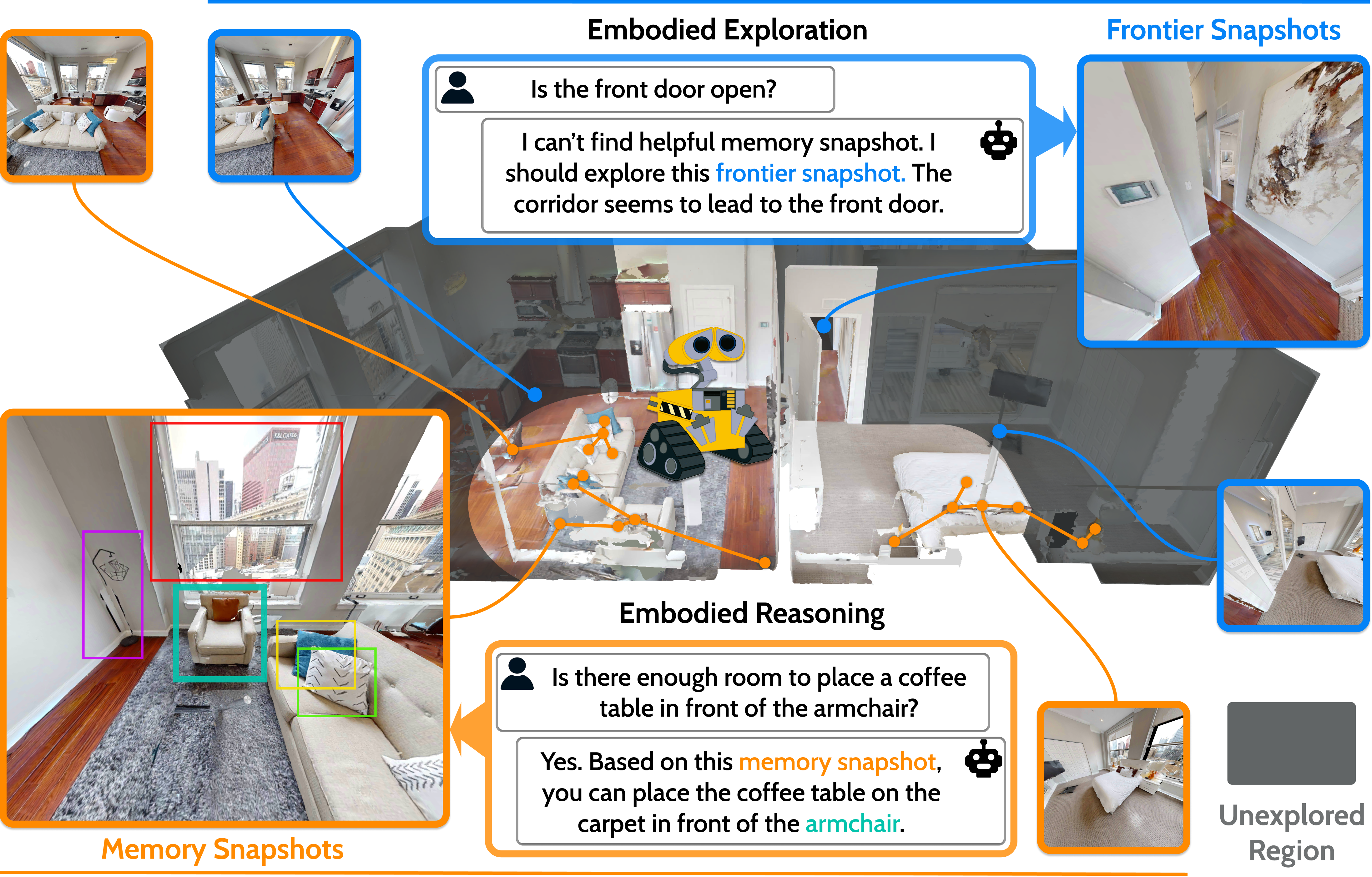
This is the official repository of 3D-Mem: 3D Scene Memory for Embodied Exploration and Reasoning.
News
- [2025/03] Inference code for A-EQA and GOAT-Bench is released.
- [2025/02] 3D-Mem is accepted to CVPR 2025!
- [2024/12] Paper is on arXiv.
Installation
Set up the conda environment (Linux, Python 3.9):conda create -n 3dmem python=3.9 -y && conda activate 3dmem
pip install torch==2.0.1 torchvision==0.15.2 --index-url https://download.pytorch.org/whl/cu118 conda install -c conda-forge -c aihabitat habitat-sim=0.2.5 headless faiss-cpu=1.7.4 -y conda install https://anaconda.org/pytorch3d/pytorch3d/0.7.4/download/linux-64/pytorch3d-0.7.4-py39cu118pyt201.tar.bz2 -y
pip install omegaconf==2.3.0 open-clip-torch==2.26.1 ultralytics==8.2.31 supervision==0.21.0 opencv-python-headless==4.10.* \ scikit-learn==1.4 scikit-image==0.22 open3d==0.18.0 hipart==1.0.4 openai==1.35.3 httpx==0.27.2
Run Evaluation
1 - Preparations
Dataset
Please download the train and val split of HM3D, and specify the path incfg/evalaeqa.yaml and cfg/evalgoatbench.yaml. For example, if your download path is /your_path/hm3d/ that
contains /yourpath/hm3d/train/ and /yourpath/hm3d/val/, you can set the scenedatapath in the config files as /your_path/hm3d/.
The test questions of A-EQA and GOAT-Bench are provided in the data/ folder. For A-EQA, we provide two subsets of different size: aeqaquestions-41.json and aeqaquestions-184.json, where aeqaquestions-184.json is the official subset provided by OpenEQA and aeqaquestions-41.json is a smaller subset for quick evaluation. For GOAT-Bench, we include the complete val_unseen split in this repository.
OpenAI API Setup
Please set up the endpoint and API key for the OpenAI API insrc/const.py.
2 - Run Evaluation on A-EQA
First run the following script to generate the predictions for the A-EQA dataset:
python runaeqaevaluation.py -cf cfg/eval_aeqa.yaml--startratio and --endratio to specify the range of tasks to evaluate. For example,
to evaluate the first half of the dataset, you can run:
python runaeqaevaluation.py -cf cfg/evalaeqa.yaml --startratio 0.0 --end_ratio 0.5To evaluate the predictions with the pipeline from OpenEQA, you can refer to link
3 - Run Evaluation on GOAT-Bench
You can directly run the following script:python rungoatbenchevaluation.py -cf cfg/eval_goatbench.yaml--startratio and --endratio.
Note that GOAT-Bench provides 10 explore episodes for each scene, and by default we only test the first episode due to the time and resource constraints.
You can also specify the episode to evaluate for each scene by setting --split.
4 - Save Visualization
The default evaluation config will save visualization results including topdown maps, egocentric views, memory snapshots, and frontier snapshots at each step. Although saving visualization is very helpful, it may slows down the evaluation process. Please make save_visualization false if you would like to run large-scale evaluation.Acknowledgement
The codebase is built upon OpenEQA, Explore-EQA, and ConceptGraph. We thank the authors for their great work.
Citing 3D-Mem
@InProceedings{Yang2025CVPR,
    author    = {Yang, Yuncong and Yang, Han and Zhou, Jiachen and Chen, Peihao and Zhang, Hongxin and Du, Yilun and Gan, Chuang},
    title     = {3D-Mem: 3D Scene Memory for Embodied Exploration and Reasoning},
    booktitle = {Proceedings of the Computer Vision and Pattern Recognition Conference (CVPR)},
    month     = {June},
    year      = {2025},
    pages     = {17294-17303}
}


