
NVIDIA Dataset Utilities (NVDU)
Nvidia Dataset Utilities (NVDU)
This project is a collection of Python scripts to help work with datasets for deep learning. For example, visualizing annotation data associated with captured sensor images generated by NVIDIA Deep learning Dataset Synthesizer (NDDS) https://github.com/NVIDIA/Dataset_Synthesizer.This module depends on OpenCV-python which currently doesn't work with Python 3.7; this module requires either Python 3.5 or 3.6.
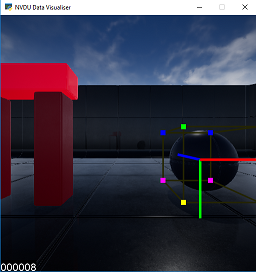
Example of a dataset frame visualized using NVDU, showing axes and 3D cuboids for annotated objects.
Table of Contents
- Table of Contents - Install from pip: - Install from source code git repo: - Usage - Usage - Examples - Visualize a dataset generated by NDDS: - Visualize a set of images using different annotation data: - Controls - Visualization options: - Other:Install
Install from pip:
pip install nvdu
Install from source code git repo:
Clone the repoUsing ssh path:
git clone ssh://git@github.com:12051/NVIDIA/Dataset_Utilities.gitgit clone https://github.com/NVIDIA/Dataset_Utilities.gitcd Dataset_UtilitiesInstall locally
pip install -e .
nvdu_ycb
nvduycb command help download, extract and align the YCB 3d models (which are used in the FAT dataset: http://research.nvidia.com/publication/2018-06Falling-Things).Usage
usage: nvduycb [-h] [-s] [-l] [ycbobject_name]
NVDU YCB models Support
positional arguments:   ycbobjectname  Name of the YCB object to check.
optional arguments:   -h, --help       show this help message and exit   -s, --setup      Setup the YCB models for the FAT dataset   -l, --list       List all the supported YCB objects
NOTE: If you don't run the nvduycb --setup before trying to use nvduviz, the visualizer will not be able to find the 3d models of the YCB object to overlay.
nvdu_viz
nvduviz_ command visualizes the annotated datasets using the NDDS format.Usage
nvduviz [-h] [-a DATAANNOT_DIR] [-s SIZE SIZE]
                [-o OBJECTSETTINGSPATH] [-c CAMERASETTINGSPATH]
                [-m MODELDIR] [-n [NAMEFILTERS [NAME_FILTERS ...]]]
                [--fps FPS] [--autochange] [-e EXPORTDIR] [--auto_export]
                [--ignorefixedtransform]
                [dataset_dir]
NVDU Data Visualiser
positional arguments:   dataset_dir           Dataset directory. This is where all the images                         (required) and annotation info (optional) are.                         Defaults to the current directory.
optional arguments:   -h, --help            show this help message and exit.   -a DATAANNOTDIR, --dataannotdir DATAANNOTDIR                         Directory path - where to find the annotation data.                         Defaults to be the same directory as the dataset                         directory.   -s SIZE SIZE, --size SIZE SIZE                         Window's size: [width, height]. If not specified then                         the window is sized to fit the resolution of the camera.   -o OBJECTSETTINGSPATH, --objectsettingspath OBJECTSETTINGSPATH                         Object settings file path.   -c CAMERASETTINGSPATH, --camerasettingspath CAMERASETTINGSPATH                         Camera settings file path.   -n [NAMEFILTERS [NAMEFILTERS ...]], --namefilters [NAMEFILTERS [NAME_FILTERS ...]]                         The name filter of each frame. e.g: *.png.   --fps FPS             How fast to automatically change frame.   --auto_change         When using this flag, the visualizer will automatically                         change the frame.   -e EXPORTDIR, --exportdir EXPORT_DIR                         Directory path - where to store the visualized images.                         If this is set, the script will automatically export                         the visualized image to the export directory.   --auto_export         When using this flag, the visualizer will automatically                         export the visualized frame to an image file in the                         export_dir directory.   --ignorefixedtransform                         When using this flag, the visualizer will not use the                         fixed transform matrix for the 3d model.
nvduviz script can work from any directory_
Examples
Visualize a dataset generated by NDDS:
- Visualize the current directory:
nvdu_viz- Visualize a relative path:
nvduviz ../adataset- Visualize an absolute path:
nvdu_viz ~/data/dataset- Visualize different aspect of a frame using a filter:
nvduviz datasetpath --name_filters .left.png .right.pngVisualize a set of images using different annotation data:
- The camera and object settings files are in the image directory:
nvduviz imagedirectoryhere -a annotationdirectory_here- The camera and object settings files are NOT in the image directory:
nvduviz imagedirectoryhere -a annotationdirectoryhere -c camerasettingpathhere -o objectsettingpath_hereControls
Visualization options:
F3 - Toggle the 2d cuboid
F4 - Toggle the 3d cuboid
F5 - Toggle the 3d models
F6 - Toggle the axes
F7 - Toggle the overlay frame name
1 - Render the 3d models normally
2 - Render the 3d models using only the edge lines
3 - Render the 3d models as point clouds
Other:
ESC - Quit the visualizer
Right - Go to the next frame
Left - Go to the previous frame
Up - Go to the next 100 frame
Down - Go to the previous 100 frame
Space - Toggle frame auto-changing
F12 - Toggle exporting the visualized frame to file


