
This project offers two Flask applications that utilize ImageAI's image prediction algorithms and object detection models. These apps enable users to upload images and videos for object recognition, detection and analysis, providing accurate prediction results, confidence scores, raw data of detected objects at frame-level, and object insights.
ImageAI Computer Vision Flask Apps




Project Description
This project consists of two Flask applications that utilize ImageAI's image prediction algorithms and object detection models to perform object recognition and analysis in images and videos. The first application, Image Object Recognition Flask Application, allows users to upload images and obtain accurate predictions about the objects contained within, along with confidence scores. The second application, Video Object Detection Flask Application, performs the detection of objects in videos, generating frame-level data of the detected objects and providing insights through data analysis. These user-friendly apps offer an accessible and intuitive platform for leveraging advanced computer vision capabilities, empowering users to explore, analyze, and extract meaningful information from visual content with ease.
Features
- App 1 - Image Object Recognition Flask Application:
- App 2 - Video Object Detection Flask Application:
Repository Structure
The repository has the following structure:
ImageAI-Flask-Apps/
├── ImageAI-web-app.py
├── image_recognizer.py
├── videoobjectdetector.py
├── templates/
│   ├── image-prediction.html
│   ├── index.html
│   └── video-object-detection.html
├── static/
│   ├── main.css
│   ├── images/
│   │   ├── demo-image-recognizer.gif
│   │   ├── demo-video-object-detector.gif
│   │   └── web-icon.ico
├── models/
│   ├── image-prediction-models/
│   │   └── README.md
│   ├── video-object-detection-models/
│   │   └── README.md
├── filesfortesting/
├── requirements.txt
├── .gitignore
├── README.md
└── LICENSE
The description of each file and folder in the repository is as follows:
- ImageAI-web-app.py: This is the core driver file for the Flask apps. It handles the routing and functionality for the Image Object Recognition and Video Object Detection apps.
- imagerecognizer.py: This file contains the code responsible for image object recognition. It utilizes ImageAI's image prediction algorithms to predict objects in uploaded images.
- videoobjectdetector.py: This file handles video object detection. It uses ImageAI's object detection models to detect objects in uploaded videos and generates frame-level data of the detected objects.
- templates/: This folder contains the HTML templates used by the Flask apps. It includes three files:
- static/: This folder contains static files used by the Flask apps, such as CSS stylesheets and images. It includes the following:
- models/: This folder is meant to store ImageAI's models for image classification and object detection. However, it currently contains two empty subfolders:
- filesfortesting/: This folder contains a collection of test images and videos that can be used for app testing and experimentation.
- requirements.txt: This file lists the necessary dependencies and packages required to run the Flask apps. It provides a convenient way to install all the dependencies.
- .gitignore: Specifies which files and directories Git should ignore, helping to keep the repository clean from unnecessary or sensitive files.
- README.md: The README file for the project. It provides an overview of the project, installation instructions, usage guidelines, and other relevant information.
- LICENSE: The license file for the project, which specifies the terms and conditions under which the code and resources are shared.
Usage
To use the ImageAI Computer Vision Flask Apps, please follow these steps:
- Install the required dependencies by running the following command to install all the necessary packages and dependencies required to run the Flask apps:
pip install -r requirements.txt- Download the image classification and object detection models:
- Once the dependencies are installed and the models are added, open the command prompt or terminal and navigate to the project directory.
- Run the following command to start the Flask apps:
python ImageAI-web-app.py- After running the above command, access the Flask apps by visiting
http://127.0.0.1:5000/in your web browser. This will take you to the home page of the Flask apps. - From the home page, you can navigate to the Image Object Recognition Flask Application or the Video Object Detection Flask Application to perform the respective tasks.
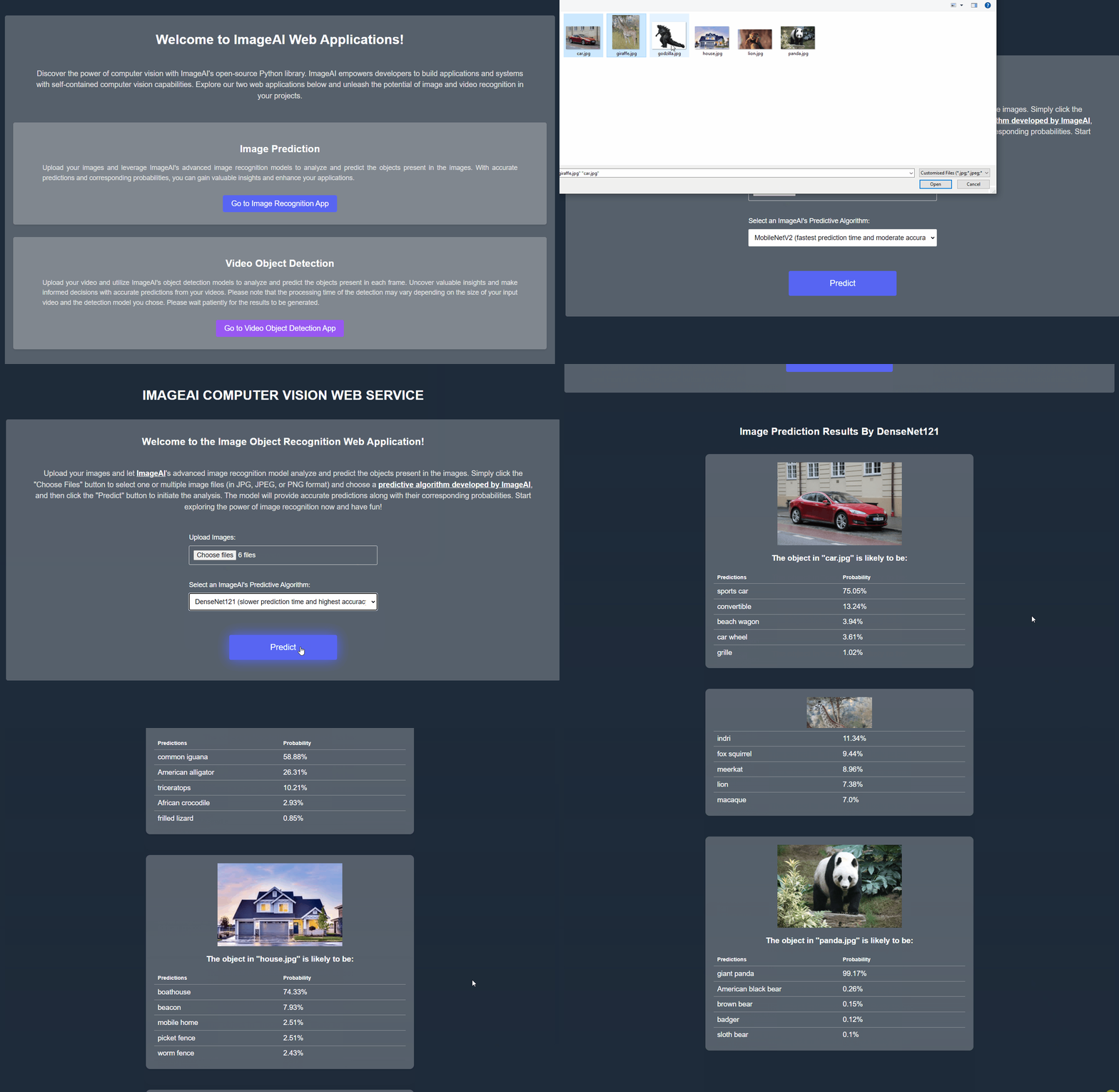
This GIF demonstrates the process of uploading an image, predicting objects in the image, and displaying the predicted objects with confidence scores.
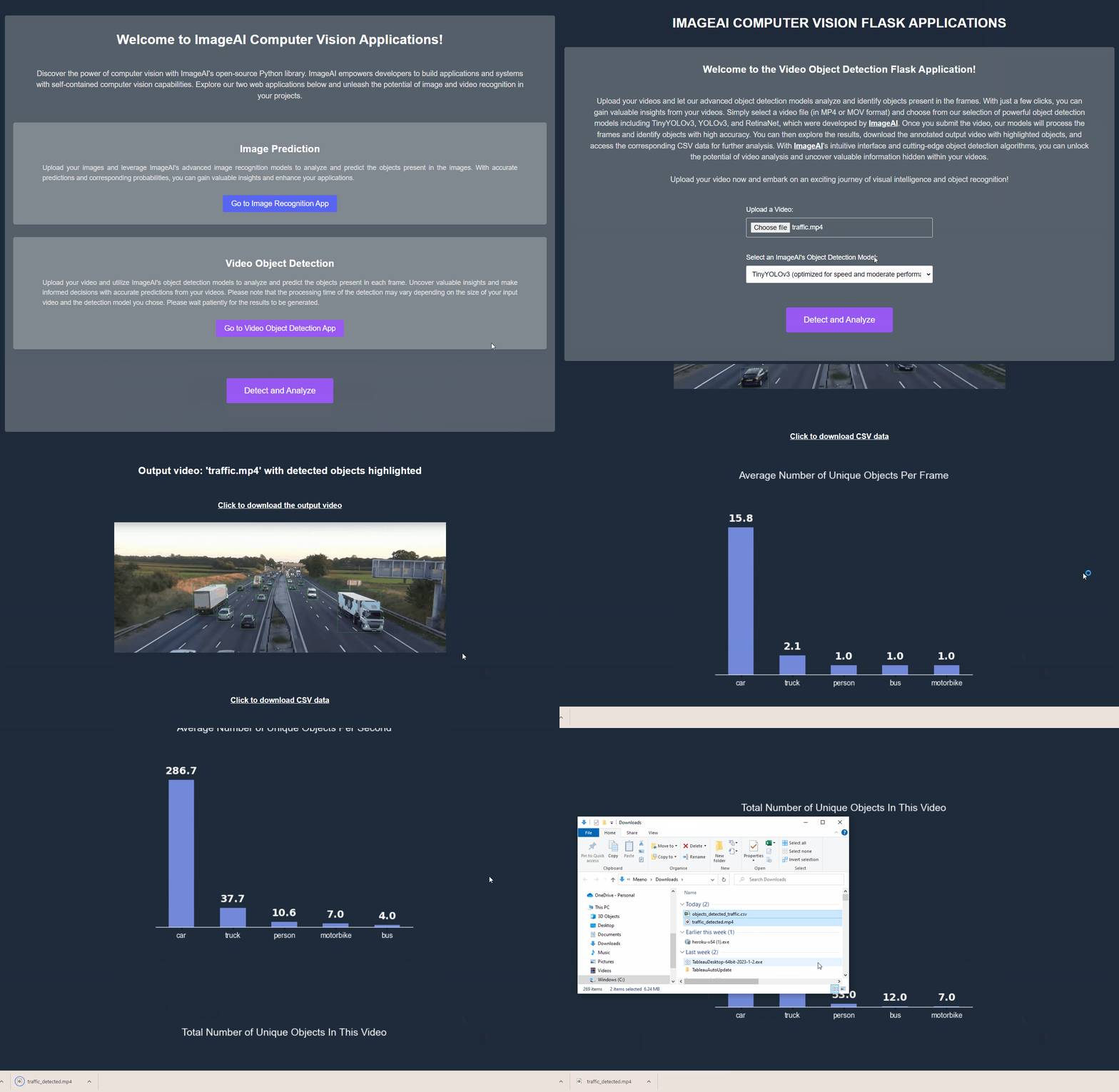
This GIF showcases the steps of uploading a video, detecting objects in the video, generating and downloading frame-level object data in CSV format, and performing data analysis on the detected objects to provide insights.
Make sure to follow these instructions in the given sequence to ensure the proper setup and usage of the ImageAI Flask Apps.
Contribution
Contributions to this project are welcome. If you encounter any issues or have suggestions for improvements, please open an issue or submit a pull request.
License
This project is licensed under the MIT License.
Acknowledgement
I would like to thank the creator of ImageAI for providing the image prediction and object detection algorithms used in this project. His contributions have been instrumental in the development of these Flask applications. To delve deeper into the computer vision algorithms and models developed by ImageAI, I encourage you to visit the ImageAI GitHub Page or explore its official documentation.


