
A full-stack platform that unifies ETL pipeline management and ML experiment tracking in a single real-time dashboard. FastAPI backend + React frontend + WebSocket live updates + AutoML with GridSearchCV. Run the whole stack in two terminals.


A full-stack platform that unifies ETL pipeline management and ML experiment tracking in a single real-time dashboard. FastAPI backend + React frontend + WebSocket live updates + AutoML with GridSearchCV. Run the whole stack in two terminals.
Features • Architecture • Setup • Usage • API Reference
What problem this solves
Data engineering and ML work typically live in separate tools — Airflow for pipelines, MLflow for experiments, custom scripts for everything else. Context-switching between them creates visibility gaps: nobody knows what's running, what failed, or which model version is linked to which data run.
This platform puts all of it in one place:
- ETL pipelines with step-by-step execution tracking and live status
- ML experiments with per-algorithm metrics, versioned models, and comparison views
- AutoML (GridSearchCV) that runs multi-algorithm searches and registers the best model
- Data quality validation with configurable rules checked at each pipeline step
- WebSocket live updates — every pipeline step, experiment completion, and AutoML progress broadcasts to all connected clients in real time
The Problems We Solve
| Problem | Traditional Approach | Our Solution | |---------|---------------------|--------------| | Fragmented tooling | Airflow + MLflow + custom scripts | Single unified dashboard | | No real-time visibility | Check logs manually, wait for emails | WebSocket-powered live updates | | ML expertise bottleneck | Only senior ML engineers can tune models | AutoML with one-click execution | | Data quality blindspots | Issues discovered in production | Integrated validation at every step | | Experiment chaos | Spreadsheets, notebooks, local files | Centralized experiment tracking |
✨ Features
Pipeline Management
- Visual Pipeline Builder: Define Extract → Transform → Load → Validate → Train steps
- Background Execution: Non-blocking pipeline runs with progress tracking
- Run History: Complete audit trail of all executions with duration and status
- Real-time Updates: WebSocket-powered live status changes
ML Experiment Tracking
- Multi-Algorithm Support: RandomForest, GradientBoosting, LogisticRegression, SVM
- Metrics Dashboard: Accuracy, Precision, Recall, F1-Score visualization
- Model Versioning: Automatic version management for trained models
- Parameter Logging: Full reproducibility with stored hyperparameters
AutoML Engine
- One-Click AutoML: Select algorithms, configure CV folds, and run
- GridSearchCV Integration: Exhaustive hyperparameter search
- Best Model Selection: Automatic identification and registration
- Progress Broadcasting: Real-time updates during optimization
Data Quality
- Validation Rules: Configurable data quality checks
- Quality Metrics: Completeness, accuracy, consistency, timeliness
- Issue Detection: Automated identification of data problems
- Profile Generation: Dataset statistics and summaries
Real-Time Monitoring
- WebSocket Connection: Instant updates without polling
- Live Log Streaming: Watch pipeline execution in real-time
- Connection Indicator: Visual status of real-time connectivity
- Multi-Client Support: Broadcast to all connected users
🏗 Architecture
System Overview
┌─────────────────────────────────────────────────────────────────────┐
│                           FRONTEND                                  │
│  ┌─────────────┐  ┌─────────────┐  ┌─────────────┐  ┌─────────────┐ │
│  │  Dashboard  │  │  Pipelines  │  │ Experiments │  │   AutoML    │ │
│  │   Charts    │  │   Manager   │  │   Tracker   │  │   Engine    │ │
│  └──────┬──────┘  └──────┬──────┘  └──────┬──────┘  └──────┬──────┘ │
│         │                │                │                │        │
│         └────────────────┴────────────────┴────────────────┘        │
│                                   │                                 │
│                          WebSocket + REST                           │
└──────────────────────────────────┬──────────────────────────────────┘
                                   │
┌──────────────────────────────────┴──────────────────────────────────┐
│                           BACKEND (FastAPI)                         │
│  ┌─────────────────────────────────────────────────────────────────┐│
│  │                    Connection Manager (WebSocket)               ││
│  └─────────────────────────────────────────────────────────────────┘│
│  ┌─────────────┐  ┌─────────────┐  ┌─────────────┐  ┌─────────────┐ │
│  │  Pipeline   │  │    ML       │  │   AutoML    │  │    Data     │ │
│  │  Executor   │  │  Service    │  │   Service   │  │  Validator  │ │
│  └──────┬──────┘  └──────┬──────┘  └──────┬──────┘  └──────┬──────┘ │
│         │                │                │                │        │
│         └────────────────┴────────────────┴────────────────┘        │
│                                   │                                 │
└──────────────────────────────────┬──────────────────────────────────┘
                                   │
┌──────────────────────────────────┴──────────────────────────────────┐
│                           DATA LAYER                                │
│  ┌─────────────────────┐              ┌─────────────────────┐       │
│  │      MongoDB        │              │    File Storage     │       │
│  │  • pipelines        │              │  • Model artifacts  │       │
│  │  • experiments      │              │  • Datasets         │       │
│  │  • models           │              │  • Logs             │       │
│  │  • validations      │              │                     │       │
│  └─────────────────────┘              └─────────────────────┘       │
└─────────────────────────────────────────────────────────────────────┘
Tech Stack
| Layer | Technology | Purpose | |-------|------------|---------| | Frontend | React 18, Recharts, Lucide Icons | Interactive dashboard with visualizations | | Backend | FastAPI, Uvicorn | High-performance async API server | | Real-time | WebSocket | Bidirectional live updates | | ML Engine | scikit-learn, pandas, numpy | Model training and AutoML | | Database | MongoDB | Document storage for flexible schemas | | Styling | Tailwind-inspired CSS | Modern dark theme UI |
Directory Structure
/app
├── backend/
│   ├── server.py              # FastAPI application (1200+ lines)
│   │   ├── WebSocket Manager  # Real-time connection handling
│   │   ├── Pipeline Executor  # Background task execution
│   │   ├── ML Service         # Model training logic
│   │   ├── AutoML Service     # GridSearchCV automation
│   │   └── REST Endpoints     # 30+ API routes
│   ├── requirements.txt       # Python dependencies
│   └── .env                   # Environment configuration
│
├── frontend/
│   ├── src/
│   │   ├── App.js             # Main React component (1700+ lines)
│   │   │   ├── useWebSocket   # Custom hook for real-time
│   │   │   ├── DashboardPage  # Stats & charts
│   │   │   ├── PipelinesPage  # Pipeline management
│   │   │   ├── ExperimentsPage# ML experiment tracking
│   │   │   ├── AutoMLPage     # Automated ML interface
│   │   │   ├── ValidationsPage# Data quality
│   │   │   └── LogsPage       # Real-time logs
│   │   ├── App.css            # Styling (500+ lines)
│   │   └── index.js           # Entry point
│   ├── package.json           # Node dependencies
│   └── .env                   # Frontend configuration
│
├── data/                      # Sample datasets
├── memory/
│   └── PRD.md                 # Product requirements document
└── README.md                  # This file
Data Flow
1. User Action (Frontend)
│
▼
- REST API / WebSocket (Backend)
│
▼
- Business Logic (Services)
│
├──► Pipeline Executor (Background Task)
│ │
│ ▼
│ Step-by-step execution with logging
│ │
│ ▼
│ WebSocket broadcast to all clients
│
├──► ML Service (Model Training)
│ │
│ ▼
│ scikit-learn model fitting
│ │
│ ▼
│ Metrics calculation & storage
│
└──► AutoML Service (Hyperparameter Search)
│
▼
GridSearchCV with CV folds
│
▼
Best model selection & registration
│
▼
- MongoDB (Persistence)
│
▼
- Response to Frontend (REST/WebSocket)
🚀 Setup
Prerequisites
- Python 3.11+
- Node.js 18+
- MongoDB 6.0+
- Git
Quick Start
# 1. Clone the repository
git clone https://github.com/Mattral/etl-ml-platform ETL-ML
cd ETL-ML
2. Setup Backend
cd backend
python -m venv venv
source venv/bin/activate  # Windows: venv\Scripts\activate
pip install -r requirements.txt
3. Configure Environment
cat > .env << EOF
MONGO_URL={your uri}
DBNAME=etlml_dashboard
EOF
4. Start Backend
uvicorn server:app --host 0.0.0.0 --port 8001 --reload
5. Setup Frontend (new terminal)
cd ../frontend
yarn install  # or npm install
6. Configure Frontend Environment
cat > .env << EOF
REACTAPPBACKEND_URL=http://localhost:8001
EOF
7. Start Frontend
yarn start  # or npm start
Docker Setup (Alternative)
# Build and run with Docker Compose
docker-compose up -d
Access the application
Frontend: http://localhost:3000
Backend:  http://localhost:8001/api/docs
Environment Variables
Backend (/backend/.env)
| Variable | Description | Default | |----------|-------------|---------| | MONGO_URL | MongoDB connection string | mongodb://localhost:27017 | | DBNAME | Database name | etlml_dashboard | | AWSACCESSKEY_ID | AWS credentials (optional) | - | | AWSSECRETACCESS_KEY | AWS credentials (optional) | - | | AWSBUCKETNAME | S3 bucket for artifacts | etl-ml-storage |
Frontend (/frontend/.env)
| Variable | Description | Default | |----------|-------------|---------| | REACTAPPBACKEND_URL | Backend API URL | http://localhost:8001 |
📖 Usage
1. Seed the Database
First, populate the database with sample data:
curl -X POST http://localhost:8001/api/seedOr use the Settings page in the UI and click "Seed Database".
2. Explore the Dashboard
Navigate to http://localhost:3000 to see:
- Stats Cards: Total pipelines, experiments, models, AutoML runs
- Pipeline Runs Chart: Success/failure trends over 7 days
- Model Accuracy Trend: Version-over-version improvement
- Data Quality Metrics: Completeness, accuracy, consistency scores
📸 Application Screenshots
Dashboard Overview
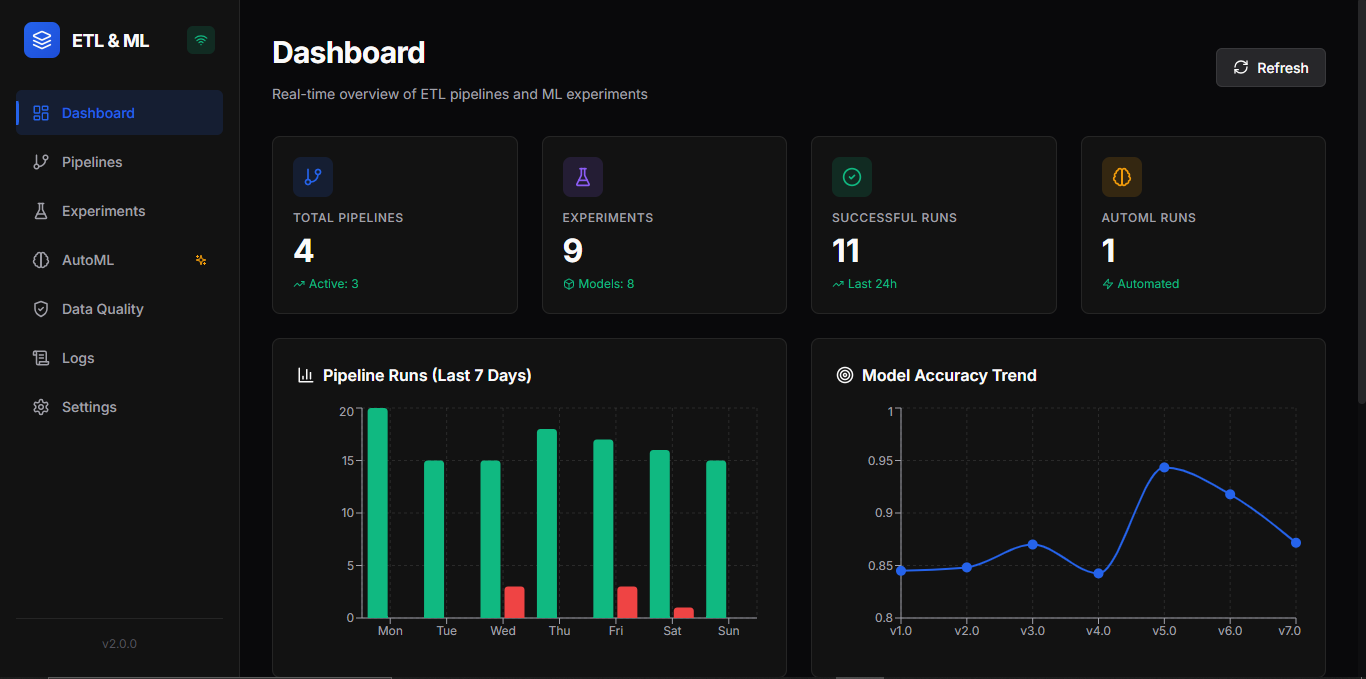
Main dashboard showing real-time statistics, pipeline trends, model accuracy, and data quality metrics
Experiments Tracking
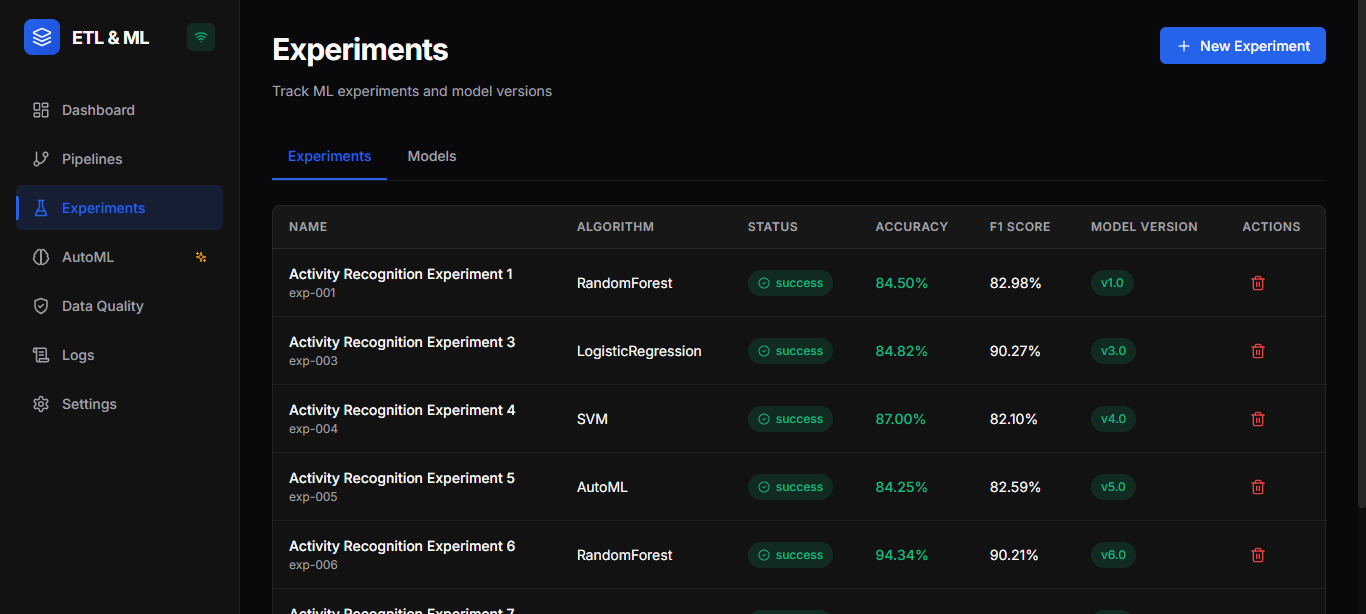
ML experiment tracking interface with multi-algorithm support and comprehensive metrics visualization
Pipeline Management
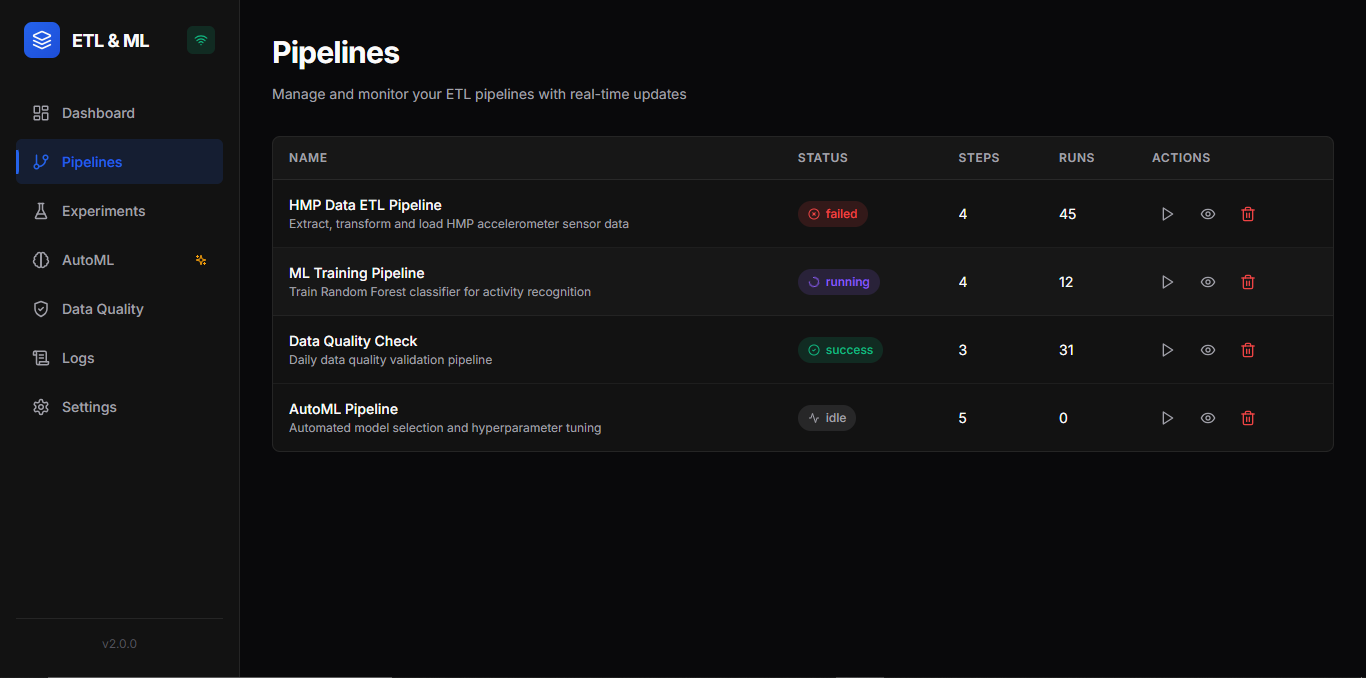
Visual pipeline management showing ETL workflows, execution status, and run history
3. Run a Pipeline
# List pipelines
curl http://localhost:8001/api/pipelines
Run a specific pipeline
curl -X POST http://localhost:8001/api/pipelines/pip-001/run
4. Create an ML Experiment
curl -X POST http://localhost:8001/api/experiments \
  -H "Content-Type: application/json" \
  -d '{
    "name": "Activity Recognition v1",
    "algorithm": "RandomForest",
    "parameters": {
      "n_estimators": 100,
      "max_depth": 10
    }
  }'
5. Run AutoML
curl -X POST http://localhost:8001/api/automl/run \
  -H "Content-Type: application/json" \
  -d '{
    "experiment_name": "Best Model Search",
    "algorithms": ["RandomForest", "GradientBoosting", "LogisticRegression"],
    "cv_folds": 5,
    "max_trials": 20
  }'
6. Monitor in Real-Time
Connect to the WebSocket for live updates:
const ws = new WebSocket('ws://localhost:8001/ws');
ws.onmessage = (event) => {
  const data = JSON.parse(event.data);
  console.log('Real-time update:', data);
};
📡 API Reference
Core Endpoints
| Method | Endpoint | Description | |--------|----------|-------------| | GET | /api/health | Health check | | GET | /api/dashboard/stats | Dashboard statistics | | GET | /api/dashboard/metrics | Chart data |
Pipelines
| Method | Endpoint | Description | |--------|----------|-------------| | GET | /api/pipelines | List all pipelines | | POST | /api/pipelines | Create pipeline | | GET | /api/pipelines/{id} | Get pipeline details | | DELETE | /api/pipelines/{id} | Delete pipeline | | POST | /api/pipelines/{id}/run | Execute pipeline | | GET | /api/pipelines/{id}/runs | Get run history |
Experiments
| Method | Endpoint | Description | |--------|----------|-------------| | GET | /api/experiments | List experiments | | POST | /api/experiments | Create & run experiment | | GET | /api/experiments/{id} | Get experiment details | | DELETE | /api/experiments/{id} | Delete experiment |
AutoML
| Method | Endpoint | Description | |--------|----------|-------------| | POST | /api/automl/run | Start AutoML job | | GET | /api/automl/runs | List AutoML runs | | GET | /api/automl/runs/{id} | Get AutoML results |
Models
| Method | Endpoint | Description | |--------|----------|-------------| | GET | /api/models | List registered models | | GET | /api/models/{id} | Get model details |
Data Quality
| Method | Endpoint | Description | |--------|----------|-------------| | GET | /api/validations | List validations | | POST | /api/validations | Create validation | | GET | /api/validations/{id} | Get validation details |
WebSocket
| Endpoint | Events | |----------|--------| | ws://localhost:8001/ws | pipelinestep, pipelinecompleted, pipelinefailed, experimentcompleted, automlprogress, automlcompleted, log |
🧪 Testing
Run Backend Tests
cd backend
pytest tests/ -v
Test API Endpoints
# Health check
curl http://localhost:8001/api/health
Verify all systems
curl http://localhost:8001/api/dashboard/stats
Frontend Lint
cd frontend
yarn lint
🛣 Roadmap
Phase 2 (Planned)
- [ ] AWS S3 integration for model artifacts
- [ ] Pipeline scheduling with cron expressions
- [ ] Email/Slack notifications
- [ ] User authentication (JWT)
Phase 3 (Future)
- [ ] Visual DAG pipeline editor
- [ ] Model deployment as REST APIs
- [ ] Apache Airflow integration
- [ ] Multi-tenant support
🤝 Contributing
We welcome contributions! Please see our Contributing Guide for details.
- Fork the repository
- Create a feature branch (
git checkout -b feature/amazing-feature) - Commit your changes (
git commit -m 'Add amazing feature') - Push to the branch (
git push origin feature/amazing-feature) - Open a Pull Request
📄 License
This project is licensed under the MIT License - see the LICENSE file for details.
🙏 Acknowledgments
- Reference implementation: ruslanmv/ETL-and-Machine-Learning
- HMP Dataset for activity recognition benchmarks
- scikit-learn team for the ML toolkit
- FastAPI for the excellent async framework
Built with precision for scale. Designed for humans.


