
A ListView-like FastScroller for Android’s RecyclerView.
FastScroll




A ListView-like FastScroller for Android’s RecyclerView.
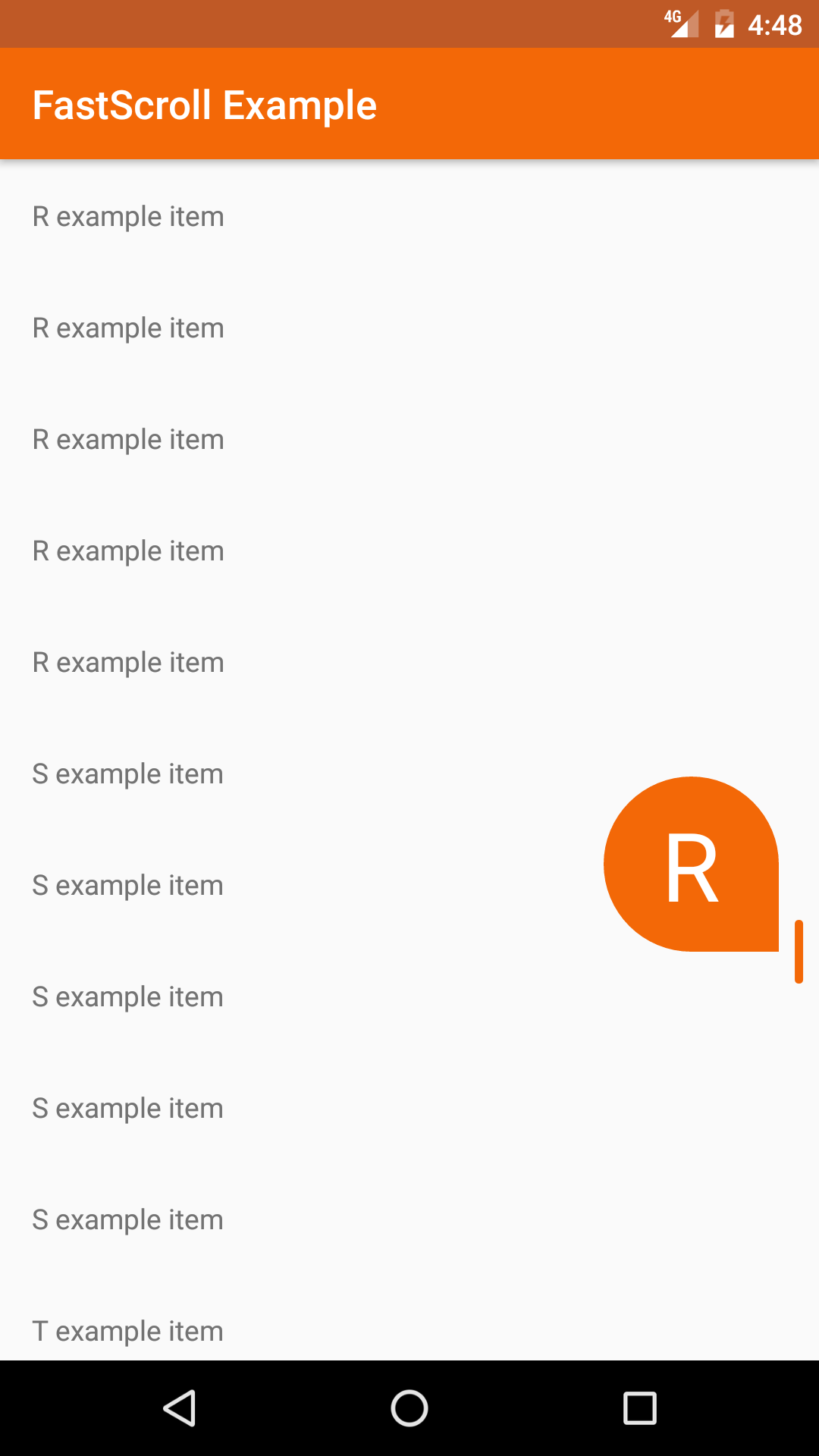
FastScroll brings the popular fast scrolling and section indexing features of Android’s ListView to the RecyclerView with a Lollipop styled scrollbar and section “bubble” view. The scrollbar provides a handle for quickly navigating a list while the bubble view displays the currently visible section index.
FastScroll was inspired by this Styling Android blog post.
Download
Gradle:
~~~groovy dependencies { implementation "io.github.l4digital:fastscroll:2.1.0" } ~~~Maven:
~~~xmlUsage
There are a few ways to implement the FastScroll library:- The FastScrollRecyclerView is a
RecyclerViewthat creates and adds theFastScrollerto its parent ViewGroup.
- The FastScrollView is a layout that creates and manages a
RecyclerViewwith aFastScroller.FastScrollViewis particularly useful when the parent ViewGroup requires a single child view, for example aSwipeRefreshLayout.
FastScrollRecyclerView:
Add theFastScrollRecyclerView to your xml layout and set your customizations using attributes.
The parent ViewGroup must be a ConstraintLayout, CoordinatorLayout, FrameLayout, or RelativeLayout in order for the FastScroller to be properly displayed on top of the RecyclerView.
~~~xml
~~~
FastScrollRecyclerView extends Android's RecyclerView and can be setup the same way.
~~~kotlin override fun onCreate(savedInstanceState: Bundle?) { super.onCreate(savedInstanceState) setContentView(R.layout.activity_example)
findViewById
Implement the FastScroller.SectionIndexer interface in your RecyclerView Adapter and override getSectionText().
~~~kotlin class ExampleAdapter : RecyclerView.Adapter
// ...
override fun getSectionText(position: Int) = getItem(position).getSectionIndex() } ~~~
FastScrollView:
Add theFastScrollView to your xml layout and set your customizations using attributes.
~~~xml
~~~
FastScrollView contains a RecyclerView and a FastScroller that can be accessed with public methods.
~~~kotlin override fun onCreate(savedInstanceState: Bundle?) { super.onCreate(savedInstanceState) setContentView(R.layout.activity_example)
findViewById
Implement the FastScroller.SectionIndexer interface in your RecyclerView Adapter and override getSectionText().
~~~kotlin class ExampleAdapter : RecyclerView.Adapter
// ...
override fun getSectionText(position: Int) = getItem(position).getSectionIndex() } ~~~
Alternative Usage:
If you are unable to use theFastScrollRecyclerView or FastScrollView, you can add a FastScroller to your layout and implement with any RecyclerView. See this github issue for an example.
FastScrollListener:
An optionalFastScrollListener can be added to receive events when fast scrolling starts or stops.
~~~kotlin override fun onCreate(savedInstanceState: Bundle?) { super.onCreate(savedInstanceState) setContentView(R.layout.activity_example)
findViewById
override fun onFastScrollStop(fastScroller: FastScroller) { // fast scroll stopped } }) } } ~~~
Customization
The following attributes can be set to customize the visibility and appearance of the elements within the FastScroller view: app:hideScrollbar=["true" | "false"] Hides the scrollbar when not scrolling* app:showBubble=["true" | "false"] Shows the section bubble while fast scrolling* app:showBubbleAlways=["true" | "false"] Shows the section bubble while scrolling* app:showTrack=["true" | "false"] Shows the scroll track while scrolling* app:handleColor=["#rrggbb" | "@color"] Sets the color of the scroll handle* app:trackColor=["#rrggbb" | "@color"] Sets the color of the scroll track* app:bubbleColor=["#rrggbb" | "@color"] Sets the background color of the section bubble* app:bubbleSize=["normal" | "small"] Sets the size of the section bubble* app:bubbleTextColor=["#rrggbb" | "@color"] Sets the text color of the section bubble* app:bubbleTextSize=["sp" | "@dimen"] Sets the scaled pixel text size of the section bubble*
License
Copyright 2022 Randy Webster. All rights reserved.Licensed under the Apache License, Version 2.0 (the "License"); you may not use this file except in compliance with the License. You may obtain a copy of the License at
http://www.apache.org/licenses/LICENSE-2.0
Unless required by applicable law or agreed to in writing, software distributed under the License is distributed on an "AS IS" BASIS, WITHOUT WARRANTIES OR CONDITIONS OF ANY KIND, either express or implied. See the License for the specific language governing permissions and limitations under the License.


