
Sample App to learn a testable design (Smalltalk flavored MVC)
Testable design example for iOS Apps ====================================

This is a sample App to learn testable design.
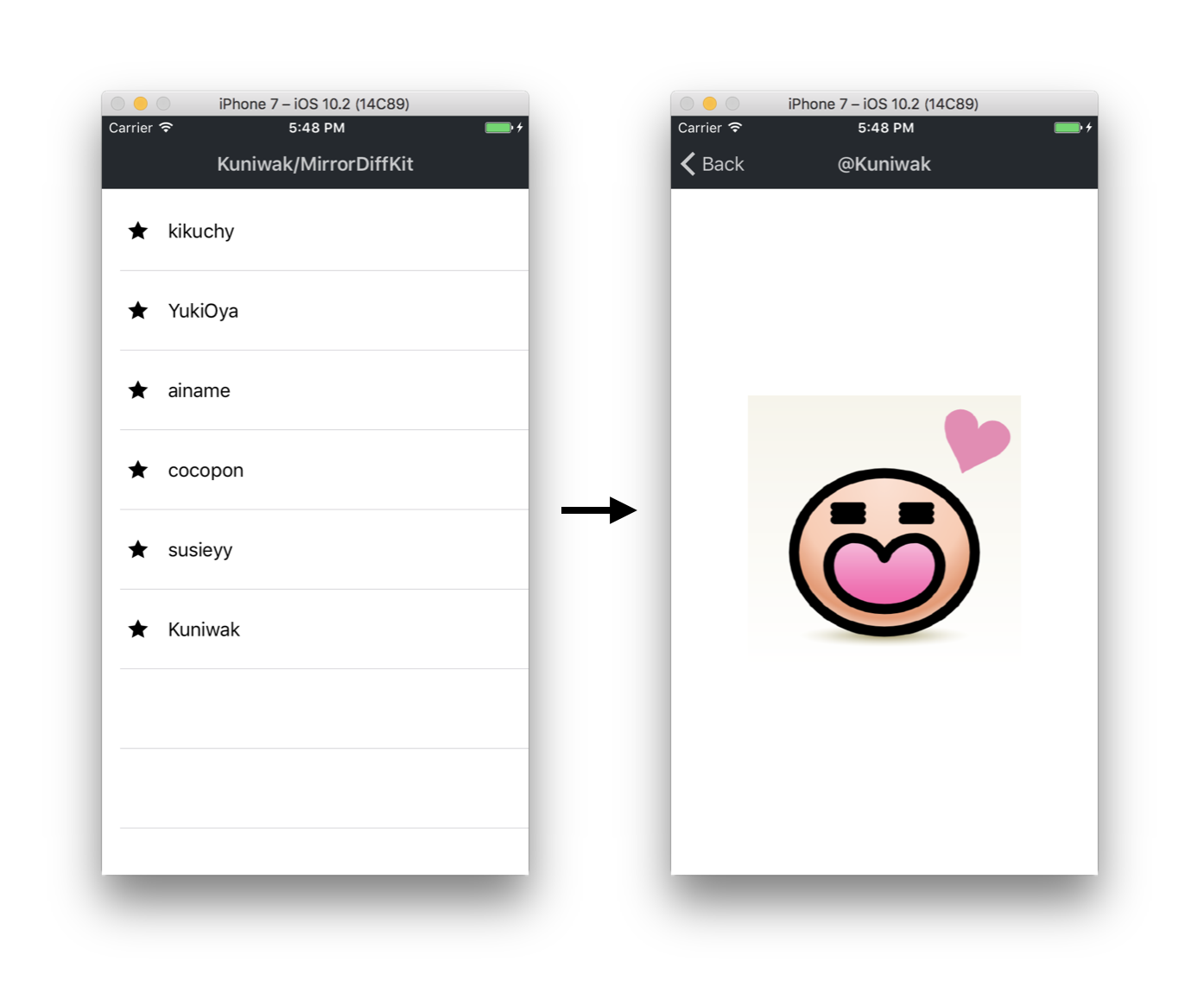
You can learn the following things by reading this implementation:
- How to make loose coupling for testing
- How to decouple global variables
- How to use type-checking as a test
Architecture
This App adopt Smalltalk flavored MVC (it is not Apple MVC). Smalltalk flavored MVC is a architecture that can test easily. You may know major architectures such as MVVM, MVP, Flux and VIPER, but also Smalltalk MVC can make loose coupling.
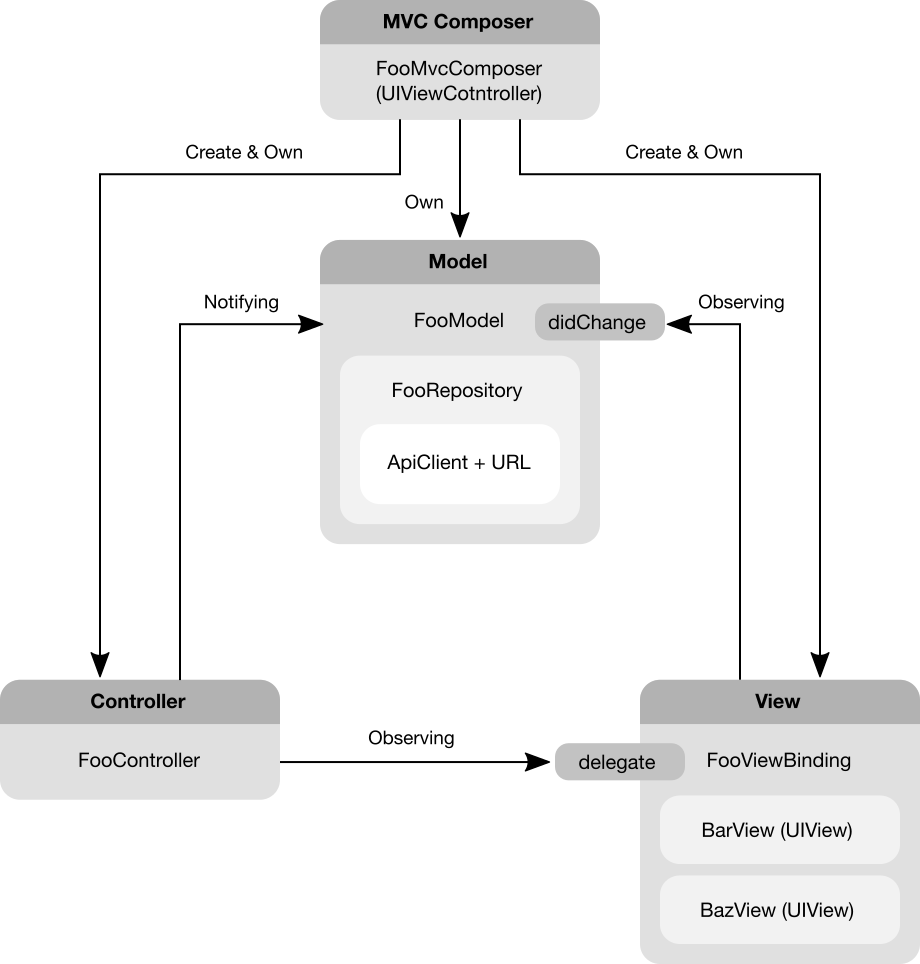
While there are a lot of architectures, but they share a common important things that we should do. So, learning this implementation is still worth the candle if you choose other architectures.
Sample Code
In our approach, we create a Xib file per UIViewController. And all UIViewControllers have a initializer that require models.
And we should create ViewBindings and Controllers and connect them to the given Model when UIViewController#loadView() is called.
Concrete implementation is below:
class FooViewController: UIViewController {
    private var model: FooModelProtocol
    private var viewBinding: FooViewBindingProtocol?
    private var controller: FooControllerProtocol?
init(model: FooModelProtocol) {         self.model = model         super.init(nibName: nil, bundle: nil)     }
required init?(coder aDecoder: NSCoder) {         // NOTE: In this project, we do not want to restore the VC.         return nil     }
// Connect Model and ViewBinding, Controller.     override func loadView() {         let rootView = FooRootView()         self.view = rootView
let controller = FooController(             observing: rootView.barView,             willNotifyTo: self.model         )         self.controller = controller
self.viewBinding = FooViewBinding(             observing: self.model,             handling: (                 bar: rootView.barView,                 baz: rootView.bazView             )         )         self.viewBinding.delegate = controller     } }
// FooModel is a state-machine that can transit to FooModelState.
// Notify change events to others via an observable didChange when
// API was successfully done or failed.
class FooModel: FooModelProtocol {
    private let repository: FooRepositoryProtocol
    private let stateVariable: RxSwift.Variable<FooModelState>
/// An Observable that will notify events when the internal state is changed.     var didChange: RxSwift.Observable<FooModelState> {         return self.stateVariable.asObservable()     }
/// The current state of the model.     var currentState: FooModelState {         get { return self.stateVariable.value }         set { self.stateVariable.value = newValue }     }
init(         startingWith initialState: FooModelState,         fetchingVia repository: FooRepositoryProtocol     ) {         self.stateVariable = RxSwift.Variable<FooModelState>(initialState)         self.repository = repository     }
func doSomething() {         switch self.currentState {         case .preparing:             // NOTE: Prevent duplicated calls.             return
case .success, .failure:             self.currentState = .preparing
self.repository                 .doSomething()                 .then { entity in                      self.currentState = .success(entity)                 }                 .catch { error in                     self.currentState = .failure(                         because: .unspecified(debugInfo: "\(error)")                     )                 }         }     } }
// States that FooModel can transit to. enum FooModelState {     case preparing     case success(Entity)     case failure(because: Reason)
enum Reason {         case unspecified(debugInfo: String)     } }
class FooViewBinding: FooViewBindingProtocol {
    typealias Views = (bar: BarView, baz: BuzzView)
    private let views: Views
    private let model: FooModelProtocol
    private let disposeBag = RxSwift.DisposeBag()
init(observing model: FooModelProtocol, handling views: Views) {         self.model = model         self.views = views
// NOTE: Change visual by observing model's state transitions.         self.model             .didChange             .subscribe(onNext: { [weak self] state in                 guard let this = self else { return }                 switch state {                 case .preparing:                     this.views.bar.text = "preparing"                 case let .success(entity):                     this.views.bar.text = "success \(entity)"                 case let .failure(because: reason):                     this.views.bar.text = "failure \(reason)"                 }             })             .disposed(by: self.disposeBag)     } }
class FooController: FooControllerProtocol {
    private let model: FooModelProtocol
    private let view: BarView
    private let disposeBag = RxSwift.DisposeBag()
init(         observing view: BarView,         willNotifyTo model: FooModelProtocol     ) {         self.model = model
// NOTE: Observe UI events from BarView and notify to the FooModel.         view.rx.tap             .asDriver             .drive(onNext: { [weak self] _ in                  guard let this = self else { return }
this.model.doSomething()             })             .disposed(by: self.disposeBag)     } }
How to Connect among UIViewControllers
In this project, use Navigator class for connecting betweren 2 UIViewControllers.
class FooViewController: UIViewController {
    private let navigator: NavigatorProtocol
    private let sharedModel: FooBarModelProtocol
init(         representing sharedModel: FooBarModelProtocol,         navigatingBy navigator: NavigatorProtocol     ) {         self.sharedModel = sharedModel         self.navigator = navigator         super.init(nibName: nil, bundle: nil)     }
required init?(coder aDecoder: NSCoder) {         // NOTE: We should not instantiate the ViewController by using UINibs to         // eliminate fields that have force unwrapping types.         return nil     }
@IBAction func buttonDidTap(sender: Any) {         let nextViewController = BarViewController(             representing: sharedModel         )         self.navigator.navigate(to: nextViewController)     } }
And also you can use UIStoryboardSegue, but using the Navigator class have two advantages:
- We can implement easily and simply common behavior (eg. sending logs for analysis)
- We can assert necessary objects at once
Navigator Implementation
/**
 A protocol for wrapper class of UINavigationController#pushViewController(_:UIViewController, animated:Bool).
 */
protocol NavigatorProtocol {
    /**
     Push the specified UIViewController to the held UINavigationController.
     */
    func navigate(to viewController: UIViewController, animated: Bool)
}

class Navigator: NavigatorProtocol {     private let navigationController: UINavigationController
init (for navigationController: UINavigationController) {         self.navigationController = navigationController     }
func navigate(to viewController: UIViewController, animated: Bool) {         self.navigationController.pushViewController(             viewController,             animated: animated         )     } }
How to Control Global Variables
In this project, we control global variables by using test doubles; Stub and Spy.
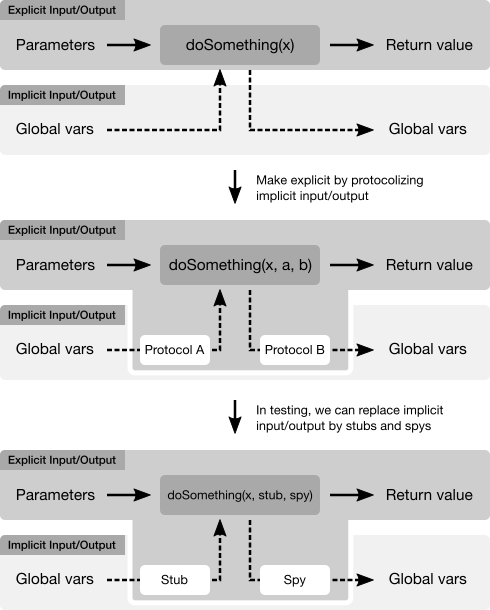
Sample code
Bad Design (fragile tests)
// BAD DESIGN
class UserDefaultsCalculator {
    func read10TimesValue() {
        return UserDefaults.standard.integer(forKey: "foo") * 10
    }
func write10TimesValue(_ value: Int) {         UserDefaults.standard.set(value * 10, forKey: "foo")     } }
// In production code:
let calc = UserDefaultsCalculator()
let value = calc.read10TimesValue()
calc.write10TimesValue(value)
// In the unit-test A, it is fragile :-( let calc = UserDefaultsCalculator() UserDefaults.standard.set(1, forKey: "foo") XCTAssertEqual(calc.read10TimesValue(), 10)
// In the unit-test B, it is also fragile :-( let calc = UserDefaultsCalculator() calc.write10TimesValue(1) XCTAssertEqual(UserDefaults.standard.integer(forKey: "foo"), 10)
Good Design (robust tests)
// GOOD DESIGN
class UserDefaultsCalculator {
    private let readableRepository: ReadableRepositoryProtocol
    private let writableRepository: WritableRepositoryProtocol
init(         reading readableRepository: ReadableRepositoryProtocol,         writing writableRepository: WritableRepositoryProtocol     ) {         self.readableRepository = readableRepository         self.writableRepository = writableRepository     }
func read10TimesValue() {         return self.readableRepository.read() * 10     }
func write10TimesValue(value: Int) {         self.writableRepository.write(value * 10)     } }
protocol ReadableRepositoryProtocol {     func read() -> Int }
class ReadableRepository: ReadableRepositoryProtocol {     private let userDefaults: UserDefaults
init(reading userDefaults: UserDefaults) {         self.userDefaults = userDefaults     }
func read() -> Int {         return self.userDefaults.integer(forKey: "foo")     } }
protocol WritableRepositoryProtocol {     func write(_ value: Int) }
class WritableRepository: WritableRepositoryProtocol {     private let userDefaults: UserDefaults
init(reading userDefaults: UserDefaults) {         self.userDefaults = userDefaults     }
func write(_ value: Int) {         self.userDefaults.set(value, forKey: "foo")     } }
// In production code:
let calc = UserDefaultsCalculator(
    reading: ReadableRepository(UserDefaults.standard),
    writing: WirtableRepository(UserDefaults.standard)
)
let value = calc.read10TimesValue()
calc.write10TimesValue(value)
// In the unit-test A, it is robust, because // we don't touch actual UserDefaults :-D let calc = UserDefaultsCalculator(     reading: ReadableRepositoryStub(firstValue: 1),     writing: WritableRepositorySpy() ) XCTAssertEqual(calc.read10TimesValue(), 10)
// In the unit-test B, it is also robust :-D let spy = WritableRepositorySpy() let calc = UserDefaultsCalculator(     reading: ReadableRepositoryStub(firstValue: 0),     writing: spy ) calc.write10TimesValue(1) XCTAssertEqual(spy.callArgs.last!, 10)
// TestDoubles definitions
class ReadableRepositoryStub: ReadableRepositoryProtocol {     var nextValue: Int
init(firstValue: Int) {         self.nextValue = firstValue     }
func read() {         return self.nextValue     } }
class WritableRepositorySpy: WritableRepositoryProtocol {     private(set) var callArgs = [Int]()
func write(_ value: Int) {         self.callArgs.append(value)     } }
Testing strategy
We stronlgy agree the blog entry; "Just Say No to More End-to-End Tests".
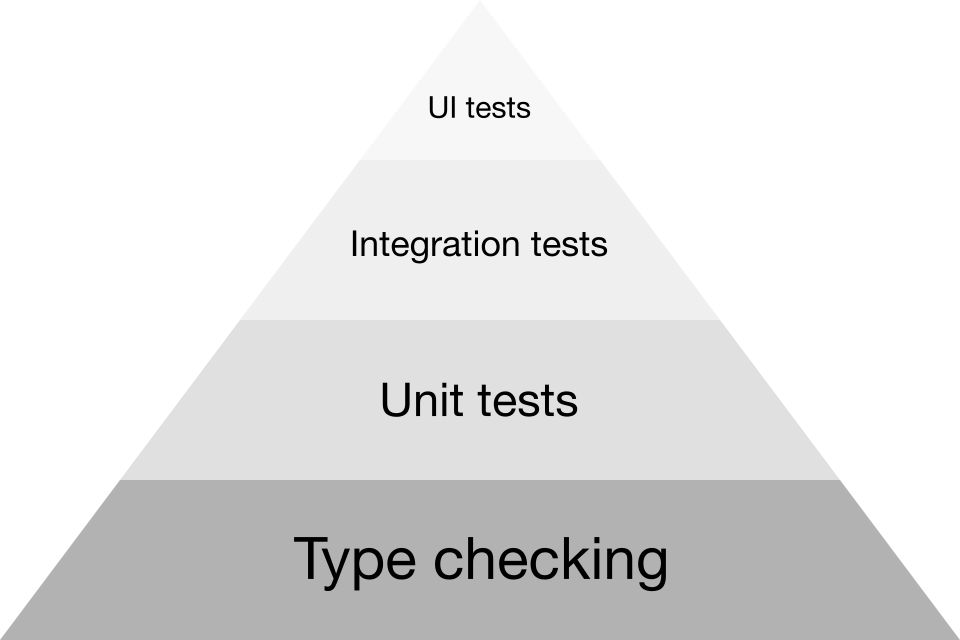
In this project, we use type-checking instead of other tests (unit tests and integration tests and UI tests) to get feedbacks from tests rapidly. Because type-checking is higher effictiveness than other tests.
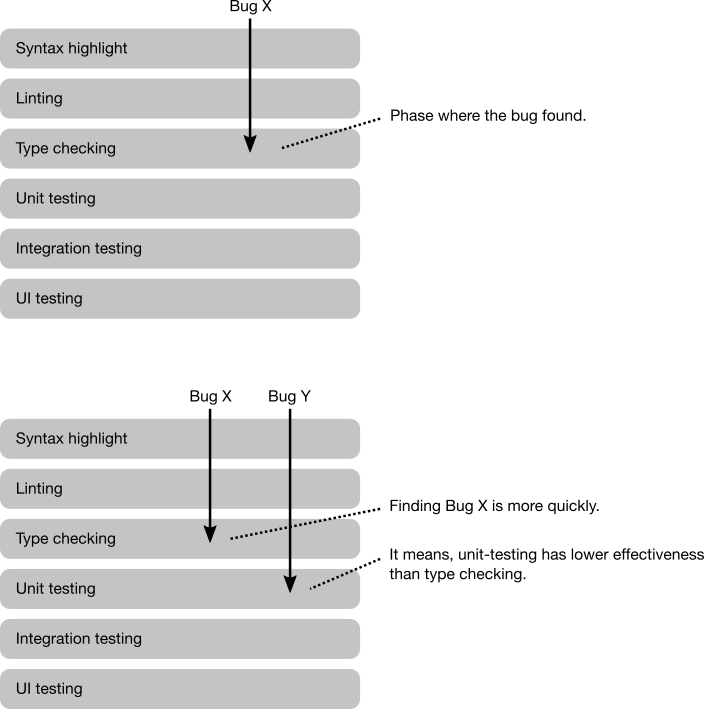
For example, we can check registering UITableViewCell to UITableVIew before dequeueing by using type-checking:
class MyCell: UITableViewCell {
    /**
     A class for registration token that will create after registering the cell to the specified UITableView.
     */
    struct RegistrationToken {
        // Hide initializer to other objects.
        fileprivate init() {}
    }
/**      Registers the cell class to the specified UITableView and returns a registration token.      */     static func register(to tableView: UITableView) -> RegistrationToken {         tableView.register(R.nib.myCell)         return RegistrationToken()     }
/**      Dequeues the cell by the specified UITableView.      You must have a registration token (it means you must register the cell class before dequeueing).      */     static func dequeue(         by tableView: UITableView,         for indexPath: IndexPath,         andMustHave token: RegistrationToken     ) -> MyCell {         guard let cell = tableView.dequeueReusableCell(             withIdentifier: R.reuseIdentifier.myCell.identifier,             for: indexPath         ) as? MyCell else {             // > dequeueReusableCell(withIdentifier:for:)             // >             // > A UITableViewCell object with the associated reuse identifier.             // > This method always returns a valid cell.             // >             // > https://developer.apple.com/reference/uikit/uitableview/1614878-dequeuereusablecell             fatalError("This case must be success")         }
// Configuring the cell.
return cell     } }
Taken together, we should follow the Test Pyramid:
References
- xUnit Test Patterns: http://xunitpatterns.com/index.html


