
Android: iOS-like over-scrolling effect applicable over almost all scrollable Android views.
Announcement>
An update regarding Bintray's shutdown: The library has been successfuly republished onto maven central, but with a different Group ID; Please update your Gradle dependencies as follows:>
> +implementation 'io.github.everythingme:overscroll-decor-android:1.1.1' >> -implementation 'me.everything:overscroll-decor-android:1.1.0'
Over-Scroll Support For Android's RecyclerView, ListView, GridView, ScrollView ...
The library provides an iOS-like over-scrolling effect applicable over almost all Android native scrollable views. It is also built to allow for very easy adaptation to support custom views.
The core effect classes are loose-decorators of Android views, and are thus decoupled from the actual view classes' implementations. That allows developers to apply the effect over views while keeping them as untampered 'black-boxes'. Namely, it allows for keeping important optimizations such as view-recycling intact.
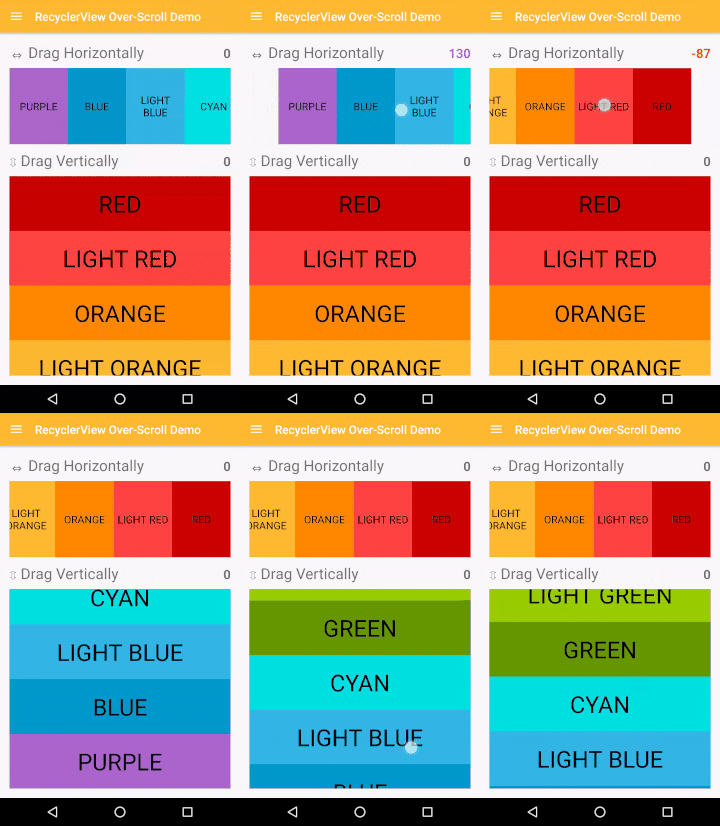
Gradle Dependency
Add the following to your module's build.gradle file:
dependencies {
    // ...

    implementation 'io.github.everythingme:overscroll-decor-android:1.1.1'
}
Usage
RecyclerView
Supports both linear and staggered-grid layout managers (i.e. all native Android layouts). Can be easily adapted to support custom layout managers.
RecyclerView recyclerView = (RecyclerView) findViewById(R.id.recycler_view);

// Horizontal
OverScrollDecoratorHelper.setUpOverScroll(recyclerView, OverScrollDecoratorHelper.ORIENTATION_HORIZONTAL);
// Vertical
OverScrollDecoratorHelper.setUpOverScroll(recyclerView, OverScrollDecoratorHelper.ORIENTATION_VERTICAL);
RecyclerView with items swiping / dragging
See Advanced Usage.ListView
ListView listView = (ListView) findViewById(R.id.list_view);
OverScrollDecoratorHelper.setUpOverScroll(listView);
GridView
GridView gridView = (GridView) findViewById(R.id.grid_view);
OverScrollDecoratorHelper.setUpOverScroll(gridView);
ViewPager
ViewPager viewPager = (ViewPager) findViewById(R.id.view_pager);
OverScrollDecoratorHelper.setUpOverScroll(viewPager);
ScrollView, HorizontalScrollView
ScrollView scrollView = (ScrollView) findViewById(R.id.scroll_view);
OverScrollDecoratorHelper.setUpOverScroll(scrollView);

HorizontalScrollView horizontalScrollView = (HorizontalScrollView) findViewById(R.id.horizontalscrollview);
OverScrollDecoratorHelper.setUpOverScroll(horizontalScrollView);
Any View - Text, Image... (Always Over-Scroll Ready)
View view = findViewById(R.id.demo_view);

// Horizontal
OverScrollDecoratorHelper.setUpStaticOverScroll(view, OverScrollDecoratorHelper.ORIENTATION_HORIZONTAL);
// Vertical
OverScrollDecoratorHelper.setUpStaticOverScroll(view, OverScrollDecoratorHelper.ORIENTATION_VERTICAL);
Advanced Usage
// Horizontal RecyclerView
RecyclerView recyclerView = (RecyclerView) findViewById(R.id.recycler_view);
new HorizontalOverScrollBounceEffectDecorator(new RecyclerViewOverScrollDecorAdapter(recyclerView));
// ListView (vertical) ListView listView = (ListView) findViewById(R.id.list_view); new VerticalOverScrollBounceEffectDecorator(new AbsListViewOverScrollDecorAdapter(listView));
// GridView (vertical) GridView gridView = (GridView) findViewById(R.id.grid_view); new VerticalOverScrollBounceEffectDecorator(new AbsListViewOverScrollDecorAdapter(gridView));
// ViewPager ViewPager viewPager = (ViewPager) findViewById(R.id.view_pager); new HorizontalOverScrollBounceEffectDecorator(new ViewPagerOverScrollDecorAdapter(viewPager));
// A simple TextView - horizontal View textView = findViewById(R.id.title); new HorizontalOverScrollBounceEffectDecorator(new StaticOverScrollDecorAdapter(view));
RecyclerView with ItemTouchHelper based swiping / dragging
As of version 1.0.1, the effect can work smoothly with the RecyclerView's built-in mechanism for items swiping and dragging (based on ItemTouchHelper). BUT, it requires some (very little) explicit configuration work:// Normally you would attach an ItemTouchHelper & a callback to a RecyclerView, this way:
RecyclerView recyclerView = (RecyclerView) findViewById(R.id.recycler_view);
ItemTouchHelper.Callback myCallback = new ItemTouchHelper.Callback() {
...
};
ItemTouchHelper myHelper = new ItemTouchHelper(myCallback);
myHelper.attachToRecyclerView(recyclerView);
// INSTEAD of attaching the helper yourself, simply use the dedicated adapter c'tor, e.g.: new VerticalOverScrollBounceEffectDecorator(new RecyclerViewOverScrollDecorAdapter(recyclerView, myCallback));
For more info on the swiping / dragging mechanism, try this useful tutorial.
Over-Scroll Listeners
As of version 1.0.2, the effect provides a means for registering listeners of over-scroll related events. There are two types of listeners, as follows.State-Change Listener
The over-scroll manager dispatches events onto a state-change listener denoting transitions in the effect's state:// Note: over-scroll is set-up using the helper method.
IOverScrollDecor decor = OverScrollDecoratorHelper.setUpOverScroll(recyclerView, OverScrollDecoratorHelper.ORIENTATION_HORIZONTAL);
decor.setOverScrollStateListener(new IOverScrollStateListener() { @Override public void onOverScrollStateChange(IOverScrollDecor decor, int oldState, int newState) { switch (newState) { case STATE_IDLE: // No over-scroll is in effect. break; case STATEDRAGSTART_SIDE: // Dragging started at the left-end. break; case STATEDRAGEND_SIDE: // Dragging started at the right-end. break; case STATEBOUNCEBACK: if (oldState == STATEDRAGSTART_SIDE) { // Dragging stopped -- view is starting to bounce back from the left-end onto natural position. } else { // i.e. (oldState == STATEDRAGEND_SIDE) // View is starting to bounce back from the right-end. } break; } } }
Real-time Updates Listener
The over-scroll manager can also dispatch real-time, as-it-happens over-scroll events denoting the current offset resulting due to an over-scroll being in-effect (the offset thus denotes the current 'intensity').// Note: over-scroll is set-up by explicity instantiating a decorator rather than using the helper; The two methods can be used interchangeably for registering listeners.
VerticalOverScrollBounceEffectDecorator decor = new VerticalOverScrollBounceEffectDecorator(new RecyclerViewOverScrollDecorAdapter(recyclerView, itemTouchHelperCallback));
decor.setOverScrollUpdateListener(new IOverScrollUpdateListener() { @Override public void onOverScrollUpdate(IOverScrollDecor decor, int state, float offset) { final View view = decor.getView(); if (offset > 0) { // 'view' is currently being over-scrolled from the top. } else if (offset < 0) { // 'view' is currently being over-scrolled from the bottom. } else { // No over-scroll is in-effect. // This is synonymous with having (state == STATE_IDLE). } } });
The two type of listeners can be used either separately or in conjunction, depending on your needs. Refer to the demo project's RecyclerView-demo section for actual concrete usage.
Custom Views
public class CustomView extends View {
    // ...
}

final CustomView view = (CustomView) findViewById(R.id.custom_view);
new VerticalOverScrollBounceEffectDecorator(new IOverScrollDecoratorAdapter() {
@Override     public View getView() {         return view;     }
@Override     public boolean isInAbsoluteStart() { 	    // canScrollUp() is an example of a method you must implement         return !view.canScrollUp();     }
@Override     public boolean isInAbsoluteEnd() { 	     // canScrollDown() is an example of a method you must implement         return !view.canScrollDown();     } });
Effect Behavior Configuration
/// Make over-scroll applied over a list-view feel more 'stiff'
new VerticalOverScrollBounceEffectDecorator(new AbsListViewOverScrollDecorAdapter(view),
        5f, // Default is 3
        VerticalOverScrollBounceEffectDecorator.DEFAULTTOUCHDRAGMOVERATIO_BCK,
        VerticalOverScrollBounceEffectDecorator.DEFAULTDECELERATEFACTOR);

// Make over-scroll applied over a list-view bounce-back more softly
new VerticalOverScrollBounceEffectDecorator(new AbsListViewOverScrollDecorAdapter(view),
        VerticalOverScrollBounceEffectDecorator.DEFAULTTOUCHDRAGMOVERATIO_FWD,
        VerticalOverScrollBounceEffectDecorator.DEFAULTTOUCHDRAGMOVERATIO_BCK,
        -1f // Default is -2
        );
Dynamic Effect Disabling
As of version 1.0.4, the effect can be dynamically disabled (detached) and reenabled (attached) at runtime:
IOverScrollDecor decor = OverScrollDecoratorHelper.setUpOverScroll(view);
// Detach. You are strongly encouraged to only call this when overscroll isn't // in-effect: Either add getCurrentState()==STATE_IDLE as a precondition, // or use a state-change listener. decor.detach(); // Attach. decor.attach();
attach() and detach() can be used repeatedly - as necessary, as can be seen in the demo project (refer to action-bar menu in recycler-view demo).
Credits
App icons by P.J. Onori, Timothy Miller, Icons4Android, Icons8.com


