
Another floating action button menu with expand/collapse behavior, in kotlin
[DEPRECATED] OneMoreFabMenu
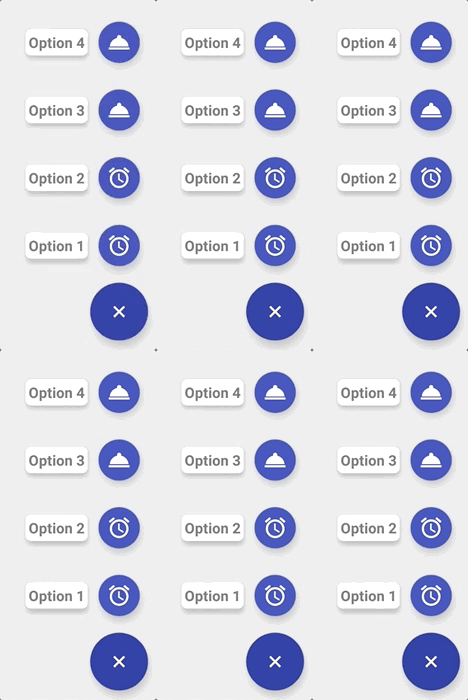
Another floating action button menu with expand/collapse behavior.


What's new:
Version 1.1.1 (02/03/2018)
- [Fix] Bug fixes
Version 1.1.0 (01/25/2018)
- [Feature] Add parameter in the layout to background text label
- [Feature] Add parameter in the layout to color text label
- [Feature] Add parameter in the layout to add label to the main button
- [Feature] Add parameter in the layout to add action to the main button
- [Feature] Add parameter in the layout to add drawable to the main button when opened
- [Enhancement] Increase padding left/right of the label
- [Enhancement] Update sample to have different example images
How to use
This library have 1 main layout param and 12 optionals
<app:content_options>[Required]
<app:colormainbutton>[optional]
<app:colorsecondarybuttons>[optional]
<app:expandedbackgroundcolor>[optional]
<app:rotatemainbutton> [optional, default=true*]
* Flag to enable/disable the rotation of main button<app:sizemainbutton>[optional]
<app:sizesecondarybuttons>[optional]
<app:closeonclick> [optional, default=false*]
* Flag to enable/disable the close menu when some option is clicked<app:labelbackgroundcolor> [optional, default=white*]
* Background color of the label<app:labelbackgrounddrawable>[optional]
<app:labeltextcolor> [optional, default=black*]
* Color of the label's text<app:enablemainas_action> [optional, default=false*]
* Flag to enable/disable the main button as an action when the menu is expanded<app:mainactiondrawable> [optional, default=icon defined in the content menu file*]
* Drawable of the main button when it is set as an action.Example of usage
<com.dekoservidoni.omfm.OneMoreFabMenu
        android:id="@+id/fab"
        android:layoutwidth="wrapcontent"
        android:layoutheight="wrapcontent"
        android:layout_gravity="bottom|end"
        app:c
        app:close_
        app:colormainbutton="@color/colorPrimaryDark"
        app:color_sec
        app:expandedbackgroundcolor="@color/omfmexpandedbackground_sample"
        app:rotatemainbutton="false"
        app:sizemainbutton="@integer/omfmfabsize_normal"
        app:size_sec
        app:labeltextcolor="@color/colorPrimary"
        app:enablemainas_action="true"
        app:main_acti/>
Menu resource example
The menu is structure from top to bottom, for example, the first one is the main button and the others will be the first option, second option and etc.
The first item don't need to have a text because only the options have labels.
<?xml version="1.0" encoding="utf-8"?>
<menu xmlns:android="http://schemas.android.com/apk/res/android">
<!-- First button is the initial Fab of the menu -->     <!-- Title here can be empty if you don't to add any action in the main button -->     <item         android:id="@+id/main_option"         android:icon="@drawable/icaddwhite_24px"         android:title=""/>
<!-- Options buttons of the Fab menu -->     <item         android:id="@+id/option1"         android:icon="@drawable/icalarmwhite_24px"         android:title="@string/options_1" />
<item         android:id="@+id/option2"         android:icon="@drawable/icalarmwhite_24px"         android:title="@string/options_2" />
<item         android:id="@+id/option3"         android:icon="@drawable/icroomservicewhite24px"         android:title="@string/options_3" />
<item         android:id="@+id/option4"         android:icon="@drawable/icroomservicewhite24px"         android:title="@string/options_4" />
</menu>
Integrating with Gradle
To integrate with your project, just add the following line to your app <build.gradle> file
compile 'com.github.dekoservidoni:omfm:1.1.1'Important!
Please make sure your project have Kotlin support:
Top-level build.gradle:
classpath "org.jetbrains.kotlin:kotlin-gradle-plugin:1.1.51"Module build.gradle:
apply plugin: 'kotlin-android' apply plugin: 'kotlin-android-extensions' dependencies { implementation "org.jetbrains.kotlin:kotlin-stdlib-jre7:1.1.51"Licence
Licensed under the Apache License, Version 2.0 (the "License"); you may not use this file except in compliance with the License. You may obtain a copy of the License at
http://www.apache.org/licenses/LICENSE-2.0
Unless required by applicable law or agreed to in writing, software distributed under the License is distributed on an "AS IS" BASIS, WITHOUT WARRANTIES OR CONDITIONS OF ANY KIND, either express or implied. See the License for the specific language governing permissions and limitations under the License.


