
Data Agent is an intelligent data analysis system that automatically completes complex data analysis tasks through multi-agent collaboration.
Data Agent
English | 简体中文
✨ Overview
Data Agent is an intelligent data analysis system that automatically completes complex data analysis tasks through multi-agent collaboration. Supports CSV files and databases (MySQL/Doris) as data sources, and can automatically recognize user intent, plan execution steps, invoke tools, and generate analysis reports.

Demo
Demo Scenario: Analyze total sales by product category Test data Sources: CSV files (examples/orders.csv, examples/products.csv)
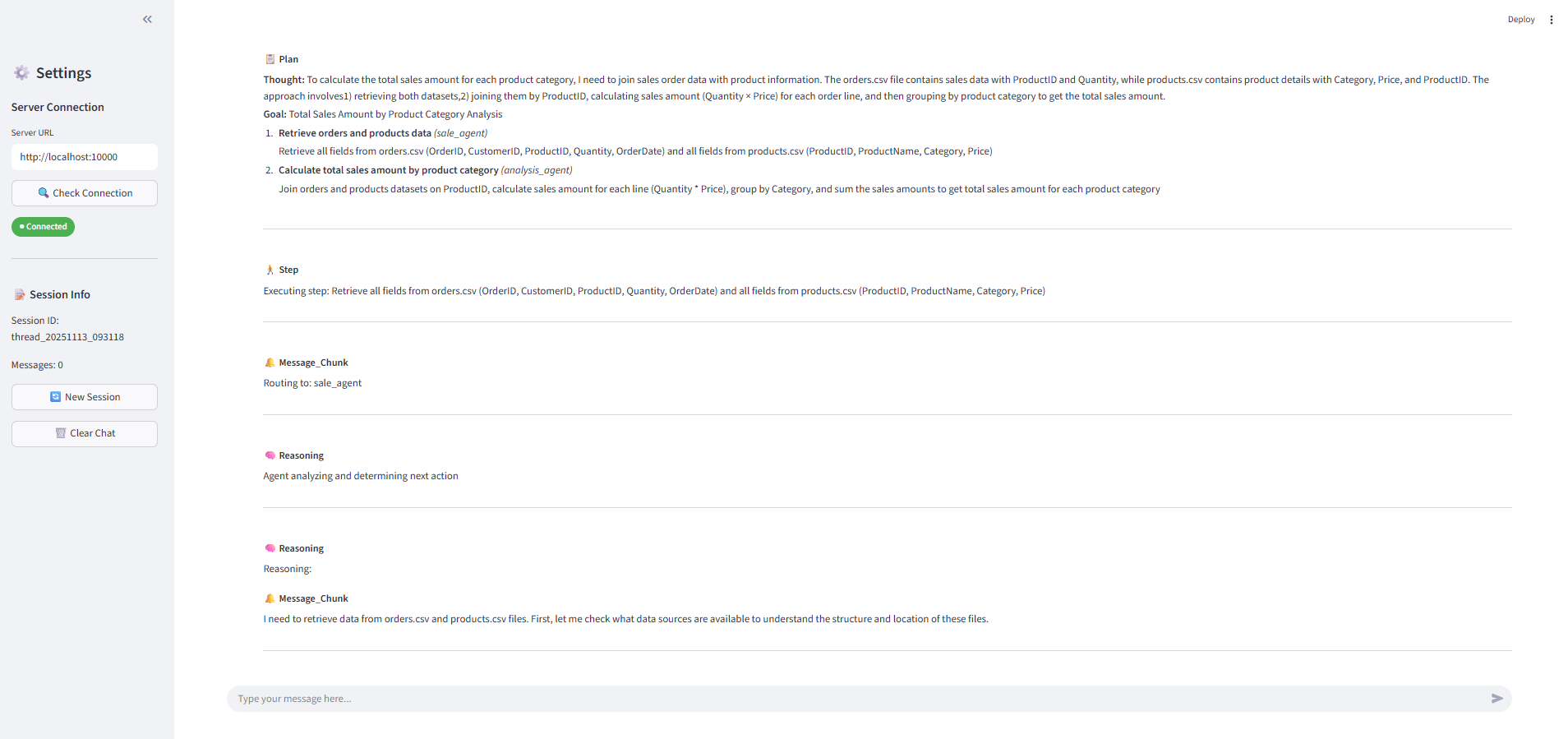
1️⃣ Task Planning & Multi-Agent Collaboration
Recognize user intent to generate execution plan, then route specific tasks to multiple agents.
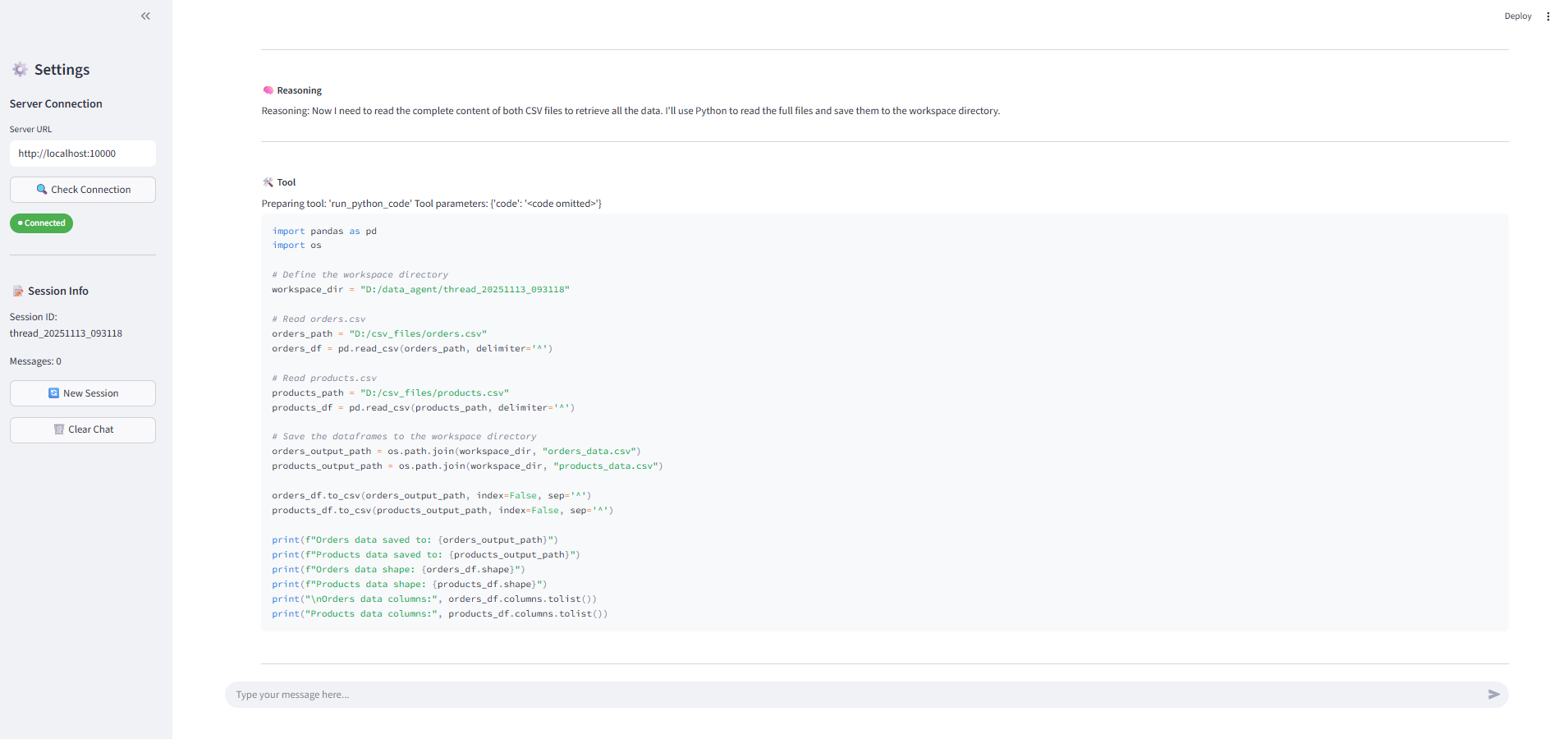
2️⃣ Tool Invocation
Automatically invoke appropriate tools to complete data retrieval and analysis.
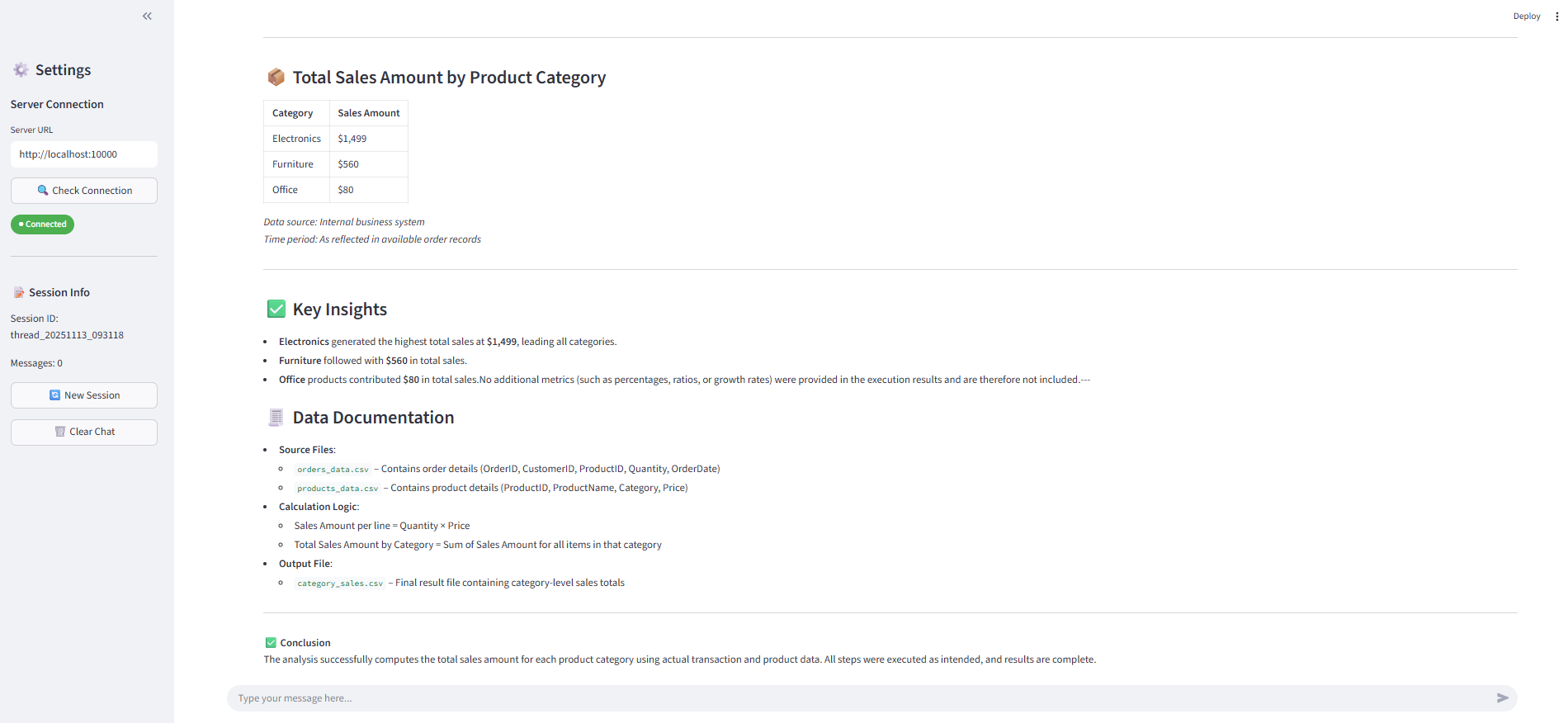
3️⃣ Professional Report Generation
Aggregate results and generate a comprehensive analysis report.
🏗️ System Architecture

🚀 Key Features
🤖 Multi-Agent Collaboration Architecture
- Plan Agent: Task planning and execution orchestration with dynamic replanning
- Sale Agent: Data retrieval and querying (with MCP tool integration)
- Analysis Agent: Data computation and analysis (Python code execution)
- Report Agent: Result aggregation and report generation
- Extensible: Easily add custom agents (advertising, traffic, user behavior, etc.)
💬 Intelligent Conversation Capabilities
- Multi-turn Conversations: Context persistence, support for follow-up questions and clarifications
- Question Rewriting: Automatically optimizes user questions for better understanding
- Intent Recognition: Intelligently distinguishes between small talk and tasks, with automatic routing
🔄 ReAct Execution Pattern
- Think-Act Loop: Reasoning + Acting with transparent decision-making process
- Tool Invocation: Support for MCP (Model Context Protocol) standard tools
- Code Execution: Dynamic Python code generation for data processing
- Error Handling: Automatic retry, feedback, and replanning mechanisms
👤 Human-in-the-Loop Mechanism
- Smart Interruption: Proactively asks users when questions are unclear
- Resumable Execution: Seamlessly continues after user provides additional information
- Real-time Feedback: Execution process is transparent and visible
🔍 RAG Enhancement
- Knowledge Base Integration: Support for RAGFlow
- Domain Knowledge: Automatically retrieves business rules, calculation formulas, etc.
- Context Enhancement: Improves accuracy for complex tasks
📊 Flexible Data Source Support
- CSV Files: Auto-scan and identify column information
- Databases: MySQL, Doris, and other MySQL protocol-compatible databases
- Generic Table Abstraction (MCP): Unified dimension/metric/filter query interface
- Auto-inference: Automatically identifies dimensions and metrics based on table schema
- Flexible Configuration: Support for custom metric formulas, required filters, etc.
🎨 Frontend Interface
- Streamlit UI: Beautiful web interactive interface
- Real-time Streaming: Watch agent execution in real-time
- Structured Display: Planning, tool calls, and code execution categorized
📦 Quick Start
1. Install Dependencies
pip install -r requirements.txt2. Create Configuration File
Copy and modify the example configuration:
cp conf.example.yaml conf.yamlOption A: CSV Mode (Recommended for Beginners)
- Ensure CSV data directory exists (default:
D:/csvfileson Windows or/data/csvfileson Linux) - Copy example data files to that directory:
# Windows
   mkdir D:\csv_files
   copy examples\*.csv D:\csv_files\

   # Linux/Mac
   mkdir -p /data/csv_files
   cp examples/*.csv /data/csv_files/
Option B: Database Mode
Configure MySQL connection inconf.yaml:
database:
  mysql:
    host: "127.0.0.1"
    port: 3306
    user: "your_user"
    password: "your_password"
    database: "your_database"
3. Start Services
Terminal 1: Date Tool Service (Required)
python -m src.mcpserver.datemcp_server.serverTerminal 2: Generic Table Query Service (Optional - Only when using database tables)
python -m src.mcpserver.generictable_mcp.servertables under agents.datasources.<agentname> in conf.yaml. If you're only using CSV files, you don't need to start this service.
Provides unified dimension/metric query interface for database tables.
Terminal 3: Backend API Service
python server.py --host 0.0.0.0 --port 100004. Use the System
Method 1: Command Line Interface (Quick Test)
python test_api.pyMethod 2: Web Interface (Recommended)
streamlit run streamlit_app.py⚙️ Configuration Guide (conf.yaml)
See conf.example.yaml for example file. Core structure:
app: General runtime parameters
locale: Interface/output language
- maxsteps/maxretrycount/maxreplancount/plantemperature: PlanAgent parameter configuration
- query_limit: Maximum number of rows returned for generic table queries
- workspace_directory: Session workspace root path
- csvdatadirectory: CSV data directory, system will scan this directory to analyze file headers and column information
llm: Configure models by "agent name"
baseurl/model/apikey
database.mysql: Database connection used for generic table queries (for Schema inference/SQL execution)
agents.capabilities: Description of each sub-agent's capabilities, PlanAgent references this for task decomposition and routing
agents.data_sources: Data source declaration for each agent
csv: Filenames existing in app.csvdatadirectory (for data source description and column info display)
- tables: Database tables for generic table queries (list of table configurations)
- Each table configuration requires:
- database: Database name (required)
- table: Table name (required)
- mcp: Optional MCP metadata configuration
- If mcp field is omitted: System will auto-infer dimensions/metrics based on table schema
- If mcp is provided:
- dimensions: Dimension definitions (English field → description)
- metrics: Metric definitions (function: sum|avg|count|max|min or formula calculation expression)
- requiredfilters: Required filter dimensions (e.g., partdt)
- value_mappings: Dimension value alias mapping (e.g., site.GB → ["GB","GLOBAL"])
- fieldhints: Field value/format hints (Agent will call gettable_schema before querying for hints)
ragflow: RAG service configuration
base_url: RAGFlow service address
- api_key: RAGFlow API key
- datasets: Dataset mapping (agentname → datasetid). PlanAgent selects appropriate dataset based on agent name for retrieval.
See conf.example.yaml for complete configuration examples.
🛠️ Advanced Features
How to Add a Custom Agent
The following steps demonstrate how to add a new sub-agent named product_agent and make it schedulable by the planner.
- Create file:
src/agents/product_agent.py
sale_agent, inherit from ReActAgentBase, integrate MCP services and tools as needed):
class ProductAgent(ReActAgentBase):
    def init(self, agent_name: str):
        # Load configuration to check if tables and CSV are configured
        config = loadyamlconfig("conf.yaml")
        datasources = config.get("agents", {}).get("datasources", {}).get(agent_name, {})
        tablesconfig = datasources.get("tables", [])
        csvconfig = datasources.get("csv", [])

        # Build MCP servers dict conditionally
        mcp_servers = {
            "date": {
                "url": "http://localhost:9095/sse",
                "transport": "sse",
            }
        }

        # Only add table MCP service if tables are configured
        if tables_config:
            mcp_servers["table"] = {
                "url": "http://localhost:9100/sse",
                "transport": "sse",
            }

        # Store CSV configuration flag for later use in run method
        self.hascsvconfig = bool(csv_config)

        super().init(
            agentname=agentname,
            # If you need generic table/date tools, configure corresponding MCP services here.
            # The table MCP service is automatically added only when tables are configured in conf.yaml.
            # You can also add other MCP services needed by this agent.
            mcpservers=mcpservers,
            max_iterations=10,
            reactllm="reactagent",
        )
async def run(self, state: StepState, config: RunnableConfig):         pushmessage(HumanMessage(content=f"Routing to: {self.agentname}", id=f"record-{str(uuid.uuid4())}"))         self.workspacedirectory = state["workspacedirectory"]         self.currentstep = state["currentstep"]
tools = await super().build_tools()         tools.append(runpythoncode)  # If you need code computation                  # Add listavailablecsv_files tool if CSV files are configured         if self.hascsvconfig:             tools.append(listavailablecsv_files)                  self.tools = tools
res = await self.executeagentstep(stepstate=state, config=config)         return {"execute_res": res}
- Register scheduling tool in the planner: Open
src/agents/plan_agent.py, add during initialization:
from src.utils.agentutils import createtaskdescriptionhandoff_tool from src.agents.product_agent import ProductAgent
self.agent_tools = [     createtaskdescriptionhandofftool(agent=SaleAgent(agentname="saleagent")),     createtaskdescriptionhandofftool(agent=AnalysisAgent(agentname="analysisagent")),     createtaskdescriptionhandofftool(agent=ProductAgent(agentname="productagent")),  # New addition ]
- Declare capabilities and data sources in configuration:
conf.yaml
agents:
  capabilities:
    product_agent:
      capabilities:
        - "Data retrieval and analysis by product dimension"
  data_sources:
    product_agent:
      csv:
        - "products.csv"
      tables:
        # Optional: If you need generic table queries, configure mcp metadata as needed (or leave empty for auto-inference)
        # - database: "analytics"
        #   table: "dim_product"
# mcp: { ... }- (Optional) Add dedicated dataset for RAG:
ragflow.datasets.productagent: "<datasetid>"
- Prompts: Most sub-agents share the ReAct template from
src/prompts/react_agent.md, no need to add new prompts. If customization is needed, you can assemble messages or extend templates inrun().
product_agent as the executor for certain steps when generating plans (provided your capability description and data source declaration support the task).


